TL;DR: Most content on leads portals hands you a feature list and stops there. This piece shows IT company owners how capture, routing, and conversion connect into one traceable workflow — and what breaks when any layer is missing. You'll leave with a clear picture of what a functioning leads portal actually does, and where most setups quietly fall apart.
What a leads portal actually is
Modern digital dashboard visualization of a leads portal with data metrics and contact management interface
A leads portal is a centralized workspace where every inbound lead lands, gets scored, and gets assigned to a rep — automatically, from the moment it enters your pipeline. It's not a CRM. A CRM stores contact history after a relationship exists. A leads portal handles the earlier, messier problem: what happens to a lead in the first minutes after it arrives.
A spreadsheet can't do this either. Spreadsheets don't route leads, don't track which source a lead came from, and don't alert anyone when a lead goes cold. They record what already happened; a lead management portal acts on what's happening now.
The two mechanics that matter most are lead routing and source tracking. Routing determines which rep gets which lead, based on rules you set — territory, deal size, product line, whatever fits your team. Source tracking tells you whether that lead came from paid search, a referral, your website form, or somewhere else. Without both, sales lead tracking becomes guesswork.
Most IT services companies manage four or more lead sources simultaneously. Without a single place to manage leads effectively, leads fall between channels — not because reps are careless, but because no system owns the handoff.
A leads portal owns that handoff.
Why a leads portal matters for your sales team
Speed is where most deals are won or lost before a rep ever sends a message. Research from Lead Response Management studies consistently shows that leads contacted within the first five minutes are dramatically more likely to convert than those reached an hour later. Without a central lead capture portal, that window closes while your team is still figuring out which spreadsheet the lead landed in.
Here is what a leads portal changes in practice:
Response speed : Leads from your website, paid campaigns, and referrals arrive in one queue, not three inboxes. Your team sees every new lead the moment it comes in, which makes same-hour follow-up achievable rather than aspirational.
Lead visibility : Every rep sees the same pipeline. No lead sits uncontacted because it was buried in someone's personal inbox or a tab nobody refreshed. Good sales lead tracking depends on this shared view.
Rep accountability : When a lead is assigned in the portal, ownership is explicit. There is no ambiguity about who follows up, and managers can see aging leads before they go cold.
Lead conversion rate : Faster response plus clear ownership compounds. Teams that qualify a sales lead inside a structured portal, rather than across disconnected tools, lose fewer leads to inaction.
The cost of not having one is concrete: leads fall through gaps between tools, response times stretch, and no one can tell you which source is actually producing revenue. Understanding real-time lead routing rules is the next piece of that puzzle.
Core features that make a leads portal effective
Not every CRM is a leads portal, and the gap shows up in the features. A general CRM stores contact records. A leads portal is built around the moment of capture and what happens in the first few minutes after — which is where most deals are won or lost.
The two highest-impact capabilities are multi-source lead capture and real-time lead routing. Multi-source capture pulls inquiries from your website forms, paid campaigns, referral partners, and organic channels into a single queue, so no lead sits in a channel-specific inbox waiting for someone to notice it. Real-time lead routing rules assign each incoming lead to the right rep automatically, based on territory, service type, company size, or whatever criteria your team uses. Together, these two features cut the lag between "lead submitted" and "rep notified" from hours to seconds.
Beyond capture and routing, the features that separate a functional portal from a basic contact list are:
Custom lead fields : That match your qualification criteria, not a generic template. If you sell managed IT services, you need fields for stack, seat count, and contract status, not just name and email.
Status tracking : Across every stage, so any rep or manager can see where a lead sits without asking.
Source attribution : That ties each lead back to its origin channel, so you know which campaigns are producing pipeline and which are producing noise.
Activity logging : That records every touchpoint automatically, removing the manual note-taking that reps skip under pressure.
To manage leads effectively at any real volume, you also need the portal to surface lead score or intent signals alongside the record, so reps prioritise without guesswork. That combination of instant routing, full visibility, and scored context is what turns a portal into a working sales tool rather than a filing cabinet. The next section covers exactly how those mechanics connect to conversion rate.
How a leads portal improves lead conversion rates
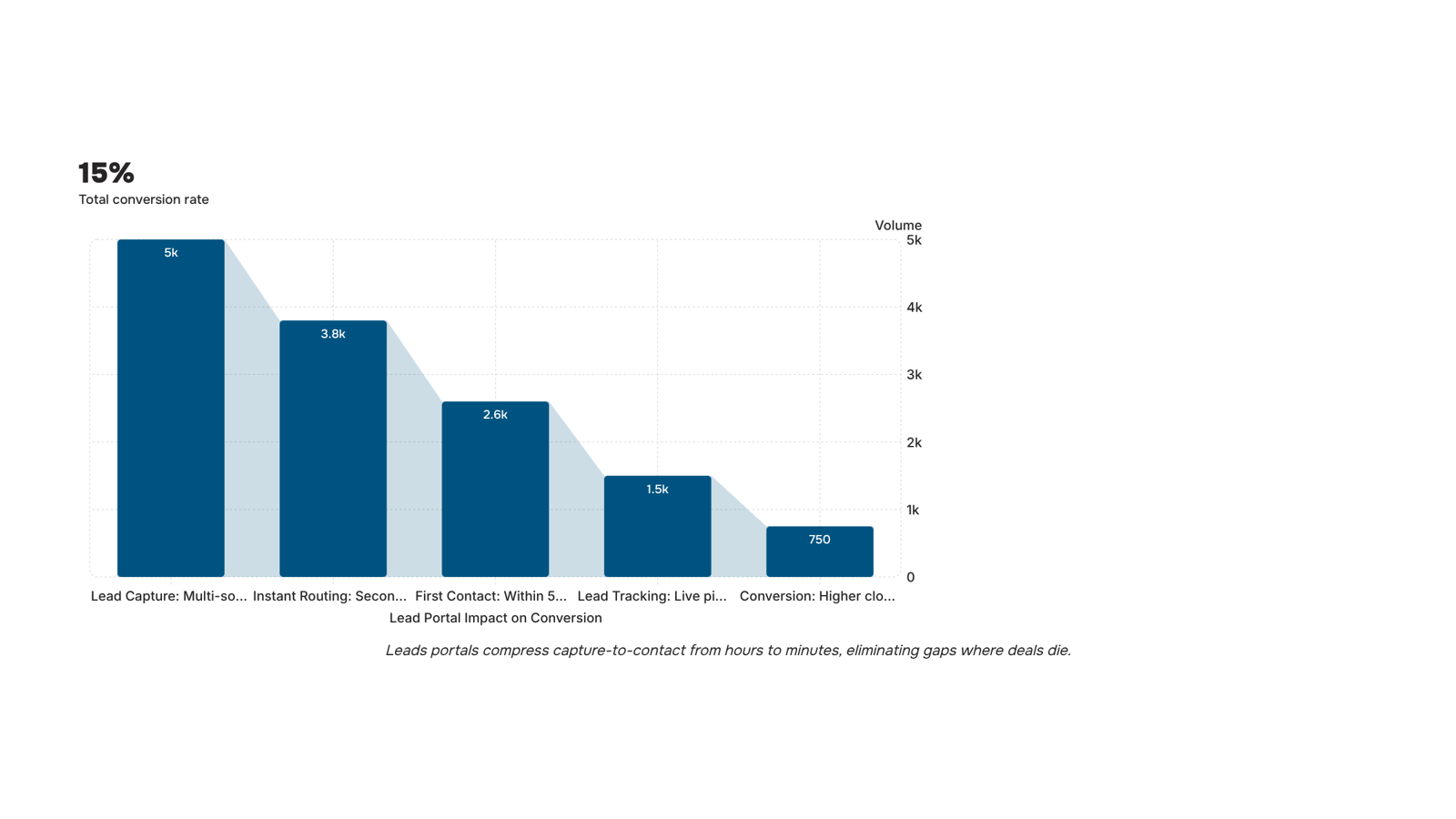
The mechanics are straightforward: a leads portal removes the gaps where leads go cold.
Without one, a lead from a paid campaign lands in a spreadsheet, waits for someone to notice it, gets assigned manually, and reaches a rep 24 to 48 hours later. By then, the lead has moved on. Research consistently shows that response time is the single biggest variable in whether a lead converts, and most B2B teams without automation are losing that race before they know they're in it.
A leads portal changes that sequence at three points.
Instant lead routing : Means the moment a lead submits a form or gets imported from any source, it's assigned to the right rep based on rules you set: territory, deal size, product interest, or source. No queue. No manual triage. The rep gets an alert and acts within minutes, not days. Setting up those real-time lead routing rules is where most of the conversion gain comes from.
Sales lead tracking : Gives every rep a live view of where each lead sits in the pipeline. No more "did anyone follow up on this? conversations. Status updates trigger the next action automatically.
Source attribution : Closes the loop on what's actually working. If your organic leads convert at twice the rate of paid ones, you need to see that at the lead level, not buried in a monthly report.
Together, these features turn a passive record-keeping system into an active conversion workflow. Tools like Evox wire this up end-to-end, so your team spends time selling rather than tracking down where a lead got stuck. That's the direct path to a higher lead conversion rate.
How to customize a leads portal for your business
Yes, a leads portal can be shaped around your process rather than the other way around.
Start with custom lead fields. Most portals let you add fields beyond the defaults — service tier interest, budget range, contract type, referral source. For an IT company managing leads across web forms, LinkedIn, and partner referrals simultaneously, those extra fields are what make the data usable rather than generic.
Web form capture is the next layer. A good lead capture portal connects directly to your website contact forms, landing pages, and paid campaign pages. Each form submission lands in the portal pre-tagged with its source, so you're not manually sorting leads after the fact.
Status workflows are where the real customization happens. Instead of generic stages like "new" and closed, you define the exact steps your team actually uses: "scoping call booked," "proposal sent," awaiting IT sign-off. That specificity matters when you're trying to manage leads effectively across a team of five or fifteen.
Once those three layers are in place, your lead management portal reflects how your sales process actually runs. Reps stop adapting to the tool and start using it. If you want to go deeper on implementing effective lead management from the ground up, that's a good next read before you configure anything.
Leads portal vs CRM: knowing which one you need
A CRM is a system of record. A leads portal is a system of action. Both store lead data, but they solve different problems, and confusing them is how IT companies end up paying for features they never use.
Dimension | Leads portal | Full CRM |
|---|
Scope | Captures, routes, and tracks leads through early pipeline stages | Manages the entire customer lifecycle, from first touch to renewal |
Setup time | Hours to days | Weeks to months |
Team size fit | 1 to 15 reps; lean sales operations | 15+ reps; dedicated admin or RevOps support |
Automation depth | Lead routing, status updates, follow-up triggers | Complex multi-stage workflows, forecasting, territory management |
If your team's main problem is that leads are falling through the cracks before they ever reach a rep, a lead management portal solves that without the overhead of a full CRM rollout. If you're managing renewals, upsells, and multi-year contracts across a large team, a CRM earns its complexity.
Most IT services companies sit in the middle. They're managing four or five lead sources simultaneously and need reliable sales lead tracking before they're ready for enterprise-grade pipeline management.
Start with the portal. You can always layer in CRM functionality once your lead flow is consistent and your team has a process worth scaling.
Manage all your leads in one place with Lio
Most IT companies pull leads from four or five sources simultaneously — web forms, referrals, paid campaigns, organic search — and lose them between handoffs. Lio closes that gap with multi-source lead capture, pulling every inbound lead into a single leads portal and applying custom fields so your team sees context, not just a name. Real-time lead routing means the right rep gets notified before the lead goes cold. No manual triage, no spreadsheet hand-off. If a lead shares a document during outreach, Lio stores it against the record automatically.
Closing
A leads portal isn't just another tool to log leads—it's the difference between capturing a lead and actually converting it. When capture, routing, and tracking work together in one system, response time drops from hours to minutes, ownership becomes explicit, and no lead disappears into a channel-specific inbox. The teams winning deals aren't the ones with the most leads; they're the ones who act on them first.
If your current setup has leads landing in spreadsheets, email inboxes, or multiple disconnected tools, you're already losing conversions before your reps know a lead exists. See how Lio's leads portal automates capture and routing so your team can focus on selling instead of hunting for leads.
FAQ
What is the purpose of a leads portal in sales and marketing?
A leads portal is a centralized workspace where every inbound lead lands, gets scored, and gets automatically assigned to a rep—the moment it arrives. It owns the handoff between capture and first contact, where most deals are won or lost.
How can a leads portal help me manage and track my sales leads?
It gives every rep a live view of the pipeline, routes leads automatically based on your rules, tracks source attribution, and logs every touchpoint—so no lead sits uncontacted and you always know which campaigns produce revenue.
What features should a leads portal have to be effective?
Multi-source lead capture, real-time routing, custom lead fields matching your qualification criteria, status tracking, source attribution, activity logging, and lead scoring—so reps prioritize without guesswork.
Can a leads portal be customized to fit my business's specific needs?
Yes. Start with custom lead fields that match your qualification criteria, then configure routing rules by territory, deal size, product interest, or source—so the portal works around your process, not the other way around.
How does a leads portal improve lead conversion rates?
It removes the gaps where leads go cold: instant routing cuts response time from hours to minutes, live tracking eliminates manual triage, and source attribution shows you what's actually working—so your team converts faster.


 Megan Foster15 September 2026


