TL;DR: Most guides on network diagram project management explain the concept and move on. This one shows IT project teams how to read a diagram, trace the critical path, spot schedule risk before it becomes a missed deadline, and choose software that makes the whole process practical. You'll leave with a working method, not just a definition.
What is a network diagram in project management?
A network diagram in project management is a visual map of every task in a project, showing how those tasks connect and in what order they must run.
Unlike a Gantt chart, which shows time, a network diagram shows logic. It answers the question: which tasks depend on which? That makes it the primary tool for modeling task dependencies in project management, where one delayed task can cascade into five others.
Most network diagrams follow one of two notations. Activity on Node (AON) places tasks inside boxes, with arrows showing dependency direction. Activity on Arrow (AOA) puts the work on the arrows themselves, with nodes marking events. AON is more common in modern project management software because it is easier to read at a glance.
For IT projects specifically, network diagrams do something Gantt charts cannot: they expose the critical path, the sequence of tasks where any slip extends the final delivery date. Understanding how dependencies chain together is where most teams find their real scheduling risk.
If you are managing a project with more than a handful of interdependent workstreams, you are in the right place.
What are the benefits of using network diagrams?
Network diagrams give project teams a shared picture of how work actually flows, which matters more than most planning documents. Here is what that picture does in practice:
Exposes hidden dependencies: Every task that must finish before another can start becomes visible. Teams stop discovering blockers mid-sprint.
Supports accurate project scheduling and timelines: Once dependencies are mapped, duration estimates stack in the right order. You can calculate earliest and latest start dates without guessing.
Identifies the critical path: The sequence of tasks with zero float tells you exactly where a delay will slip the final deadline. Everything else is negotiable.
Improves resource allocation: When you can see which tasks run in parallel, you assign people to parallel workstreams instead of queuing them unnecessarily.
Speeds up replanning: When scope changes, you update the diagram and the ripple effects surface immediately. No manual audit of a flat task list.
Works across methodologies: Waterfall, hybrid, and even agile programs with fixed release windows all benefit from dependency mapping at the milestone level.
For IT project managers running multiple projects across a portfolio, this visibility compounds. You can spot resource conflicts before they collide. If you want free IT project management software that handles this without a steep learning curve, the next section covers what to look for.
How to create a network diagram for your project
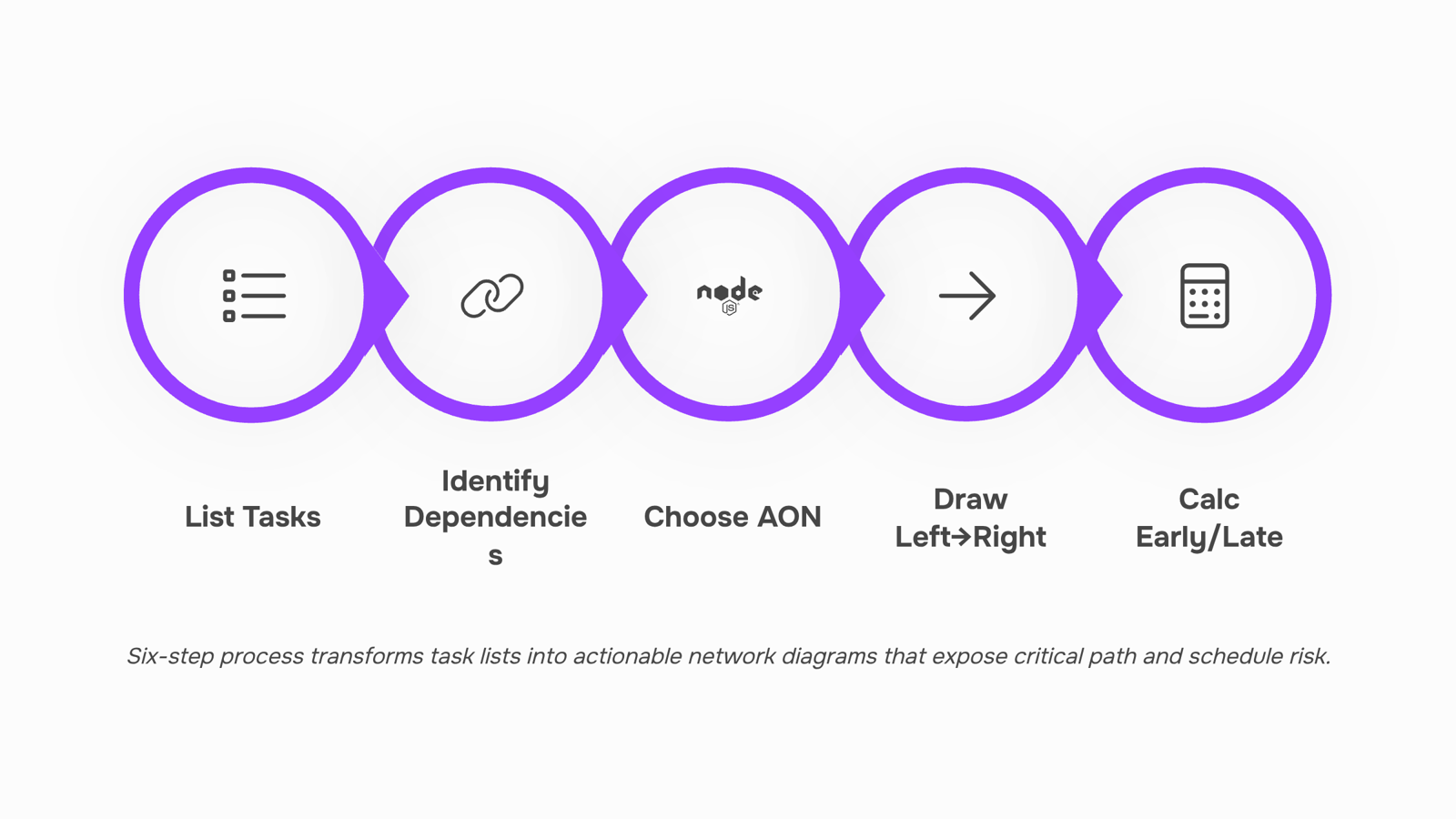
Start with your full task list. Before you draw anything, write out every deliverable, milestone, and handoff your project requires. Group related tasks and note which ones can run in parallel versus which ones must finish before the next one starts. That dependency mapping is the foundation of every node and arrow you'll place.
List all tasks and assign durations: Write each task as a discrete action with a time estimate attached. Vague tasks like "do testing" become "QA regression testing, 3 days." Specificity here prevents gaps later.
Identify task dependencies in project management terms: For each task, ask: what must be complete before this starts? Finish-to-start is the most common relationship, but flag any start-to-start or finish-to-finish dependencies too. These become your arrows.
Choose your notation: Activity on Node (AON) places tasks inside boxes with arrows showing sequence. Activity on Arrow (AOA) puts tasks on the arrows themselves, with nodes representing events. AON is the standard in most project management software that tracks dependencies and timelines, so default to it unless your team has a specific reason not to.
Draw the network left to right: Start with tasks that have no predecessors. Connect each task to its successors using directional arrows. Parallel paths run horizontally at the same level. Your diagram should never loop back on itself.
Add durations and calculate early/late start dates: Once the structure is set, label each node with its duration. A forward pass gives you earliest start and finish dates; a backward pass gives you latest. The difference between them is float, which tells you where schedule risk lives.
Validate with your team: Walk the diagram with the people doing the work. Missing dependencies surface fast when someone says "we can't start X until Y ships the API."
If you're working across multiple workstreams, managing multiple projects across a portfolio adds complexity that a single diagram won't capture alone.
How network diagrams support scheduling and critical path analysis
Once your network diagram is built, the real value is in reading it correctly — specifically, finding where schedule risk hides.
Every network diagram contains at least one critical path: the longest sequence of dependent tasks from start to finish. Any delay on that path delays the entire project. Tasks off the critical path have float (also called slack), meaning they can slip by a day or two without pushing your end date. The diagram makes both visible at a glance.
To find schedule risk, work through the diagram in two passes:
Forward pass: Starting from the first node, calculate the earliest each task can start and finish. Add each task's duration to its earliest start to get its earliest finish.
Backward pass: Starting from the final node, calculate the latest each task can start without delaying the project. Subtract durations working right to left.
Identify zero-float tasks: Where earliest finish equals latest finish, float is zero. Those tasks form your critical path. Any slip there is a slip to your delivery date.
A typical IT infrastructure rollout might show eight tasks on the critical path and four with two to three days of float. That float is your scheduling buffer — useful when a vendor delivery slips or a resource is pulled to another project.
Project scheduling and timelines become much easier to defend to stakeholders when you can point to a diagram and say exactly which tasks carry zero tolerance for delay.
For teams managing several workstreams at once, this analysis also feeds directly into portfolio-level planning, where critical path conflicts across projects are one of the hardest problems to spot without a visual model.
Can network diagrams work in agile project management?
Yes, with one important constraint: agile project management diagrams work best at the sprint or release level, not across an entire backlog.
In a traditional waterfall project, a network diagram maps every task from kickoff to delivery. In agile, that scope is too fluid. Dependencies shift between sprints, priorities reprioritize, and a diagram built in week one is outdated by week three. Trying to network-diagram an entire agile project usually produces a chart nobody trusts.
Where network diagrams genuinely help agile teams is inside a sprint. Map the five to twelve tasks in a two-week sprint, identify which ones block others, and you have a practical dependency view your daily standup can actually use. The critical path through a sprint tells you which tasks the team cannot afford to slip.
Release planning is the other good fit. When you are sequencing two or three sprints toward a release milestone, a lightweight network diagram surfaces cross-sprint blockers before they land in the wrong sprint.
If your team is doing longer-cycle agile work, like PI planning in SAFe, the case for network diagram project management gets even stronger. The planning horizon is long enough that dependency tracking pays off.
For teams still deciding between planning approaches, How to Build a Waterfall Diagram in Excel (And When to Stop Using One) covers where the boundary sits.
What software is best for creating network diagrams?
Most dedicated diagramming tools, Lucidchart, Draw.io, and Microsoft Visio among them, are good at producing clean visuals. Where they fall short for active projects is the live part. You build the diagram, export it, and then maintain it manually while the project moves. For a one-time stakeholder presentation, that trade-off is fine. For tracking a critical path network diagram across a six-week IT deployment, it creates a second source of truth that drifts from reality within days.
The more useful question for IT teams is: what tool keeps the network diagram connected to actual work?
For teams that need network diagram software built into their project workflow rather than bolted on afterward, the practical options split into two categories:
Standalone diagramming tools (Lucidchart, Draw.io, Visio): best for documentation, proposals, and presentations where the diagram is the deliverable
Work management tools with dependency and timeline views (tools that render task networks from live data): best when the diagram needs to reflect what is actually happening
Taro sits in the second category. It tracks task dependencies and surfaces a timeline view built from real assignments, not a static export. When a dependency slips, the downstream impact is visible immediately, which is where most project delays originate. If your team is already dealing with ownership confusion or misaligned task sequences, that visibility matters more than diagram aesthetics.
For IT company owners running multiple projects across a portfolio, a tool that generates the network view from live data also removes the overhead of keeping diagrams synchronized manually.
If budget is a constraint, there are free IT project management options worth evaluating before committing to a paid tier.
Closing
A network diagram is only useful the moment it stops being static. The real power isn't in drawing it once—it's in keeping it in sync as your project moves. Tasks slip, dependencies shift, and scope changes. If your diagram doesn't update in real time, it becomes a relic by week two, and you lose the visibility that made it valuable in the first place.
Taro keeps your network diagram, timeline view, and live task progress in one place. Dependencies stay current as work progresses, the critical path updates automatically, and your team sees schedule risk the moment it emerges—not after a missed deadline surfaces it. Ready to turn your dependency map into a live project control center?
FAQ
How do I create a network diagram for project management?
List all tasks with durations, identify dependencies (what must finish before each task starts), choose Activity on Node notation, draw left to right with parallel paths at the same level, calculate early/late start dates, then validate with your team to catch missing dependencies.
What are the benefits of using network diagrams in project management?
Network diagrams expose hidden dependencies, enable accurate scheduling, identify the critical path where delays slip your deadline, improve resource allocation by showing parallel work, speed up replanning when scope changes, and work across waterfall, hybrid, and agile methodologies.
Can network diagrams be used for agile project management?
Yes, but at the sprint or release level only. Agile backlogs shift too frequently for full-project diagrams—they become outdated by week three. Use network diagrams to map dependencies within a sprint or across a fixed release window instead.
What software is best for creating network diagrams for project management?
Choose software that keeps your diagram in sync with live project progress. Taro combines dependency mapping, timeline visualization, and real-time task tracking in one place, so your network diagram stays current as work moves, not static after day one.
How do network diagrams help with project scheduling and timelines?
Network diagrams reveal the critical path—the longest sequence of dependent tasks where any delay pushes your end date. They also show float on non-critical tasks, giving you a scheduling buffer. Forward and backward passes calculate earliest and latest start dates, exposing exactly where schedule risk lives.


 Elena Petrova15 September 2026


