TL;DR: Most automation guides spend half the article convincing you automation is worth doing. This one skips that and gives IT company owners seven specific tasks to automate first, ranked by time saved and implementation effort. Each one includes a decision rule so you can wire up your first workflow today, not next quarter.
Why most teams automate the wrong things first
The most common mistake is automating what is convenient, not what is costly. Teams reach for the easiest trigger-and-action pair, wire it up, and call it a win. Meanwhile, the processes bleeding hours every week stay manual.
The pattern shows up consistently: a team spends two days building an automated Slack notification for a task that happens once a month, while client onboarding emails still go out manually, inconsistently, and late. The notification saves maybe 10 minutes a month. The onboarding gap costs client trust.
The underlying issue is that most teams skip the triage step entirely. They never ask which processes run daily, carry a real error cost, or break down when one person is out sick. Those are the processes where automated logic pays back fast. A one-time setup that runs 200 times a year is a different investment than one that runs twice.
Before you automate workflows, identify which of your processes are actually ready for automation. The criteria matter more than the tooling. The next section gives you a single decision filter, built around volume, frequency, and error cost, so you can apply it to your own task list, not just the seven covered here.
The one rule for deciding what to automate
Before you automate anything, run it through three questions: Does this task happen more than a few times a week? Does a mistake here cost real time or money to fix? Is the logic clear enough to write down in steps?
If all three answers are yes, automate it now. If only one or two apply, it goes on a backlog.
A task that runs daily with no clear error cost is a candidate. A task that runs daily, breaks client billing when it fails, and follows the same steps every time is a priority. That distinction matters when you're trying to scale your projects and automate workflows without burning setup time on the wrong things first.
The seven tasks ahead all pass this filter. Each one is high-frequency, carries a real error cost, and follows logic you can define without a developer.
If you want to go deeper on applying this filter to your own process list, which business processes are most commonly automated across IT teams is a useful next read.
7 tasks IT teams should automate right now
The seven tasks below aren't ranked arbitrarily. Each one clears the decision filter from the previous section: high volume, high frequency, and a measurable error cost when done manually.
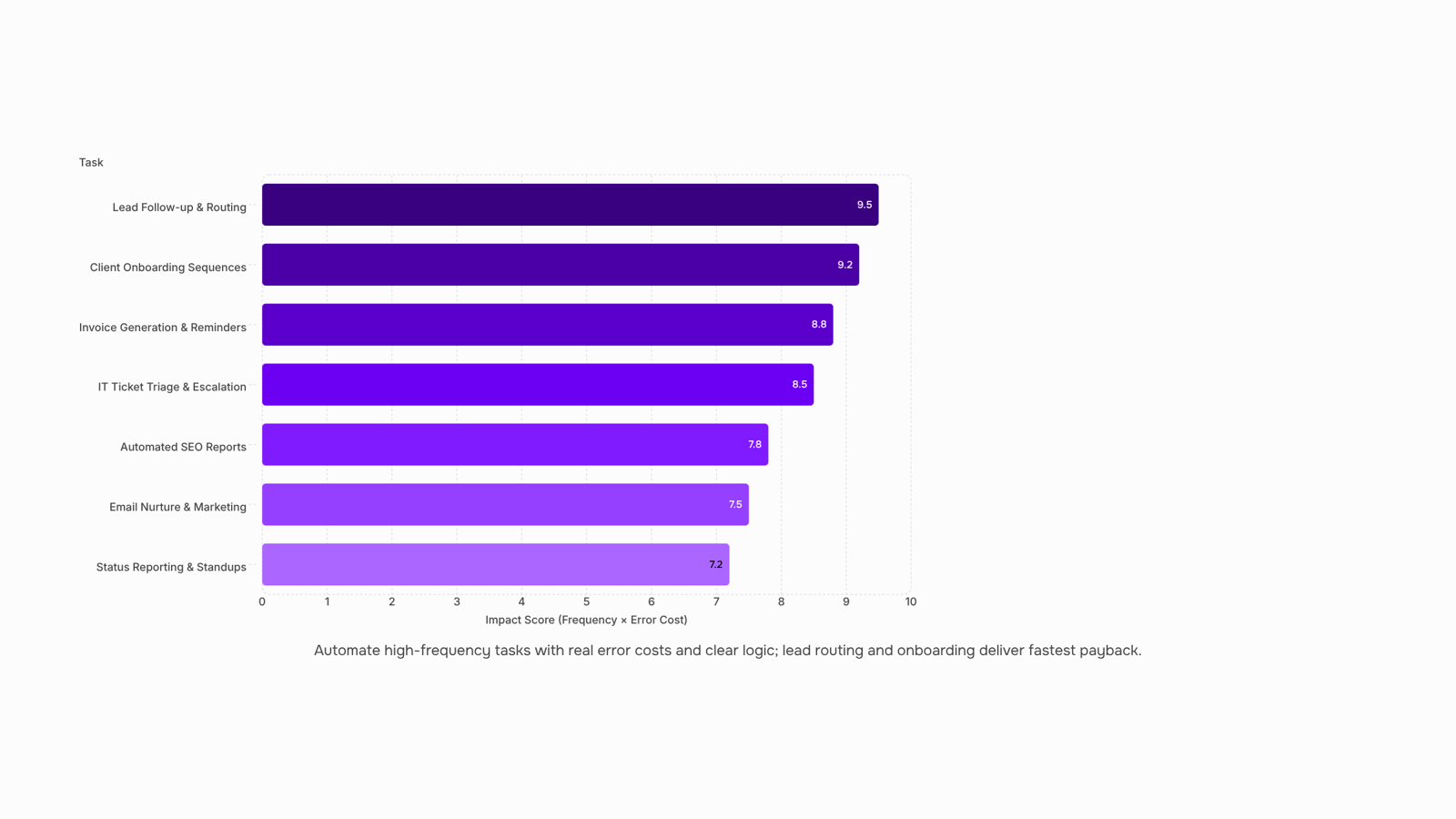
Lead follow-up and routing Most IT companies lose deals not because their product is wrong but because response time is. When a lead fills out a form, a manual process might take hours to assign and reply. Automated follow-up sends a personalized acknowledgment within seconds, scores the lead, and routes it to the right person based on deal size or service type. If you want to see what this looks like end-to-end, which business processes are most commonly automated across IT teams covers the routing logic in detail.
Client onboarding sequences Onboarding a new client typically involves the same 12 to 15 steps every time: sending a welcome email, creating a project folder, assigning an account manager, scheduling a kickoff call. Doing this manually once is fine. Doing it 40 times a quarter is where errors creep in. Automate the sequence so that a single trigger (contract signed, payment received) kicks off every downstream step without anyone touching it.
Automated marketing and email nurture Automated marketing is one of the highest-leverage places to start. A drip sequence that runs on a schedule, adjusting based on whether a contact opened or clicked, does more consistent work than a team manually sending one-off campaigns. This extends to social: if you automate Instagram posts or LinkedIn updates on a content calendar, your team stops losing hours to manual scheduling every week.
Automated SEO reports Pulling keyword rankings, traffic changes, and backlink data manually every Monday morning is exactly the kind of task that gets skipped when the team is busy. Automated SEO reports pull from your analytics tools on a schedule, format the data, and deliver it to whoever needs it. No one has to remember. No one has to format a spreadsheet. The report just arrives.
IT ticket triage and escalation Support tickets that sit in a generic inbox waiting for a human to read and categorize them slow down resolution time and frustrate clients. An automation that reads ticket metadata (subject line, client tier, keyword match) and routes to the right queue, or escalates based on SLA timers, cuts average response time significantly. This is where tools like Microsoft Power Automate and Revo's workflow automation both operate well: trigger-based routing that runs without anyone watching it. For teams that want to build this without a long setup, automations you can build and run today without a long setup is a practical starting point.
Invoice generation and payment reminders IT service companies often invoice on a monthly cycle. Generating invoices manually, attaching the right line items, sending them, and then chasing late payments is a process that should run itself. Automate invoice creation from project completion data, send on a schedule, and trigger payment reminders at day 7, day 14, and day 30 without anyone drafting a follow-up email.
Internal status reporting and standup updates Team leads spend real time every week pulling status from multiple tools to write a report no one asked them to write manually. An automated logic layer that queries your project management tool, compiles task completion rates, and posts a summary to Slack or email on a schedule removes that entirely. If you want to understand how to set up a timed workflow that runs without manual input, this is one of the cleaner use cases to start with.
The common thread across all seven: a human defined the rule once, and the system runs it every time. Before building any of these, how to identify which of your processes are ready to automate will help you confirm the trigger and outcome are clear enough to hand off.
Both can automate workflows, but they solve different problems. Picking the wrong one costs you time instead of saving it.
Rules-based automation (triggers and conditions) wins when the logic is fixed and the outcome must be consistent. A new client submits an onboarding form, a contract gets generated, a Slack message fires, an invoice is queued. No interpretation needed. These chains run in milliseconds and never misfire because someone phrased a request differently. For tasks like these, a rules-based tool is faster, cheaper, and more auditable than any AI model.
AI automation earns its place when the input varies and judgment is required. Classifying a support ticket by urgency, drafting a first-pass response from unstructured customer notes, or flagging an anomaly in a usage report — these tasks resist clean if/then logic. AI handles the ambiguity; rules handle the execution that follows.
A practical decision rule: if you can write the logic as a flowchart in under five minutes, use rules-based automation. If the input changes shape every time, add AI to the front end.
Most IT teams need both. Revo connects the two layers — AI interprets, rules execute — so you can build and run automations today without a long setup.
How to get started with automation in 5 steps
Getting started doesn't require a big rollout. Pick one task, build one workflow, and go from there.
Identify one high-frequency, low-judgment task. Look for work your team does more than three times a week that follows the same steps every time. Onboarding checklists, ticket acknowledgments, and weekly status reports are common starting points. If you're unsure where to begin, how to identify which of your processes are ready to automate walks through a practical decision framework.
Map the current manual steps. Write out what triggers the task, what happens in sequence, and where it ends. If you can't describe it in five steps or fewer, the process needs simplification before automation.
Connect your existing tools. Most IT teams already use a ticketing system, a CRM, and a communication platform. Revo acts as the connection layer between them, so you're not rebuilding workflows from scratch. You're wiring up what already exists.
Build and run a test workflow. Start with a single trigger-and-action pair. If the first run produces the right output, expand it. If it doesn't, the failure is contained and easy to fix. Automations you can build and run today without a long setup shows what a working first workflow looks like in practice.
Scale your projects and automate workflows gradually. Once one workflow runs reliably, apply the same pattern to the next task. Revo's process automation handles the scheduling and sequencing, so adding a second or third workflow takes minutes, not days. For timer-based processes, see how to set up a timed workflow that runs without manual input.
Three mistakes that slow down your first automation rollout
The most common mistake is automating a broken process. If a task is chaotic manually, adding automated logic on top locks in the chaos. Fix the process first, then automate it.
The second mistake is picking a task that happens twice a month. Automation pays back in repetition. A task that runs daily or weekly returns the time investment within weeks. A monthly task might take a year to break even.
The third mistake is skipping a test run. Run your workflow on one real case before switching it on for the whole team. Most failures show up in edge cases, not the happy path.
If you want a broader view of where automation fits your operations, setting up an office automation system is a practical next step before you scale.
Closing
The seven tasks above aren't exotic or theoretical. They're the ones IT teams run every week, the ones that pile up when someone calls in sick, and the ones that slip through cracks when you're focused on delivery. The decision filter—high frequency, real error cost, clear logic—is your actual triage tool. Apply it to your own task list, pick one, and wire it up this week. Revo lets you build that first workflow without touching your existing stack or waiting for a developer. Start with one automation today and watch how much time your team actually gets back.
FAQ
What tasks can I automate to save time at work?
Lead routing, client onboarding, email nurture, SEO reporting, ticket triage, invoice generation, and status reporting are the highest-impact starters. Pick tasks that run more than a few times weekly, carry real error costs, and follow clear logic.
How can I automate repetitive tasks at work?
Define the trigger (form submission, contract signed, timer), write the logic steps once, and connect them in a workflow tool. Rules-based automation handles fixed logic; AI handles tasks requiring judgment. Start with one workflow and expand from there.
What are the benefits of automating business processes?
Faster response times, fewer errors, consistent execution, and reclaimed hours. A process that runs 200 times yearly saves weeks of manual work and removes the risk of human mistakes when someone is overloaded or out.
Can I automate tasks with AI?
Yes, but AI works best for tasks requiring judgment—ticket classification, draft responses, priority assessment. For fixed-logic tasks like onboarding or invoicing, rules-based automation is faster, cheaper, and more reliable.
How do I get started with automation?
Run your task list through three questions: Does it happen more than a few times weekly? Does a mistake cost real time or money? Is the logic clear? If yes to all three, build that workflow first. Revo connects your stack without rebuilding anything.
What is the difference between AI automation and rules-based automation?
Rules-based automation runs fixed logic consistently and instantly—perfect for onboarding and invoicing. AI automation interprets varying inputs and makes judgment calls—better for ticket classification and draft responses. Use rules-based for predictable tasks, AI for nuanced ones.
How do I know if a task is worth automating?
A task is worth automating if it runs more than a few times weekly, breaks something when done wrong, and follows clear steps. Automating a monthly task that takes 10 minutes wastes setup time. Automating a daily task that runs 200 times yearly pays back immediately.


 Elena Petrova15 September 2026


