TL;DR: Most roundups on the best task management tools for macOS list every app with a free tier and call it research. This one gives IT company owners a four-tier framework that separates passive to-do lists from AI-driven work execution systems, so you can match the right tool to how your team actually operates. The difference in that decision shows up in delivery speed and missed deadlines.
Most macOS task management comparisons hand you a feature checklist. They don't tell you why a tool that works fine on Windows feels clunky on a Mac — or why that distinction matters when you're switching contexts 40 times a day.
Four criteria actually separate a tool built for macOS from one that just runs on it.
Menu bar access. A macOS menu bar task app lets you capture tasks and check priorities without breaking focus. Tools that require a full window switch add friction that compounds across a workday.
Spotlight and launcher integration. Things 3 and OmniFocus both surface tasks directly in Spotlight and Raycast. If a tool can't do that, you're adding a manual step every time you want to find or create a task.
Native app vs. web wrapper. Electron-based apps consume more RAM and respond slower than native SwiftUI builds. On a MacBook with 8GB of RAM running Xcode and a browser, that difference is noticeable.
Apple ecosystem depth. Calendar sync, Reminders handoff, iCloud storage — these integrations determine whether the tool fits your existing workflow or fights it.
The best task management tools for macOS clear all four bars. Understanding the difference between task tracking and task management also matters here, because some tools only do one. That gap becomes the basis for the tier framework in the next section.
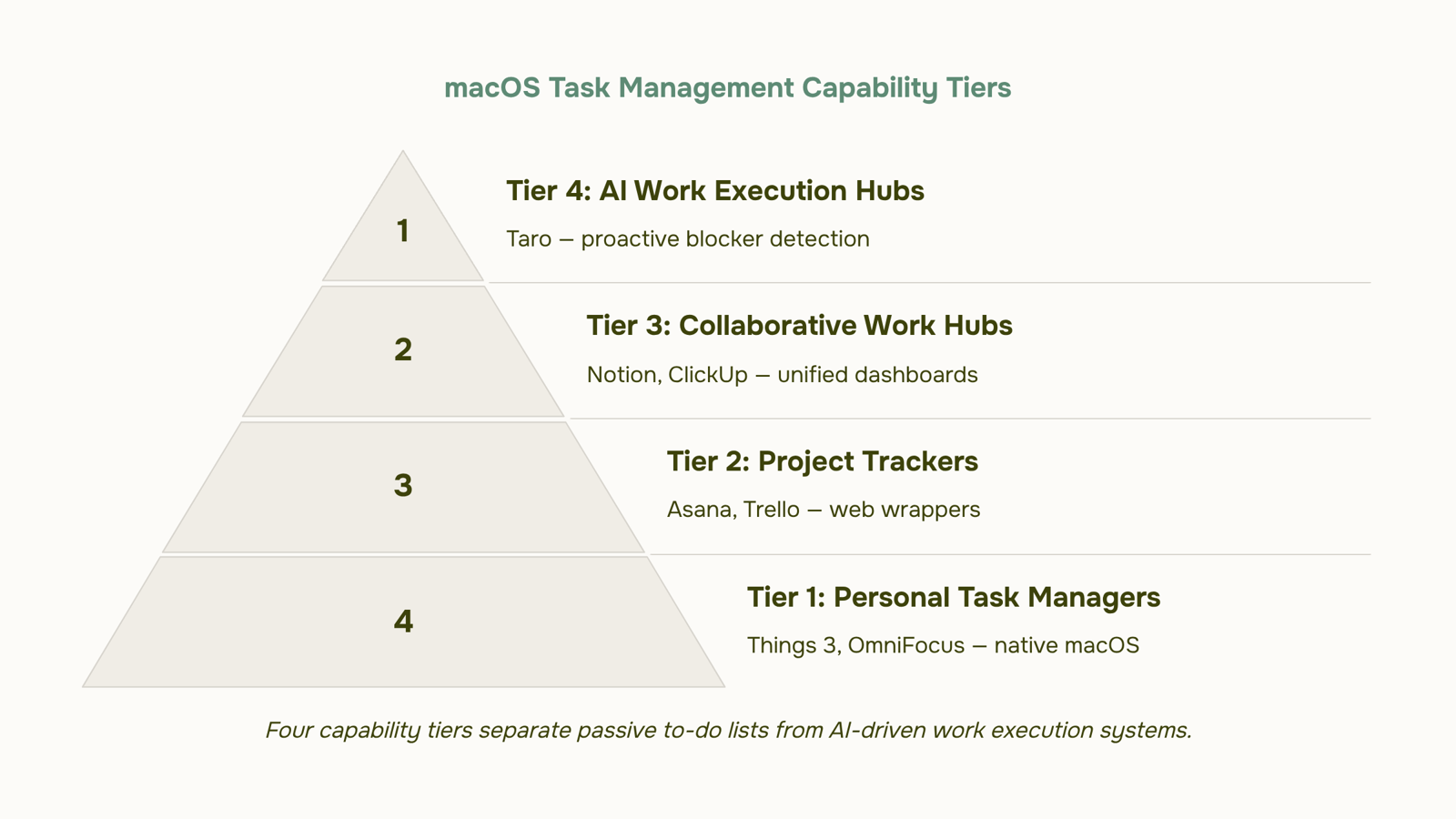
The macOS Task Management Capability Tier Matrix
Most roundups on the best task management tools for macOS sort by feature count. The result: 20 tools, no decision logic, and a reader who still doesn't know which tier of tool they actually need.
This matrix fixes that. It classifies macOS task tools into four tiers by capability, not by popularity.
Tier 1 — To-do Lists Tools like Things 3 and OmniFocus. These are native macOS apps with deep Apple ecosystem integration: menu bar access, Spotlight capture, Shortcuts support, and Reminders sync. They handle personal task capture well. What they don't do is coordinate work across a team. If you're an IT company owner assigning tasks to five people, Tier 1 breaks down fast.
Tier 2 — Project Trackers Tools like Asana and Trello. These ship desktop apps for macOS, but most are web wrappers — no native menu bar, limited Spotlight integration, and no Raycast or Alfred support. They track what you tell them. Deadlines, owners, statuses — all manual. The coordination overhead stays with your team.
Tier 3 — Collaborative Work Hubs Tools like Notion and ClickUp. Broader than project trackers: wikis, databases, dashboards, and tasks in one place. macOS compatibility varies. Notion runs as an Electron wrapper. ClickUp's desktop app has menu bar support but no native Spotlight integration as of 2025. These tools handle project and task management as a unified system better than Tier 2, but they still rely on manual input to stay current.
Tier 4 — AI Work Execution Hubs This is where task tracking vs AI work execution becomes a real distinction. Tier 4 tools don't just record tasks — they surface blockers, flag overdue work, and suggest what needs attention. Taro sits here. It connects task management to your CRM (Revo), billing (Inzo), and email (Evox), so a delayed client deliverable doesn't have to be manually escalated. Understanding how AI task managers reduce coordination overhead is the core reason Tier 4 exists as a separate category.
The tier you need depends on team size, coordination complexity, and whether you want a tool that records work or one that actively manages it. The next section covers that gap in detail.
Task tracking vs. AI work execution: what the difference costs your team
Most task management tools do one thing: store what you tell them. You add a task, set a due date, assign an owner. The tool waits. If the deadline slips or the wrong person is overloaded, you find out after the fact, usually in a status meeting.
That's task tracking. It's passive by design.
AI work execution is different in a specific way: the system surfaces information you didn't ask for. It flags that a sprint milestone is at risk because three dependent tasks are unassigned. It suggests who should own a new task based on current workload. It tells you a project is trending late before the due date arrives. The tool acts on patterns, not just inputs.
The operational cost of staying in tracking mode is real. For a small team running client delivery on Mac, a missed blocker on Tuesday becomes a client escalation by Friday. The best task tracker apps for teams handle assignment and status well. What they don't do is reason about your workload.
Taro sits in the AI work execution tier. It connects tasks to sprints, time logs, and project milestones in one workspace, and uses that connected data to surface risks proactively, not reactively.
If you're still choosing between task management approaches, that distinction is the right place to start.
Not all macOS task tools belong in the same conversation. A solo developer using Things 3 for personal GTD has different requirements than a five-person IT delivery team tracking client sprints in a shared workspace. The capability tier matrix below separates these tools by what they actually do, not just what they list on a features page.
Tier 1: Personal task managers with strong macOS integration
Things 3 sits at the top of this tier. Native macOS app, menu bar access, Spotlight integration, and a Quick Entry shortcut that captures tasks without breaking your flow. Subtask organization on macOS is clean and fast. The ceiling is real though: no team collaboration, no workload visibility, no AI. For a solo operator, it's the best-built Mac app in this category.
OmniFocus targets power users who need custom perspectives and complex project hierarchies. Spotlight integration works. Menu bar access works. The learning curve is steep and the pricing reflects it. For IT owners managing their own work, it's capable. For managing a team's work, it falls short.
Tier 2: Collaborative tools with partial macOS support
Asana runs as a desktop app on macOS but it's an Electron wrapper, not a native build. No menu bar. No Spotlight. The collaboration features are solid for teams of 10 to 50, and the timeline view handles project dependencies well. Subtask organization works but gets unwieldy past three levels deep.
Notion is a flexible workspace, not a task manager. Teams use it as one, but without due dates surfaced in a unified view or any native macOS hooks, it requires discipline to maintain. Good for documentation-heavy teams that want tasks alongside notes. Not the right pick if delivery speed matters.
Linear is built for software teams. Fast, opinionated, and genuinely good at sprint management. No menu bar integration, but the macOS app is snappy. Best fit for engineering-led IT teams running two-week cycles.
Tier 3: AI work execution hubs
Taro occupies a different tier entirely. Where the tools above record what you tell them, Taro surfaces priorities, flags blockers, and connects task execution to your CRM, billing, and project timeline in one workspace. For IT teams that want to understand how AI task managers reduce coordination overhead, this is the clearest example of the category in practice. It runs as a web app in 2025, so native macOS hooks like Spotlight aren't available yet — a real trade-off if you live in the menu bar.
ClickUp also claims this tier with AI features, but the interface complexity often creates more coordination overhead than it removes. It works best for teams that already have a defined process to systematize, not teams still building one.
For small IT teams evaluating the best task management tools for macOS, the decision splits cleanly: native macOS depth versus team execution capability. You rarely get both at full strength in one tool — except when the team collaboration side is strong enough that the macOS trade-off stops mattering.
How Taro compares to Asana, Notion, and Things 3 on macOS
Four tools dominate the conversation when IT owners search for the best task management tools for macOS, but they sit in genuinely different capability tiers. Here's how they stack up across the dimensions that actually matter for a Mac-first team.
Dimension | Taro | Asana | Notion | Things 3 |
|---|
macOS integration depth | Web app with desktop wrapper; no menu bar or Spotlight access | Desktop app; no menu bar or Spotlight | Desktop app; no menu bar or Spotlight | Native macOS app; menu bar, Spotlight, and Shortcuts support |
AI capability tier | Built-in AI predicts task delays and flags blockers before they hit deadlines | AI assist via add-on (Asana Intelligence); summarization and goal suggestions | AI via third-party integrations; no native task prediction | None |
Team collaboration | Real-time task assignment, sprint planning, Kanban board, time logging in one workspace | Strong team workflows; robust project templates | Flexible but requires manual structure; no native sprint layer | Single-user focused; no team collaboration |
Unified project-task system | Projects, sprints, subtasks, and time tracking in one connected system | Projects and tasks unified; billing and CRM require separate tools | Databases can mirror a project-task structure, but setup is manual | Tasks only; no project layer |
Things 3 wins on macOS depth — nothing else here matches its native integration. If you're a solo operator who lives in Apple's ecosystem, that matters.
For teams, the trade-off shifts. Asana handles project and task management well but stops at the delivery layer. Notion is flexible but requires significant configuration to behave like a project and task management unified system.
Taro's advantage is scope: it connects task execution to sprint planning, time logging, and cross-tool visibility without requiring a second platform. If you want to understand how AI task managers reduce coordination overhead in practice, that connected layer is where the difference shows up.
How to choose the right tier for your team today
Answer these four questions before you buy anything.
How big is your team? Under 10 people on Mac, a macOS native task manager like Things 3 handles personal workloads cleanly. Ten or more, you need shared visibility.
Do you already have a project system? If tasks live in spreadsheets, skip lightweight apps entirely.
Is your team ready for AI? If yes, AI task managers reduce coordination overhead measurably — Taro fits here.
How deep is your macOS dependency? Menu bar access and Spotlight matter daily for most IT owners.
Map your answers: solo or small team on Mac → Things 3. Growing IT team needing the best task management tools for macOS with cross-tool visibility → Taro.
Closing
Most IT teams running on Mac are already operating at Tier 2 or 3 without realizing Tier 4 exists. They've built workflows around passive task tracking — Asana boards, Notion databases, scattered status updates — because that's what the tool ecosystem offered them. The operational cost shows up as Friday escalations that should have been flagged on Tuesday, overloaded developers who nobody noticed were at capacity, and client deliverables that slip because blockers stayed invisible until the weekly standup. Tier 4 changes that equation. Instead of recording work and hoping someone notices when it drifts, the system surfaces risks before they become crises. If you're ready to see what active work execution looks like in practice — where your macOS task manager actually reasons about your workload instead of just storing it — try Taro and watch how many status meetings you stop needing.
FAQ
What features should I look for in a task management tool for macOS?
Menu bar access, Spotlight integration, native app builds, and Apple ecosystem depth (Calendar sync, Reminders handoff, iCloud storage). Without these, you're adding friction every time you capture or find a task.
How do AI-powered task managers differ from traditional to-do apps on macOS?
Traditional tools record what you tell them and wait. AI work execution systems surface blockers, flag overdue work, and suggest priorities without manual input — turning passive tracking into active risk management.
Which task management tools support macOS menu bar, Spotlight, and Apple ecosystem integrations?
Things 3 and OmniFocus lead Tier 1 with full native support. Asana, Notion, and Trello ship desktop apps but lack native menu bar and Spotlight integration. Taro integrates deeply with the Apple ecosystem as part of its Tier 4 AI execution model.
What is the difference between task tracking and AI work execution for teams on macOS?
Task tracking is passive: you input tasks and deadlines, the tool stores them. AI work execution is active: the system flags risks, suggests workload rebalancing, and surfaces blockers before they become crises — reducing coordination overhead.
How does Taro compare to tools like Asana, Notion, or Things 3 for macOS users?
Things 3 excels for solo operators but has no team collaboration. Asana and Notion handle teams but rely on manual status updates. Taro operates at Tier 4: it connects tasks to sprints, time logs, and project milestones, surfacing risks proactively across your entire team.
What are the best task management tools for small teams on Mac?
Tier 2 tools like Asana work for 5–10 person teams managing basic coordination. For teams that need active risk visibility and reduced status meeting overhead, Tier 4 (Taro) is the better fit despite higher complexity.
Can I manage projects and tasks in a unified system on macOS?
Yes. Tier 3 tools like Notion and ClickUp combine tasks, wikis, and dashboards. Tier 4 (Taro) unifies tasks with sprints, time logs, and milestones, adding AI-driven risk surfacing that Tier 3 tools don't offer.
Which task management tool offers the best subtask organization on Mac?
Things 3 has the cleanest subtask UX for solo work. OmniFocus supports deeper hierarchies for power users. For teams, Asana handles subtask organization well but gets unwieldy past three levels; Taro's sprint-based structure keeps hierarchy flat and scannable.


 Elena Petrova11 September 2026


