TL;DR: Most task management app roundups hand you a ranked list and leave the selection work to you. This one gives IT company owners a decision framework: what criteria to evaluate, in what order, and how to spot the tools that create more overhead than they remove. You'll finish with a clear method for matching a tool to how your team actually works.
What task management apps actually do
A task management app gives your team a shared place to create, assign, and track work from start to finish. That sounds simple, but the gap between a personal to-do list and a team-grade system is significant enough to send your search in the wrong direction if you skip this distinction.
Personal tools like a notes app or a solo checklist app handle one person's tasks well. They fall apart the second you need to see who owns what, whether a deadline is at risk, or why a sprint slipped. Team-grade task management apps add dependency tracking, workload visibility, status workflows, and integrations with the other tools your team already uses.
That distinction matters because many small businesses land on the wrong tool first, adopt it, and watch usage drop within 60 days as work reverts to chat threads and spreadsheets.
For IT teams specifically, the bar is higher. You need sprint support, time logging, and a system that connects tasks to client work and billing, not just a board with colored cards.
The best personal task management apps solve individual focus problems. Team-grade task management apps solve coordination problems. Before you evaluate any tool, decide which problem you actually have. Most IT company owners have the second one.
What features matter most in a task management app
Not every feature gap is obvious until a team is already stuck. The tools that look identical in a comparison table often diverge on the five things that actually determine whether a team keeps using them past week six.
1. Task ownership with clear accountability: Every task needs one owner, not a group tag. When ownership is ambiguous, work stalls in review cycles or falls through entirely. The outcome you're buying is fewer "I thought you had that" conversations.
2. Workload visibility across the team: A task list tells you what exists. Workload visibility tells you who has capacity and who is already at risk of missing a deadline. For IT teams specifically, this matters before sprint planning, not after. The best task tracker apps for teams consistently rank this as the feature most tied to on-time delivery.
3. Sprint support or structured iteration cycles: Ops-heavy teams can work from a running backlog. Development and IT teams need sprint containers: a defined scope, a start date, an end date, and a burndown view. Time and task management apps that skip sprint structure force engineering teams to bolt on a second tool, which is exactly the overhead you're trying to eliminate.
4. Time tracking built into the task layer: Standalone time trackers create a second data entry job. When time logging lives inside the task, your team logs it because it takes two clicks, not because someone sent a reminder. The downstream benefit is accurate project cost data without a weekly reconciliation ritual.
5. Integration with the tools that hold your real data: A task app that doesn't connect to your CRM, billing system, or communication layer becomes an island. Work gets duplicated. Status updates go stale. The best task management apps treat integration as a core feature, not an add-on tier. Top task management apps like Taro connect directly to billing and CRM layers so task status reflects actual project state, not a manually updated field.
The failure mode across all five: teams adopt a capable tool, skip configuration, and revert to chat within 60 days. Features only work if they match how your team actually runs work.
How to match an app to your team's workflow type
Before you open a single pricing page, answer one question: how does your team actually move work forward day to day?
Three workflow types cover most IT businesses:
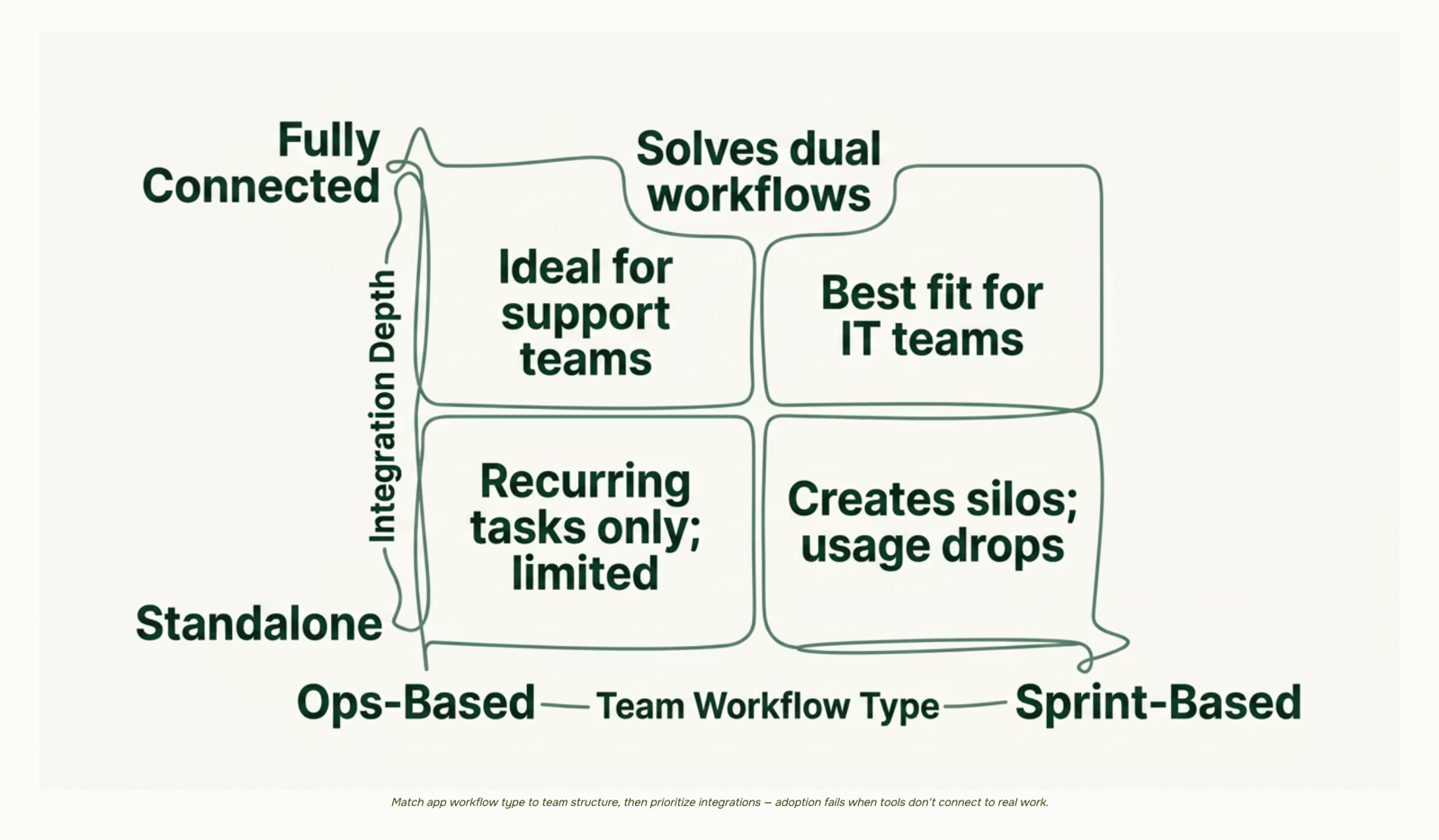
Sprint-based teams run two-week cycles, plan in backlogs, and need a board that supports story points, sprint velocity, and burndown tracking. A Kanban-only tool will frustrate them within weeks.
Ops-based teams handle recurring work — tickets, maintenance windows, client requests — where the work never "ends," it just cycles. They need recurring tasks, SLA tracking, and queue views, not sprint boards.
Hybrid teams run project delivery alongside ongoing support. They need both structures in one place, or they end up with two tools and an ownership gap in the middle.
Most teams skip this question and evaluate on features. That's why usage drops — the app structure fights the way the team thinks about work. If you're looking at best task management apps for small business options, workflow fit matters more than any individual feature.
Retail operations teams are a useful example here. The best retail task management apps for multi-location teams are almost always ops-based: recurring checklists, location-level queues, and escalation paths. A sprint board adds friction, not structure.
Once you know your workflow type, the shortlist writes itself. Sprint-based teams should evaluate tools with native sprint planning. Ops teams should check for recurring task automation and SLA fields. Hybrid teams need to confirm that both modes coexist without separate workspaces — otherwise you're back to two tools.
How to choose a task tracker for your IT team walks through this matching process in more detail if your team spans more than one type.
Why integrations determine whether the app gets used
Most task management apps fail at adoption, not features. Teams pick a tool, use it for a few weeks, then drift back to Slack threads and spreadsheets because the app never connected to where work actually lives.
The integration layer is what determines whether the app sticks. If your developers track time in one tool, manage sprints in another, and log client requests through a CRM, a task app that can't read from those systems creates a second inbox nobody maintains. Research on how teams choose task tracker apps shows this pattern repeats across IT teams of almost every size.
Before committing to any time and task management app, ask three questions:
Does it sync bidirectionally with your CRM and billing tool? One-way pushes create stale data within days.
Can it surface workload data without a manual export? If capacity planning requires a spreadsheet step, it won't happen consistently.
Does it connect to your communication layer natively? A Zapier workaround adds a failure point and a maintenance burden.
Taro connects directly to Revo (CRM), Inzo (billing), and Evox (email), so task status, client context, and time logs stay in one place without middleware. For IT teams evaluating task management apps, that native connectivity is often the difference between a tool that gets used and one that gets replaced.
How AI is changing what task management apps can do in 2026
Most task management apps built before 2023 do one thing: record what someone said they'd do. AI changes that in a specific way. Instead of waiting for a deadline to slip, newer tools analyze workload distribution, historical completion rates, and dependency chains to flag risk before it becomes a missed date.
For teams above five people, this shift changes what you should actually evaluate. The question is no longer "can this tool show me a Kanban board?" It's "can this tool tell me that the sprint is at risk on Tuesday, not Friday when it's too late?"
The functional difference shows up in three areas:
Deadline prediction: AI models trained on your team's velocity flag tasks likely to overrun, not just tasks that are overdue
Auto-assignment: the system routes new tasks based on current workload, not just role or availability on paper
Workload visibility: managers see capacity in real time, so setting task priorities across your team becomes a data decision, not a gut call
Taro's task management layer does all three inside a single workspace, connected to sprint planning and time tracking, so the AI has enough signal to be useful rather than decorative.
When you're comparing the best task management apps at this capability level, ask whether the AI acts on your actual project data or just surfaces generic suggestions. That distinction separates the top task management apps from the ones that add "AI" to a feature list without changing what the tool actually does.
A five-question framework for choosing the right app
Most teams skip this step entirely. They sign up for a free trial, poke around for a week, and make a decision based on which interface felt familiar. Then, 60 days later, work has drifted back to Slack threads and shared spreadsheets.
Run through these five questions before you open a single trial account.
Does your team run sprints or fixed-deadline projects? If yes, you need sprint boards, backlog management, and velocity tracking, not just a Kanban column. Most generic task management apps skip this entirely.
How many tools does your team currently use for work? The average SMB employee touches multiple productivity tools daily. If the answer is four or more, consolidation should be a hard requirement, not a nice-to-have.
Do you need workload visibility across people, not just tasks? A list of tasks tells you what exists. A workload view tells you who is overloaded on Thursday. These are different features, and most best task management apps for small business skip the second one.
Does the app connect to your billing or CRM? For IT teams, a task that isn't tied to a client or an invoice is a gap in your workflow.
Will this work on mobile for your field or remote staff? Task management apps for iPhone need offline support and push notifications, not just a responsive web view.
If any answer is "I'm not sure," check the task management features built for team workflows before committing to a trial.
Frequently asked questions about task management apps
What should I look for in task management apps? Prioritize sprint support, workload visibility, and integrations with your existing tools. A task app that can't surface who's overloaded or connect to your CRM creates a new silo, not a solution.
Why do teams stop using task management apps? Usage typically drops when the tool adds friction instead of removing it. Teams revert to chat within 60 days when tasks live separately from context. The best task tracker apps for IT teams share one trait: low-friction daily habits built in from day one.
Closing
The right task management app isn't the one with the most features—it's the one that matches how your team actually works and connects to the tools where your real data lives. Once you've identified your workflow type (sprint-based, ops-based, or hybrid), filtered for the five core features that matter, and confirmed integration depth, you're ready to run a single trial. Taro is built specifically for IT teams that need sprint support, AI-powered deadline handling, and native connections to billing and CRM without the setup overhead of an enterprise platform. The next step is a one-week trial with your actual backlog. Does it reduce the time you spend in status meetings?
FAQ
What are the top task management apps for teams?
The best apps depend on your workflow type. Sprint-based teams need native sprint planning and burndown views. Ops teams need recurring task automation and SLA tracking. Hybrid teams need both structures coexisting without separate workspaces. Integration depth and workload visibility matter more than feature count.
How do I choose the best task management app for my business?
Start by identifying your workflow type: sprint-based, ops-based, or hybrid. Then evaluate on the five core features—ownership clarity, workload visibility, sprint support, time tracking, and integrations. Finally, confirm the tool connects bidirectionally to your CRM, billing, and communication layer before committing.
What features should I look for in a task management app?
Prioritize task ownership with clear accountability, workload visibility across the team, sprint support (if applicable), built-in time tracking, and native integrations with your CRM and billing system. Skip tools that require workarounds or manual data entry steps.
Are task management apps suitable for personal use?
Personal to-do list apps work fine for individual focus. Team-grade task management apps solve coordination problems—dependency tracking, workload visibility, and status workflows. Choose based on whether you're managing one person's tasks or coordinating work across a group.
Can task management apps integrate with other productivity tools?
Yes, but integration quality varies. Look for bidirectional syncing with your CRM and billing system, not one-way pushes. Native integrations are more reliable than Zapier workarounds. Taro connects directly to CRM, billing, and email without middleware.


 Elena Petrova15 September 2026


