TL;DR: Most guides hand you a generic "send on Tuesday at 10am" rule and treat it as settled. This one shows IT company owners why population-level send-time advice actively hurts deliverability on niche B2B lists, then walks through a five-step framework that uses your recipients' actual behavioral data to find the right window for each contact.
What email send time optimization actually means
Email send time optimization means choosing when each email lands in a recipient's inbox based on behavioral signals, not a fixed clock time you picked once and never revisited.
That distinction matters. Scheduling an email for Tuesday at 10am is just scheduling. Optimization means analyzing when a specific recipient (or a behaviorally similar segment) actually opens, clicks, and replies, then delivering at that window. One is a calendar decision. The other is a data decision.
The two main approaches split along this line:
Population-level rules: Send at the time that performs best across your entire list, based on aggregate open-rate data
Recipient-level adaptive timing (send time personalization): Deliver to each contact at their individual high-engagement window, adjusted per timezone and past behavior
Most teams default to population rules because they're simpler to configure. But a single send time applied across a 5,000-contact B2B list ignores the fact that your contacts are distributed across timezones, job roles, and daily routines.
EVOX's timezone-based delivery handles this at the contact level, so you're not manually managing send windows by segment. For the mechanics of why timing errors compound into deliverability problems, the next section covers that directly.
Why generic send-time advice fails B2B lists
Population-level send-time data is built on consumer email behavior. When a platform analyzes hundreds of millions of sends to find "Tuesday at 10am," the majority of those sends are going to Gmail inboxes belonging to shoppers, subscribers, and newsletter readers — not IT decision-makers who check email between back-to-back meetings or after a morning standup.
Your B2B niche list has a different behavioral distribution. A 50-person managed services provider's prospect list might be heaviest with CTOs and IT directors who batch-read email at 7am or after 5pm. Sending at the population peak means your message lands mid-morning when their attention is on tickets, not inbox. Open rates drop. Replies drop further.
That suppression creates a compounding problem most guides skip entirely: inbox algorithms score your domain partly on engagement signals. Low opens and low replies from a send tell Gmail and Outlook that recipients aren't interested. Enough of those signals and your next campaign starts in promotions or spam before a single person decides whether to open it. This is the deliverability risk that generic B2B email marketing best practices rarely connect to send-time decisions.
Email open rate optimization isn't just about picking a better hour. It's about understanding that the wrong hour actively trains inbox filters against you, and that the best time to send sales emails is the one your specific audience's behavior reveals, not the one a benchmark averaged across millions of unrelated contacts.
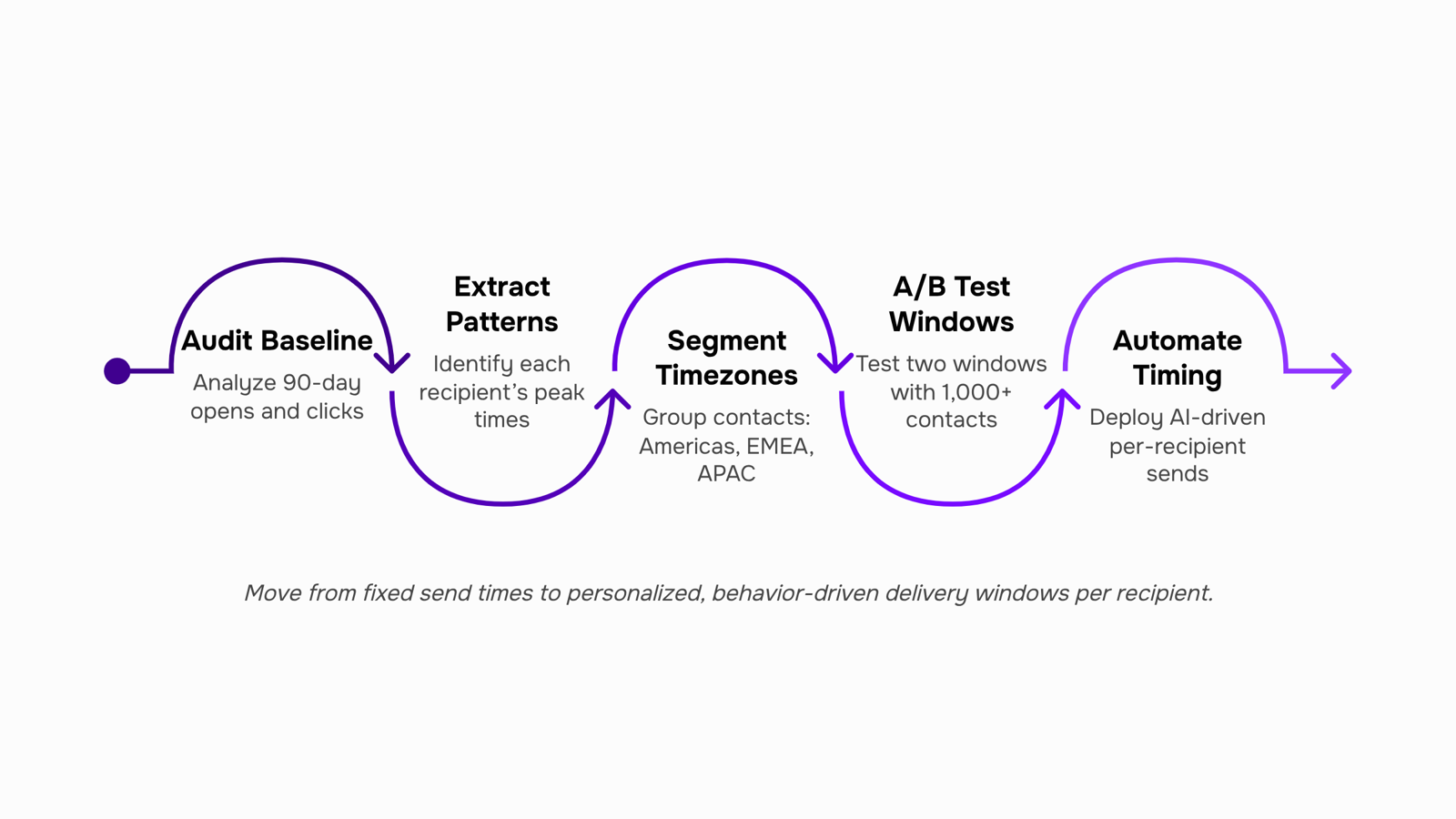
Step 1: Audit your current engagement baseline
Before you change a single send time, you need to know what your campaigns are actually doing right now.
Pull your last 90 days of campaign data and sort opens and replies by day of week and hour of day. Most email platforms export this in CSV format. If yours doesn't surface hour-level data natively, check your send time optimization settings — you may have more granularity available than the default dashboard shows.
Look for two numbers: open rate by send window (morning, afternoon, evening) and reply rate by the same windows. Open rate tells you who noticed the email. Reply rate tells you who was ready to act. They often peak at different times, which matters for email sequence timing decisions.
One caution: a sample under 250 recipients per time window produces unreliable signal. If your list is smaller, group by day rather than hour to keep the data meaningful. This is the minimum threshold most A/B testing methodologies recommend before drawing conclusions.
What you're building here is a baseline, not a verdict. Document the top two and bottom two performing windows. That gap is where email open rate optimization begins.
Step 2: Read your per-recipient engagement patterns
List-level averages tell you when most people open. Per-recipient timestamps tell you when your lead opens — and those two numbers are often an hour or more apart.
Start by pulling the open timestamp for every reply or click in your last 90 days of campaigns. You're looking for patterns per contact, not per send. A lead who consistently opens between 7:00 and 8:00 AM is telling you something a Tuesday-at-10AM benchmark never could.
Most teams skip this step because extracting it manually means exporting CSVs and writing pivot tables. Evox's send-time heatmaps surface this automatically: each contact's engagement history maps to a visual grid, so you can see at a glance that your enterprise accounts skew early morning while your SMB contacts cluster around lunch.
This is where send time personalization moves from theory to a concrete decision. Once you know a contact's peak window, you schedule into it — not into the list average.
One practical note: you need enough data per contact before individual patterns are reliable. Fewer than five opens from a single recipient is noise, not signal. For contacts with thin history, fall back to your A/B-tested send windows from Step 1 until you accumulate more data.
AI email send time tools automate this matching at scale. Without that, you're manually managing exceptions — which breaks down past 200 contacts.
Step 3: Segment your list by timezone before you schedule
Timezone segmentation is the most overlooked step in email send time optimization, and the fix is straightforward once you see the problem clearly.
If your list spans New York, London, and Sydney, a single 9am EST send lands at 2pm in London and midnight in Sydney. Even a well-crafted subject line won't recover from a 3am delivery. Before you schedule any campaign, pull your contacts by timezone, either from the country/region field in your CRM or from the IP data captured at signup.
Group them into send windows that match local business hours. A practical starting split:
For email sequence timing across multi-step campaigns, this segmentation matters even more. A follow-up that fires 48 hours after the first email should still land during business hours in the recipient's timezone, not yours.
Evox handles timezone-based email delivery automatically through its campaign scheduling system. You set the target send window once, and the queue engine staggers delivery so each contact receives the email at the right local time. No manual list-splitting required at send time.
Step 4: Run a structured A/B test across send windows
Pick two send windows that represent a real hypothesis, not random slots. A useful starting contrast for most IT service businesses: Tuesday 8–9am local time versus Tuesday 1–2pm local time. Same day, same subject line, same call to action. The only variable is when the email lands.
Split your list 50/50. For results to be statistically meaningful, each group needs at least 1,000 contacts. Below that threshold, a 2–3 percentage point difference in open rate is noise, not signal. If your list is smaller, run the test across two consecutive sends to the same segment before drawing conclusions.
Let the test run for 48 hours before reading results. Email open rate optimization depends on giving recipients enough time to open on their own schedule, not just the first hour after delivery.
What you're measuring: open rate as the primary signal, reply rate as the secondary one. For the best time to send sales emails, reply rate often matters more than opens, because a reply indicates genuine intent, not just inbox curiosity.
Once you have a winner, don't treat it as permanent. A single test tells you which window performed better for this list, this month. Document the margin (for example, 28% open rate versus 22%), then schedule a retest in 90 days. Audience behavior shifts, and send-time optimization only compounds when you keep feeding it fresh data.
Step 5: Automate adaptive timing and stop re-testing manually
Manual re-testing breaks down once your list passes a few hundred contacts. Engagement patterns shift as new subscribers join, old ones churn, and buying cycles change. Running fresh A/B splits every quarter to keep up is a full-time job you don't have.
AI email send time optimization removes that cycle. Instead of testing a fixed window and locking it in, an adaptive system scores each recipient's historical open and click patterns, then schedules each send into their personal peak window. Send time personalization at this level means two people on the same campaign receive the same email at different times because their behavior data points to different windows.
EVOX's send-time optimization is built on this model, using timezone-based delivery and a queue system that holds messages until each recipient's optimal window opens, rather than batching everyone at once.
The practical payoff: you stop re-running A/B tests for timing and redirect that effort toward copy and offer testing, where the signal-to-noise ratio is higher. The system updates as new engagement data comes in, so your timing stays calibrated without manual intervention.
For lists above a few hundred contacts, this is the only approach that scales.
Common send-time mistakes that cut open rates
Applying consumer benchmarks to B2B lists is the most common mistake. Data showing peak opens at "Tuesday 10am" comes from mixed-industry panels that include retail and media audiences. Your IT decision-maker list behaves differently, and optimizing against the wrong baseline quietly erodes open rates over time.
Reply timestamps are a signal most teams ignore entirely. When a prospect replies at 7am or 6pm, that tells you exactly when they're in their inbox. Feeding those timestamps back into your email sequence timing logic is free data most senders leave on the table.
Uniform send intervals compound the problem. A five-step sequence sent every 48 hours hits recipients at the same clock time regardless of their actual engagement window.
The fourth mistake: skipping re-optimization after list growth. A send window calibrated on 200 contacts rarely holds once you cross 2,000. Email send time optimization is not a one-time configuration — it degrades as your list composition shifts.
Closing
Email send time optimization isn't about finding one perfect hour for your entire list. It's about matching each contact's actual behavior to when they're most likely to engage. Start with your baseline data, segment by timezone, and test systematically. The difference between a quarterly send-time review and a system that adapts every time a contact opens or replies is automation—and that's where tools like Evox's send-time optimization step in. What's your current send time based on: a benchmark you read once, or actual data from your own list?
FAQ
What is the best time to send a B2B marketing email?
The best time is when your specific audience actually engages, not a population average. Start by auditing your last 90 days of opens and replies by hour, then segment by timezone and test systematically. Generic benchmarks often suppress deliverability on niche B2B lists.
Does send time actually affect email open rates?
Yes, significantly. Wrong timing trains inbox algorithms against you: low opens and replies signal disinterest to Gmail and Outlook, pushing future campaigns into spam. Matching send time to recipient behavior protects deliverability and lifts engagement.
Should I use the same send time for every contact on my list?
No. Per-recipient send time personalization outperforms list-wide rules because contacts have different timezones, job roles, and daily routines. Segment by timezone first, then use individual engagement patterns to refine windows further.
How long should I run a send-time A/B test before drawing conclusions?
Run until each variant reaches at least 250 recipients. Below that threshold, results are noise. Most teams need 2–4 weeks of campaigns to accumulate reliable signal; document open rate and reply rate separately, as they often peak at different times.


 Elena Petrova15 September 2026


