TL;DR: Most feature guides for vendor invoice management software hand you a capability checklist and leave the evaluation to you. This one maps each feature to the specific workflow failure it prevents, so IT company owners can assess software against real operational gaps, not marketing copy. You'll finish with a clear framework for deciding which capabilities your billing process actually needs.
What vendor invoice management software actually does
Vendor invoice management software is a dedicated system that captures, routes, and reconciles bills from suppliers — replacing the spreadsheets and email threads that most accounts payable teams still rely on.
The core problem it solves: manual invoice handling is slow and error-prone. Research from the Institute of Finance and Management puts the error rate for manually keyed invoices at roughly 3.6%, which compounds quickly when you're processing hundreds of bills a month. Missed due dates, duplicate payments, and lost approvals are symptoms of the same root cause — no single system owns the process.
What the software actually handles, end to end:
Capturing invoices from email, PDF, or supplier portals
Routing them through an approval workflow without manual forwarding
Matching invoices against purchase orders and receipts (three-way matching)
Tracking payment status and allocating funds to the right vendor accounts
Syncing records with your accounting system so nothing needs to be re-entered
For a closer look at how a vendor invoice management system works end to end, the next section walks through each of the eight features tied to the specific failure it prevents.
The core features and what each one prevents
Most feature lists for vendor invoice management software read like a spec sheet. Eight bullet points, no context, no explanation of what breaks when any one of them is missing. This section works differently. Each feature below is paired with the failure it prevents.
1. Centralized invoice capture: Without a single intake point, invoices arrive by email, fax, portal, and PDF attachment, and some get missed entirely. Centralized capture pulls every format into one queue. The failure it prevents: invoices that sit in someone's inbox for two weeks and trigger late-payment penalties.
2. Invoice approval workflow: A structured invoice approval workflow routes each bill to the right approver based on vendor, amount, or cost center, then escalates automatically if no action is taken. Without it, approvals stall when the relevant manager is traveling, and vendors follow up repeatedly. The failure it prevents: approval bottlenecks that push payment past due dates.
3. Three-way matching: Three-way matching compares the purchase order, the goods receipt, and the vendor invoice before any payment is released. Discrepancies surface before money moves, not after. The failure it prevents: paying for goods that were never delivered or quantities that don't match what was ordered.
4. Vendor bill tracking: Vendor bill tracking gives AP teams a live view of every open, pending, and paid invoice across all suppliers. Without it, teams run manual spreadsheets that go stale within hours. The failure it prevents: duplicate payments and missed liabilities that distort your month-end close. Inzo's vendor bill management tracks status and payment allocation in the same view, so nothing falls through between "approved" and "paid."
5. Duplicate detection: Duplicate invoices are more common than most teams expect, particularly when vendors resubmit after a delayed acknowledgment. Automated duplicate detection flags invoices with matching vendor ID, amount, and date before they reach payment. The failure it prevents: paying the same bill twice, which is harder to recover than it sounds.
6. Audit trail and document storage: Every approval, rejection, edit, and payment needs a timestamped record attached to the original invoice. Without it, responding to an auditor's question means hunting across email threads and shared drives. The failure it prevents: compliance exposure and hours lost reconstructing decisions after the fact.
7. ERP and accounting system integration: Vendor invoice data needs to flow into your general ledger, accounts payable subledger, and cash flow forecasts without manual re-entry. Poor integration creates reconciliation gaps and forces double-keying. The failure it prevents: data discrepancies between your invoice tool and your accounting system that only surface at quarter-end. For a closer look at how a vendor invoice management system works end to end, the integration layer is where most of the complexity lives.
8. Vendor credit management: When a vendor issues a credit note, that credit needs to offset future invoices automatically. Manual credit tracking is easy to forget, especially across high-volume supplier relationships. The failure it prevents: paying full invoice amounts when a credit was already on the table.
These eight capabilities represent the core features of vendor invoice management software that separate a system built for AP teams from a generic billing tool. If you're setting up a vendor invoice processing workflow from scratch, this list is a practical checklist for what to require before signing a contract.
How the software automates invoice processing
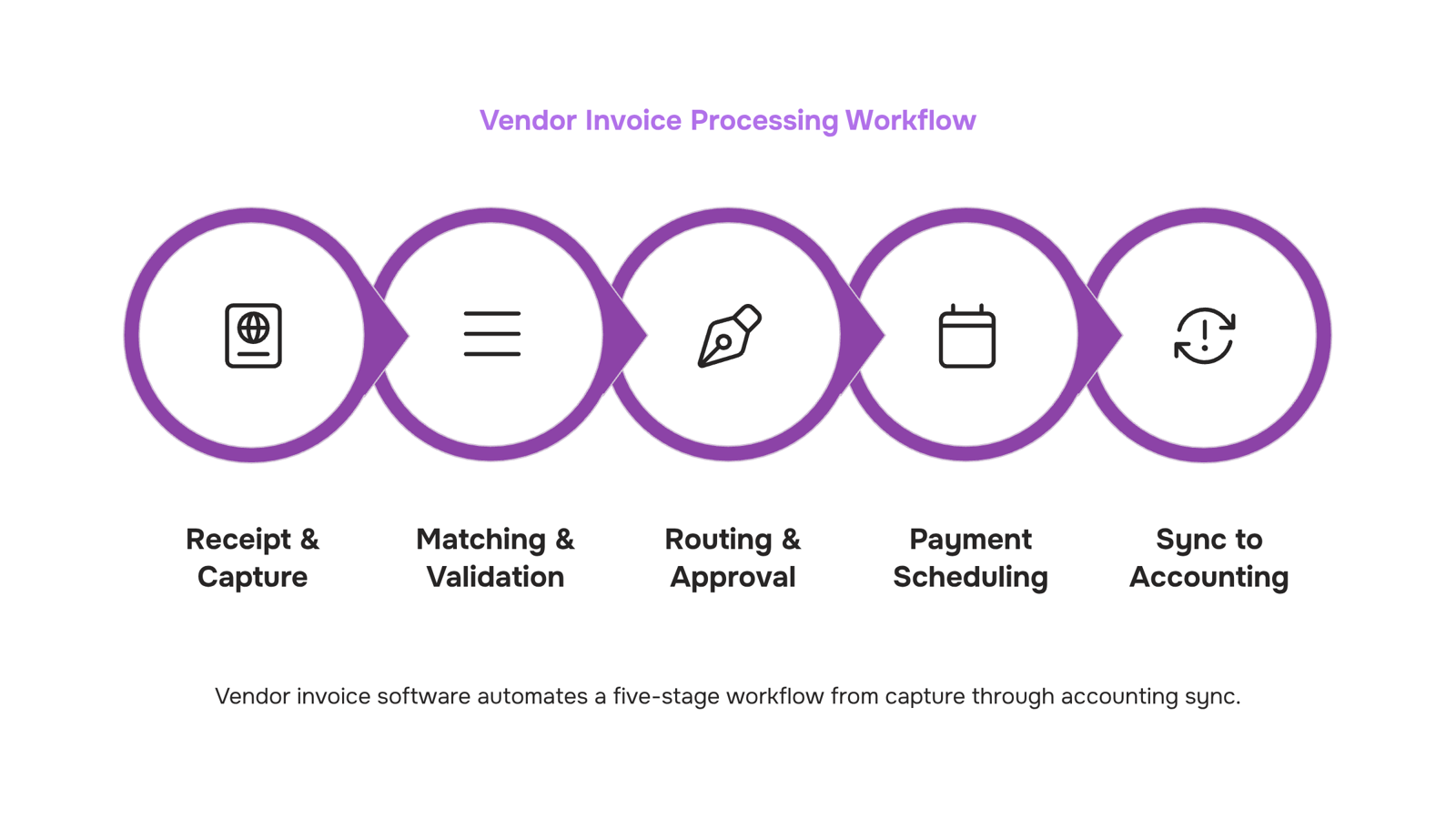
Automated invoice processing follows a predictable sequence, and the value shows up at each handoff where a human used to slow things down.
Receipt and capture: When a vendor invoice arrives, by email, portal, or EDI, the software reads it using OCR and structured data extraction. Line items, amounts, vendor IDs, and due dates get pulled into the system without manual keying. This is where accounts payable automation eliminates the highest-volume error source: manual data entry accounts for the majority of invoice processing errors, according to IOFM benchmarks.
Matching and validation: The system cross-references the invoice against the corresponding purchase order and goods receipt automatically. Mismatches flag for review; clean matches move forward without touching a human queue.
Routing and approval: Approval rules run automatically based on invoice amount, vendor type, or cost center. A $500 invoice from a pre-approved vendor clears in minutes. A $50,000 invoice from a new vendor routes to the right approver with context already attached.
Payment scheduling: Once approved, the invoice schedules for payment against the due date, capturing early-payment discounts where available.
For teams setting up a vendor invoice processing workflow from scratch, this four-stage flow is the baseline. Tools like Inzo extend it further: invoices can generate automatically when a CRM deal closes or a project milestone completes, so the billing cycle starts without anyone remembering to trigger it.
How vendor invoice software improves accuracy and compliance
Three mechanisms do most of the accuracy work in vendor invoice management software: three-way matching, duplicate detection, and audit trails.
Three-way matching compares the purchase order, the goods receipt, and the vendor invoice before any payment is approved. If the quantities or amounts don't align, the invoice gets flagged automatically rather than passing through to payment. That single check catches the majority of billing errors before they cost you money.
Duplicate detection runs a similar check against invoice numbers, vendor IDs, and amounts. Without it, a resubmitted invoice or a keying error can result in a double payment that takes weeks to recover. Manually processed invoices carry a significantly higher error rate than automated ones, and most of those errors trace back to missing these two controls.
Audit trails handle the compliance side. Every status change, approval, and exception gets timestamped and logged, so you have a clean record for internal reviews or external audits without reconstructing anything manually.
Together, these features of vendor invoice management software shift invoice accuracy and compliance from something your team actively manages to something the system enforces by default. Inzo applies all three within a single workflow, so approvals, exceptions, and payment records stay connected rather than scattered across separate tools.
How the software integrates with your existing accounting systems
Good integration isn't a checkbox — it's the difference between a tool that fits your workflow and one that creates a parallel data problem.
At minimum, vendor invoice management software should sync bidirectionally with your accounting system (QuickBooks, Xero, or your ERP) so that approved invoices post automatically and payment status flows back without manual entry. That two-way sync is what makes accounts payable automation actually reduce work rather than just shift it.
The data that needs to flow between systems includes vendor records, GL codes, payment terms, and approval status. If any of those require re-entry, you've added a reconciliation step, not removed one.
Before committing to a tool, check three things:
Does it connect to your accounting system natively, or only via a third-party connector like Zapier?
Can it pull vendor and deal data from your CRM automatically?
Does it write back payment status in real time?
Inzo handles the CRM side through its Lio integration, which triggers invoice creation directly from closed deals — so vendor records and billing data stay in sync from the start. For a fuller picture of how a vendor invoice management system works end to end, that context matters before you evaluate any tool.
Benefits for your accounts payable team
Accounts payable automation cuts the manual work that slows most AP teams down, but the gains go beyond speed. Here are the outcomes teams consistently report after adopting vendor invoice management software.
Faster processing: Automated routing and approval workflows reduce invoice cycle times from days to hours. Teams handling hundreds of vendor bills monthly feel this immediately.
Fewer keying errors: Manual data entry carries a well-documented error rate. Removing it from the equation means fewer duplicate payments and fewer reconciliation headaches at month-end.
Cleaner cash flow visibility: With vendor bill tracking in one place, you can see outstanding liabilities in real time rather than chasing down spreadsheets before a board call.
Audit-ready records: Every approval, edit, and payment is timestamped and searchable. Audit prep drops from days to an afternoon.
Vendor relationship stability: On-time payments, confirmed by accurate tracking, reduce the friction that strains supplier relationships over time.
For a deeper look at how these outcomes connect to daily workflow, see how automated invoice processing reduces manual work step by step.
How to evaluate software for your team
Before you commit to any vendor invoice management software, run through these questions:
Does it handle the full cycle — creation, approval, payment, and reconciliation — or just part of it?
How does it connect to your existing accounting system or CRM? A tool that sits in isolation creates a second data entry problem.
Can it track vendor credits and payment allocations, not just invoice status?
What does the audit trail look like? If you can't pull a clean history for a vendor, the tool will fail you at the worst time.
For a deeper look at how these features work together, see how a vendor invoice management system works end to end.
Inzo covers all of the above in one place, including vendor bill tracking, credit management, and payment allocation.
Closing
Vendor invoice management software isn't about having every bell and whistle. It's about plugging the specific gaps in your current process: the invoices that slip through email, the approvals that stall, the duplicate payments that surface at month-end close. The eight features covered here map directly to those failures. Start by identifying which one costs your team the most time or money right now, then evaluate software against that priority first. Ready to see how these features work together? Check out Inzo's vendor invoice management capabilities, or take a free trial to run your own invoices through the workflow.
FAQ
What are the key features of vendor invoice management software?
The eight core features are centralized capture, approval workflows, three-way matching, vendor bill tracking, duplicate detection, audit trails, ERP integration, and vendor credit management. Each one prevents a specific operational failure—late payments, approval bottlenecks, duplicate payments, or compliance gaps.
How can vendor invoice management software automate invoice processing?
The software automates four stages: OCR capture pulls invoice data without manual keying, matching validates against purchase orders and receipts, approval rules route bills to the right approver automatically, and payment scheduling captures early-pay discounts. Manual work drops at every handoff.
What are the benefits of using vendor invoice management software for accounts payable?
Faster approvals eliminate payment delays and late fees. Automated matching and duplicate detection cut billing errors from 3.6% down to near zero. Audit trails simplify compliance, and ERP integration eliminates reconciliation gaps between systems.
Can vendor invoice management software integrate with existing accounting systems?
Yes. ERP and accounting system integration is a core feature. Invoice data flows into your general ledger, AP subledger, and cash flow forecasts without manual re-entry, eliminating data discrepancies and double-keying.
How does vendor invoice management software improve invoice accuracy and compliance?
Three-way matching catches billing errors before payment. Duplicate detection flags resubmitted invoices automatically. Timestamped audit trails attached to every invoice create a complete compliance record for auditors without hunting through email.
What is three-way matching and why does it matter for vendor invoices?
Three-way matching compares the purchase order, goods receipt, and vendor invoice before payment. It catches mismatches in quantity or amount automatically, preventing payment for goods never delivered or quantities that don't match what was ordered.
How do I know if my team needs vendor invoice management software?
If your team processes invoices manually, tracks approvals in email, runs spreadsheets for vendor tracking, or has experienced duplicate payments or missed due dates, you have gaps that software solves. Start with the failure that costs you the most time or money.


 Natalie Brooks14 September 2026


