TL;DR: Most automated CRM guides stop at "saves time and closes more deals." This one maps each benefit to the specific trigger, workflow, or handoff that produces it, so IT company owners can see exactly where the system earns its keep. You'll finish with a clear picture of what to automate first and what to expect when you do.
What is an automated CRM system
An automated CRM system is software that handles contact management, lead tracking, follow-up scheduling, and data entry without requiring a salesperson to do it manually. Instead of your team logging every call, updating deal stages, or sending follow-up emails by hand, the system does it based on triggers you define — a form submission, an email open, a missed call.
For a lean sales team, that distinction matters. The manual sales tasks you can eliminate with CRM automation add up fast: data entry alone consumes roughly 17% of a sales rep's week, according to Salesforce's State of Sales research. That's time not spent on calls, demos, or closing.
What an automated CRM system actually handles depends on how you configure it, but the core functions are consistent:
Lead capture from web forms, ads, or email, routed to the right rep automatically
Follow-up sequences triggered by prospect behavior, not calendar reminders
Deal stage updates based on activity, so your pipeline reflects reality
Duplicate detection and field validation, which keeps your data clean from the start
The data quality angle is worth pausing on. Most CRM problems aren't software problems — they're dirty-data problems. Automation enforces consistency at the point of entry, before bad records spread.
If you're also thinking about integrating marketing automation with your CRM, that's where the system compounds.
Key benefits of using an automated CRM
The operational case for an automated CRM system comes down to a simple chain: less manual work, faster response, cleaner data, more closed deals. Here are the benefits that actually move the needle.
Faster lead response: Speed is the single biggest variable in whether a lead converts. Research from Harvard Business Review found that companies contacting a prospect within an hour are nearly seven times more likely to qualify that lead than those waiting even 60 minutes. Automated CRM software removes the delay by triggering follow-up the moment a lead enters the system, no rep required.
Less time on data entry: According to Salesforce's State of Sales report, sales reps spend roughly 28% of their week on administrative tasks instead of selling. An automated CRM captures contact details, logs calls, and updates deal stages without manual input. That time goes back to pipeline work. See the specific manual sales tasks you can eliminate with CRM automation for a breakdown.
Cleaner, more reliable contact data: Duplicate records, missing fields, and stale contact details quietly kill pipeline accuracy. Automated CRM systems apply deduplication rules and validation checks at the point of entry, so your reports reflect reality rather than data hygiene debt. This is a problem most feature-catalog comparisons skip entirely.
Consistent follow-up across every lead: Manual processes rely on individual reps remembering to follow up. Automation applies the same sequence to every contact, regardless of rep workload or time zone. The result is a predictable cadence rather than a patchwork of effort. If you want to go deeper, automating your sales team's workflow covers the sequencing logic in detail.
Better alignment between marketing and sales: When your automated CRM software connects to your marketing stack, lead source data, campaign attribution, and engagement scores travel with the contact record. Sales knows exactly what a prospect has seen before the first call. For the integration side of this, integrating marketing automation with your CRM walks through the setup.
Scalable lead scoring without analyst overhead: Scoring leads manually works at 50 leads a month. It breaks at 500. Automated scoring rules rank contacts by behavior and fit criteria continuously, so your team always works the highest-priority pipeline first. Pair this with automated lead generation and AI scoring to close the loop from capture to qualification.
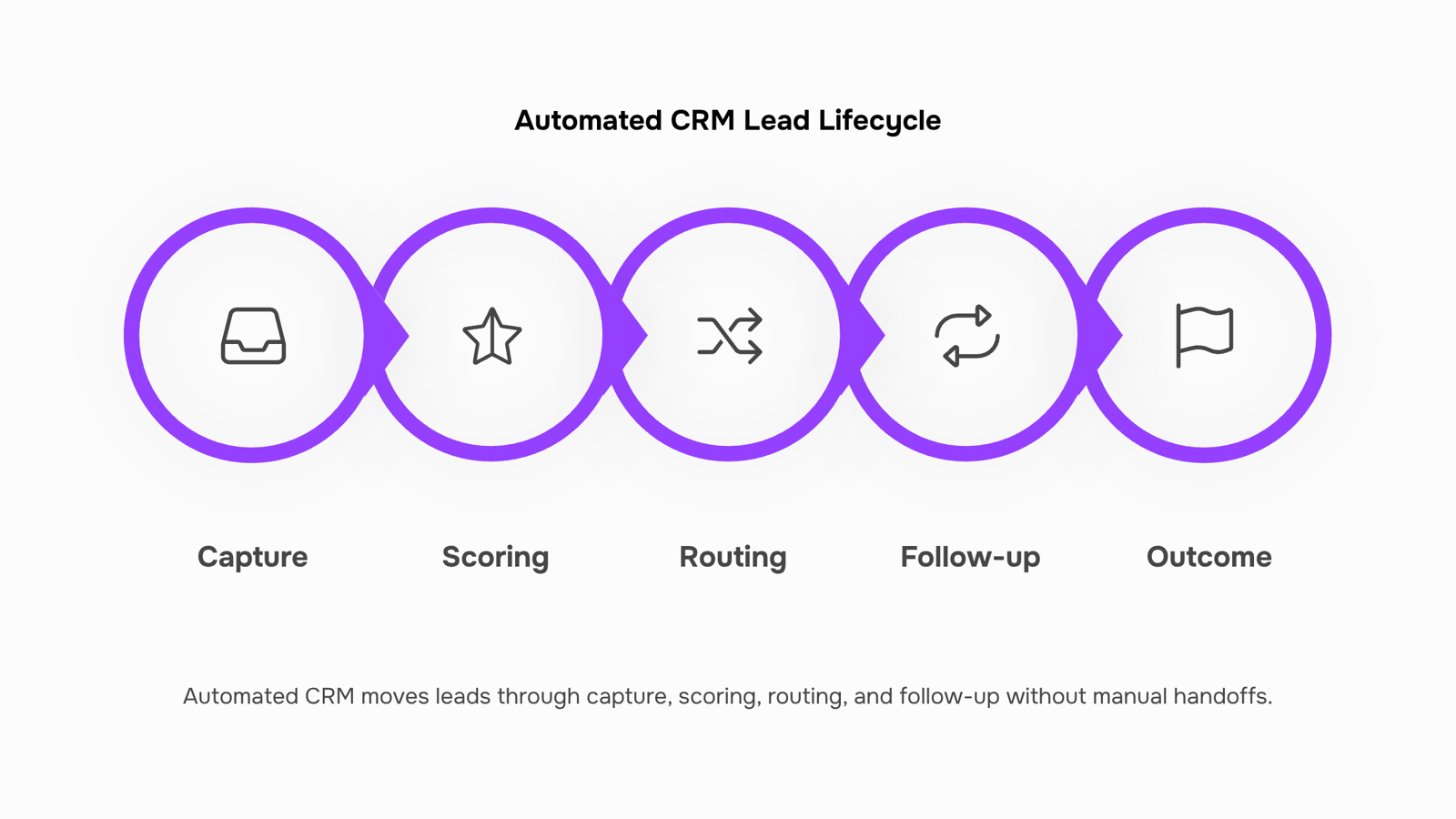
Lead management breaks down at four predictable points: capture, scoring, routing, and follow-up. An automated CRM system handles all four without anyone manually moving data between fields or spreadsheets.
Here is how the lifecycle works in practice:
Capture: Every inbound lead, whether from a web form, email, or ad click, gets logged automatically. No copy-paste, no missed entries at the end of a busy Friday.
Scoring: The system evaluates each lead against criteria you define: company size, job title, pages visited, content downloaded. Leads that meet your threshold move forward. The rest stay in a nurture queue. This is where automated lead generation and AI scoring pays off most visibly.
Routing: Qualified leads get assigned to the right rep based on territory, industry, or deal size. No inbox triage, no "who owns this?" threads.
Follow-up: Sequences trigger automatically based on lead behavior. A prospect who opens your pricing page gets a different message than one who downloaded a case study. The manual sales tasks you can eliminate with CRM automation are exactly these repetitive touchpoints.
Lio, WorksBuddy's lead management agent, runs this entire sequence inside your existing stack. It captures, scores, routes, and queues follow-ups without a rep touching the record until the lead is warm. That matters because responding to a lead within five minutes produces significantly higher contact rates than waiting even thirty minutes.
For teams also running outbound, integrating marketing automation with your CRM closes the loop between campaign activity and rep action.
Dirty data is a quiet revenue leak. When contact records are incomplete, duplicated, or months out of date, your sales team wastes time chasing dead ends instead of closing deals. Salesforce research consistently finds that reps spend roughly 28% of their week on manual data entry and administrative cleanup — time that compounds into missed pipeline.
An automated CRM addresses this at the source. AI-driven data cleansing runs continuously: it flags duplicate contacts, merges split records, and fills missing fields by cross-referencing public data sources and your own activity history. Enrichment layers add job titles, company size, and verified contact details without anyone opening a spreadsheet.
The practical result is a contact list that stays accurate as your pipeline grows, not one that degrades the moment your team gets busy. For IT company owners running lean sales operations, that matters more than any feature checklist.
Revo handles this as part of its broader workflow automation — triggering enrichment tasks when a new contact enters the system, scheduling periodic deduplication sweeps, and surfacing records that fall below a data-completeness threshold so a human can review them before they cause a problem.
If you're also thinking about how clean data feeds into campaign performance, the best practices for CRM campaign management are worth reading alongside this.
Not every feature on a vendor's checklist earns its place on a lean IT team. When you're evaluating an automated CRM system, prioritize criteria that remove friction from your actual workflow rather than ones that look impressive in a demo.
Start with these:
Lead capture and routing automation: The system should pull leads from web forms, email, and inbound channels and assign them without manual input. Slow routing kills deals.
Automated follow-up sequences: Triggered emails and task reminders based on lead behavior, not a calendar someone has to maintain.
Data deduplication and field enrichment: As covered in the previous section, dirty records waste sales time. Your automated CRM software should flag duplicates and fill missing fields automatically.
Pipeline stage triggers: When a lead moves from "qualified" to "proposal sent," the next action should fire on its own. No one should be manually updating stages and then remembering what to do next.
Reporting without manual exports: Deal velocity, conversion rate, and response time should be visible in a live dashboard, not a spreadsheet someone builds on Friday.
For IT company owners running small sales teams, the right question isn't "does this platform have AI?" It's "which manual sales tasks can this eliminate from my team's day?" That focus keeps evaluation honest.
Most automated CRM software doesn't integrate by magic — it integrates by trigger. A contact fills out a form, and the CRM creates a record, assigns an owner, and queues a follow-up email. A deal moves to "Proposal Sent," and the invoicing tool generates a draft. These trigger-action chains are what separate a connected sales stack from a collection of tabs you switch between manually.
The tool categories that connect most cleanly to an automated CRM are:
Email platforms (sequences fire when lead status changes)
Invoicing tools (billing triggers on deal stage updates)
Calendar and scheduling apps (meeting links sent automatically after qualification)
Workflow automation layers (routing logic, internal alerts, cross-tool handoffs)
That last category is where Revo fits. As the automation layer inside WorksBuddy, Revo handles the connective tissue — the conditional logic that decides what happens next when your CRM updates. You can explore the specifics of integrating marketing automation with your CRM or review the manual sales tasks you can eliminate with CRM automation to see which handoffs are worth wiring up first.
How AI is changing automated CRM in 2026
Three shifts define where an automated CRM system is heading this year.
First, predictive lead scoring has moved from rule-based point systems to models that weigh behavioral signals — page visits, email open sequences, reply timing — and re-rank leads continuously, not just at import.
Second, conversational AI now handles contact enrichment in real time. Instead of manual research, the system queries enrichment APIs during active conversations and writes clean data back to the record. This directly addresses the dirty-duplicate problem that quietly kills pipeline accuracy.
Third, autonomous follow-up sequencing adjusts cadence based on engagement signals rather than fixed intervals. A lead who opens three emails in one hour gets a different next step than one who hasn't opened in a week.
For the broader system context, CRM best practices for sales teams covers how these AI layers fit a working pipeline.
Closing
An automated CRM system isn't about replacing your sales team—it's about freeing them to do what they do best: sell. By handling lead capture, scoring, routing, and follow-up automatically, you reclaim the 28% of the week your reps spend on administrative work and redirect it to pipeline building. The question isn't whether to automate; it's where to start. If your team is still logging leads manually or chasing follow-ups by hand, the next step is to see how a purpose-built system like Lio handles the full lead lifecycle from capture to close. Start with a demo or trial to map your current bottlenecks against what automation can unlock.
FAQ
What are the benefits of using an automated CRM system?
Faster lead response (within five minutes, not hours), less time on data entry, cleaner contact records, consistent follow-up across every lead, better marketing-sales alignment, and scalable lead scoring. Together, these cut admin work and compress sales cycles.
How can an automated CRM help me manage my leads and contacts?
It captures leads automatically, scores them against your criteria, routes qualified ones to the right rep, and triggers follow-ups based on prospect behavior—all without manual intervention. Your team works warm leads, not raw data.
What features should I look for in an automated CRM platform?
Lead capture and routing, behavior-based scoring, automated follow-up sequences, duplicate detection and data validation, marketing integration, and activity logging. Prioritize systems that enforce data quality at entry, not after the fact.
Can an automated CRM help me personalize my customer interactions?
Yes. Automation tracks prospect behavior—pages visited, content downloaded, emails opened—so follow-up sequences adjust in real time. A prospect who views pricing gets a different message than one downloading a case study.
How does an automated CRM integrate with my existing sales and marketing tools?
Modern CRM systems like Lio connect to your marketing stack so lead source, campaign attribution, and engagement scores travel with the contact record. Sales sees what marketing touched before the first call, closing the loop from capture to close.


 Elena Petrova15 September 2026


