TL;DR: Most AI integration guides explain the technology and skip the hard part: figuring out where it fits in your actual stack. This one gives IT company owners a sequenced decision framework, from auditing your current systems to choosing the right integration layer, so you connect AI where it creates real value instead of adding complexity to processes that were already struggling.
What AI integration actually means
Digital nodes and data streams integrating into unified system hub, representing AI business integration
AI integration means connecting AI capabilities directly into the systems your team already uses — your CRM, helpdesk, billing platform, project tools — so that AI acts on real work rather than sitting in a separate tab.
That distinction matters. Buying a standalone AI tool is not integration. If your team copies data into ChatGPT, reads the output, and pastes it somewhere else, you have a manual process with an AI-shaped step in the middle. AI integration services remove that gap by wiring AI into the data flows and triggers that already drive your operations.
A practical example: an IT company that connects an AI lead-routing agent to its CRM doesn't just get faster responses. It gets consistent routing logic that runs at 2 a.m. without a human decision.
The failure mode most teams hit is treating integration as a technology problem when it's actually a process problem first. Before any API gets called, the underlying workflow needs clear ownership and clean data. Choosing the right AI platform starts with that audit, not a feature comparison.
Why AI integration matters for your business systems
Most IT systems don't fail because the tools are wrong. They stall because the same manual steps run on repeat: a sales rep logs a lead by hand, a support ticket sits unrouted for 40 minutes, a content team pulls performance data from three dashboards before writing a single brief.
Speed is the most visible payoff. AI integration cuts response latency at the points where delays cost you deals or satisfaction scores. In sales follow-up specifically, AI-assisted lead routing can reduce time-to-response from hours to minutes, which directly affects conversion rates.
Accuracy compounds over time. When AI reads from a single connected data source rather than a human copying between systems, error rates in reporting and handoffs drop. For IT companies managing client environments, that means fewer billing discrepancies and cleaner audit trails.
Cost shifts from headcount to throughput. You're not replacing people; you're removing the work that keeps them from higher-value tasks. AI integration services typically show the clearest ROI in billing, scheduling, and tier-one support, where volume is high and the logic is repeatable.
Customer experience is where the gains become visible externally. When your systems share context, a client doesn't repeat themselves across three touchpoints. That consistency is what retention actually looks like in practice.
For IT company owners exploring ai integration in content management strategies, the same logic applies: connected systems produce consistent output faster, with less manual review at each stage.
What to check before you integrate anything
Most AI integration projects don't fail at the technology layer. They fail because the process being automated was already broken, and the AI just runs that broken process faster.
Before you evaluate any ai integration tools or talk to an ai integration agency, answer four questions honestly.
Is your data clean enough to act on? If your CRM has duplicate contacts, missing fields, or inconsistent tagging, any AI model trained or triggered on that data will produce unreliable outputs. Gartner estimates that poor data quality costs organizations an average of $12.9 million per year — and that's before AI amplifies the errors.
Is the underlying process documented? AI can follow a defined workflow. It cannot invent one. If your team can't describe a process in writing, it isn't ready to automate. Map it first.
Is there a named owner? Every integration needs one person accountable for monitoring outputs, handling exceptions, and deciding when the model is wrong. Without that, issues go unnoticed for weeks.
Does it clear your security baseline? Check data residency, access controls, and vendor compliance before connecting anything to a live system. This matters especially when choosing the right AI platform for your IT business — the wrong choice creates exposure that's hard to reverse.
If any of these four answers is unclear, fix that before touching the integration layer.
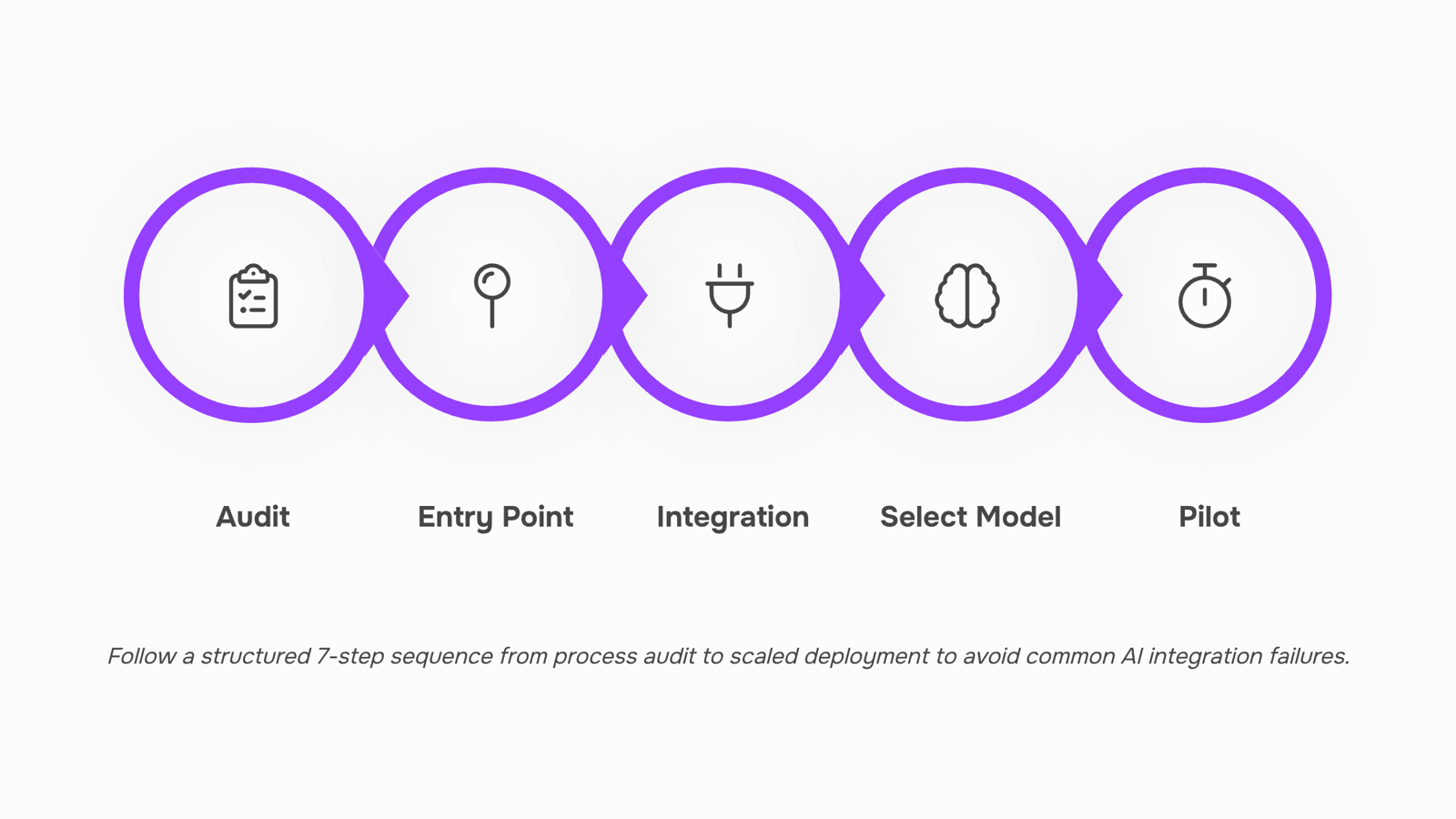
How to integrate AI into your existing systems in 7 steps
Audit your current processes before touching a single tool. List every workflow you want AI to touch. For each one, ask: is this process documented, consistent, and producing clean data? If the answer is no to any of those, fix the process first. AI integration on top of a broken workflow produces faster, more expensive mistakes.
Identify your highest-leverage entry point. Pick one process where the input data is clean, the steps are repetitive, and the outcome is measurable. Sales follow-up routing, invoice generation, and support ticket triage are common first targets for IT companies. Starting narrow gives you a real result to show the team within 30 days.
Choose your integration layer. This is where most teams stall. You need a way for AI to read from and write to your existing tools. Options range from native connectors (a gmail ai integration that reads inbound leads directly from your inbox) to API-based middleware that links your CRM, ticketing system, and communication stack. If you want to connect your tools and automate the workflows between them without writing custom code, no-code automation platforms handle this layer well for most IT company stacks.
Select the AI model or agent that fits the task. A claude ai integration works well for document summarization, contract review, and structured reasoning tasks. GPT-based models handle conversational interfaces and email drafting. Specialized agents built for lead routing, billing, or e-signatures outperform general models on narrow, high-volume tasks. Match the model to the job, not the other way around. If you need guidance here, choosing the right AI platform for your IT business walks through the decision criteria in detail.
Run a controlled pilot on real data. Deploy to one team or one workflow segment. Set a two-week observation window. Log every output the AI produces and have a human spot-check at least 20% of them. You are not measuring perfection; you are measuring whether error rates are acceptable and whether the output is consistent enough to trust at scale.
Document the new workflow before you expand. Once the pilot passes, write down exactly how the ai integrations fit into the process: triggers, handoffs, escalation rules, and who owns each step. This documentation is what makes the next integration faster and what prevents the team from reverting to the old process under pressure.
Scale to adjacent workflows using what you learned. Apply the same audit-pilot-document cycle to the next process. Teams that follow this sequence typically find that the second and third ai integration takes half the time of the first, because the integration layer is already in place and the team knows what good output looks like.
For a deeper look at what this approach returns in practice, the benefits of using AI integration services covers the operational and financial outcomes most IT companies see after their first two or three integrations.
Common mistakes that stall AI integration projects
Most AI integration projects don't fail at the technical layer. They stall because of decisions made before a single line of code runs.
Integrating too many systems at once is the most common trap. Pick one workflow, prove the value, then expand. Trying to wire up your CRM, helpdesk, and billing tools simultaneously spreads your team thin and makes it nearly impossible to isolate what's working.
Skipping process documentation before selecting ai integration tools means you're automating a broken process. If your lead handoff has three undocumented steps that live in someone's head, no amount of ai integration services will fix that.
Ignoring team adoption turns a technical success into a practical failure. If the people using the system don't trust it or weren't involved in scoping it, they'll route around it.
Underestimating data readiness is quieter but just as damaging. Gartner research consistently finds that poor data quality is a leading cause of AI project stalls, not tool limitations.
Skipping ownership assignment means no one is accountable when outputs drift. Assign a named owner before deployment, not after.
For a fuller look at how these mistakes show up day-to-day, integrating AI into your team's workflow covers the adoption side in detail.
Buying a standalone AI tool is a product decision. AI integration is an architectural one. They look similar on a vendor's pricing page but create completely different outcomes once you're past month one.
Dimension | Standalone AI tool | AI integration |
|---|
Scope | Solves one task in isolation | Connects across CRM, helpdesk, billing, and ops |
System impact | Adds a new login and workflow | Changes how existing workflows behave |
Maintenance | Vendor manages updates | Your team (or an ai integration agency) owns the connections |
A standalone tool gives you a faster start but a lower ceiling. You get one capability, disconnected from everything else your team already uses. Integration takes longer to wire up, but the benefits of using AI integration services compound: data flows between systems, handoffs become automatic, and you stop re-entering the same information in three places.
The right choice depends on what you're solving. If the problem lives in one tool, buy a point solution. If the problem lives in the gaps between tools, that's an integration problem, and a point solution won't touch it.
How to manage ongoing AI integrations in one place
Once your AI integrations go live, the real maintenance work begins. Most teams end up with a patchwork: one AI tool connected to their CRM, another wired into their helpdesk, a third handling invoices, and no single place to see what's running, what's broken, or what's slowing down.
Revo acts as that connective layer. Its drag-and-drop workflow builder lets you connect your tools and automate the workflows between them without writing code, so when one integration breaks or a process changes, you fix it in one place rather than hunting across five dashboards.
The practical difference: instead of monitoring each AI connection separately, you build cross-platform automation sequences in Revo that treat all your ai integrations as one coordinated system. If you want to go deeper on what that unlocks, the benefits of using AI integration services are worth reviewing before you scale further.
Closing
AI integration isn't about replacing your stack or overhauling how you work. It's about connecting the tools you already trust so they move faster and make fewer mistakes. Start by auditing one high-leverage process — one where your data is clean and the steps repeat. Then pick an integration layer that lets you wire AI into that workflow without custom code. The payoff isn't theoretical; it's measurable within weeks: faster response times, fewer handoffs, less manual data entry. What's the one process on your team that would free up the most time if it ran on its own?
FAQ
How can I integrate AI into my existing business systems?
Audit your current process, identify your highest-leverage entry point, choose an integration layer (API-based middleware or no-code automation), select the right AI model, run a controlled pilot, document the workflow, then scale. Start with one clean, repeatable process before expanding.
What are the benefits of using AI integration for automation?
Speed (faster response times), accuracy (fewer errors across handoffs), cost (higher throughput without adding headcount), and customer experience (consistent context across touchpoints). ROI is clearest in billing, scheduling, and tier-one support.
What are the common challenges of AI integration?
Treating it as a technology problem instead of a process problem first. Most failures stem from poor data quality, undocumented workflows, unclear ownership, or weak security baseline — not the AI itself.
How can AI integration improve customer experience?
Connected systems share context, so clients don't repeat information across touchpoints. Faster response times and fewer errors build the consistency that drives retention.
What are the key considerations for successful AI integration?
Clean data, documented processes, named ownership, and security compliance. If any of these is unclear, fix it before integrating. Broken processes just run faster with AI.
Do I need an AI integration agency or can I do it in-house?
You can start in-house if your team has process clarity and clean data. No-code integration platforms let you wire AI into existing tools without custom code. Agencies help when you lack internal bandwidth or need specialized expertise.
What is the difference between AI integration and workflow automation?
Workflow automation handles task sequencing and triggers. AI integration adds intelligent decision-making to those workflows — reading context, routing based on logic, or summarizing data before handoff. They work best together


 Elena Petrova15 September 2026


