TL;DR: Most guides on AI workflow integration stop at tool recommendations. This one builds a decision-layer framework that shows IT company owners exactly where AI should act autonomously, where it should assist, and where humans must stay in control — then walks through a six-step rollout sequence so you get the handoffs right before a single tool is purchased.
What integrating AI into human workflows actually means
Integrating AI into human workflows means embedding AI into the tasks your team already runs, not handing those tasks over entirely. The people stay. The process stays. What changes is where the manual effort sits.
There are three modes worth distinguishing.
Autonomous tasks run end-to-end without human input, like auto-routing a support ticket.
Assisted tasks use AI output that a human reviews before acting, like a draft proposal a manager edits and sends.
Human-only tasks stay untouched, typically where judgment, relationship, or accountability can't be delegated.
Most IT teams operate somewhere in the middle. A developer spends two hours a day reformatting data between systems. A project lead copies status updates into three different tools. Neither task requires human judgment, but both consume it anyway.
That's the gap AI integration closes: not replacing decisions, but removing the work that crowds them out. If you want to see what this looks like end-to-end, how to automate workflows across your entire operation maps the full picture.
The next section covers what that shift actually produces in measurable terms.
Why this matters for your team right now
The cost of waiting is not abstract. McKinsey research consistently finds that knowledge workers spend a significant share of their week on tasks a well-configured automation handles in seconds: status updates, data re-entry, ticket routing, report formatting.
For IT teams specifically, that time compounds. Every hour a senior engineer spends moving data between tools is an hour not spent on architecture decisions or client escalations.
The concrete benefits of integrating AI into human workflows show up in four places:
Speed. Routine tasks that take 20 to 40 minutes manually run in under two minutes once automated.
Error reduction. Manual data handoffs introduce transcription mistakes. AI-assisted handoffs don't.
Decision quality. When AI handles data gathering, your team reviews conclusions instead of hunting for inputs.
Team capacity. Workflow automation for IT teams doesn't shrink headcount. It redirects it toward work that actually requires judgment.
The teams that automate workflows across their entire operation early gain a compounding advantage: each process they automate frees attention to improve the next one.
The risk of waiting isn't falling behind on a trend. It's spending another quarter paying skilled people to do work a configured system would handle without them.
Classify your work before you automate anything
Before you pick a tool or trigger your first automation, sort every task on your plate into one of three buckets.
Autonomous: AI runs it start to finish with no human review. Think invoice status updates, meeting transcript summaries, or routing a support ticket to the right queue. The output is low-stakes and reversible if it's wrong.
Assist: AI drafts, flags, or scores, and a human approves before anything moves. Proposal writing, anomaly detection in a client report, or a contract renewal recommendation all belong here. The AI handles the heavy lifting on AI task automation, but a person owns the final call.
Human-only: Judgment, relationships, and accountability that can't be delegated. Firing a vendor, negotiating a contract, or delivering bad news to a client stays in this column permanently.
Run your task list through this filter before you touch a single integration. Most teams skip this step and wire up automation for tasks that actually need human judgment, then wonder why outputs feel off.
A practical way to do this: export your team's recurring tasks from your project tracker, then label each one with A, AS, or H. Anything labeled A is your first automation target when you build an AI pipeline that moves data through your workflow automatically. This classification is also how you define the handoff boundary before you start wiring tools together, which is exactly what the next step covers.
Six steps to integrate AI into your team's workflow
Before you pick a tool, you need a sequence. Most teams jump straight to "let's try an AI tool" and end up with a disconnected experiment that nobody trusts. These six steps give you a repeatable path from audit to review cycle, with a defined handoff boundary at each stage.
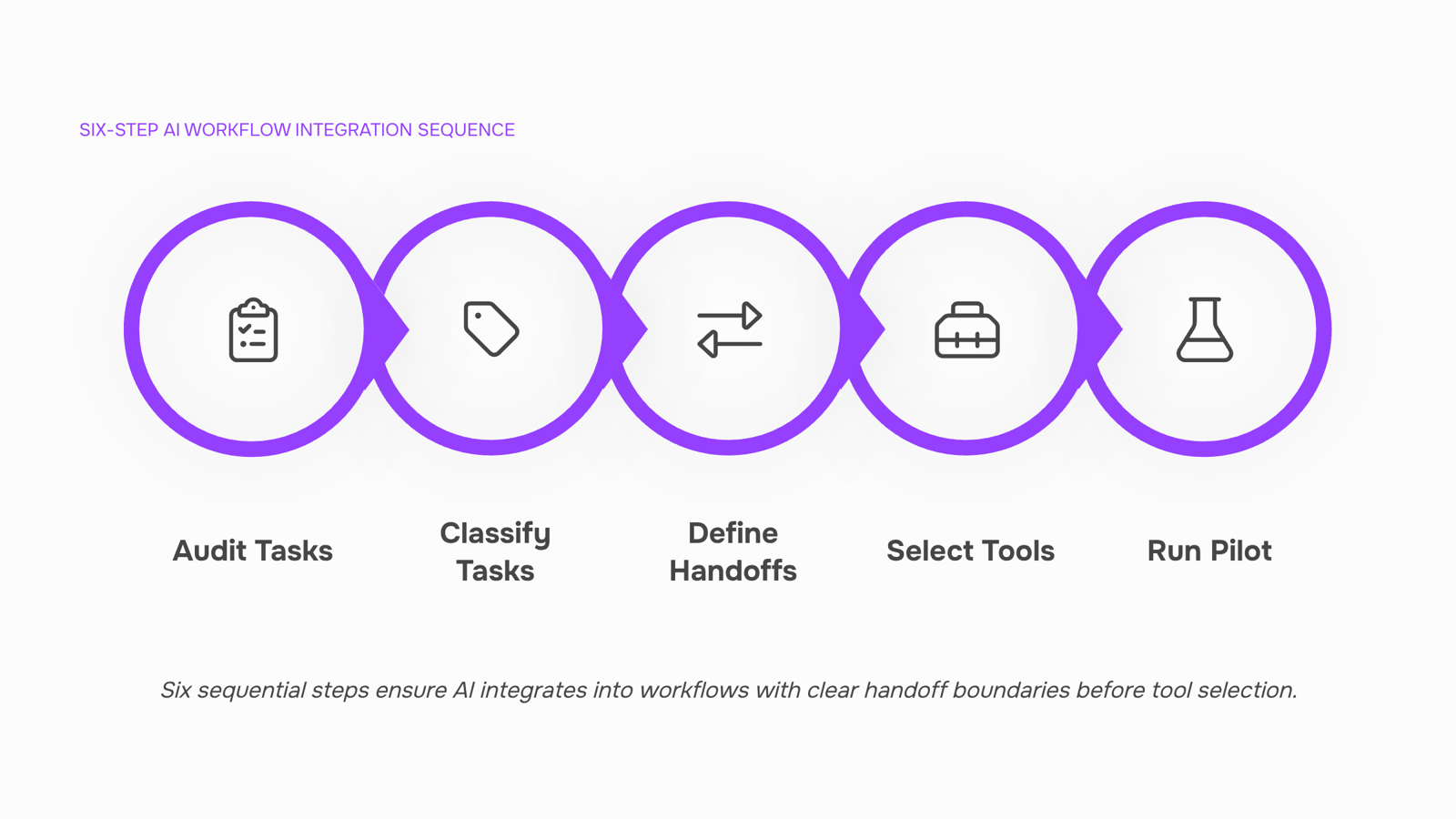
Step 1: Audit your current task list
List every recurring task your team runs in a week. Don't filter yet. You're looking for volume, frequency, and the person currently responsible. A shared spreadsheet works fine here. The goal is a raw inventory, not a polished one.
Step 2: Apply the autonomous-assist-human classification
Take the inventory from Step 1 and sort each task into one of three buckets: fully autonomous (AI handles it end to end), AI-assisted (AI drafts or flags, human decides), or human-only (judgment, relationships, accountability). This is the decision layer covered in the previous section. Don't skip it. Tool selection without this classification is guesswork.
Step 3: Define the handoff boundary for each AI task
For every task you marked autonomous or assisted, write one sentence that describes where AI output stops and human review begins. For example: "AI generates the invoice draft; the account manager approves before it sends." That sentence becomes your process rule. Without it, you'll find out the hard way that nobody knew who was responsible when something went wrong.
Step 4: Select tools that match the boundary you defined
Now you can look at tools. Match the tool's capability to the handoff rule, not the other way around. If you're automating workflows across your entire operation, you need a platform that lets you configure approval steps, not just trigger actions. For IT teams connecting internal and external tools, Revo handles this at the workflow level, so the boundary you defined in Step 3 is enforced by the system, not by memory.
Step 5: Run a two-week pilot on one workflow
Pick the highest-volume, lowest-risk task from your autonomous bucket. Run it for two weeks. Track two numbers: time saved and error rate. If you want to build an AI pipeline that moves data through your workflow automatically, start here before scaling.
Step 6: Schedule a monthly review cycle
AI workflow automation is not a one-time setup. Tasks change, team size changes, and tool capabilities change. Block 30 minutes each month to review your classification list, check error rates, and adjust handoff boundaries. Follow best practices for keeping AI workflows running without manual fixes to make this review lightweight rather than a project in itself.
The sequence matters because each step builds on the last. Skip the audit and your classification is incomplete. Skip the boundary definition and your pilot has no success criteria.
Three real examples of AI integration in human workflows
Three scenarios where AI and human collaboration in the workplace produces a measurable result.
Lead routing at a 12-person IT consultancy. An AI agent (Revo, in this case) monitors inbound form submissions, scores each lead against a set of rules the team defined in Step 1, and routes high-fit leads directly to the senior account manager's queue. The human reviews the summary, not the raw data. Time from submission to first human touchpoint dropped from 4 hours to under 15 minutes.
Task assignment across a distributed dev team. The team's project board connects to an AI layer that reads ticket priority, current workload per engineer, and skill tags. When a new ticket lands, the AI drafts an assignment and flags it for the team lead to approve or override. The lead spends 5 minutes reviewing rather than 30 minutes triaging. This is workflow automation for IT teams applied at the coordination layer, not the execution layer.
Invoice processing for a managed services provider. AI extracts line items from client purchase orders, matches them to the service agreement, and drafts the invoice. A finance team member reviews the draft and approves. Errors from manual re-entry dropped significantly once the handoff boundary was defined clearly.
For a broader view of how these patterns connect, see how to automate workflows across your entire operation and build an AI pipeline that moves data through your workflow automatically.
AI assistance vs. full automation: how to tell the difference
The difference comes down to one question: does the outcome require human judgment before it takes effect?
AI assistance means the system analyzes, drafts, or scores — then a human reviews and acts. A support ticket gets triaged and tagged automatically, but a technician decides the priority and assigns it. The AI reduces cognitive load; the human owns the decision.
AI task automation means the system executes end-to-end without a pause for human input. An invoice gets generated, sent, and logged the moment a project status flips to "complete." No one approves each step.
Workflow type | Who decides | Who acts | Example |
|---|
AI assistance | Human | Human (informed by AI) | Contract review flagged for approval |
Partial automation | AI | Human (executes AI output) | Lead scored and routed to rep |
Full AI workflow automation | AI | AI | Invoice generated and sent on trigger |
Hybrid | Shared | Shared | Task assigned by AI, deadline set by manager |
Map each workflow you identified in Step 1 to one of these four rows. Anything in the top two rows needs a defined handoff point — which is exactly where most rollouts break down.
Mistakes that slow down AI workflow integration
Three failure points derail most AI rollouts before the second month.
Automating before auditing. Teams pick a tool, connect it to a live process, and discover mid-run that the underlying workflow was already broken. AI executes the broken steps faster. Map the process first, then automate it.
Skipping the handoff boundary. This is the gap most guides on how to integrate AI into business processes miss entirely. When AI output passes to a human for review, someone needs to own that moment explicitly. If no one does, decisions stall and the automation gets blamed.
Ignoring the review cycle. Integrating AI into human workflows is not a one-time setup. AI outputs drift as inputs change. A monthly review of accuracy, edge cases, and human overrides keeps the system honest.
Fix the boundary problem first. It costs nothing and prevents the most common stall.
Closing
The difference between AI integration that sticks and AI integration that becomes shelf-ware is clarity about where humans stay in control. Your classification framework—autonomous, assisted, human-only—is that clarity. Once you've sorted your task list and defined your handoff boundaries, you're ready to wire tools together with confidence. The next move: pick one high-volume task from your autonomous bucket, run it for two weeks, and measure time saved and error rate. That pilot teaches you more than any vendor demo will. Ready to build your first workflow? Start by connecting one existing tool in Revo and creating a single trigger-action sequence. No automation experience required.
FAQ
How can I integrate AI into my team's workflow?
Classify your tasks into autonomous (AI runs it end-to-end), assisted (AI drafts, human approves), or human-only (judgment required). Define handoff boundaries for each AI task, then select tools that enforce those boundaries. Run a two-week pilot on your highest-volume, lowest-risk task before scaling.
What are the benefits of integrating AI into human workflows?
Routine tasks run 10x faster, manual handoff errors drop dramatically, your team reviews conclusions instead of hunting for inputs, and skilled people shift toward work that actually requires judgment. The result: better decisions made faster, not fewer people.
What are some examples of successful AI integration in human workflows?
Invoice status updates that run autonomously, proposal drafts that a manager reviews before sending, support tickets routed to the right queue without human triage, and contract renewal recommendations flagged for approval. All keep humans in control of final decisions.
How do I get started with integrating AI into my business processes?
Export your recurring tasks and label each one autonomous, assisted, or human-only. Pick the highest-volume autonomous task, define its handoff boundary in one sentence, then run it for two weeks. Track time saved and error rate. That pilot is your proof point.
What is the difference between AI assistance and full workflow automation?
Assisted tasks have a human approval step built in—AI drafts a proposal, a manager reviews and sends it. Autonomous tasks run end-to-end without human input, like auto-routing a support ticket. Both are automation; the handoff boundary is what differs.
How do I know which tasks to automate first?
Start with tasks that are high-volume, low-risk, and require no judgment. These deliver speed gains fast and build team confidence. Avoid automating tasks where relationships, accountability, or nuanced decisions matter—those stay human-only.


 Marcus Thompson15 September 2026


