TL;DR: Most content on healthcare workflow automation stops at "reduce manual work" without showing which processes to automate first or how the steps connect. This piece maps the full operational sequence — from patient intake to billing — and ties each automated workflow to a specific outcome IT company owners can measure. You'll leave with a clear starting point and the logic behind each automation decision.
What is healthcare workflow automation?
Healthcare workflow automation is the use of software to execute repeatable administrative and clinical processes — scheduling, billing, referrals, prior authorizations — without manual intervention at each step.
Manual healthcare workflows create real operational drag. Staff re-enter the same patient data across three systems. Referral faxes sit in queues for days. Prior authorization requests stall because no one triggered the follow-up. These aren't edge cases; CAQH estimates that the US healthcare system spends tens of billions of dollars annually on manual administrative transactions that could be handled electronically.
Healthcare process automation replaces that manual handoff with a defined trigger-logic-action sequence. A patient books an appointment, the system automatically sends a confirmation, flags insurance verification, and queues a pre-visit intake form — no coordinator touching each step individually.
The operational case is straightforward: fewer manual touchpoints means fewer errors, faster throughput, and staff time redirected toward patient-facing work. For IT company owners building or managing healthcare platforms, this is where automation pays back fastest — not in flashy AI features, but in eliminating the friction that slows down every patient interaction.
If you're already thinking about how this applies beyond healthcare, the same trigger-based logic applies to IT workflow automation across departments.
How healthcare workflow automation works
Healthcare workflow automation works through a four-part sequence that repeats across every process you configure: a trigger fires, logic evaluates conditions, an action executes, and a notification confirms the outcome.
Here's how that plays out in a real scheduling workflow:
Trigger. A patient submits an appointment request through your portal. That submission event starts the automation.
Logic check. The system evaluates availability rules, insurance eligibility, and provider preferences simultaneously, in milliseconds.
Action. A confirmed appointment slot is written to the calendar, an intake form is sent to the patient, and the relevant care team member is assigned, all without a coordinator touching it.
Notification. The patient receives a confirmation. The provider gets a prep summary. If the patient hasn't confirmed within 24 hours, a follow-up reminder fires automatically.
That four-step loop is what lets you automate healthcare workflows across departments without rebuilding each process from scratch.
The same trigger-logic-action-notification structure applies to billing, compliance reporting, and staff task routing. The underlying mechanism doesn't change; only the data and conditions do.
CAQH research estimates that fully automating administrative transactions in US healthcare could save the industry billions annually, largely because manual steps introduce delays at each handoff point. Workflow automation in healthcare operations eliminates those handoffs by design, not by asking staff to move faster.
When you're ready to map this to your own stack, the workflow automation software selection guide covers how to match tool capabilities to process complexity.
Most common healthcare workflows to automate
Five workflow categories account for the majority of repetitive administrative work in healthcare. Automating these first gives IT owners the fastest return on any healthcare workflow automation investment.
Patient intake. Intake automation replaces paper forms and manual data entry with digital pre-registration that writes directly into the EHR. Patients complete forms before arrival; staff spend that time on clinical support instead of clipboards.
Appointment scheduling. Automated scheduling handles booking, reminders, and cancellation fill-in without a front-desk call. According to MGMA data, practices using automated reminders see measurable reductions in no-show rates — one of the clearest ROI signals in healthcare process automation.
Medical billing and claims. Billing workflows generate claims from visit data, run eligibility checks, flag coding errors before submission, and route denials to the right reviewer automatically. Manual billing is where most revenue leakage happens; automation closes that gap by catching errors at the source rather than after a payer rejection.
Compliance reporting. Regulatory submissions, audit logs, and policy acknowledgments all run on fixed schedules with defined data sources — exactly the conditions where automation performs reliably. Staff no longer chase signatures or manually compile reports the day before a deadline.
Staff task routing. When a lab result arrives, a referral is submitted, or a patient flags a concern through a portal, someone needs to act. Automated task routing assigns that action to the right person based on role, department, or urgency without a coordinator in the middle. This is where healthcare workflow automation software creates the most visible day-to-day change for clinical teams.
CAQH research consistently shows that prior authorization, eligibility verification, and claims management remain among the most manual and most automatable administrative transactions in US healthcare — meaning these five categories are not arbitrary. They reflect where actual staff hours are going.
If you're deciding where to start, the question is which workflow creates the most downstream delay when it fails. For most practices, that's scheduling or billing. Choosing the right healthcare workflow automation software determines how well the logic you build in one area connects to the others.
Benefits of automating healthcare workflows
Automating healthcare workflows cuts costs, reduces errors, and gives clinical staff more time with patients. Here are five outcomes IT owners consistently see once automation is running.
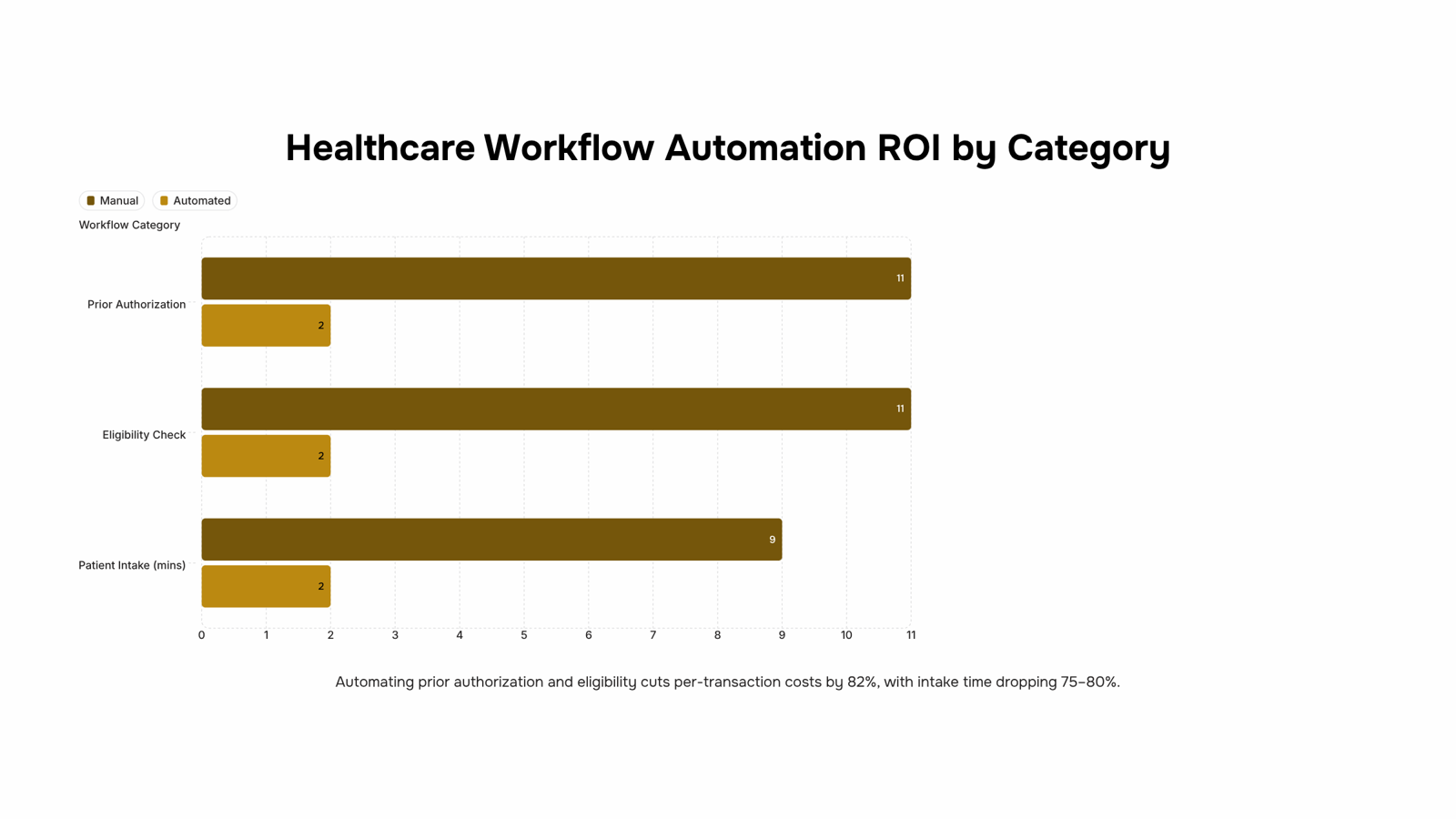
Reduced administrative cost. According to CAQH, manual processing of a single prior authorization costs healthcare organizations roughly $11 in staff time, compared to $2 when automated. Multiply that across hundreds of weekly transactions and the savings compound fast.
Lower error rates in billing and coding. Manual data entry across disconnected systems is the primary driver of claim denials. Automated billing workflows validate codes before submission, cutting denial rates without adding headcount.
Faster patient intake. Automated intake routes patient-submitted forms directly into the EHR, eliminating re-keying. What used to take a front-desk staff member 8 to 10 minutes per patient drops to under two.
Improved compliance accuracy. Compliance reporting in healthcare involves dozens of recurring deadlines. Automated task routing ensures the right staff member gets the right checklist at the right time, with a timestamped audit trail attached.
Staff time redirected to care. Research on workflow automation in healthcare operations consistently shows that nurses and coordinators spend 30 to 40 percent of their shifts on administrative tasks. Automation reclaims a meaningful portion of that time.
Tools like Revo handle the process sequencing across these categories without requiring custom code, which matters when your IT team is already stretched thin.
How healthcare workflow automation improves patient care
Two scenarios show where healthcare workflow automation produces the clearest patient-facing gains.
Scenario 1: Outpatient scheduling. A primary care clinic running manual appointment booking typically sees 15–20% of slots lost to scheduling gaps, double-bookings, or late cancellations with no backfill. When you automate healthcare workflows for scheduling — confirmation messages, waitlist triggers, and reminder sequences — those gaps close. Patients get faster access; front-desk staff stop spending two hours a day on phone tag. The mechanism is simple: the system detects a cancellation and immediately offers the slot to the next patient on the waitlist, without anyone manually checking a spreadsheet.
Scenario 2: Hospital intake and billing. Manual intake processes create a chain of delays. A patient's insurance isn't verified before arrival, so billing holds until someone runs it manually post-discharge. That hold can delay treatment authorization for a follow-up procedure by days. Automating the intake sequence — eligibility checks, prior authorization requests, and discharge summaries — cuts that chain at multiple points. Fewer billing errors reach the payer, which means fewer claim rejections and faster reimbursement cycles.
Both scenarios follow the same logic: remove the manual handoff, and the patient moves through the system faster with fewer error-driven interruptions. That's the core value of healthcare workflow automation software — not just operational efficiency, but a direct reduction in the friction patients experience.
If you're mapping which processes to tackle first, the workflow automation software selection guide covers the decision criteria in detail.
Can healthcare workflow automation reduce costs?
The short answer: yes, and the savings are concentrated in a small number of workflow categories.
CAQH's 2023 Index found that the US healthcare industry spends over $350 billion annually on administrative tasks, with prior authorizations, claims processing, and eligibility verification accounting for the bulk of manual labor costs. Those three categories are also where healthcare process automation delivers the fastest, most measurable ROI.
For IT owners, the pattern is consistent: automating eligibility checks alone typically cuts per-transaction costs from around $11 (manual) to under $2 (automated). Claims routing and denial management follow a similar curve. Scheduling automation reduces no-shows, which directly protects revenue that would otherwise disappear with no recovery path.
The workflows worth targeting first share two traits: they run at high volume daily, and a single human error triggers a downstream cost (a denied claim, a delayed authorization, a missed appointment slot). That combination makes the ROI case straightforward to build internally.
If you're mapping where to start, the guide on automating business processes for team efficiency covers the prioritization logic that applies directly to healthcare workflow automation decisions.
How to start automating healthcare workflows
Start by mapping every workflow your team touches in a week. Write them down, not from memory, but by watching what actually happens. Then identify the highest-volume manual steps: appointment reminders, referral routing, prior authorization follow-ups. These are where healthcare workflow automation in healthcare operations pays off fastest.
Once you have that list, rank by volume and error rate. The CAQH Index consistently flags prior authorizations and eligibility checks as the most automatable administrative tasks in US healthcare. Start there.
For tooling, match the software to your process complexity. A workflow automation software selection guide helps here. Revo handles no-code workflow builds, so your IT team can wire up a pilot without a development sprint.
Run one pilot workflow end-to-end before expanding. Measure error rate and time-to-complete. If both drop, scale it.
Closing
Healthcare workflow automation isn't about replacing staff or cutting corners on care. It's about removing the administrative friction that keeps clinical teams from doing their actual job. Once you've mapped your highest-volume manual processes—scheduling, billing, intake, compliance, task routing—you're ready to connect those processes to an automation layer that handles the trigger-logic-action sequence without custom development. Revo is built to run those connections across your healthcare stack, turning your process map into live automation in weeks, not months. The question isn't whether to automate; it's which process you'll automate first. Start with the workflow that creates the most downstream delay when it fails, then build from there.
FAQ
Can healthcare workflow automation reduce costs?
Yes. CAQH research shows prior authorization processing costs $11 per transaction manually versus $2 when automated. Multiply that across hundreds of weekly transactions and savings compound quickly across billing, compliance, and administrative labor.
How does healthcare workflow automation enhance patient care?
Automation redirects staff time from paperwork to clinical work. Patients get faster intake, fewer follow-up delays, and more consistent communication. Clinical teams spend less time on manual task routing and more time on patient interaction.
What are the most common healthcare workflows to automate?
Patient intake, appointment scheduling, medical billing and claims, compliance reporting, and staff task routing account for most repetitive administrative work. Start with whichever creates the biggest downstream delay when it fails—usually scheduling or billing.
What should IT teams consider before implementing healthcare workflow automation?
Map your highest-volume manual processes first. Prioritize workflows with clear ROI signals—no-show reduction, claim denial rates, compliance deadlines. Choose a platform that connects processes without custom development so automation scales as your needs grow.


 Elena Petrova15 September 2026


