TL;DR: Most workflow software guides hand you a feature checklist and call it a decision framework. This one connects each capability category to a specific operational outcome, then shows IT company owners how to match software to the way their team actually works, not the way vendors describe their products. You'll leave with a clear selection criteria you can apply before your next vendor call.
What workflow software actually does for your business
Professional 3D illustration of organized workflow software dashboard with interconnected business tools and process management systems
Workflow software is a system that moves work from one person, team, or tool to the next without someone manually pushing it along. An approval request routes itself. A new client triggers an onboarding checklist. A completed task notifies the next person automatically.
For small businesses, that definition has a direct operational cost attached to it. According to Asana's Anatomy of Work research, employees spend a significant portion of their week on repetitive coordination tasks — status updates, follow-up emails, manual handoffs — rather than the actual work they were hired to do. For a five-person team, that adds up fast.
Business workflow software addresses this by replacing the manual coordination layer with rules and triggers you configure once. The work still happens; it just doesn't depend on someone remembering to move it forward.
This matters beyond enterprise IT teams. A 10-person IT services company running client onboarding through email threads and spreadsheets has the same coordination problem as a 500-person org — just with less margin to absorb the waste.
If you want to understand how to choose workflow automation software for your company before committing to a platform, the decision starts here: does the tool replace your manual coordination layer, or does it just add another place to log tasks?
How workflow software improves team productivity
Four productivity gains stand out when teams move from manual handoffs to automated workflow software.
Faster approvals: Manual approval chains rely on someone remembering to follow up. With approval workflow software, requests route automatically to the right person, trigger reminders if no action is taken, and log every decision. What used to take two to three days often resolves in a few hours.
Fewer status meetings: When work moves through a defined process, status is visible without asking. A manager can see where a client onboarding sits, which contracts are pending review, and what's blocked, without scheduling a check-in. Most teams find this alone recovers three to five hours a week across the team.
Shorter onboarding cycles: New hire onboarding typically involves ten to fifteen manual steps spread across HR, IT, and the hiring manager. Automated sequences handle the routing, send the right documents at the right time, and flag exceptions. The process runs the same way every time, which matters more as your team grows.
Fewer errors on repetitive tasks: When a human copies data between tools or manually triggers a follow-up, mistakes happen. Workflow software removes those touchpoints. If you're evaluating options, how to choose workflow automation software for your company covers the decision criteria in detail.
For teams without a developer, a no-code visual workflow builder lets you wire up these gains without writing a single line of code.
Features to look for in workflow software
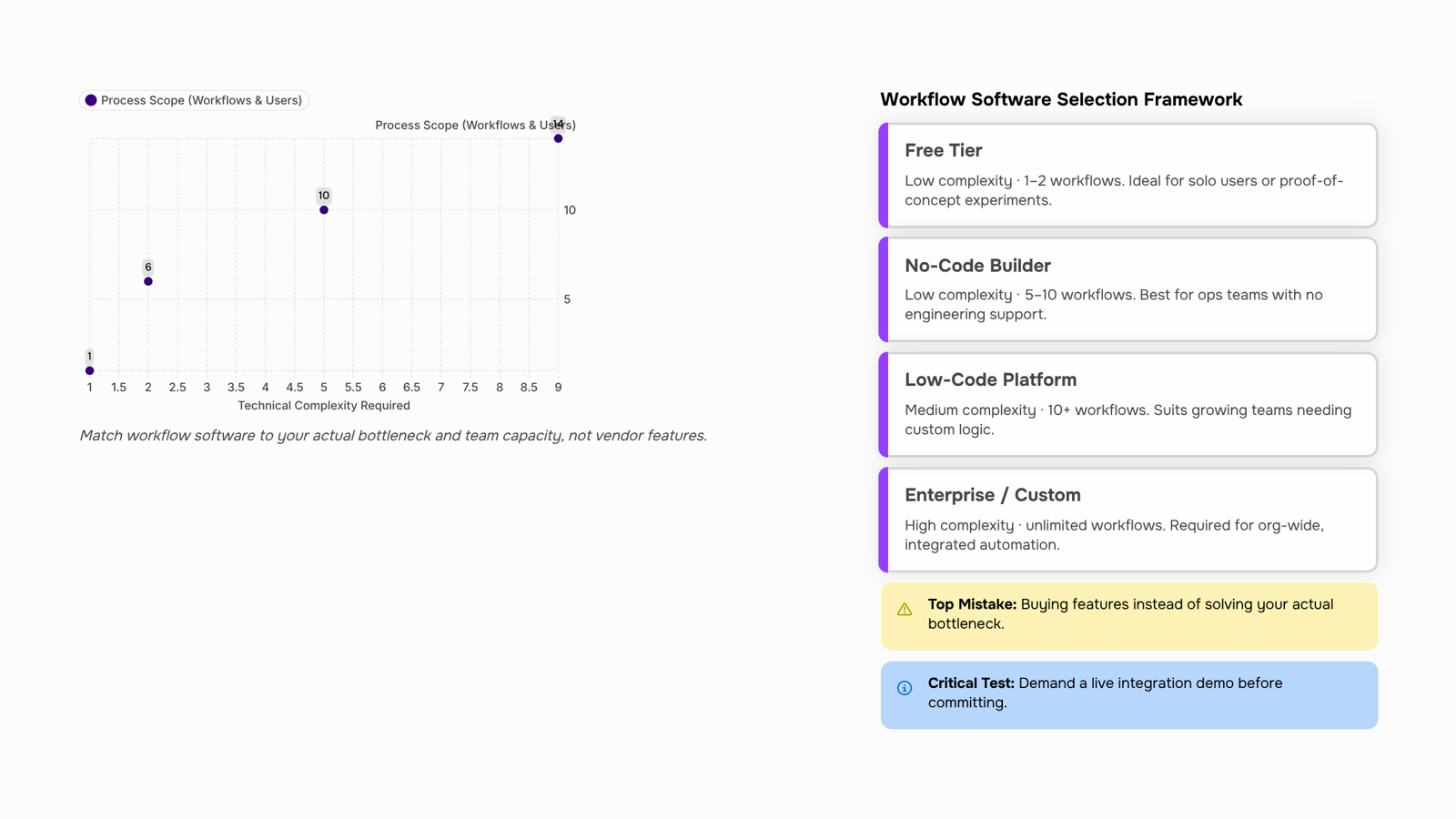
Most feature lists for workflow software are organized around what vendors want to sell, not what your team actually needs. Here's a more useful frame: group features by the problem they solve.
For approval bottlenecks, the critical feature is conditional routing. Approval workflow software should let you define rules like "if contract value exceeds $10K, route to CFO" without writing code. If the tool requires a developer to change that logic, it will never get updated.
For cross-functional visibility, look for real-time status tracking and audit logs. These matter more than dashboards. A dashboard tells you where things stand; an audit log tells you why a task sat for three days.
For onboarding and repeatable processes, step-by-step workflow testing is underrated. Before you roll out a process to the whole team, you should be able to run it in a sandbox, catch broken handoffs, and fix them. Most teams skip this and discover the gaps in production.
For integrations, treat this as a risk question, not a checkbox. Ask: what happens when the integration breaks? Does the tool surface errors clearly, or do tasks silently disappear? Project management workflow software that integrates with your CRM and billing system is only valuable if those connections are observable and recoverable.
Free vs. paid is a real trade-off worth naming. Free workflow software typically caps you at a small number of active workflows or users, which is fine for a 5-person team testing automation for the first time. Once you're running more than a handful of processes across departments, those limits become the bottleneck. The question isn't whether free is good enough today; it's whether you'll have to migrate everything in six months.
For a deeper breakdown of how to evaluate these trade-offs against your current stack, choosing the right workflow automation software is worth reading alongside this.
Whether workflow software works for remote teams
Remote teams break on handoffs, not on talent. When someone in Lagos finishes a task and the next owner is in London, the gap between "done" and "picked up" is where work disappears.
The specific problems are predictable: no visibility into task status, approval requests sitting in someone's inbox, and no clear record of who decided what. Research from Buffer found that remote teams consistently rank process visibility as a top operational challenge — not communication, not time zones, but visibility.
Good automated workflow software solves this by replacing the "did you see my message?" follow-up with a triggered handoff. Task reaches a defined state, next owner gets notified, status updates automatically. No one has to chase anyone.
For distributed teams specifically, look for three things in any business workflow software you evaluate:
Async-friendly notifications (email or Slack, not just in-app)
Audit trails showing who acted and when
Role-based access so contractors see only what they need
Revo handles all three without requiring your team to learn a new interface. If your current tool forces someone to log in just to check status, that friction compounds across time zones.
Integration is a risk factor, not a feature checkbox. When workflow software can't connect to the tools your team already uses, you don't just lose convenience — you create new manual work to bridge the gap.
The failure pattern looks like this: your AP workflow software approves an invoice, but the payment status never updates in your accounting workflow software because there's no live connection. Someone on your team now copies that data by hand. The automation you paid for just moved the bottleneck, not eliminated it.
Before committing to any platform, map three things: which tools your team uses daily, where data currently moves between them, and what breaks when that handoff is late. Legal workflow software, for example, often needs to push signed documents directly into a case management system. If that connection requires a custom build, factor that cost into your evaluation.
The practical test: ask the vendor to show you a live connection between their platform and your two most critical tools. Not a screenshot — a working demo. If they can't, that gap becomes your team's problem.
For teams that want to wire up connections without writing code, a no-code visual workflow builder removes that dependency on engineering. You can also use business process management software for small businesses as a reference point for evaluating how well a tool fits your existing stack.
How to choose the right workflow software for a small business
Start by naming your actual bottleneck, not your software budget.
Most IT owners approach this backwards. They browse tools, compare pricing pages, and then try to fit their operations around whatever they bought. A cleaner process: identify the specific failure first, then match the tool type to it.
Step 1: Name the failure mode: Is work stalling because approvals have no owner? Because data lives in three disconnected apps? Because your team is doing the same manual handoff every week? Each failure points to a different category of business workflow software.
Step 2: Decide how much technical lift you can absorb: If your team has no developer bandwidth, a no-code visual workflow builder will get you running faster than a platform that requires scripting. If you need custom logic, low-code workflow automation tools give you flexibility without a full engineering project.
Step 3: Test the integration layer before you commit: As covered in the previous section, a tool that cannot connect to your existing stack creates a new problem instead of solving the old one. During any trial, connect it to the two or three apps your team uses daily and confirm data moves without manual exports.
Step 4: Match the pricing tier to your actual usage: Free workflow software works for simple, low-volume processes, typically one or two linear workflows with limited users. Once you add conditional logic, multiple teams, or audit requirements, free tiers usually hit a ceiling fast. Know that ceiling before you build on top of it.
For a more detailed breakdown of how to apply this process, the guide on how to choose workflow automation software walks through each decision point with examples.
Common mistakes to avoid when buying workflow software
Buying on feature count instead of fit is the most common error. A tool with 200 integrations means nothing if it doesn't connect your ticketing system to your billing queue. Map your actual bottleneck first, then check whether the software solves that specific handoff.
Skipping the approval workflow test is the second mistake. Most demos show the happy path. Ask the vendor to walk you through a rejected approval, a reassigned task, and a deadline breach. If the approval workflow software can't handle exceptions cleanly, it will create more manual work, not less.
The third mistake is treating "free" as a starting point rather than a constraint. Free tiers of automated workflow software typically cap active workflows at five to ten, which is enough to prototype but not enough to run operations. Know that ceiling before you build processes around it.
Closing
Choosing workflow software comes down to one question: does it replace your manual coordination layer, or does it just add another place to log tasks? The best tool for your business matches the way your team actually works, not the way a vendor's demo looks. Start by mapping your biggest bottleneck—approvals, handoffs, or visibility—then evaluate tools against that specific problem, not against a generic feature list. Once you've narrowed your options, test one in a sandbox before rolling it out. Ready to move forward? Revo is built specifically for small business owners who need workflow automation without a dedicated IT team to configure it. Take a closer look at how Revo's visual workflow builder lets you wire up your first automation in minutes.
FAQ
What is the best workflow software for small businesses?
The best tool matches your biggest bottleneck and doesn't require a developer to maintain it. Revo is built for small teams who need no-code automation without IT overhead.
How does workflow software improve productivity?
It eliminates manual coordination: faster approvals (hours instead of days), fewer status meetings, shorter onboarding, and fewer errors on repetitive tasks.
What features should I look for in workflow software?
Conditional routing (no-code rule changes), real-time status tracking, audit logs, sandbox testing, and observable integrations that surface errors clearly.
Is workflow software suitable for remote teams?
Yes. Remote teams break on handoffs, not talent. Look for async notifications, audit trails, and role-based access so distributed teams stay aligned without chasing status.
Can workflow software integrate with existing tools?
Integration is a risk factor, not a checkbox. Verify live connections exist and errors surface clearly—otherwise automation just moves the bottleneck instead of eliminating it.


 Elena Petrova15 September 2026


