TL;DR: Most guides explain double opt-in conceptually. This one walks through the exact build sequence, from form fields to confirmation-email triggers, covering the specific copy and UX decisions that determine whether a subscriber confirms or ghosts. You'll finish with a working flow tied to measurable deliverability and list-quality outcomes.
What double opt-in actually does to your list
3D illustration of double opt-in sign-up form workflow with email verification steps
Double opt-in adds a single gate between your sign-up form and your active list: a double opt-in confirmation email that asks the subscriber to click a link verifying their address. The flow is straightforward. Someone fills out your form, your system sends a confirmation message, and only after they click does the address land on your mailing list.
That extra step filters out three categories of garbage:
Typos and fake addresses that would hard-bounce on your first send
Bot submissions that inflate your list count without adding a single real reader
People who didn't actually want to subscribe (misclicks, pre-checked boxes, someone else entering their address)
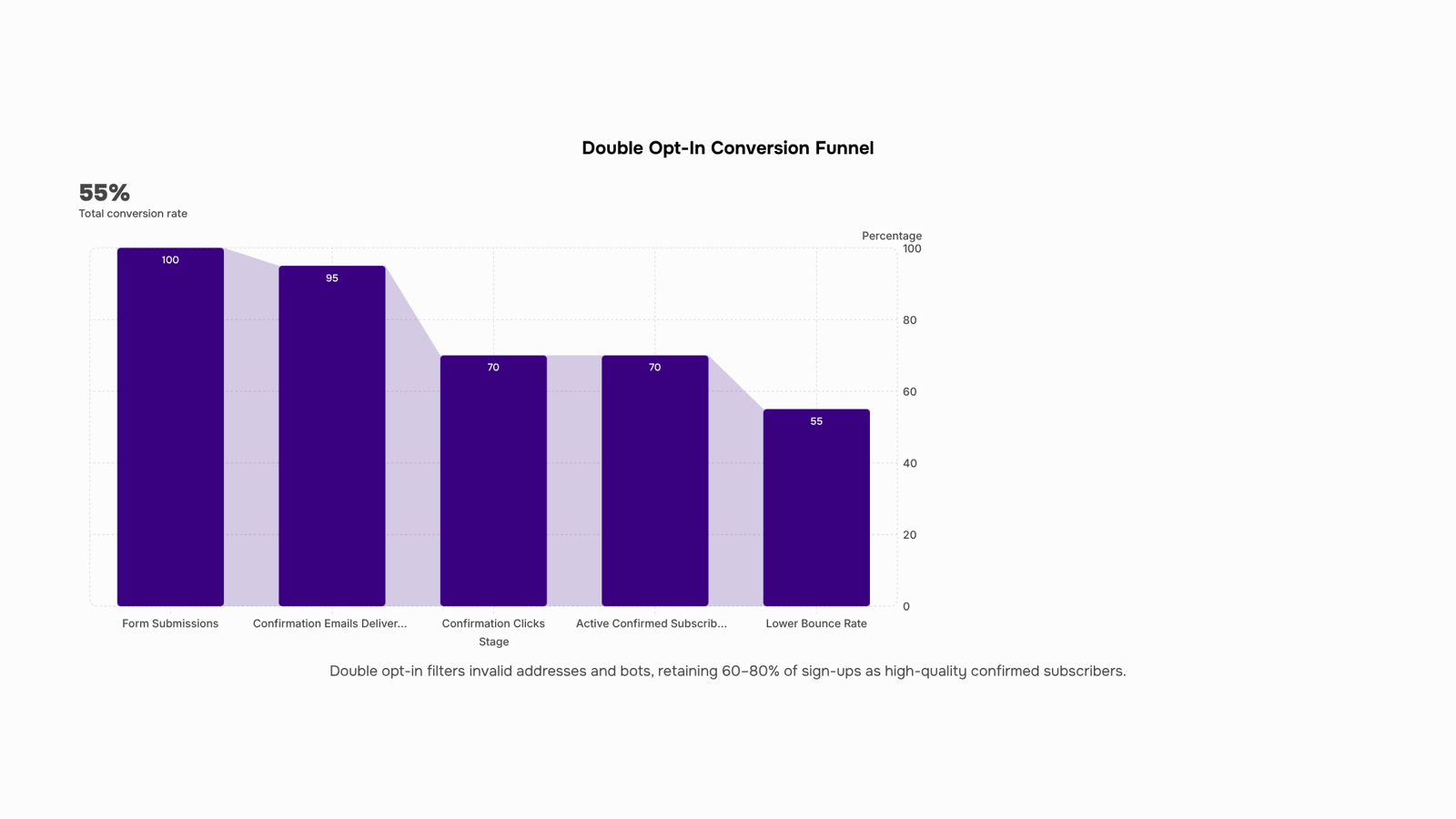
The result is measurably better email list quality. Double opt-in lists see lower bounce rates and fewer spam complaints because every subscriber actively confirmed their interest, filtering out invalid entries before they ever receive a campaign. Rejoiner's analysis confirms that double opt-in reduces bounced, unsubscribed, and complaint emails compared to single opt-in lists.
The tradeoff is real: you will lose some percentage of sign-ups who never open or click the confirmation email. Most teams see confirmation rates between 60% and 80%. But the contacts who do confirm are provably engaged, which means higher open rates, better sender reputation, and fewer deliverability problems downstream.
If you want a deeper look at permission-based email marketing and consent management, that context helps explain why confirmed consent protects your domain long-term.
A sign-up form with double opt-in lives or dies at step one. If the form itself creates confusion or friction, no one reaches the confirmation email. Here are the elements that determine whether your sign-up form double opt-in flow actually converts.
Form fields: fewer wins. Collect only the email address at this stage. Every additional field (name, company, phone) drops completion rates. You can gather profile data later, after confirmation, when the subscriber has already committed. If you absolutely need a first name for personalization, make it optional and visually de-emphasized.
Microcopy that sets expectations. Below the submit button, a single line should tell the subscriber what happens next: "Check your inbox for a confirmation link." This reduces support tickets and increases the chance they actually open the confirmation email. Vague button text like "Submit" underperforms specific text like "Send me the confirmation."
Friction-reduction choices that matter:
Pre-check no boxes. Let the subscriber actively opt in, which strengthens your permission-based email marketing and consent management posture.
Show a success state immediately after submission. A page or inline message saying "Almost done, confirm your email" keeps the subscriber oriented.
Avoid CAPTCHAs unless bot traffic is measurable. Each challenge layer costs completions.
Visual hierarchy. The email field and CTA button should be the two most prominent elements. Surrounding text, privacy links, and branding sit below them in the visual stack. Following these email sign-up form best practices keeps the path from form to inbox as short as possible.
Treat the form and the confirmation email as one conversion funnel. A subscriber who fills out the form but never confirms is the same as a subscriber you never had.
How to set up the confirmation email trigger
The build sequence has three parts: a form submission event, a confirmation email send, and a link destination. Get any of these wrong and your sign-up form double opt-in flow breaks silently.
1. Configure the form submission event. When someone submits your form, the system needs to tag that contact as "pending" (not confirmed). This prevents them from entering your main list or receiving campaign emails prematurely. Most platforms handle this by placing the subscriber in a holding state until the confirmation link is clicked. In MailerLite, for example, you toggle double opt-in on at the account level so every new API or form submission routes through confirmation first.
2. Build the double opt-in confirmation email. This is the email that fires immediately after form submission. It needs to arrive within seconds, not minutes. Configure your trigger as "on form submit" with zero delay. The email itself should contain one clear CTA button linking to your confirmation endpoint. Keep the subject line functional ("Confirm your subscription" outperforms clever alternatives here). For guidance on structuring that email, see these double opt-in email design patterns.
3. Set the link destination. The confirmation link should point to a page that moves the contact from "pending" to "confirmed" in your database and redirects them to a thank-you page or next step. This is where most teams drop the ball: they confirm the subscriber but don't route them anywhere useful afterward.
If you run multi-step sequences, Evox (WorksBuddy's campaign automation agent) lets you wire the confirmation click as a trigger event that immediately enrolls the new subscriber into a welcome sequence. No manual list moves, no delay between confirmation and first real email.
The key tradeoff: simpler tools handle steps 1-3 as a single toggle. That works until you need conditional logic (different confirmation emails by source, or branching welcome flows). If your permission-based email marketing requirements vary by segment, you need the trigger-level control described above.
Examples of double opt-in emails that get confirmed
Three double opt-in confirmation email patterns consistently outperform generic "please confirm" messages. Here's what makes each one work, broken down by functional element.
Pattern 1: The single-purpose confirmation
Subject line: "Confirm your email to get started" (no branding, no cleverness, just the action required)
Body: One sentence restating what they signed up for, followed by a single CTA button
CTA button copy: "Yes, subscribe me"
Confirmation page redirect: A thank-you page with next steps (first resource, onboarding link, or expected send schedule)
This pattern works because it removes every distraction. The subscriber sees one button and one job. Oracle's double opt-in guidance emphasizes that your confirmation page or popup should make it abundantly clear that further action is required. The same principle applies to the email itself.
Pattern 2: The value-reminder confirmation
Subject line: "Your [specific deliverable] is waiting, confirm to access"
Body: Two to three lines reminding the subscriber what they'll receive (a template, a report, a discount code) once they confirm
CTA button copy: "Confirm and get my [deliverable]"
Confirmation page redirect: Immediate delivery of the promised asset, no extra steps
This pattern ties the confirmation click to a reward. It reframes the action from "admin task" to "unlock something I want." Confirmation rates tend to climb when the subscriber remembers why they filled out the form in the first place.
Pattern 3: The urgency-based confirmation
Subject line: "Confirm within 24 hours or your spot expires"
Body: Short copy noting the link expires, plus one line of social proof (subscriber count or testimonial snippet)
CTA button copy: "Confirm my spot"
Confirmation page redirect: Welcome page with a countdown to the first email or event
Adding a time constraint creates a reason to act now rather than later. This works well for waitlists or limited-access communities.
Across all three patterns, notice the shared structure: subject line states the required action, body gives one reason to complete it, CTA uses first-person language, and the redirect page continues the experience rather than dead-ending. For deeper guidance on layout and visual hierarchy in these emails, see double opt-in email design patterns. And if you want to understand how confirmed subscribers feed into B2B lead generation sequences, that handoff is where the real revenue impact starts.
Three form designs worth studying, each built around a different tradeoff in the sign-up form double opt-in funnel.
Example 1: Single-field with inline value prop. One email field, a submit button, and a single line above it stating exactly what the subscriber gets ("Weekly ops teardowns, delivered Tuesday"). No name field. This design prioritizes speed over personalization. Mobile rendering is clean because there's nothing to stack. The double opt-in conversion rate stays high here because friction is minimal before the confirmation email arrives.
Example 2: Two-field form with expectation-setting footer. Email plus first name, with a short note below the button: "You'll get a confirmation email in under 60 seconds." Adding the name field lets you personalize the confirmation email subject line, which lifts open rates on that critical second step. The footer text reduces "where did my confirmation go?" support tickets. On mobile, the two fields stack vertically without horizontal scroll.
Example 3: Multi-step embedded form. Step one collects the email. Step two (shown after submit) asks for company size or role. The confirmation email fires after step one, so even if someone abandons step two, you still capture the confirmed subscriber. This treats the form-to-confirmation handoff as a single conversion funnel rather than two disconnected events. Campaign Monitor notes that including double opt-in after form submission reduces spam addresses on your list.
The common thread across all three: value proposition placement happens before the input field, not after. That's the email sign-up form best practices pattern most forms get backwards. For deeper guidance on what the confirmation email itself should look like, see these double opt-in email design patterns.
Most teams treat the sign-up form and the confirmation email as separate projects. They're one funnel. Every element between "submit" and "confirmed" either adds or loses subscribers.
Subject line testing. Your confirmation email subject line is the single highest-leverage variable for double opt-in conversion rate. Test action-oriented lines ("Confirm your spot" or "One click to finish") against generic ones ("Please confirm your subscription"). Even small wording shifts can move confirmation rates by 5-15 percentage points. Avoid spam-trigger words like "free" or "act now" in confirmation subjects.
Send-time for the confirmation email. Deliver it within 5 seconds of form submission. Every minute of delay drops the likelihood someone clicks. If your ESP batches sends, switch to transactional delivery for this one message.
Reminder sequence timing. Send one reminder 24 hours after the first confirmation email. A second reminder at 48 hours is the ceiling. Beyond that, you're training inbox filters to ignore you. Oracle notes that more moving parts mean more points of failure, so keep the sequence tight.
Thank-you page copy. Tell the subscriber exactly what to do next: "Check your inbox for an email from [sender name]. Click the confirmation link." Name the sender. Show a screenshot of the email if possible. This reduces the "I never got it" support tickets that plague sign-up form double opt-in flows.
For deeper guidance on what your confirmation email itself should look like, see double opt-in email design patterns.
Closing
Double opt-in isn't just a compliance checkbox—it's a filter that turns sign-ups into actual subscribers. The confirmation email is where most teams lose momentum, either by sending it too late, burying the CTA, or failing to route the confirmed contact into their next sequence. Once a subscriber confirms, the real work starts: routing that lead to the right nurture step without manual handoffs. Evox captures confirmed subscribers directly into your lead CRM and triggers the next automation immediately, so your sign-up form does more than build a list—it starts a pipeline. Ask yourself: after someone clicks that confirmation link, does your system know what to do next, or does the lead sit idle?
FAQ
How do I create a sign-up form with double opt-in functionality?
Set up a form that collects email only, configure it to place submissions in a 'pending' state, then trigger a confirmation email immediately on submit. When the subscriber clicks the confirmation link, move them to 'confirmed' and redirect to a thank-you page or next step.
What are some examples of effective sign-up forms with double opt-in?
Effective forms minimize friction: email field only, clear microcopy like 'Check your inbox for a confirmation link,' no pre-checked boxes, and immediate success feedback. Pair with a confirmation email that has one clear CTA button and a functional subject line.
Can you show me examples of double opt-in emails for sign-up forms?
Pattern 1: Single-purpose email with 'Confirm your email to get started' subject and 'Yes, subscribe me' button. Pattern 2: Value-reminder email with 'Your [deliverable] is waiting, confirm to access' subject and a CTA tied to what they'll receive.
How do I optimize my sign-up form for double opt-in conversions?
Collect email only at signup, use specific button text ('Send me the confirmation' not 'Submit'), show a success state immediately, skip CAPTCHAs unless bots are measurable, and keep the confirmation email subject line functional and urgent.
What are the key elements of a successful double opt-in sign-up form?
Minimal form fields (email only), microcopy setting expectations, no pre-checked boxes, immediate success feedback, and a confirmation email sent within seconds with one clear CTA button and a redirect to a thank-you or next-step page.
What happens if a subscriber never confirms their email address?
They remain in 'pending' status and never enter your active list. Most teams see 60–80% confirmation rates; unconfirmed contacts don't receive campaigns and don't count toward list quality metrics.
Does double opt-in hurt my list growth rate?
Yes, you'll lose 20–40% of sign-ups who never confirm. But the tradeoff is worth it: confirmed subscribers have higher open rates, lower bounce rates, and fewer spam complaints, protecting your sender reputation long-term.


 Elena Petrova15 September 2026


