TL;DR: Most priority list guides stop at the definition. This one shows IT team leads how to score, sequence, and maintain a priority list inside a real workflow, including the specific criteria, sequencing logic, and AI-assisted steps that keep it accurate past day one. You'll leave with a six-step framework you can apply this week.
What a priority list actually is
A priority list is a ranked inventory of tasks or projects ordered by urgency, impact, and dependency — not just by when something landed in your inbox. That ranking is what separates it from a plain to-do list, which captures work but says nothing about sequence.
A to-do list answers "what needs doing." A priority list for work answers "what needs doing first, and why."
For IT teams, that distinction matters more than most. The average IT professional juggles multiple active projects simultaneously, and without a ranked order, the loudest request wins — not the most critical one. Work gets picked up based on who asks hardest, not what actually unblocks the team.
The structure also forces a decision about ownership. When every item has a rank, it becomes obvious which tasks lack a clear owner or a realistic deadline. That visibility is hard to get from a flat list.
If you already use a to-do list but find your team still misses deadlines or constantly context-switches, the gap is usually prioritization logic, not effort. Learning how to prioritize tasks on a to-do list effectively is the faster fix than adding more tools.
Why a priority list matters for your team
Without a structured project priority list, teams don't just move slower — they make the wrong calls faster.
Four outcomes shift immediately when task prioritization becomes a deliberate practice rather than a gut call.
Faster decisions. When every item has a rank, the next action is obvious. Engineers stop asking "what should I work on?" and managers stop fielding that question six times a day.
Reduced context-switching. Unplanned interruptions cost roughly 23 minutes of recovery time per switch (Gloria Mark, UC Irvine). A shared priority list gives everyone the same source of truth, so mid-sprint pivots require a deliberate conversation rather than a Slack message that derails a developer's afternoon.
Clearer accountability. A priority list without owners is just a ranked wish list. When each item carries a name and a deadline, accountability is structural, not assumed. Best practices for setting task priority covers how to assign ownership without creating bottlenecks.
Fewer missed deadlines. Most deadline failures trace back to invisible dependencies, not laziness. A visible priority stack surfaces those conflicts before they become incidents.
For IT teams managing multiple client projects simultaneously, these four outcomes compound. One missed dependency can cascade across three client deliverables. Learning how to prioritize tasks on a to-do list is where that discipline starts.
How to create a priority list in 6 steps
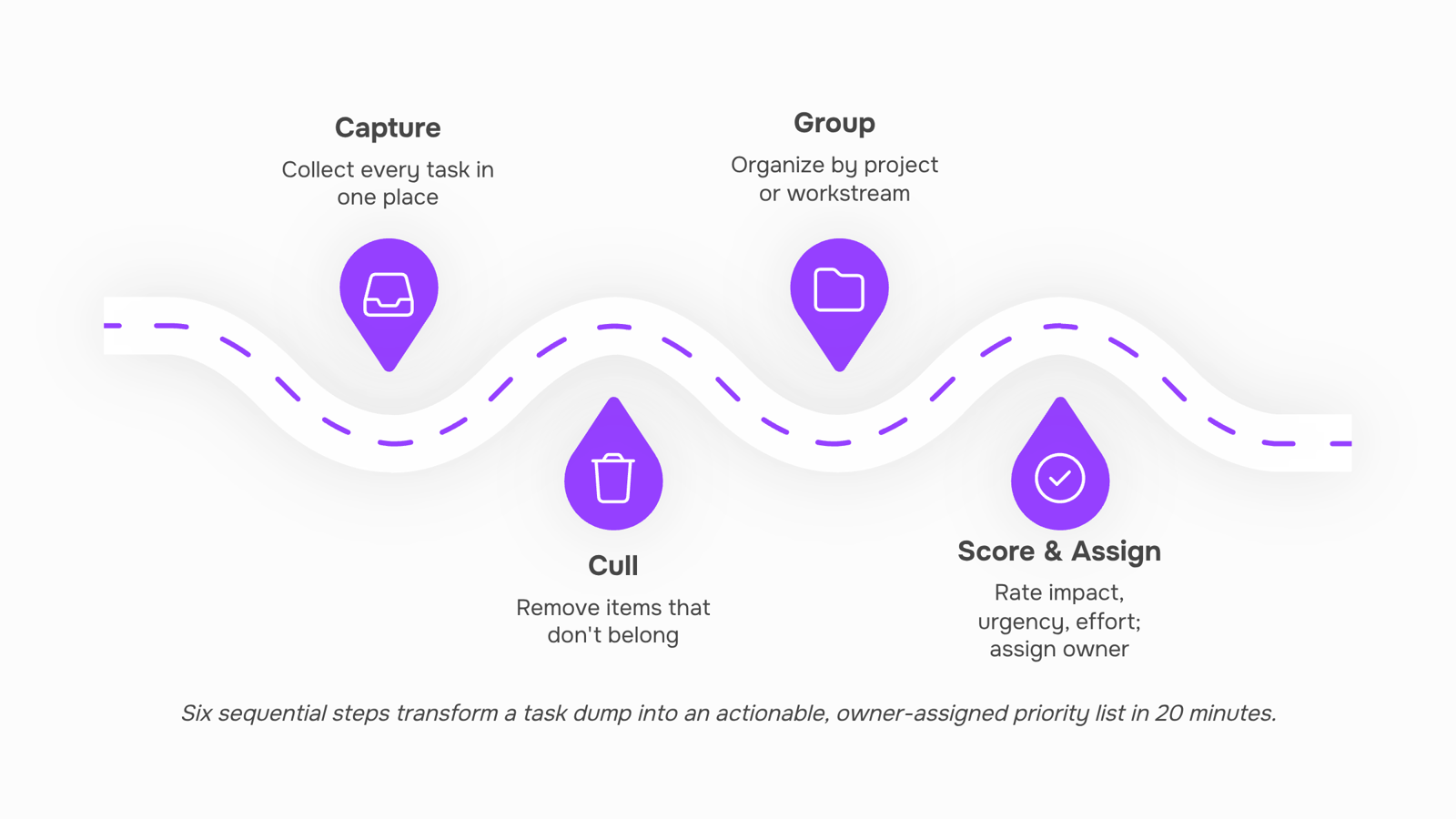
Building a priority list from scratch takes about 20 minutes the first time. Here is the process that makes it stick.
Capture everything in one place
Start with a full brain dump. Pull tasks from your inbox, chat threads, meeting notes, and any open browser tabs you have been meaning to act on. Do not filter yet. The goal is a single, unbroken list of every item competing for your team's attention. Most IT teams discover 30 to 50 items they had been tracking across four or five different places. Getting them into one view is the first real win.
Remove what does not belong
Before you rank anything, cut the noise. Delete duplicates, close out completed items, and flag anything that belongs to someone else's list. A priority list that includes tasks you cannot act on is just a longer list. Aim to reduce your raw capture by 20 to 30 percent before moving forward.
Group by project or workstream
Cluster the remaining items by context: client deliverables, internal builds, support tickets, compliance work. This step prevents you from comparing a five-minute bug fix against a three-week feature build, which is a comparison that produces bad decisions. Grouping first lets you prioritize within categories, then across them.
Score each item on impact, urgency, and effort
This is where how to prioritize tasks gets concrete. For each item, assign a quick score of 1 to 3 on three dimensions: how much it moves the needle (impact), how soon it must be done (urgency), and how much work it requires (effort). High impact, high urgency, low effort items rise to the top automatically. The next section covers this scoring method in more detail, but even a rough pass here is enough to sort your list into tiers: do now, do this week, and do later.
Assign a single owner to every item
A task without an owner is a task that waits. For each item on your list, name one person responsible for moving it forward. Not a team, not a shared inbox. One person. This is the step most priority list templates skip, and it is exactly why accountability breaks down in practice. If you cannot name an owner, that is a signal the task is either not ready to be worked or not actually a priority.
Set a review trigger, not just a review date
Most teams schedule a weekly review and then skip it when things get busy. A more reliable approach is to define the conditions that force a review: a new client request comes in, a deadline shifts, a sprint closes, or a blocker gets resolved. Any of those events should prompt a five-minute check on whether the list still reflects reality. Teams that tie their reviews to events rather than calendar slots keep their lists accurate without adding another standing meeting.
Once you have a working list, the question becomes how often to update it. For most IT teams running two-week sprints, a light review at sprint boundaries plus event-triggered updates is enough. If your backlog is large or fast-moving, tools like Taro's auto-prioritization can scan your backlog and surface what deserves attention before your next planning session, which removes the manual re-ranking work from step four entirely.
The six steps above give you a complete, owner-assigned list in a single sitting. The next section shows you how to score items more precisely when gut feel is not enough.
How to prioritize tasks inside your list
Most task prioritization advice stops at "sort by importance." That's not a method, it's a restatement of the problem.
A lightweight scoring approach gives you something to act on. For each item on your list, assign a score of 1 to 3 across three dimensions:
Impact: How much does completing this move a project, client, or revenue outcome forward?
Urgency: Does this have a hard deadline, or does it just feel pressing?
Effort: How many hours or people does this realistically require?
Add the three scores. Items with the highest combined score move to the top. When two items tie, urgency breaks it.
A concrete example: a client onboarding checklist scores 3 (impact) + 3 (urgency) + 2 (effort) = 8. An internal process doc scores 2 + 1 + 1 = 4. The onboarding work goes first, every time.
This method takes about two minutes per item and removes the gut-feel bias that quietly pushes urgent-but-low-impact work ahead of high-value tasks. If you want a deeper breakdown of how to prioritize tasks on your to-do list, that guide covers edge cases like dependencies and blocked tasks.
For teams managing this inside Taro, scores can be attached directly to tasks so the ranked order is visible to everyone, not just the person who built the list.
How often to review and update your priority list
A priority list for work decays fast. Scope shifts, stakeholders change their minds, and urgent items appear without warning. Without a regular review rhythm, the list stops reflecting reality and starts reflecting the last time anyone looked at it.
Run a standing weekly review of no more than 20 minutes. Check whether the top five items still belong at the top, whether any task has stalled waiting on a dependency, and whether anything new has jumped the queue.
Beyond the weekly cadence, three events should trigger an immediate update:
A project milestone ships or misses its deadline
A client escalates or changes the scope of a request
A team member is added, removed, or pulled onto another workstream
These event-based triggers matter because a static list creates false confidence. Your team executes against priorities that no longer match the actual situation.
If you want a broader view of how to structure the decisions that feed into each review, the best methods for project prioritization covers the frameworks worth knowing before you sit down each week.
The right tool depends on how many items your team is actively managing and how often priorities shift.
Tier | Best for | Priority list template | Backlog handling | AI assistance |
|---|
Spreadsheet | Solo or 2–3 person teams, stable backlog | Manual, fully custom | Up to ~30 items before it breaks down | None |
Manual task manager | Teams of 5–15, moderate churn | Built-in templates, drag-to-reorder | Handles volume; ownership still manual | None |
AI-assisted task manager | 10+ person teams, fast-moving project priority list | Auto-generated, updates on triggers | Reads full backlog, surfaces what's slipping | Flags risk, suggests order |
Spreadsheets work until they don't. Once your backlog crosses 30–40 items and more than one person is editing, you spend more time maintaining the list than executing it.
Manual task managers solve the collaboration problem. You can assign owners, set due dates, and prioritize tasks on a to-do list without a shared spreadsheet. The gap is that reprioritization is still a human judgment call made on stale data.
That's where AI-assisted tools change the equation. Taro's backlog auto-prioritization reads your entire project priority list, scores items against deadlines and dependencies, and tells you what to build first before a deadline slips. For teams learning how to create a priority list that actually stays current, that's the difference between a living document and a static one.
Closing
A priority list is only useful if it stays accurate. The six-step framework above gets you a ranked, owner-assigned list you can execute from immediately. But backlogs grow faster than manual re-scoring can keep up with, especially in IT teams juggling multiple client projects. Once your list is built, the real discipline is maintaining it without turning weekly reviews into a bottleneck. That's where auto-prioritization tools like Taro step in—they scan your backlog continuously and surface what deserves attention next, so your list stays current without the manual audit. Start with the six steps this week. Then ask yourself: which of your team's updates happen so often that you'd benefit from having the scoring happen automatically.
FAQ
How do I create an effective priority list?
Capture everything in one place, remove what doesn't belong, group by project, score each item on impact/urgency/effort (1-3 scale), assign one owner per task, and set event-triggered reviews instead of calendar dates. This takes about 20 minutes the first time.
What are the benefits of using a priority list in project management?
Faster decisions, reduced context-switching (context-switching costs ~23 minutes recovery time), clearer accountability, and fewer missed deadlines. Teams stop making decisions based on who asks loudest and start working on what actually unblocks the team.
How can I prioritize tasks in my priority list?
Score each item 1-3 on impact (how much it moves the needle), urgency (hard deadline vs. just feels pressing), and effort (realistic hours/people required). Add the scores; highest combined score goes first. When items tie, urgency breaks it.
What tools can I use to create and manage a priority list?
Start with a spreadsheet or work management platform. For IT teams with fast-moving backlogs, Taro's auto-prioritization removes manual re-ranking, so your list stays accurate without weekly audits. Most teams pair this with event-triggered reviews rather than standing meetings.
How often should I review and update my priority list?
Tie reviews to events—new client request, deadline shift, sprint close, blocker resolved—rather than calendar dates. For two-week sprints, a light review at boundaries plus event-triggered updates keeps the list current without adding meetings.
What is the difference between a priority list and a to-do list?
A to-do list answers 'what needs doing.' A priority list answers 'what needs doing first, and why.' The ranking is the difference. Without it, the loudest request wins, not the most critical one.
How do I handle tasks that all seem equally urgent?
Separate them by impact and effort. A high-impact, low-effort task that feels urgent should move ahead of a high-urgency, low-impact task. If they're truly equal on all three dimensions, that's a signal one doesn't belong on the priority list yet.


 Elena Petrova15 September 2026


