TL;DR: Most prioritization guides hand you a framework — Eisenhower, MoSCoW, ABCDE — then leave you to figure out how it holds up when you're running five client projects at once and your backlog grows faster than you can sort it. This piece shows IT company owners how to build a prioritization system that stays current, and where AI changes what manual triage actually costs you.
Why most to-do lists fail at prioritization
Organized task list notebook with prioritized checkboxes on clean desk with professional office setting
A to-do list is a capture tool. Its job is to make sure you don't forget things. Prioritization is a different job entirely — and most lists never get that memo.
The result is a flat inventory: 40 tasks, no signal about which three actually matter today. According to Asana's State of Work report, knowledge workers manage an average of 29 tasks at any given time. When everything lives at the same level, the list doesn't guide your day — it just makes the pile visible.
The deeper problem is structural. Traditional lists hide the true scope of what you're dealing with. A single line item like "finish client proposal" can represent four hours of focused work. "Reply to Marcus" takes three minutes. On a flat daily to-do list, both look identical. So you clear the quick wins, feel productive, and the high-stakes task sits untouched until Thursday becomes a crisis.
There's also a reactive drag that compounds this. Most teams find that a significant portion of their day goes to unplanned work — Slack messages, urgent requests, ad-hoc meetings — that never appeared on the list at all. The list doesn't account for that pressure, so it falls further behind reality as the day progresses.
Conflating capture with prioritization means you're constantly re-sorting instead of executing. You turn a one-liner into a fully structured task with priority and due date only when the system forces the question upfront — otherwise, that decision gets deferred until the moment of action, which is exactly when you have the least bandwidth to make it well.
The next section covers four frameworks that actually answer the prioritization question.
Four prioritization methods and when to use each
Most to-do list task advice treats prioritization as a one-time sort: pick your top three, start there, done. That works for a single project. It breaks down when you're managing five clients, a sprint, and a support queue simultaneously.
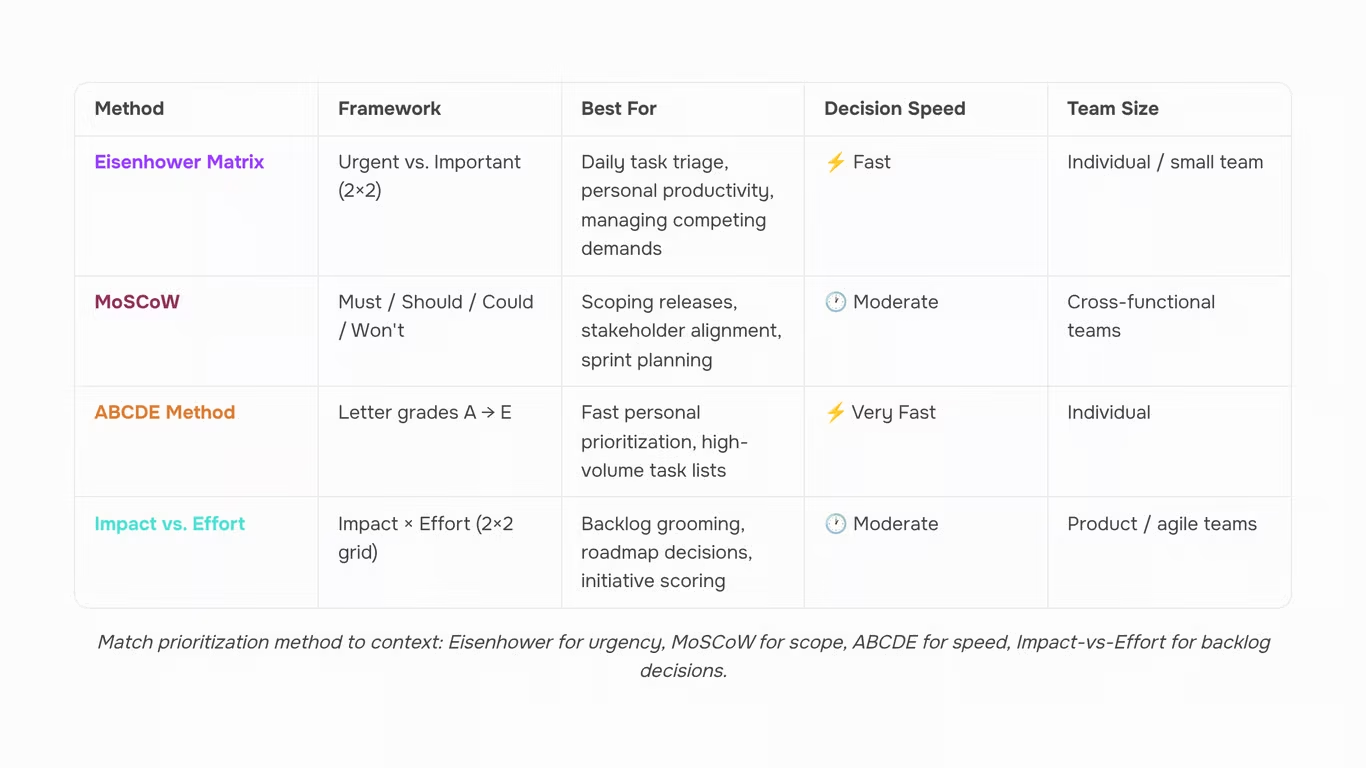
These four methods cover the situations that actually come up in IT work. The key is matching the method to the context, not picking a favorite and applying it everywhere.
Eisenhower Matrix: Splits tasks into four quadrants: urgent and important (do now), important but not urgent (schedule), urgent but not important (delegate), and neither (cut). It's the right tool when your list mixes reactive work with strategic work and you can't tell which is which. The trap is treating everything as urgent, which collapses the quadrants into noise. If more than 40% of your tasks land in "urgent and important," that's a sign the list itself needs pruning, not just sorting.
MoSCoW: (Must-have, Should-have, Could-have, Won't-have) is built for scope decisions, not daily execution. Use it when you're negotiating deliverables with a client or scoping a sprint. It forces a conversation about what actually ships versus what gets deferred. It's a poor fit for personal daily lists because it doesn't account for effort or sequence.
ABCDE: Assigns a letter grade to every task before you start: A tasks have real consequences if skipped, B tasks matter but aren't critical, C tasks are nice-to-do, D tasks get delegated, E tasks get eliminated. It's faster to apply than Eisenhower and works well for how to prioritize tasks across a mixed daily list. The discipline is in honest grading — most people over-assign A.
Impact vs. effort: Plots tasks on a 2×2 grid: high impact, low effort (do first); high impact, high effort (plan carefully); low impact, low effort (batch or skip); low impact, high effort (cut). It's the best method for backlog grooming and sprint planning because it surfaces quick wins without ignoring the big bets.
A practical rule for choosing: use Eisenhower when urgency is blurring your judgment, MoSCoW when scope is the real argument, ABCDE when you need a fast daily rank, and impact-vs-effort when you're deciding what makes the sprint at all.
If you want to skip the manual scoring entirely, Taro can re-rank your entire backlog based on AI reasoning — useful when the list has grown past the point where any matrix fits on a whiteboard.
What belongs on a daily to-do list (and what doesn't)
A daily to-do list should contain only the tasks you intend to complete today. That sounds obvious, but most people's lists are actually three different things collapsed into one: a project backlog, a weekly plan, and a daily execution list. Mixing them is what makes a list feel overwhelming before 9am.
Here's how to separate them:
Project backlog — every task that exists, across every project, regardless of when it needs to happen. This is your inventory, not your schedule. It belongs in your project tool, not on today's list.
Weekly plan — the subset of backlog items you've committed to finishing this week. Review it on Monday. Update it on Friday. Don't look at it mid-day when you're trying to execute.
Daily execution list — the 3 to 7 to do list tasks you will actually complete today, given your real available hours. This is the only list that should be in front of you while you work.
The failure mode is pulling directly from the backlog each morning without filtering through a weekly plan first. You end up with a mix of urgent-but-small and important-but-large tasks sitting at the same level, which makes prioritization harder than it needs to be.
A useful filter: if a task can't be completed in a single work session, it doesn't belong on today's list as written. It belongs on the weekly plan, broken into a smaller step that can. The next section covers exactly how that decomposition works — and why it changes your priority scores in ways a single large task obscures.
Why breaking large tasks into smaller items changes your priority order
Writing "redesign client portal" as a single to-do list task hides at least five decisions inside one line. Large tasks are clusters of unrelated steps with different owners, durations, and dependencies. Breaking them down forces those details into the open.
Once decomposed, the priority order changes because the work itself becomes clearer:
- Dependencies surface: "Get client sign-off on scope" must happen before "configure authentication." You can't see that sequence inside a one-liner.
- Time estimates improve: The brain treats large tasks as a single effort and underestimates them. Subtasks get estimated more accurately, so your daily list reflects what's actually completable.
- Blockers become visible: "Redesign client portal" might sit at medium priority all week. But one of its subtasks, "get client sign-off on scope," could be blocking three other people right now. That subtask belongs at the top of today's list. The parent task doesn't tell you that.
- Scoring methods produce accurate results: Frameworks like RICE or MoSCoW only work when the unit of work is small enough to score honestly.
Taro handles this with task and subtask creation that tracks dependencies, so blockers surface in the right place. You can also turn a one-liner into a fully structured task with priority and due date without building the breakdown manually.
How to manage multiple projects on one to-do list without losing track
Most to-do lists collapse under multiple projects for one reason: tasks are ordered by when they were added, not by what actually matters. Recency bias disguises itself as priority.
The fix isn't a longer list. It's structure. Here's how to build it:
- Tag by project and priority level, not just project: Label each task with its project name and a priority tier (critical, high, medium, low). This lets you filter across your entire backlog in one pass without switching views or re-reading everything from scratch.
- Group by dependency, not by project. Identify which tasks are blockers — nothing downstream moves until they're done — and which are parallel work that can run simultaneously. Atlassian's project management guidance cites dependency-mapping as one of the two practices that most reduce context-switching across concurrent projects.
- Apply one priority scale across all projects. If "high" means something different in Project A than in Project B, you're not prioritizing — you're guessing. A single consistent scale forces honest comparison. Taro's task view ships with 7 task statuses and 4 priority levels in a single view, so the framework stays consistent by default.
- Review sequence, not just priority. A task can be high priority and still be blocked for three days. Knowing that frees you to move to the next actionable item instead of stalling on something you can't touch yet.
- Limit active projects in view at one time. Showing every project simultaneously creates noise. Filter to two or three active projects per work session and revisit the rest in a scheduled review.
Structure beats length every time.
Where AI-assisted reprioritization changes the manual triage equation
Manual triage has a compounding problem: every time a new task lands, a deadline shifts, or a team member goes out sick, the prioritization logic you applied last sprint is partially wrong. Most task prioritization methods — MoSCoW, RICE, Eisenhower — require you to re-score the backlog from scratch. For teams managing multiple projects simultaneously, that's a recurring tax on focused work time.
AI task management changes the equation by treating reprioritization as a continuous process rather than a periodic ritual. Instead of you re-applying a framework, the system reads the full backlog, weighs dependencies, remaining capacity, and hard deadlines, then re-ranks tasks automatically. Taro's backlog auto-prioritization does exactly this: it can re-rank your entire backlog based on AI reasoning whenever inputs change, without you opening a scoring spreadsheet.
The practical difference shows up most clearly when you manage multiple projects. A task that ranked third on Project A may become first if Project B's deadline moves up and they share a dependency. A human triage process catches that eventually. An AI-assisted one catches it the moment the deadline changes.
AI also removes the cold-start problem for new tasks. Rather than leaving a one-liner sitting unscored at the bottom of the list, Taro can turn a one-liner into a fully structured task with priority and due date on creation. The task enters the backlog already ranked, not as noise waiting to be processed.
The result is a to-do list task order that reflects current reality, not the last time someone had 30 minutes to sort it.
Building a prioritization habit that survives a growing backlog
Most prioritization systems fail not because the method is wrong, but because it only gets applied once. A daily to-do list that isn't reviewed as new work arrives becomes a backlog of good intentions within two weeks.
A repeatable weekly routine looks like this: every Monday, spend 10 minutes reviewing what's new, what's shifted, and what's blocked. Reassign priority levels accordingly. Mid-week, do a 5-minute check on anything that's moved from "planned" to "reactive." On Friday, archive completed items and flag anything that needs to be broken into smaller tasks before next sprint.
The goal is to increase productivity by keeping your list accurate, not just long. Taro's 7 task statuses and 4 priority levels built into a single task view make that weekly review faster — you're adjusting, not rebuilding from scratch each time.
Stop Re-Ranking Your To-Do List Manually
Prioritization isn't a one-time decision. Every new client request, every shifted deadline, every task that slips a day changes the order your list should be in — and most teams don't catch it until something's already late.
The method matters: separating urgent from important, sizing tasks honestly, protecting your highest-focus hours for the work that actually moves projects forward. Get those habits right and your team stops firefighting and starts shipping predictably.
The harder problem is maintenance. A to-do list task that was low-priority on Monday can be critical by Thursday, and manually re-ranking a growing backlog is where most prioritization systems quietly break down.
That's exactly what Taro's auto-prioritization is built for — it re-ranks your backlog as deadlines shift and dependencies change, so you're always working from an accurate list, not a stale one. Try it on your own backlog and see what surfaces.



 Elena Petrova15 September 2026


