TL;DR: Most scope of work guides give you a definition and a blank template. This one walks IT company owners through the five decisions that actually prevent scope creep, covers how to handle change requests after the SOW is signed, and shows what a tight SOW looks like for a real service engagement. You leave with a process, not just a document.
What a scope of work actually is
A scope of work is a written agreement that defines exactly what will be delivered, by whom, and under what conditions. It sets the boundary between what is included in a project and what is not.
Most teams treat it as a formality. That framing causes problems. A scope of work functions as a control mechanism: when a client asks for something new mid-project, the SOW is what you point to. Without it, every "small addition" is a negotiation with no reference point, and projects drift. PMI research consistently links the absence of a formal scope document to cost overruns and missed deadlines on IT engagements.
The scope of work definition matters because it is not the same thing as a work plan or a work breakdown structure. Those tools describe how work gets done. The SOW describes what work is in scope at all.
Think of it this way: the SOW is the contract layer. Everything else, timelines, task lists, resource plans, sits underneath it. Get the boundary wrong at this stage, and no amount of project management fixes it later.
Key elements every scope of work needs
A complete SOW has seven components. Miss any one of them and you create the exact ambiguity the document is supposed to prevent.
Objectives state what success looks like in measurable terms. "Migrate the client's CRM to a cloud environment with zero data loss and 99.9% uptime post-launch" is an objective. "Improve the system" is not.
Deliverables list every output the client receives, named specifically. A deliverable is a noun: a configured server, a tested API integration, a training document. If it isn't listed, it isn't included.
Timeline maps each deliverable to a date or milestone. A single end date isn't enough. Break the project into phases so both sides can spot slippage early, not at the deadline.
Exclusions are the section most SOWs skip, and the one that prevents the most disputes. Explicitly name what you will not do. "Out of scope: third-party software licensing, hardware procurement, post-launch support beyond 30 days." This is where a scope of work template earns its value, because the exclusions section forces you to think through edge cases before the project starts.
Acceptance criteria define how a deliverable gets approved. "Client will review and approve within five business days of delivery; silence after that period constitutes acceptance" removes the ambiguity that stalls final payment.
Payment terms tie compensation to milestones, not just calendar dates. Milestone-based billing gives both sides a clear trigger and reduces disputes over whether work was actually completed.
Change process describes what happens when scope shifts. A one-paragraph change-order clause, requiring written approval before any out-of-scope work begins, is the single best tool for scope creep prevention. For teams managing multiple concurrent projects, pairing these key elements of a scope of work with a work breakdown structure keeps deliverables traceable at every level.
How to define your scope of work in 5 steps
Writing a scope of work from scratch feels open-ended until you break it into a fixed sequence. These five steps give you that sequence, so you move from a blank page to a signed document without missing anything that causes problems later.
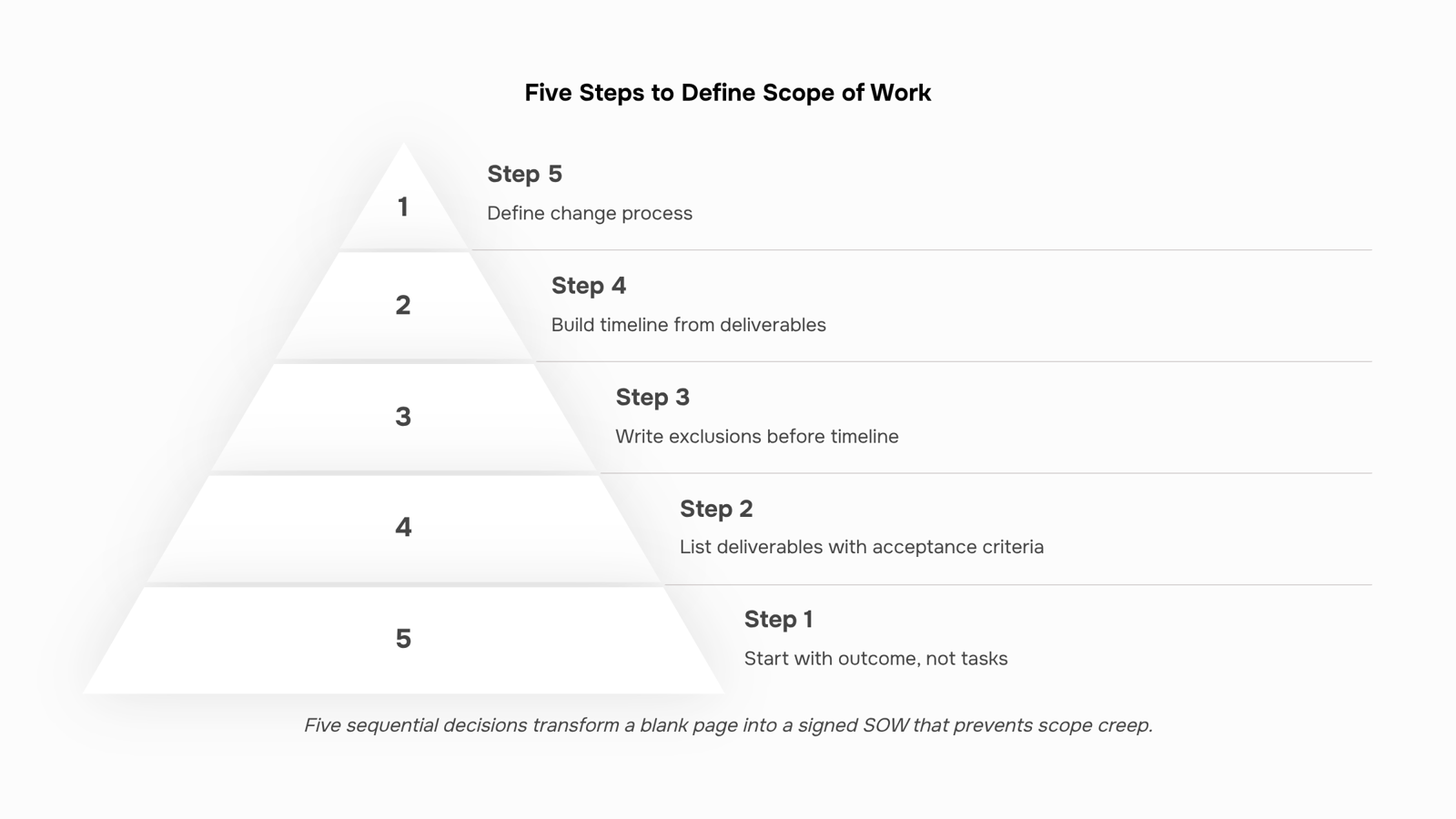
Start with the outcome, not the task list. Define what "done" looks like before you list a single deliverable. Write one or two sentences that describe the end state the client expects. For an IT infrastructure project, that might be: "Client's on-premise servers migrated to AWS, with zero data loss and all staff able to authenticate within five business days of go-live." That sentence becomes the anchor for every decision that follows.
List deliverables with acceptance criteria attached. For each deliverable, write the condition that makes it acceptable. "Website redesign" is not a deliverable. "Five-page responsive website, reviewed and approved by the client's marketing lead within three business days of submission" is. This pairing is your primary tool for scope creep prevention — if a deliverable has no acceptance criteria, any version of it can be disputed.
Write the exclusions section before the timeline. Most teams skip this step and pay for it later. Explicitly name what you are not doing: "This SOW excludes third-party API integrations, mobile app development, and ongoing maintenance after the 30-day warranty period." Exclusions are where the scope of work definition earns its value. A client who later asks for something excluded has no grounds to call it in-scope.
Build the timeline from the deliverables, not the calendar. Map each deliverable to a milestone, then sequence the milestones. Use durations rather than fixed dates where possible ("14 business days after kickoff" beats "March 15") so the timeline survives a delayed start. If you need a structured way to break the work down before you sequence it, a work breakdown structure is the right tool at this stage.
Define the change process before you sign. Every SOW needs a change control clause. Specify the minimum: how a change request is submitted, who reviews it, and how pricing adjustments are handled. A one-paragraph clause here prevents the informal "can you just add this" conversations that quietly double a project's scope. Teams that treat the SOW as a living control mechanism rather than a filing document catch these requests before they compound.
Once all five elements are in place, you have a document that sets expectations, assigns ownership, and gives both sides a reference point when disagreements arise. If you want to understand how this document sits alongside your project execution plan, the next section covers exactly how a scope of work differs from a work plan across four key dimensions.
Scope of work vs. project plan: what each one does
These two documents solve different problems, and mixing them up causes real friction on projects.
A scope of work is a contract-layer document. It defines what gets delivered, what falls outside the engagement, and what both parties agreed to before work starts. Its primary audience is the client or stakeholder who needs to sign off. You write it before the project plan exists.
A project plan is an execution-layer document. It maps tasks, owners, dependencies, and timelines so your team knows how to deliver what the SOW promises. Its audience is internal. You write it after the SOW is locked.
Dimension | Scope of work | Project plan |
|---|
Purpose | Define deliverables and boundaries | Sequence tasks and assign ownership |
Primary audience | Client or sponsor | Internal team |
Timing | Before work begins | After SOW is approved |
Level of detail | What and why | How and when |
In practice: if a client asks "what exactly are we getting," you hand them the SOW. If a developer asks "what am I doing Tuesday," you hand them the project plan. Conflating the two means either your client is reading Gantt charts they don't need, or your team is trying to execute from a document that never named a single task.
For a related layer of planning, building an effective work plan for your team covers how to translate a locked SOW into team-level execution.
How to handle scope changes after sign-off
Scope changes are inevitable. The question is whether you handle them with a process or with a conversation that leaves everyone confused about what was actually agreed.
A simple change request process works like this:
The client or stakeholder submits the change in writing, describing what they want added, removed, or modified.
You assess the impact: hours, cost, timeline, and which existing deliverables shift as a result.
Both parties sign off on the updated scope before any new work begins.
That third step is where most IT teams lose ground. Work starts before approval lands, and the original SOW quietly expands without a paper trail.
For scope creep prevention, the SOW itself should include a change clause that sets this expectation upfront. Something like: "Any work outside this document requires a written change order, agreed by both parties, before execution." One sentence, placed before the deliverables list, removes most of the ambiguity.
When changes are frequent, a work breakdown structure helps you visualize exactly which tasks are affected by a requested change, so your impact assessment takes minutes instead of a meeting.
Log every approved change against the original SOW. Over a 6-month engagement, those logs become your clearest record of what was delivered versus what was originally promised, which matters when billing disputes arise.
A signed SOW is only useful if your team can see it while they're working. Paste the deliverables, milestones, and ownership assignments from your scope of work template directly into a project tool like Taro, where each item becomes a tracked task with a named owner and a due date.
This is how you define scope of work in practice, not just on paper. When a deliverable lives inside your project hierarchy, the team stops guessing what's in scope and managers can spot drift before it compounds.
Change requests from the previous step get logged in the same workspace. One place, one version, no "which doc is current" confusion.
Closing
A scope of work is the boundary document that protects both you and your client. It prevents scope creep by making exclusions explicit, ties deliverables to acceptance criteria, and gives you a reference point when mid-project requests arrive. The SOW only works if it moves from a signed PDF into your actual project execution. Once it's approved, mirror those deliverables into Taro as trackable tasks with owners and deadlines. That's the step that turns a filing-cabinet artifact into a running project that stays aligned with what you promised.
FAQ
How do I define the scope of work for my project?
Start with the outcome, not tasks. Write what done looks like, then list deliverables with acceptance criteria attached. Write exclusions before the timeline, sequence milestones, and define your change process before signing.
What are the key elements of a scope of work statement?
Objectives, deliverables, timeline, exclusions, acceptance criteria, payment terms, and change process. Missing any one creates the ambiguity the SOW is supposed to prevent.
Can a scope of work be changed during a project?
Yes, through a formal change order. Your SOW should include a change control clause specifying how requests are submitted, reviewed, and priced before any out-of-scope work begins.
How does a scope of work differ from a project plan?
The SOW is a contract-layer document defining what gets delivered and what doesn't. The project plan is an execution-layer document that sequences tasks and assigns ownership to your team.


 Elena Petrova15 September 2026


