


Project Management Built for
Every Team and Every Stage
Projects with budget, priority, dates, approvals, and 5 status stages. Plus member roles, expiry-based sharing, auto progress.

From a project idea to a fully governed delivery unit in four steps
TARO gives every project full structure—fields, roles, approvals, and progress—before any task exists.

Create
Every project starts with more than just a name.
A TARO project is a structured entity, not a folder of tasks. At creation you set a budget, priority, start and end dates, and a cover image. Every field shows on the card, so leads gauge health at a glance.
Progress
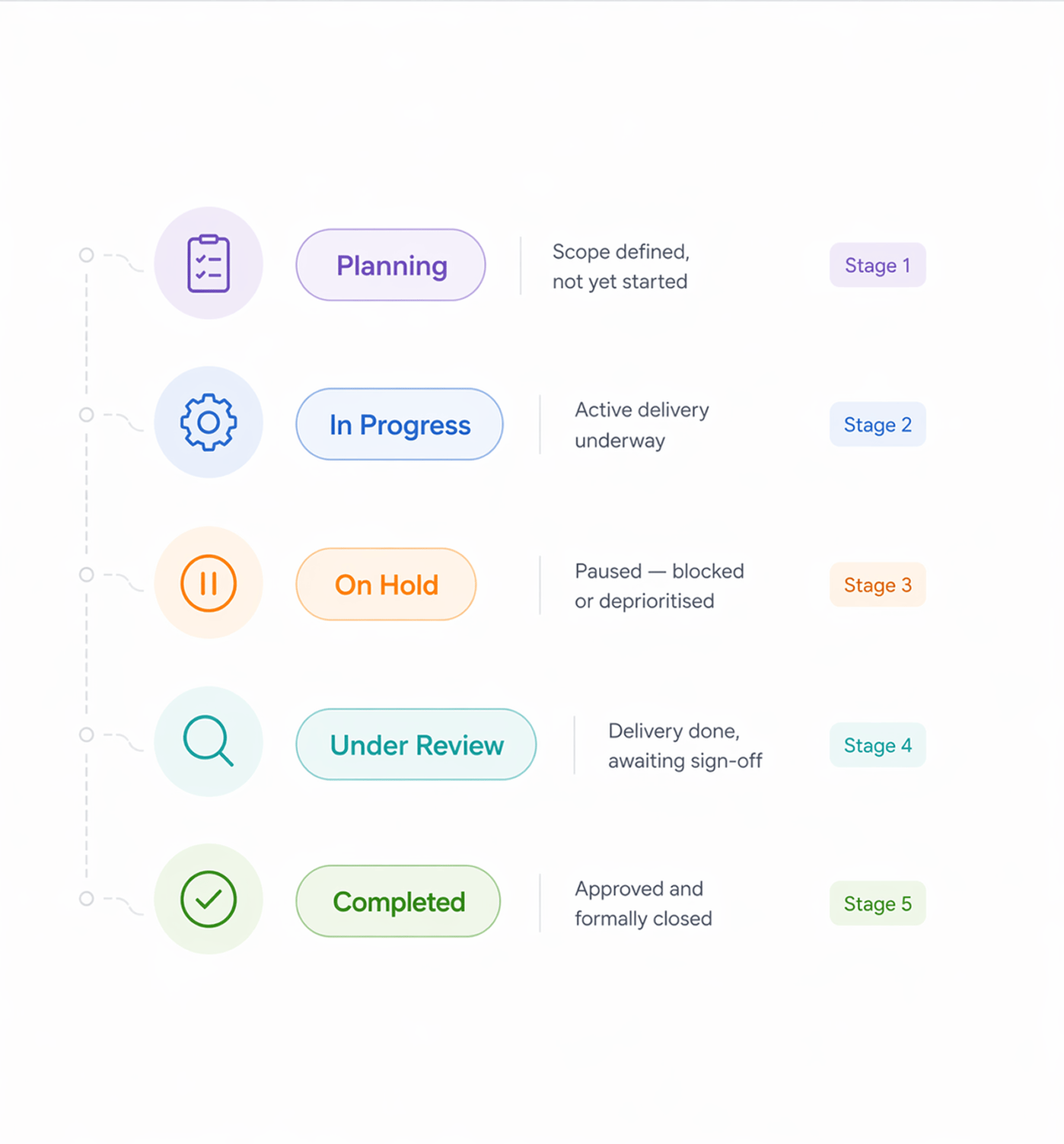
Five stages that cover the full project lifecycle.
Every project moves through five defined stages, from planning through active delivery to formal closure. Each transition is deliberate and logged, so the history reflects how the project actually progressed.
Access
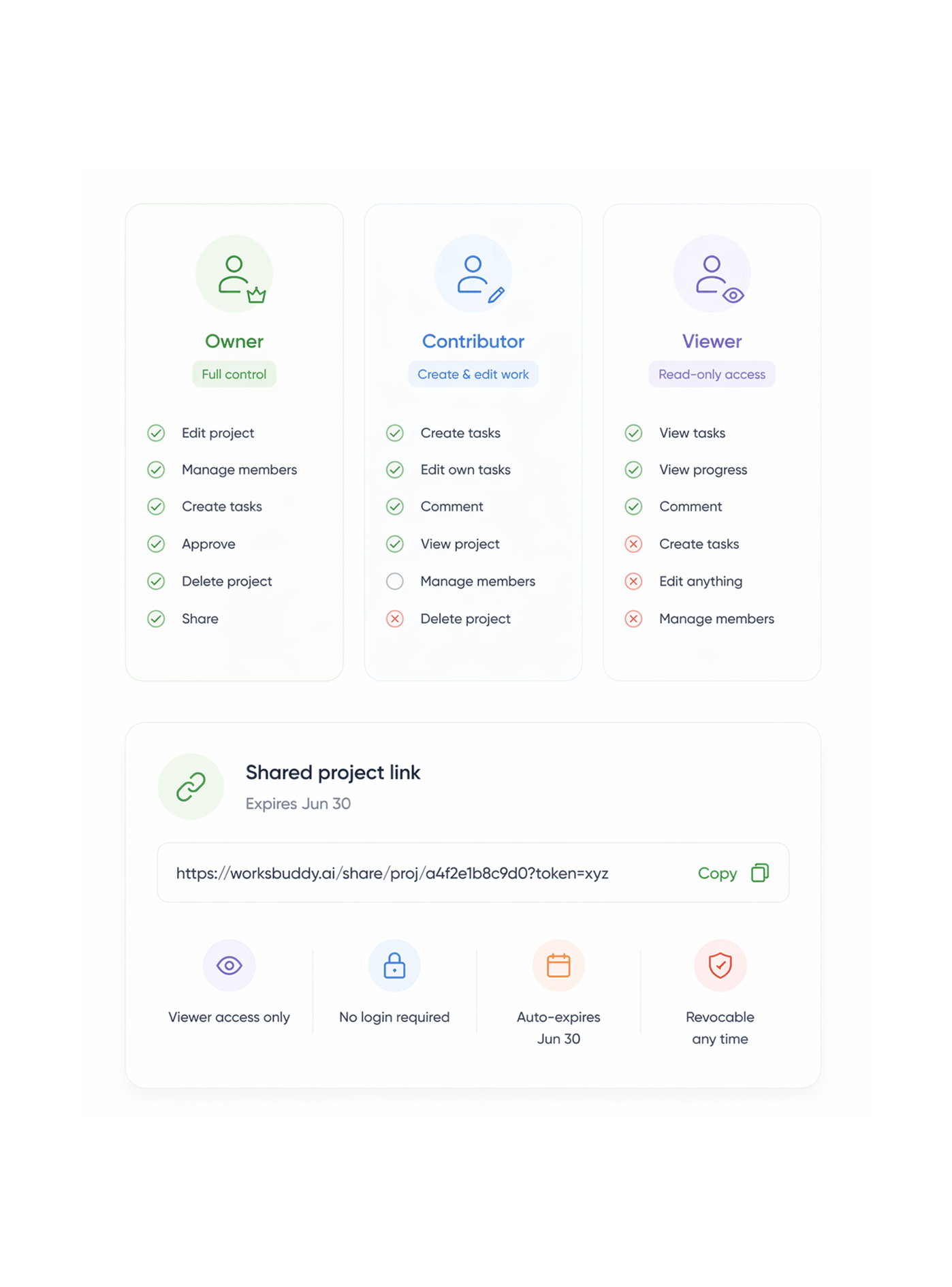
Three roles. Expiry based sharing. Exact access control.
Every member gets one of three roles—Owner, Contributor, or Viewer—each with a distinct permission set enforced at every action. For external stakeholders, sharing generates a tokenized link with an expiry date.
- Full control
- Create & edit work
- Read only access
Governance
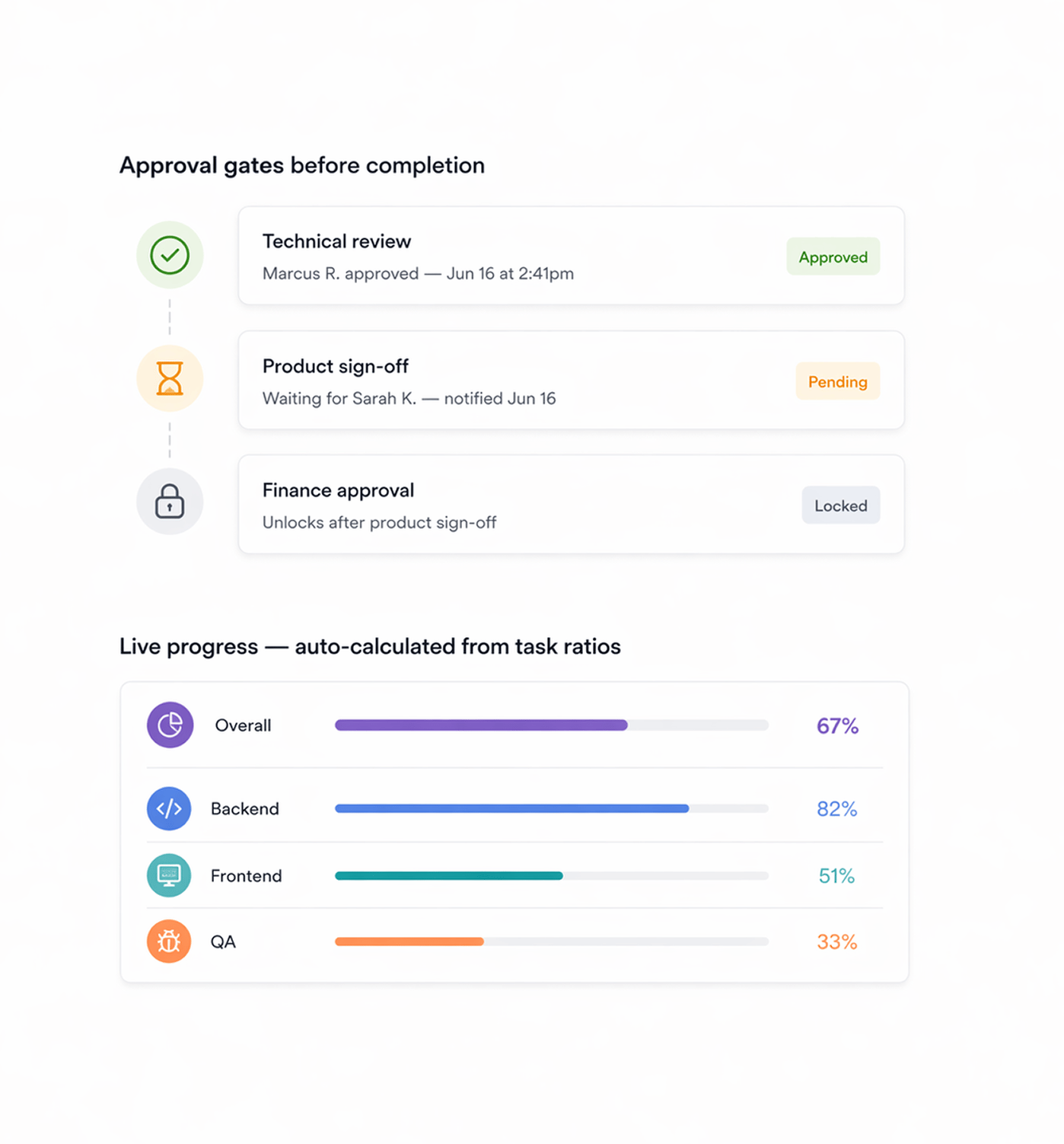
Approval gates before completion. Progress that calculates itself.
Projects moving to Completed pass through an approval workflow requiring reviewer sign-off before close. TARO calculates progress from the ratio of completed tasks to total, updating the bar live.
Six reasons teams never go back
A project isn't just a list of tasks. It's a budget, a priority, a team, a timeline, and an approval gate. TARO treats it that way from creation.

Budget lives on the project not in a spreadsheet
Every project carries its budget alongside its tasks, timeline, and team. Leads see budget, progress, and deadline in one place no separate finance tool.

Progress calculates itself from live task ratios
No manual updates, no percentage sliders. TARO calculates progress from completed tasks over total, updating the bar the instant any status changes.

Approval workflows before formal project close
Projects don't just get marked done. Designated reviewers must approve in sequence before a project moves to Completed. The workflow enforces sign-off.

Three roles access is explicit, not guessed
Owner, Contributor, Viewer. What each role can and can't do is explicit and enforced. No one discovers delete access they shouldn't have.

Expiry based sharing for external stakeholders
Generate a tokenized link with an expiry date. A client sees the project's live progress until the link expires—no account, no permanent access.

Cover images make the workspace scannable
Each project's cover image lets teams identify work fast. A grid of gray rectangles tells you nothing; named, distinct cards tell you everything.


800+ product teams
already using TARO
Built for every team managing
work that spans weeks
Engineering leads, product managers, and operations teams use TARO's Project Management layer for one reason: work that spans sprints and needs approval at completion deserves real structure.
Project status stages
Member roles
Progress auto calculated
Approvals skipped
Budget, timeline, and progress in one place not three separate tools.
Leads create a project with budget, deadline, and priority. The live progress bar calculates from task completions, and an approval gate enforces review before close. See it at a glance.
Projects are the container. TARO's intelligence is what fills them.
Once a project is structured, TARO's AI runs beneath it—predicting delivery and ranking what's next.

Task Management
Full task CRUD with rich text, 7 statuses, 4 priorities, subtasks, checklists, time tracking, dependencies, and 6 view modes all nested in the project.

Sprint & Agile
Run the full sprint lifecycle in a project planning, burndown, AI workload balancing, and completion prediction, with carryover at close.

Completion Analysis
Predicts the actual finish date from team velocity, current blockers, and sprint history. Gives you the real date before you commit.

Risk Prediction
Scans the project for overdue tasks, stalled workflows, velocity drops, and blocked dependencies, surfacing fixes before deadlines slip.
Everything you need to know about TARO Project Management
Common questions from engineering leads, PMs, and account managers evaluating TARO's project layer.
TARO calculates project progress as the ratio of completed tasks to total tasks at any moment. Tasks with a status of "Completed" count as done; all other statuses (To Do, In Progress, In Review, On Hold) count as not-done. The percentage and bar update every time a task's status changes, no manual input. Progress can also break down by tag, so a project with "Backend" and "Frontend" tags shows a separate bar per tag.