TL;DR: Most eSignature creator guides stop at the basics and skip the decisions that slow deals down: routing logic, field setup, and post-signature workflow. This one walks IT company owners through the full signing process, from document configuration to completion certificates, including when sequential versus parallel signing changes your turnaround time. You'll finish with a method you can put to work today.
What an eSignature creator actually is
An eSignature creator is software that captures a legally binding electronic signature and embeds it directly into a document, producing a tamper-evident record of who signed, when, and from where. That's meaningfully different from typing your name in a font field or scanning a wet signature and pasting it as an image. Neither of those creates an audit trail. Neither carries the authentication layer that makes a signature enforceable under the ESIGN Act (US, 2000) or eIDAS in the EU.
A proper electronic signature tool does three things: it verifies signer identity (via email, SMS, or access code), records every action in a timestamped audit log, and generates a completion certificate that travels with the document. That certificate is what you'd produce in a dispute.
What it doesn't do is replace legal review. The tool handles execution; a lawyer handles the terms.
If you want to understand how signatures are actually captured before committing to a workflow, how to create a free electronic signature covers the mechanics clearly. The next section covers which document types, including NDAs, SOWs, and vendor agreements, a typical esignature creator supports out of the box.
What you can sign with an eSignature creator
Most document types you already work with are supported. Contracts, NDAs, vendor agreements, statements of work, employment offers, partnership terms, and service agreements all qualify for online document signing without modification. If it exists as a PDF or common office format, an esignature creator can handle it.
The practical boundary is simpler than most people expect: if the document requires a wet-ink notarization by law (certain real estate deeds, court filings, wills in some jurisdictions), an electronic signature alone won't satisfy the requirement. Everything else is fair game.
For IT company owners, the most common use cases are client contracts, SaaS subscription agreements, vendor onboarding forms, and project SOWs. These are exactly the documents where delays cost money. Getting them signed online cuts the back-and-forth that stalls deal closure.
If you want to understand how electronic signatures hold up legally and technically against traditional signatures, that comparison is worth reading before you commit to a workflow.
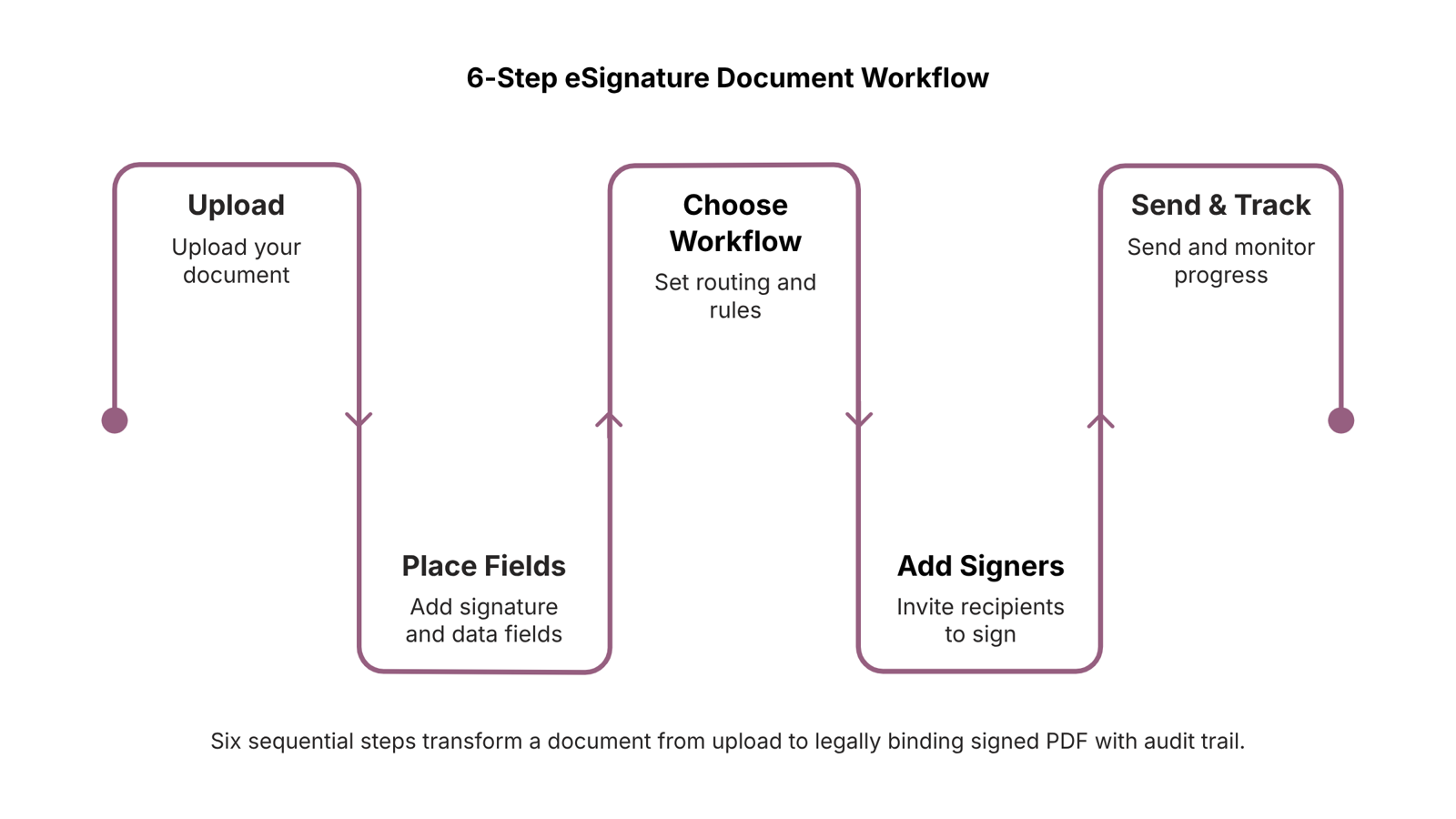
How to use an eSignature creator in 6 steps
Here is a clean six-step walkthrough of the full document signing workflow, from first upload to signed PDF in your inbox.
Upload your document: Drag in a PDF, Word file, or Google Doc. Most esignature creator tools accept these formats natively. If you're working with a contract, NDA, or SOW, upload the final version, not a draft, because the audit trail timestamps the moment the document enters the workflow.
Place signature and form fields: Open the document editor and drag fields onto the page: signature block, date, initials, or free-text input. Place them precisely where you need them, not just at the end. A well-placed field set reduces back-and-forth because signers don't have to guess where to sign or what to fill in.
Choose your signing workflow: This step is where most guides skip the detail that matters. You have three options:
Self-sign: You sign the document yourself, typically for internal records or personal declarations.
Sequential: Signers receive the document one after another in a fixed order. Use this for contracts where approval hierarchy matters, such as a vendor agreement that needs your legal review before the counterparty signs.
Parallel: All signers receive the document at the same time. Use this when order is irrelevant and speed is the priority, like collecting signatures from multiple team members on a policy update.
Sequential workflows take longer by design. Parallel workflows close faster because no one is waiting on someone else. Knowing which to use for each document type is the single biggest factor in how quickly your document signing workflow resolves.
Add signers and set the routing order: Enter each signer's email address and assign them to the correct fields. If you're using sequential routing, confirm the order before you send. A misfired sequence means the wrong person gets the document first, which can create compliance problems on regulated contracts.
Send and track in real time: Once you hit send, the platform timestamps the delivery and tracks every action: opened, viewed, signed, or declined. You're not waiting on email threads or phone calls to find out where things stand. If a signer hasn't opened the document after 24 to 48 hours, most tools let you send a reminder without re-uploading anything.
Download the completed PDF with the audit trail: After all parties sign, the platform generates a final PDF with signatures embedded directly into the document, plus a completion certificate that logs every action, timestamp, and IP address. This is the record that holds up if a dispute arises. For a deeper look at how electronic signatures compare to traditional signatures on security, the audit trail is usually the deciding factor.
Sigi handles all six steps inside WorksBuddy, so the signed document can link directly to a CRM deal or invoice without a manual handoff. If you're still deciding which platform fits your setup, choosing the right online document signing platform covers the criteria worth checking before you commit.
Why businesses use an eSignature creator
Switching from paper to an electronic signature tool isn't just about convenience. Each benefit maps directly to a measurable outcome your business cares about.
Speed: Contracts that once took days to return now close in hours. When you route documents through an online document signing workflow, signers receive a link, sign from any device, and return the completed file without printing a single page. For multi-party agreements, parallel signing (all parties sign simultaneously) cuts turnaround further compared to sequential chains where each person waits on the previous one.
Cost reduction: Printing, couriering, and storing paper contracts adds up faster than most teams track. Removing those steps eliminates a recurring line item with no operational tradeoff.
Compliance and audit readiness: Every signed document generates a timestamped completion certificate that records who signed, when, and from which IP address. That record is available immediately if a dispute arises or an auditor asks. Under the ESIGN Act (US, 2000) and eIDAS (EU), electronic signatures carry the same legal weight as handwritten ones, provided the signing process captures intent and identity.
Fewer dropped deals: Manual follow-up on unsigned contracts is a real source of revenue leakage. An esignature creator with automated reminders removes that dependency on memory.
If you want to see how these outcomes connect in practice, Sigi handles the full workflow from upload to signed PDF inside WorksBuddy.
Is an eSignature creator secure and reliable
Security is the most common reason IT company owners hesitate before moving away from wet signatures. The hesitation is understandable, but the mechanics of a modern esignature creator address most of it directly.
Every signed document generates an audit trail: a timestamped log of who opened the document, when they signed, and from which IP address. That log is embedded in a tamper-evident completion certificate, so any post-signature alteration invalidates the record automatically. Signing links are encrypted and single-use, meaning a forwarded email can't produce a second valid signature.
Legal standing is solid. Electronic signatures have been enforceable under the US ESIGN Act since 2000 and under eIDAS across the EU since 2016. Both frameworks treat a properly recorded electronic signature as equivalent to a handwritten one. If you want a deeper look at how electronic signatures compare to traditional signatures on security, that breakdown covers the specific evidentiary differences.
When you sign documents online through Sigi, each completed document gets a PDF with embedded signature data alongside a full audit certificate, which matters when a client or auditor asks for proof months later.
For a full primer on the underlying technology, see what an electronic signature is and how it works.
Can you use an eSignature creator for free
Yes, most esignature creator tools offer a free tier. The honest answer is that free plans work fine for occasional, low-volume signing — typically one to three documents per month with basic text fields only.
What free plans usually cut:
Document volume: most cap you at 3–5 sent documents per month
Field types: advanced fields like conditional logic, initials, or date-auto-fill are paid-only
Workflow routing: sequential or parallel signing order is rarely available on free tiers
Audit trails and completion certificates: often locked behind paid plans, which matters if you need legal defensibility
If you're an IT company owner signing the occasional contractor NDA, a free esignature tool covers you. Once you're routing service agreements through multiple approvers, or need a tamper-proof record for compliance, the free tier creates gaps you'll feel later.
Choosing the right online document signing platform breaks down what to check before committing to any plan.
Manage the full document lifecycle in one place
Signing a document is one step, not the finish line. Once a contract is signed, most IT teams still have to manually update their CRM, generate a completion certificate, notify the next person in the queue, or trigger an invoice. That manual handoff is where deals stall and errors compound.
A well-configured document signing workflow connects each of those steps automatically. The esignature creator handles the signature; post-signature triggers handle everything downstream. Sequential signing workflows, where each party signs in a defined order, work well for multi-party IT contracts where approval chains matter. Parallel workflows suit situations where all parties can sign independently.
Sigi connects signing directly to CRM deals, tasks, and invoices inside WorksBuddy, so the workflow continues without anyone copying data between tabs. Every signed document gets a tamper-proof completion certificate automatically.
If you want to understand how the underlying technology holds up legally and technically, what an electronic signature is and how it works covers the mechanics. For platform selection, choosing the right online document signing platform maps out the decision criteria.
Closing
The difference between a signing tool and a signing workflow is routing logic and automation. Most IT company owners start with self-sign or parallel workflows for speed, then layer in sequential routing for contracts that need approval gates—and that's when you realize you need post-signature automation to keep deals moving without manual handoffs. Sigi's self-sign and multi-party workflows handle both, with direct integration to your CRM and invoicing so signed documents don't sit in an inbox waiting for the next step. Start with a free trial to wire up your first document today.
FAQ
What types of documents can I sign with an eSignature creator?
Contracts, NDAs, vendor agreements, SOWs, employment offers, and service agreements all work. Anything that's a PDF or office format qualifies—except documents requiring wet-ink notarization by law, like certain real estate deeds or court filings.
Is an eSignature creator secure and legally binding?
Yes. Electronic signatures carry the same legal weight as handwritten ones under the ESIGN Act (US) and eIDAS (EU), provided the tool captures identity verification and generates a timestamped audit trail. That completion certificate is what holds up in disputes.
Can I use an eSignature creator for free?
Many platforms offer free tiers with limited documents or signers per month. For IT company workflows with recurring multi-party contracts, paid plans unlock unlimited routing, reminders, and audit trails without per-document fees.
What are the benefits of using an eSignature creator for business?
Contracts close in hours instead of days, printing and courier costs disappear, every signature generates an audit trail for compliance, and automated reminders eliminate dropped deals from manual follow-up.
Do signers need an account to sign a document I send them?
No. Signers receive a link via email, sign directly in their browser, and verify identity through email, SMS, or access code—no account creation required. That removes friction and speeds turnaround.


 Megan Foster15 September 2026


