TL;DR: TL;DR: Most invoice processing guides describe what a system does without showing how each step triggers the next. This one walks through all six stages from receipt to reconciliation, identifies where manual handoffs create delays and errors, and shows IT company owners exactly where automation removes those bottlenecks.
What an invoice processing system actually does
Modern 3D illustration of invoice processing system workflow with documents and data flow indicators
An invoice processing system is the full operational cycle that moves a vendor invoice from the moment it arrives — email, PDF, EDI, or paper — through verification, approval, and payment, ending only when the transaction is reconciled against your books.
Most definitions stop at "software that handles invoices." That undersells the scope. The system has to capture invoice data, match it against purchase orders and delivery receipts, route it for approval, schedule payment, and then confirm that what was paid matches what was owed. Each stage produces a specific output that triggers the next.
Manual workflows break at the matching and approval stages most often. AP teams spend time chasing down PO numbers, correcting data entry errors, and waiting on email approvals — all before a single payment is scheduled.
An automated invoice processing system replaces those manual handoffs with rules-based routing and data extraction, so the cycle runs without someone shepherding each invoice through. Understanding how invoice automation works mechanically makes the six steps ahead easier to map to your current process.
How an invoice processing system works: 6 steps
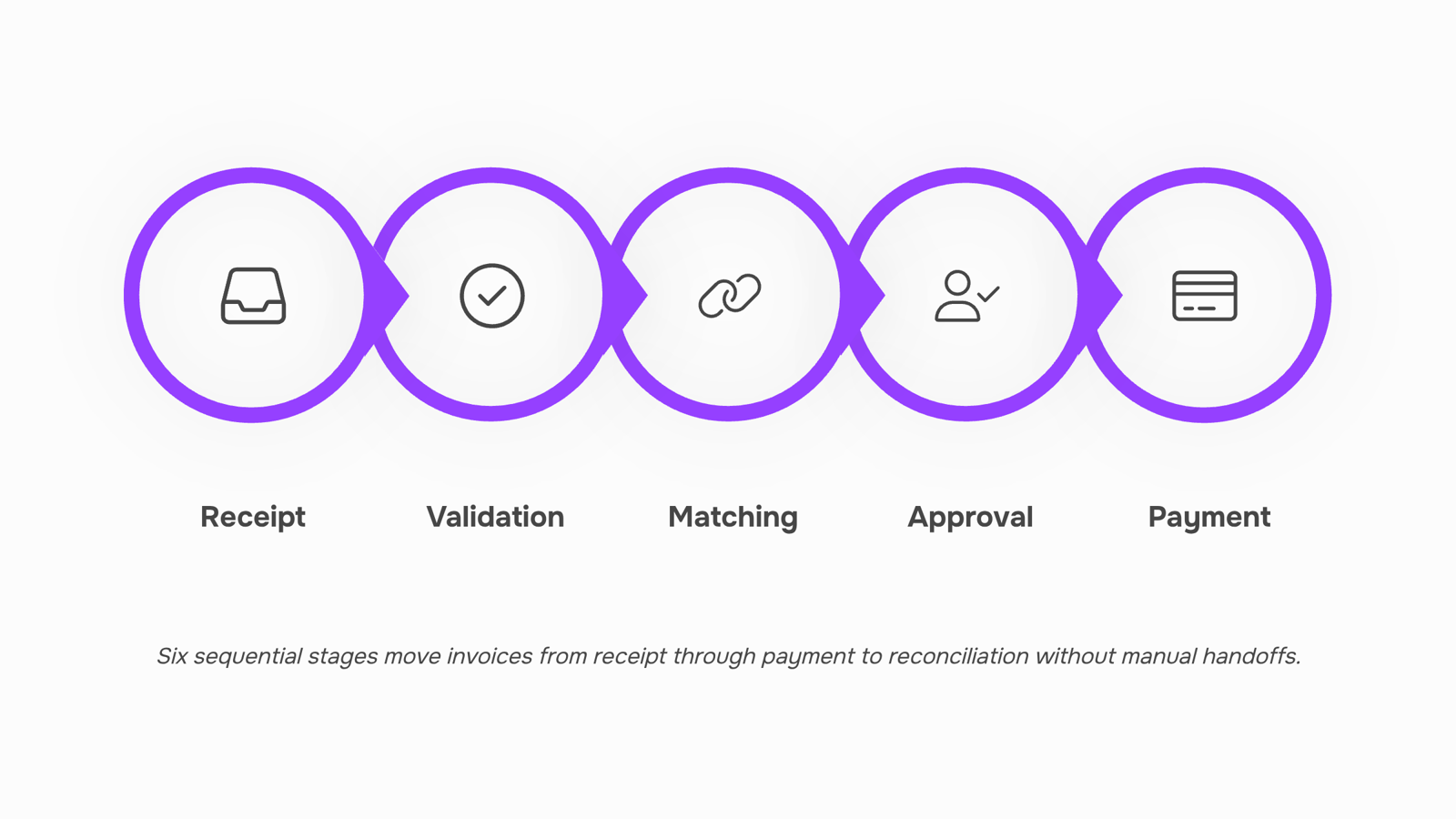
Every invoice moves through the same sequence, whether your team handles it manually or routes it through an automated invoice processing system. The six steps below map that sequence exactly — what kicks each stage off, and what it produces.
Step 1: Receipt and capture
An invoice arrives — via email, supplier portal, EDI feed, or paper scan. The system captures it and converts unstructured data (vendor name, invoice number, line items, amounts, due date) into structured fields. In electronic invoice processing systems, this happens through OCR combined with machine learning that improves extraction accuracy over time. Output: a digital record ready for validation.
Step 2: Validation and duplicate check
The captured data runs against basic business rules: is the invoice number unique? Does the vendor exist in your approved vendor list? Are required fields populated? A vendor invoice processing system flags duplicates automatically — a common failure point in manual AP, where the same invoice submitted twice often clears both times. Output: a clean, validated invoice or a flagged exception routed for review.
Step 3: Three-way matching
The invoice matches against the originating purchase order and the goods receipt. If quantities, prices, and vendor details align across all three documents, the invoice clears automatically. If they don't, it routes to the appropriate approver. This step is where most manual processing time disappears — matching by hand across spreadsheets and email threads is slow and error-prone. Output: a matched invoice approved for payment, or an exception with a specific mismatch noted.
Step 4: Approval routing
Invoices that pass matching move through your defined approval workflow. Routing logic can be based on invoice amount, cost center, department, or vendor type. An automated invoice processing system enforces these rules consistently — no invoices sitting in an inbox because an approver is traveling. Output: an approved invoice with a complete audit trail of who approved what and when.
Step 5: Payment execution
Approved invoices schedule for payment according to terms — net 30, net 60, or early-payment discount windows. The system batches payments, initiates the transfer (ACH, wire, check), and updates the AP ledger. For teams that want to understand how invoice automation works across the payment cycle, this step is where cash flow visibility becomes concrete: you can see exactly what's scheduled, when, and to whom. Output: payment initiated and ledger updated.
Step 6: Reconciliation and archiving
Once payment clears, the system matches the payment record against the invoice and the bank statement. Discrepancies surface immediately rather than at month-end. The closed invoice archives with its full document trail — invoice, PO, receipt, approval log, payment confirmation — making audit prep a query rather than a document hunt. Teams exploring how AI-powered AP automation improves this stage typically find the biggest gains here: reconciliation that once took days compresses to hours. Output: a reconciled, archived record ready for reporting.
Each step feeds the next. Break any link in the chain and exceptions accumulate downstream.
Benefits of automating invoice processing
Manual invoice processing costs most IT teams between $15–$40 per invoice, according to IOFM benchmarks. Automation brings that closer to $3–$5. That gap is where the internal case gets made.
Here's what a well-configured automated invoice processing system actually delivers:
Speed. Invoices that took 2–3 days to route, approve, and log now complete in hours. Fewer handoffs, fewer delays.
Error reduction. Manual entry introduces mistakes on roughly 3–5% of invoices in typical AP environments. Automated matching against POs and contracts catches mismatches before they reach payment.
Cash flow visibility. When invoices are captured and coded in real time, your accounts payable balance reflects reality — not a two-day lag. The best automated invoice processing system for real-time accounts payable insights connects invoice status directly to cash position, so you're not estimating.
Audit readiness. Every approval, exception, and timestamp is logged automatically. When an auditor asks for documentation, you pull a report — you don't reconstruct a paper trail.
For IT companies specifically, tools like Inzo add another layer: invoices can trigger automatically from project completion or CRM deal closure, which means billing happens when the work happens, not when someone remembers to send it.
Features to look for in an invoice processing system
Not every invoice processing system fails the same way. Most fail at the same three points: they can't talk to your accounting software, they have no trigger-based logic, and they surface data too late to act on it. Here's what to look for instead.
Accounting software integration is the first filter. A native connection to your GL means invoice data flows directly into your chart of accounts without a manual export step. A middleware connection works, but adds a failure point. The next section covers this distinction in detail — it matters especially for IT companies with project-based billing where invoice timing affects revenue recognition.
Trigger-based automation separates functional systems from genuinely useful ones. The system should route invoices automatically based on amount thresholds, vendor type, or approval tier — not require someone to push them forward manually. For a practical breakdown of how these mechanics work, see how invoice automation works for faster billing.
Three-way matching (PO, receipt, invoice) should run without human input on standard transactions. Exceptions get flagged; clean invoices move through.
Audit trail and status visibility matter the moment a payment is disputed. Every status change, approval, and timestamp should be logged automatically.
AI-powered anomaly detection is worth prioritizing in electronic invoice processing systems handling volume. Duplicate detection and line-item validation catch errors that rule-based logic misses — a capability covered in depth in this guide to AI-powered AP automation.
Inzo covers invoice creation, tracking, and sending within a single workflow — so these capabilities work together rather than requiring separate tools for each step.
Two types of connections exist here, and they behave very differently in practice.
A native integration means your invoice processing system writes directly to your accounting software's data layer — no translation step, no third-party middleware sitting in between. When a vendor invoice clears approval, the journal entry posts automatically. QuickBooks, Xero, and NetSuite all support this via direct API. The data lands clean, with the correct GL codes, project references, and tax fields already mapped.
A middleware connection (think webhook-to-Zapier-to-accounting) adds a failure point at every handoff. For IT companies running project-based billing, that matters: one missed field on a vendor invoice can misallocate hours across client projects and create reconciliation headaches at month-end.
For an automated invoice processing system, the integration test is simple: does a completed invoice trigger a downstream action without manual intervention? If your team is still copying data between systems, the integration isn't working.
Inzo handles this natively — when a contract closes through Revo, invoice creation triggers automatically, with project data already attached. No middleware, no copy-paste.
For a deeper look at how AI-powered AP automation improves invoice processing accuracy, that's worth reading before evaluating any vendor invoice processing system.
Common mistakes that slow your invoice processing down
Four mistakes show up repeatedly when IT company owners build or inherit an invoice processing system.
No three-way match before approval. Skipping the check between purchase order, receipt, and invoice is the fastest route to duplicate payments and failed audits. Build it in from day one.
Manual data entry at the point of receipt. Keying vendor details by hand introduces errors that compound downstream — a mistyped amount on one invoice can throw off an entire project's billing reconciliation.
Treating every vendor the same. High-volume, recurring vendors need a different approval path than one-off contractors. A flat workflow creates bottlenecks where none need to exist.
No integration between your vendor invoice processing system and your accounting tool. When invoice data lives in one place and your books live in another, reconciliation becomes a manual job at month-end.
Most of these failures are structural, not operational. If you're building from scratch, setting up your vendor invoice processing system correctly before adding volume saves significant rework later.
Invoice processing system vs. manual accounts payable: a direct comparison
Manual AP is slow by design. A single invoice routed through email, printed, signed, re-scanned, and filed can take 10–15 days to clear. Ardent Partners research puts the average manual cost per invoice at around $15; automated processing drops that closer to $3.
The gap across four dimensions:
Dimension | Manual AP | Invoice processing system |
|---|
Speed | 10–15 days | 1–3 days |
Error rate | ~20% of invoices have errors | Under 5% with validation rules |
Visibility | Batch reporting, often weekly | Real-time dashboards |
Scalability | Headcount grows with volume | Volume scales without new hires |
Electronic invoice processing systems close the error gap by validating fields at capture, before data touches your ledger. That's the mechanic most manual workflows skip entirely.
If you want the full ROI breakdown behind these numbers, or a closer look at how AI-powered AP automation improves invoice processing, both are worth reading alongside this comparison.
Closing
The real payoff isn't just speed — it's the consistency and visibility that comes when invoices move through a defined system instead of an inbox. IT companies running project-based billing have an additional advantage: when your invoice processing system connects directly to project completion and client contracts, billing happens automatically when the work closes, not weeks later. That connection between delivery and cash flow is where most IT teams find their biggest operational win. Start by mapping your current approval workflow and identifying where invoices sit longest — that's your highest-impact automation target. Ready to see how Inzo handles that project-to-invoice connection natively? Explore Inzo's invoice processing features and run a free trial with your next batch of invoices.
FAQ
How does an invoice processing system work?
It captures invoice data automatically, validates it against your vendor list, matches it to purchase orders and receipts, routes it through approvals, schedules payment, and reconciles the payment against your books — each step triggering the next without manual handoffs.
What are the benefits of automating invoice processing?
Automation cuts processing cost from $15–$40 per invoice to $3–$5, reduces errors from 3–5% down to near-zero, delivers real-time cash flow visibility, and builds an audit trail automatically — eliminating the document hunt at year-end.
Can an invoice processing system integrate with my existing accounting software?
Yes — look for native GL integration so invoice data flows directly into your chart of accounts without manual export. Middleware connections work but add a failure point; native is always better.
What features should I look for in an invoice processing system?
Prioritize accounting software integration, trigger-based automation that routes invoices by amount or vendor without manual pushes, and three-way matching (PO, receipt, invoice) that runs without human input.
What is the difference between an invoice processing system and manual accounts payable?
Manual AP relies on email routing and spreadsheet matching, introducing 2–3 day delays and 3–5% error rates. Automated systems complete the cycle in hours with near-zero errors and real-time visibility into cash position.
How long does it take to set up an automated invoice processing system?
Setup time depends on your GL integration complexity and approval workflow depth, but most teams see invoices flowing through the system within 2–4 weeks of initial configuration.


 Elena Petrova15 September 2026


