TL;DR: Most articles on invoice workflow software hand you a feature checklist and leave the wiring to you. This one shows IT company owners exactly how each billing stage gets automated, from trigger to payment confirmation, and which integrations remove the manual handoffs between them. You'll finish with a clear map of how the full cycle runs without someone chasing it.
What invoice workflow software actually does
Basic invoicing tools let you create and send a bill. Invoice workflow software does something structurally different: it manages the entire sequence of events around that bill, from triggering invoice creation at a project milestone to routing it for approval, delivering it to the client, tracking opens, and escalating overdue payments automatically.
The distinction matters for IT companies specifically. Your billing doesn't follow a simple "work done, invoice sent" pattern. You're billing against milestones, retainers, and change orders, often across multiple clients simultaneously. A standalone invoicing tool handles the document. Invoice workflow software handles the process, including the handoffs, conditions, and follow-ups that surround it.
Concretely, that means the software watches for a defined trigger (a milestone marked complete, a subscription renewal date, a time-tracking threshold), generates the invoice, routes it through any required approval, and sends it without anyone queuing up tasks manually. If the client hasn't paid by day 14, a follow-up goes out automatically.
If you want to understand how each of those steps connects, how invoice automation works under the hood breaks down the mechanics. For a practical setup sequence, automate your invoice workflow in six steps is a good next read.
The sections below show what that automation is actually worth, in time, errors, and cash flow.
Why manual invoicing costs IT companies more than time
Manual invoicing looks manageable until you add up what it actually costs. For IT companies running project-based billing, the damage shows up in three places: delayed cash flow, billing errors, and missed follow-ups.
Late B2B payments affect roughly 55% of invoices in North America, and most of that delay starts before the invoice even leaves your desk. When a project wraps and someone has to manually pull hours, cross-reference the SOW, build the invoice in a spreadsheet, and email it, that sequence easily takes two to three days. Multiply that across ten active clients and you have a consistent two-week gap between work delivered and cash received.
Billing errors compound the problem. A wrong line item or a missed milestone charge doesn't just create a dispute — it signals to the client that your internal operations are loose. For IT service companies specifically, where project-milestone invoicing is the norm, a single skipped phase can mean thousands of dollars billed late or not at all.
Missed follow-ups are quieter but just as costly. Without invoice tracking software, there's no automatic alert when a payment goes past 30 days. Someone has to remember to check.
If you're evaluating where to start, the best auto invoicing software for small businesses covers the baseline options before you move to a full automate invoicing process.
How invoice workflow software automates your process in 6 steps
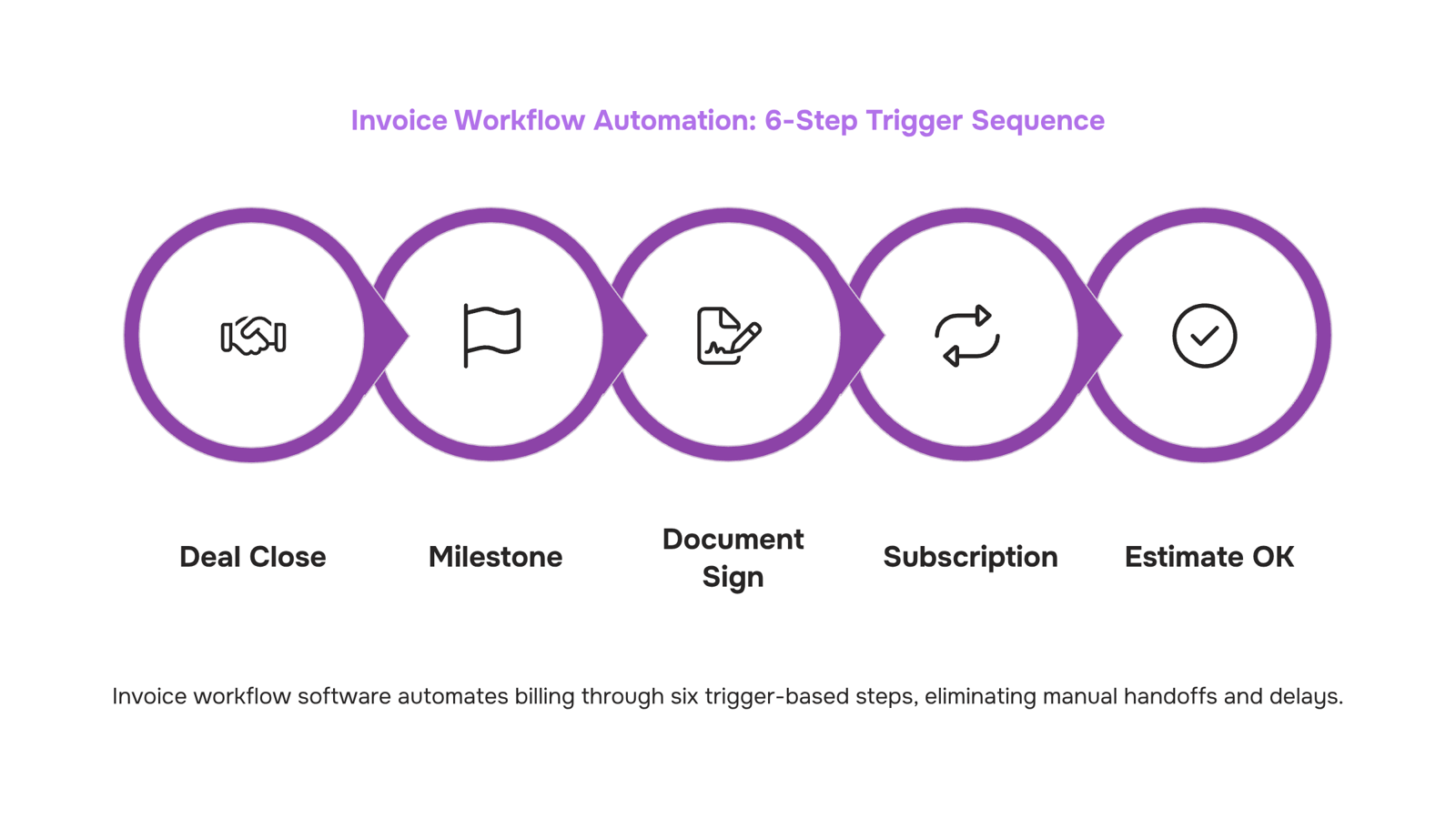
Each of the six steps below maps to a specific trigger event. When you know what fires each action, you can spot exactly where your current process breaks down.
Step 1: Deal close fires the first invoice
The moment a contract is signed or a deal is marked closed in your CRM, invoice workflow software creates a draft invoice automatically. Client name, billing address, line items, and payment terms pull from the deal record. No one opens a spreadsheet. No one copies data from one tab to another. This is the starting gate for the entire automate your invoice workflow in six steps sequence.
Step 2: Project milestone completion triggers milestone billing
For IT companies running fixed-scope projects, this step matters more than any other. When a project phase closes in your project management tool, the invoice is generated against that milestone's value. No waiting for someone to remember. No end-of-month scramble to reconstruct what was delivered. Tools like Inzo pull completion signals from connected project agents, so the invoice exists the moment the work is marked done.
Step 3: Document signing triggers deposit or retainer invoices
When a client signs a statement of work or service agreement, that signature event fires an invoice for the upfront payment. This is where a lot of IT firms lose days: the contract is signed, the project starts, and the deposit invoice gets created three days later because someone was busy. Connecting your e-signature workflow to your invoicing layer removes that gap entirely. If you want to understand how invoice automation works under the hood, this trigger-based architecture is the core of it.
Step 4: Subscription dates drive recurring invoice automation
Managed services, monthly retainers, SaaS reseller agreements: these all follow a fixed schedule. Recurring invoice automation handles them without any human input. You set the billing cycle, the amount, and the client once. The software generates and sends every subsequent invoice on schedule. Automated invoice processing and the ROI it delivers is most visible here, because the volume compounds fast across a managed services book of business.
Step 5: Estimate conversion creates the invoice directly
When a client approves a quote or estimate, the approved document converts into an invoice with one action or automatically, depending on your configuration. Line items, discounts, and tax rates carry over exactly. This eliminates the retyping step that introduces billing errors and the delay between approval and billing that slows cash collection.
Step 6: Invoice approval workflow routes internal sign-off before sending
For invoices above a threshold amount, or for new clients, most IT companies need an internal review before the invoice goes out. The invoice approval workflow step handles this automatically: the software routes the invoice to the right approver based on rules you define (amount, client type, project category), logs the approval, and sends the invoice the moment sign-off is recorded. No email chains. No chasing down a manager.
The full sequence looks like this in practice: deal closes, deposit invoice fires; project phase completes, milestone invoice fires; subscription date arrives, recurring invoice fires; each one routes through approval if the rules require it, then sends. The invoice management best practices for IT companies that actually hold up in production all follow this trigger-based structure rather than relying on someone remembering to create an invoice at the right time.
The difference between a billing process that runs and one that leaks cash is almost always at the trigger layer: which events automatically create invoices, and which ones still depend on a person noticing.
Features to look for in invoice workflow software
Most invoice workflow software lists the same five features in the same order. This breakdown is different: it's weighted for IT companies, where billing ties to project milestones, retainers, and multi-stakeholder approvals rather than simple product sales.
Invoice approval workflow is the first thing to pressure-test. Look for configurable approval chains, not just a single-approver toggle. A 50-person IT firm typically routes invoices through a project manager, finance lead, and sometimes a client-side contact before anything goes out. If the tool can't model that sequence, you'll rebuild it in email.
Milestone and project linking separates purpose-built tools from generic ones. Your invoices don't exist in isolation: they attach to a deal close, a sprint completion, or a signed SOW. Software that links invoices to projects and deals means a late payment surfaces in context, not as a disconnected line item in a spreadsheet.
Invoice tracking software capability matters beyond "sent/paid" status. You want timestamped delivery confirmation, open receipts, and automatic payment reminders triggered by due-date proximity, not by someone checking a dashboard on a Friday afternoon.
Expense approval is often missing from tools that focus only on outbound invoicing. If your team logs billable expenses mid-project, those need to flow into the invoice without a manual copy-paste step.
Finally, check whether the tool handles recurring invoice automation natively. Retainer clients and subscription billing shouldn't require a Zap or a workaround.
Inzo covers all five of these inside one agent, with project and deal linking built in rather than bolted on.
How invoice workflow software connects to your accounting system
The connection type matters more than most buyers realize. A native integration writes directly to your accounting system's API — QuickBooks Online, Xero, or FreshBooks — so a paid invoice closes the receivable, updates the ledger, and triggers the next milestone invoice without any manual entry. A middleware connector (think Zapier-style bridges) does the same job in theory, but adds a sync delay, an extra failure point, and another monthly bill.
For IT companies billing on project milestones, that distinction is concrete: a native invoice integration with accounting means your revenue recognition stays accurate without a Friday reconciliation session. A middleware layer often drops line-item detail, so you end up with lump-sum entries your accountant has to unpick.
Before committing to any invoice workflow software, ask the vendor two questions: does the sync run in real time or on a schedule, and does it pass line-item data or just totals? Those two answers tell you most of what you need to know about how invoice automation works under the hood.
Dimension | Basic invoicing tool | Invoice workflow software |
|---|
Automation depth | Generate and send a PDF | Auto-trigger invoices on project milestones, approvals, or payment events |
Approval routing | None | Multi-step routing with role-based sign-off before an invoice leaves the queue |
Integration scope | Export CSV or connect one accounting app | Native sync with accounting, CRM, and project management in a single data flow |
Recurring invoice automation | Manual copy-and-resend | Schedule, adjust, and pause recurring billing cycles without touching each invoice |
Basic tools handle creation. Invoice workflow software handles the entire sequence from trigger to reconciliation.
The practical gap shows up in IT billing specifically. When your revenue depends on milestone-based project invoices, a tool that can't route approvals or fire automatically on a deliverable forces someone to babysit the queue. That's the failure point most teams don't notice until a payment cycle slips.
If you want to see what the full sequence looks like end-to-end, how invoice automation works under the hood breaks down each stage.
Closing
Invoice workflow software turns billing from a manual chase into a triggered sequence. The difference between a process that runs and one that leaks cash sits at the trigger layer: which events automatically create invoices, and which ones still depend on someone remembering. Once you map your six billing triggers—deal close, milestone completion, document signing, subscription dates, estimate conversion, and approval routing—the rest runs without intervention. Start by identifying which of these triggers fire most often in your business, then wire the first one into your workflow software. That single automation will show you the cash flow gain in the first month.
FAQ
How can invoice workflow software automate my invoicing process?
Invoice workflow software watches for defined triggers—deal close, milestone completion, subscription renewal—and automatically generates, routes for approval, and sends invoices without manual intervention. Each trigger fires a specific action, turning your billing from a manual sequence into a connected system.
What features should I look for in invoice workflow software?
Prioritize trigger-based automation, approval routing, recurring invoice handling, client integration (CRM, project tools, e-signature), and payment tracking with overdue escalation. The best tools connect all six billing triggers so invoices fire at the right moment without someone queuing them manually.
Can invoice workflow software integrate with my existing accounting system?
Yes. Invoice workflow software should sync with your accounting platform (QuickBooks, Xero, NetSuite) so invoices post automatically and payment records update in real time. This eliminates double-entry and keeps your books current without manual reconciliation.
What is the difference between invoice workflow software and basic invoicing tools?
Basic invoicing tools let you create and send a bill. Invoice workflow software manages the entire sequence around that bill—triggers, approvals, routing, tracking, and follow-ups—so the process runs automatically instead of depending on someone remembering each step.
Does invoice workflow software handle recurring invoices automatically?
Yes. Set the billing cycle, amount, and client once, and the software generates and sends recurring invoices on schedule with zero manual input. This is especially valuable for managed services and retainer-based billing.
How long does it take to set up an automated invoice workflow?
Basic setup typically takes one to two weeks: map your billing triggers, connect your integrations (CRM, project tools, accounting), and define approval rules. Most teams see their first automated invoice fire within days of configuration.


 Kayla Morgan15 September 2026


