What Monte Carlo analysis actually is
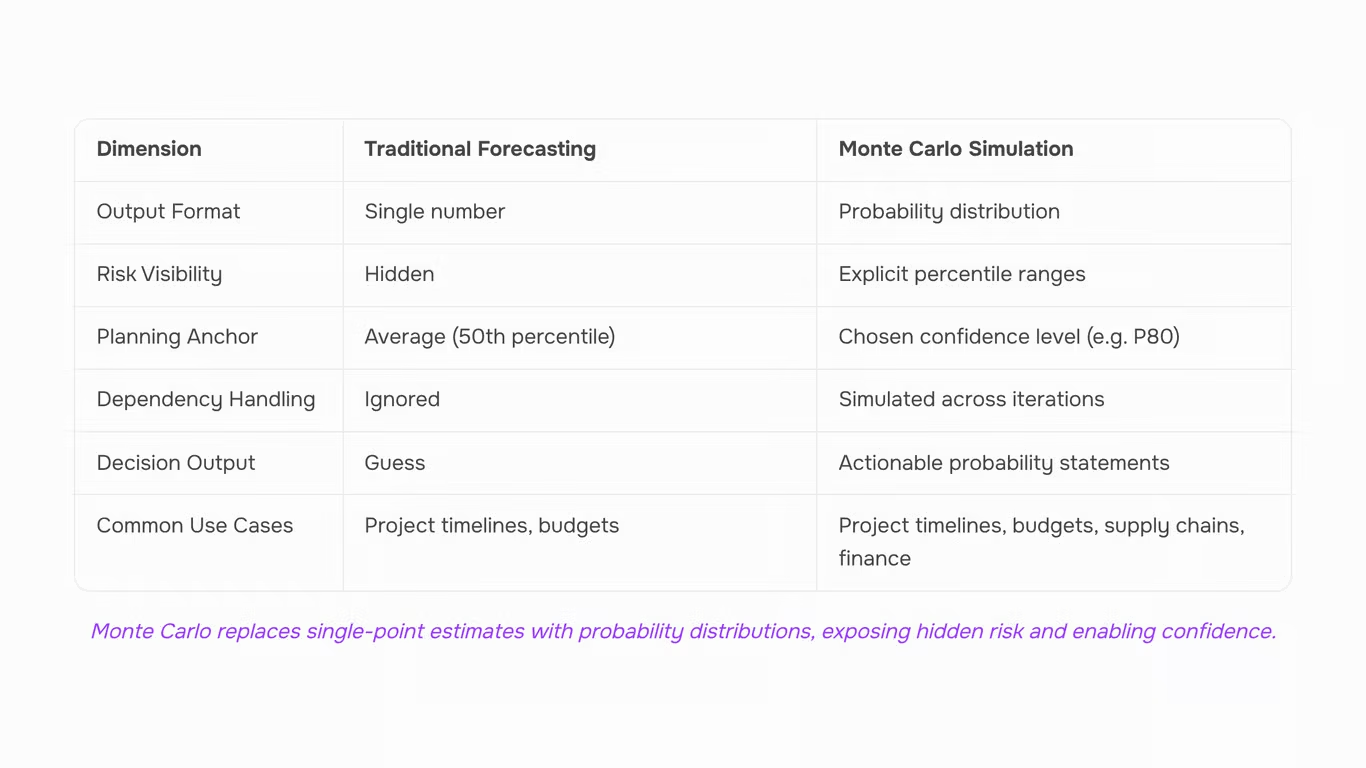
Monte Carlo analysis is a method that models the probability of different outcomes in a process by running thousands of simulated scenarios, each drawing randomly from a defined range of inputs.
Where a traditional estimate gives you one number — say, "this project will take 12 weeks" — Monte Carlo gives you a distribution: a 20% chance it finishes in 10 weeks, a 50% chance by 13 weeks, a 10% chance it runs past 16. That distinction matters because it tells you not just what's expected, but how much uncertainty surrounds that expectation.
The mechanism works in three steps. First, you define each uncertain input (task duration, cost, demand volume) as a range with a probability shape — often a triangular or normal distribution. Second, the model draws one random value from each input range and calculates an outcome. Third, it repeats that process thousands of times. Most practitioners recommend at least 1,000 iterations for stable results; 10,000 is common for project schedule risk. The aggregated outputs form a probability distribution you can actually reason about.
In practice, teams run Monte Carlo simulations in tools like @RISK by Palisade, Oracle Crystal Ball, or ModelRisk — all Excel add-ins that layer simulation capability onto spreadsheets most analysts already use. Python libraries like NumPy also handle this for teams comfortable with code.
This approach shows up across disciplines. Project managers use it to model schedule and cost risk. Finance teams apply it to cash flow forecasting. IT organizations use it when planning infrastructure capacity or evaluating the risk profile of a phased rollout — the same context where earned value analysis in project management often surfaces as a complementary measurement tool.
The next section covers why single-point estimates hide the risk that Monte Carlo exposes directly.
How it differs from traditional forecasting methods
Traditional forecasting produces three numbers: best case, worst case, and most likely. Planners pick one, usually the middle, and build around it. That single number carries no information about how likely it is to be correct, or how severe the downside gets.
Monte Carlo analysis replaces that single number with a full probability distribution across thousands of simulated outcomes.
Key differences:
- Single-point estimates hide risk: A 90-day estimate could represent a tight distribution or a wide one where 30% of projects run past 120 days. The number looks identical either way.
- Traditional forecasting anchors on the average: That means roughly half of all outcomes land worse than the plan.
- Monte Carlo sets a confidence threshold: Instead of planning to the average, you can price and schedule to the 80th percentile.
- Output is a decision, not a guess: "75% chance the project completes within 105 days" tells a stakeholder something actionable. "90 days" does not.
According to Investopedia, the Monte Carlo method "aims at a sounder estimate of the probability that an outcome will differ from a projection" — which is precisely what single-point forecasting cannot produce.
Where businesses apply Monte Carlo analysis
Monte Carlo analysis applies across more business functions than most IT company owners realize. The method isn't limited to financial modeling or engineering risk — it fits any decision where inputs are uncertain and the outcome range matters.
- Project timelines are the most common entry point. A project manager feeds in task duration ranges and dependencies, runs thousands of simulated schedules, and gets a probability distribution of completion dates instead of a single Gantt chart finish line. This pairs naturally with earned value analysis in project management, where both methods together give a clearer picture of schedule and cost health simultaneously.
- Budget forecasting is the second major use case. Rather than submitting a single cost estimate with a 10% contingency buffer added by feel, finance teams model each cost line as a range. The simulation shows the 80th-percentile budget outcome — the number you'd need to be confident in 8 out of 10 scenarios.
- Supply chain risk is where Monte Carlo analysis earns its place in business decision making for operations teams. Lead times, supplier failure rates, and demand variability all carry uncertainty. Simulating those inputs together reveals which combination of variables actually drives stockout risk, not just which single variable looks worst in isolation.
- Pricing models benefit too. When a new service has uncertain cost inputs and uncertain demand elasticity, Monte Carlo runs show the probability distribution of margin outcomes — which is more useful than a break-even calculation that assumes everything goes to plan.
For IT company owners managing infrastructure refresh cycles, IT lifecycle management decisions carry the same kind of compounding uncertainty that Monte Carlo handles well.
Using Monte Carlo analysis for project risk assessment
Monte Carlo simulation replaces single-point task estimates with ranges, then runs hundreds or thousands of iterations to show how those ranges interact across a full schedule. The output is a probability distribution of completion dates, not a single number.
Here's how the process works:
- Define three values per task: For each task, assign an optimistic, most likely, and pessimistic duration. A software deployment task might be 3 days, 5 days, or 12 days.
- Run the simulation: The tool samples randomly from each task's range, chains tasks according to their dependencies, and records the resulting end date. Repeat hundreds or thousands of times.
- Read the distribution: Instead of "we ship March 14," you can tell stakeholders "there's a 50% chance we finish by March 14 and an 80% chance by March 28." Those are P50 and P80 figures, covered in the next section.
A few things to watch:
- Critical path variance dominates: A high-variance task on the critical path widens the distribution far more than the same variance on a parallel track. The simulation captures this automatically; a spreadsheet estimate does not.
- Dependencies compound risk: Tasks that feed into each other multiply uncertainty. The simulation surfaces this; a Gantt chart hides it entirely.
On tooling: @RISK by Palisade and Oracle Crystal Ball are the standard Excel add-ins for this workflow. For teams that want simulation connected to live planning data, Taro links task-level inputs directly to project tracking so risk inputs stay current as work progresses.
Pair Monte Carlo with earned value management (EVM) for full coverage: EVM shows where the project stands against baseline; Monte Carlo shows where it is likely to end up.
How to interpret Monte Carlo simulation results
When a Monte Carlo simulation finishes running, you get a cumulative distribution curve — a smooth S-curve that maps every possible completion date against the probability of hitting it. Reading that curve correctly is where most teams either make a good decision or punt back to gut feel.
The three numbers you'll see most often are P50, P80, and P90.
P50
- Is the date by which 50% of simulation runs finished. Think of it as the median outcome, not the optimistic one. Half the scenarios beat it; half didn't.
P80
- Means 80% of runs completed by that date. This is the number most project managers use for external stakeholder commitments — it reflects a realistic buffer without being so conservative it loses credibility.
P90
- Is the high-confidence mark. 90% of simulated scenarios finished by this date. Use it when the cost of a missed deadline is high: a regulatory submission, a customer go-live with contractual penalties, or a product launch tied to a marketing campaign.
- The gap between P50 and P90 is your real risk signal. A two-week gap suggests the schedule is reasonably tight. A six-week gap means the simulation found a lot of paths where things went wrong — and you should find out which tasks drove that spread before you commit to anything.
- Turning the curve into a decision means picking the percentile that matches the consequence of being wrong. A team running internal tooling can probably commit to P50 and adjust if needed. A team delivering to an external client under a contract should anchor to P80 at minimum. This is the same logic behind earned value analysis in project management — the numbers only help if you map them to a decision rule before you're under pressure.
- One practical step: when you present results to stakeholders, show the P50 and P80 dates together, not just a single number. That range communicates uncertainty honestly without triggering the instinct to demand a single-point commitment that the data doesn't support.
- Interpreting monte carlo results well also means checking whether your simulation ran enough iterations. Fewer than 1,000 runs can produce an unstable curve where the percentile values shift between runs — most practitioners recommend 10,000 iterations as the floor for project schedule analysis.
Running a Monte Carlo simulation in Excel: what works and what does not
Excel can run a basic monte carlo analysis excel workflow, and Microsoft's own documentation confirms the approach: build a model, replace fixed inputs with random variables using RAND() or NORMINV(), then use a Data Table to recalculate the model hundreds of times and collect the output distribution. For simple cost estimates with three or four independent variables, this works well enough to get a P50/P80 read without buying new software.
The limits show up fast once your model grows.
Data Tables in Excel cap out at around 1,000 rows before performance degrades noticeably, and 1,000 iterations is on the low end for statistically stable results — most practitioners recommend 10,000 or more. Correlation between tasks is the bigger problem. Excel has no native way to model dependent durations: if a delayed procurement phase pushes testing, the Data Table treats each task as independent and understates schedule risk. That's the exact scenario where a single-point estimate already fails you, and the simulation should be catching it.
Third-party monte carlo simulation tools like @RISK by Palisade and Oracle Crystal Ball plug directly into Excel and solve both problems. They handle correlated inputs, run 10,000+ iterations in seconds, and output tornado charts that rank which variables drive the most variance. The tradeoff is cost and setup time — both tools have licensing fees, and building a well-structured model still takes a few hours the first time.
For IT project owners tracking schedule risk alongside budget and resource data, pairing simulation outputs with earned value analysis in project management gives a more complete picture than either method alone.
The honest summary: Excel works for simple models under low stakes. For anything with task dependencies, correlated risks, or board-level decisions, a dedicated tool is worth the setup cost.
What software handles Monte Carlo analysis beyond spreadsheets
Beyond spreadsheets, monte carlo analysis software falls into three categories, each with a different setup-to-output tradeoff.
- Dedicated add-ins like @RISK (Lumivero) and Oracle Crystal Ball bolt onto Excel and add proper distribution modeling, correlation between variables, and 10,000+ iteration runs — things a DATA TABLE can't do. Setup takes hours, not minutes, but the output is statistically defensible.
- Standalone modeling tools like Analytica handle complex dependency chains that break Excel entirely. They're worth the learning curve for multi-phase programs or portfolio-level decisions.
- Project management risk tools with built-in simulation — including platforms that integrate schedule, resource, and cost data — are the practical choice for most IT teams. They connect directly to task dependencies, so you're not rebuilding your project model in a separate tool. Teams already tracking earned value analysis in project management will find the data is already structured correctly for this kind of risk modeling.
Closing
Monte Carlo analysis transforms uncertainty from a hidden risk into a readable probability distribution — but only if your input data is clean, current, and feeds the model in real time. Most teams build simulations manually, which means they're working with yesterday's estimates and spreadsheet snapshots. Taro's risk prediction and analytics features surface the same early-warning signals automatically, pulling live project data and surfacing probability ranges without the simulation overhead. Your team gets decision-ready output — P50, P80, confidence thresholds — without building the model from scratch. The question isn't whether you need Monte Carlo insight; it's whether you're going to extract it manually or let your tools do it. Start by mapping one critical project's uncertainty inputs and see what a full probability distribution reveals about your actual risk exposure.
FAQ
Q. How is Monte Carlo analysis used in business decision making?
A. Monte Carlo runs thousands of simulated scenarios using random inputs to produce probability distributions instead of single-point estimates. This lets decision-makers see outcome ranges — like 75% chance of completion within 105 days — rather than guessing whether a single forecast is reliable.
Q. What are the advantages of using Monte Carlo analysis over traditional forecasting methods?
A. Traditional forecasting hides risk by anchoring on one number; roughly half your outcomes land worse than planned. Monte Carlo shows the full probability distribution, so you can set confidence thresholds (like 80%) and plan to that level instead of the average case.
Q. Can Monte Carlo analysis be used for risk assessment in project management?
A. Yes. Replace single-point task estimates with ranges, run thousands of iterations through your schedule, and get a probability distribution of completion dates. This surfaces schedule risk that Gantt charts hide, especially when high-variance tasks sit on the critical path.
Q. How do I interpret the results of a Monte Carlo analysis?
A. Look for percentile figures: P50 is the median outcome (50% chance of finishing by this date), P80 is the 80th percentile (80% confidence). Use these thresholds to set realistic buffers and communicate risk to stakeholders instead of single-number promises.
Q. What software is available for performing Monte Carlo analysis?
A. @RISK by Palisade, Oracle Crystal Ball, and ModelRisk are Excel add-ins. Python libraries like NumPy work for teams comfortable with code. Taro integrates risk prediction and analytics to surface Monte Carlo insights from live project data automatically.
Q. How many simulations do you need to run for reliable Monte Carlo results?
A. Run at least 1,000 iterations for stable results; 10,000 is common for project schedule risk. More iterations increase precision but show diminishing returns beyond 10,000 for most business decisions.
Q. What inputs does a Monte Carlo simulation require for project timeline forecasting?
A. Define each task's optimistic, most-likely, and pessimistic duration as a range with a probability shape (triangular or normal distribution). Include task dependencies so the simulation chains them correctly across iterations.



 Elena Petrova15 September 2026


