TL;DR: Most risk assessment tool guides hand you a feature checklist and leave the hard part — matching those features to your actual workflow — to you. This one gives IT company owners a decision framework built around five criteria that separate tools that catch risks early from tools that produce reports no one acts on. You'll finish with a clear method for evaluating, shortlisting, and choosing.
A risk assessment tool is software that identifies, scores, and tracks threats to your business before they become active problems. That last part matters. A spreadsheet or a generic risk register captures what you already know. A real risk assessment tool surfaces what you haven't noticed yet, assigns probability and impact scores, and tells you when a risk's status changes.
The functional gap is significant. A spreadsheet requires someone to update it manually, which means risk visibility depends entirely on whether that person has time. A purpose-built workplace risk assessment tool monitors conditions continuously, escalates automatically, and keeps a timestamped audit trail without manual input.
For IT company owners, that distinction shapes every project outcome. According to PMI research, a significant share of IT project failures trace back to risks that were identified too late or not tracked at all. A tool that integrates with your active workload, rather than sitting in a separate tab, closes that gap.
The next section covers exactly how to evaluate tools against your own context, including risk management solutions built for IT operations and the specific criteria that separate useful from ornamental.
Most vendor comparison pages rank tools by feature count. That tells you what a tool has, not whether it will catch the risk that derails your next delivery. Score any risk assessment tool against these five criteria instead.
1. Scope of risk coverage: A tool that only tracks financial exposure misses the operational and delivery risks that sink IT projects. Before you evaluate anything, list the risk categories your team actually faces: scope creep, third-party dependencies, resource gaps, compliance deadlines. If a tool can't map to at least 80% of that list, it doesn't fit your context regardless of its pricing tier.
2. Workflow integration: A risk log that lives outside your delivery workflow gets updated once a quarter, if at all. Project management risk assessment tools that sit inside your task and sprint environment surface risks as work happens, not after the post-mortem. Ask vendors specifically: does the tool connect to where work is assigned, not just where it's reported?
3. Real-time alerting: Detection lag is where IT projects bleed. A tool that flags a risk three days after the trigger is a reporting tool, not a prevention tool. Look for real-time risk alerts inside your project workspace that fire on configurable thresholds, not on a weekly digest schedule.
4. Reporting format: Risk data presented as a raw data dump serves your auditor, not your project lead. The tool should produce outputs your team actually reads: heat maps for prioritization, owner-tagged action items, and exportable summaries formatted for client or board-level review. If you need a separate BI tool to make the reports usable, that's a gap.
5. Compliance mapping: If your clients operate in regulated industries, your risk assessment software built for compliance workflows needs to map risk categories to the relevant frameworks, whether that's ISO 27001, SOC 2, or a client-specific control set. Generic risk registers don't do this. Tools built for IT service delivery should.
Run any shortlisted tool through all five. A tool that scores well on four but fails integration will cost you more in manual overhead than it saves anywhere else.
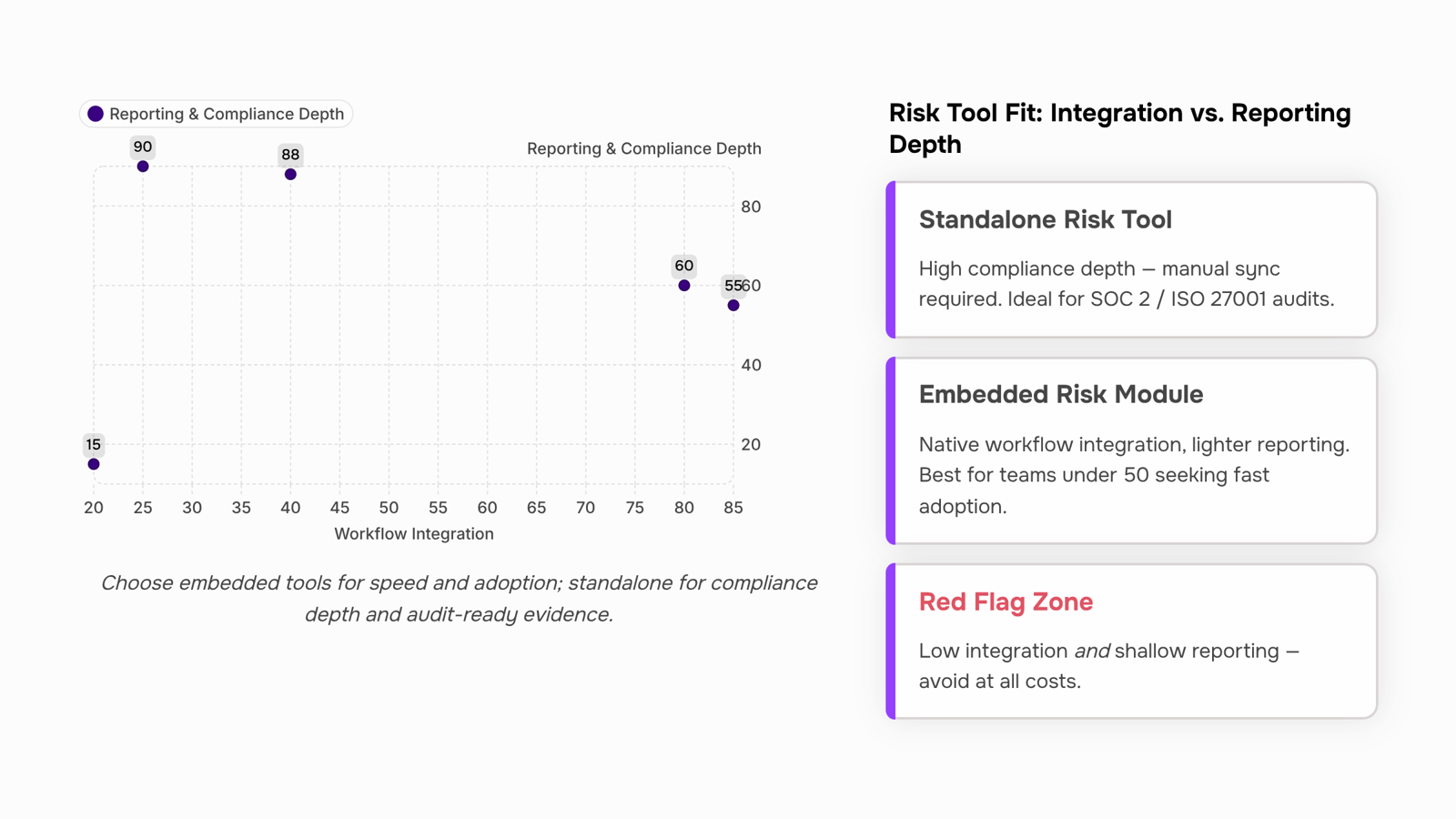
Standalone risk assessment tools log what you tell them. A risk assessment tool embedded in your project workflow catches what you might miss.
Here's a concrete example. An IT team is three weeks into a software delivery sprint. A developer flags a dependency delay in the task tracker. In a disconnected setup, that flag lives in the project tool while risk lives in a separate spreadsheet. Nobody connects the two until the deadline slips. With an embedded approach, the same flag triggers a risk update automatically, because the task data and the risk register share the same environment.
That connection matters most during sprint planning and milestone reviews, the two moments when risk exposure changes fastest. Teams using project management risk assessment tools that sit inside their delivery workflow tend to catch scope creep, resource conflicts, and third-party dependencies earlier, because the signals are visible in context rather than buried in a separate system.
The practical difference comes down to three things:
Trigger points: Embedded tools can flag a risk the moment a task status changes, a deadline shifts, or a resource gets reassigned. Standalone tools flag risks when someone manually updates them.
Ownership: When risk lives next to the work, the person doing the work owns the risk. When it lives elsewhere, ownership drifts to whoever manages the separate tool.
Response time: A risk identified during active sprint work is actionable. A risk identified in a weekly export review is often already a problem.
Taro handles this by keeping risk tracking inside the same workspace where tasks, timelines, and team capacity live. A dependency slip in one project surfaces as a risk signal without requiring a separate log entry.
A risk assessment tool for compliance isn't just about logging risks — it's about producing the specific artifacts that auditors and regulators actually ask for.
Different frameworks demand different evidence. SOC 2 auditors want a continuous audit trail showing who reviewed a control and when. ISO 27001 requires documented control mapping tied to Annex A categories. GDPR enforcement focuses on data processing records, breach response timelines, and evidence that risk assessments happened before new processing activities began. A tool that can't export structured evidence for each of these isn't a compliance tool — it's a checklist app.
The risk assessment tool features that matter for compliance break down like this:
Audit trails: Timestamped logs of every risk review, status change, and owner reassignment. Not a summary — a full history.
Control mapping: The ability to link individual risks to specific framework controls (SOC 2 Trust Services Criteria, ISO 27001 Annex A, GDPR Article 35).
Evidence export: One-click export of risk registers, review histories, and control status in formats auditors accept (PDF, CSV, structured JSON).
Access controls: Role-based permissions so you can demonstrate who had visibility into sensitive risk data.
If a vendor's demo shows you a heat map but can't show you how it exports evidence for a SOC 2 Type II audit, that gap will cost you during the actual audit.
For a deeper look at risk assessment software built for compliance workflows, the linked guide covers framework-specific requirements in more detail. Taro maps risks directly to compliance controls so your audit trail builds itself as your team works.
The honest answer: neither option is universally better. The right choice depends on how your team actually works, not how a vendor positions their product.
A standalone risk assessment tool gives you deeper reporting, purpose-built risk registers, and more granular control mapping. Setup typically runs two to four weeks, and the cost structure is a separate SaaS line item. For mature IT teams running formal compliance programs, that depth pays off. For everyone else, it often creates a tool nobody opens after month two.
An embedded risk module inside a project management risk assessment tool keeps risk visible where work actually happens. Setup is faster, usually under a week, because the integrations already exist. The tradeoff is reporting depth: most embedded modules handle operational risk well but fall short on the evidence export and control mapping that risk assessment software built for compliance workflows requires.
Dimension | Standalone tool | Embedded module |
|---|
Setup time | 2–4 weeks | Under 1 week |
Workflow integration | Requires manual sync or API work | Native, already connected |
Reporting depth | Comprehensive, audit-ready | Operational focus, lighter compliance output |
Cost structure | Separate license, $30–$150/user/month | Included in project tool subscription |
For IT teams under 50 people managing active delivery work, an embedded module removes the adoption barrier. Teams running SOC 2 or ISO 27001 programs will likely need the standalone depth, or a platform that ships both in one place.
Four patterns reliably predict a risk assessment tool gets abandoned before the 90-day mark.
No real-time alerting: If a tool only surfaces risks when someone manually opens a dashboard, it's a reporting tool, not a risk tool. Your team needs real-time risk alerts inside your project workspace — not a weekly summary that arrives after the deadline slips.
Manual-only data entry: Any workplace risk assessment tool that requires someone to type in every risk, status update, and severity score will be abandoned within weeks. The overhead kills adoption. Look for automated data capture tied to actual work activity.
No integration with task or project tools: Risk that lives in a separate system gets ignored. If the tool can't connect to where work happens, your team will stop logging risks the moment a sprint gets busy. This is the most common failure mode, and the one most feature lists skip entirely.
Shallow or locked reporting: If you can't export a clean audit trail or filter risks by project, owner, or date range, the tool fails the moment a client or auditor asks a question. Check risk assessment software built for compliance workflows to understand what export depth actually looks like in practice.
Pick two risks you're actively managing right now, not hypothetical ones. Enter both into the trial tool exactly as you would in production: assign an owner, set a likelihood score, and link each risk to a live task or sprint.
Then watch what happens. Does the tool surface real-time risk alerts inside your project workspace when a linked task slips? Or do you have to check manually?
Next, export a report. If it takes more than five minutes or requires IT help, that's a signal.
Finally, ask one team member who didn't configure the tool to find both risks unaided. If they struggle, adoption will too.
Four steps, one week. That's enough to validate any project management risk assessment tool before you commit.
Closing
The five criteria you just walked through—scope, integration, alerting, reporting, and compliance mapping—aren't theoretical. They're the difference between a tool that sits unused and one your team actually relies on. Start by listing the risks your team currently tracks manually or misses entirely, then test any shortlisted tool against those five dimensions. If you want to see what embedded, real-time risk tracking looks like in practice, Taro's risk alerts dashboard shows how risk signals surface inside your project workspace without requiring a separate log or manual update. Run a quick test with your next sprint to see if that integration model catches risks your current process misses.
FAQ
How do I choose the best risk assessment tool for my business?
Score any tool against five criteria: scope of risk coverage, workflow integration, real-time alerting, reporting format, and compliance mapping. A tool that scores well on four but fails integration will cost more in overhead than it saves.
What features should a risk assessment tool have?
Look for real-time alerts tied to task changes, integration with your project workspace, heat maps and owner-tagged action items, audit trails, and the ability to map risks to compliance frameworks relevant to your clients.
Can a risk assessment tool help with compliance?
Yes, if it produces structured audit trails, maps risks to specific framework controls (SOC 2, ISO 27001, GDPR), and exports evidence in formats auditors accept. A generic risk register cannot do this.
How does a risk assessment tool improve workplace safety?
By surfacing risks automatically when conditions change, rather than waiting for manual updates. Early detection lets teams address threats before they become active problems, reducing project delays and resource strain.
What is the difference between a risk assessment tool and risk management software?
A risk assessment tool identifies and tracks specific threats. Risk management software is broader—it includes assessment, mitigation planning, response workflows, and stakeholder communication across the entire risk lifecycle.


 Elena Petrova11 September 2026


