TL;DR: Most template guides hand you a file and stop. This one goes field by field through what belongs in a price quotation template, explains why each element affects whether a client approves it, and shows IT company owners how to turn an accepted quote into an invoice without re-entering data.
What a price quotation template actually is
Most IT owners conflate three different documents. An estimate is informal and approximate. A proposal argues why you're the right vendor. A price quotation is a formal, binding offer at a fixed price, valid for a defined period — typically 30 days for project work, 60–90 days for managed service contracts.
The difference between a one-off quote and a standardized price quotation template isn't cosmetic. A template enforces consistency across every rep, every deal, and every client. It also compresses turnaround time: teams using structured templates report cutting quote creation from 45+ minutes to under 10.
Critically, a good template is designed to convert. Each field — from the header through to the signature block — signals professionalism and reduces the friction between "we're interested" and "here's the purchase order." That quote-to-cash workflow is where most IT businesses lose deals they've already won.
What to include in a price quotation template
A quotation format for IT services needs more than a price list. Here's what belongs in every template, and what each field actually communicates to the client.
Header block. Your company name, logo, address, and contact details go at the top. Below that: the client's full legal name and billing address. This isn't decoration — it's the information that flows directly into the invoice when the quote is accepted. Getting it right here saves a correction later. If you're converting quotes to invoices automatically, as Lio handles in the quote-to-cash workflow, the header data populates without re-entry.
Quote number and date. A unique reference number makes follow-up conversations unambiguous. "I'm calling about quote 2026-0047" is faster than "the one I sent last Tuesday." The issue date anchors the validity window.
Expiry date. Standard practice for IT services is 30 days, though project-based work with volatile subcontractor costs often uses 14. State it explicitly. Clients who see no expiry date assume the price is open-ended — which creates awkward conversations when costs shift.
Line items. Each service, deliverable, or product gets its own row: description, quantity, unit price, and line total. Vague line items ("IT support — $4,000") generate questions. Specific ones ("Help desk support, 20 hrs/month × $85/hr") close faster. For recurring managed services, separate one-time setup fees from monthly charges.
Subtotal, taxes, and total. Show the math. Clients in different tax jurisdictions need to see the pre-tax figure. If you apply GST, VAT, or state sales tax, list the rate and amount as a separate line.
Payment terms. Net 30, 50% upfront, milestone-based — state it here. This is also where you reference your late payment policy if you have one. Leaving terms off a quote means negotiating them after the client has already mentally committed to the total, which rarely goes well.
Signature or acceptance block. A dated signature line (or an e-signature field) converts the quote into a binding agreement. Without it, "approval" is a verbal handshake. For a clean audit trail, this is non-negotiable.
Notes or scope exclusions. One short paragraph covering what's not included prevents scope creep disputes. "This quote excludes third-party software licensing unless itemized above" is the kind of sentence that saves hours of back-and-forth.
For the invoice side of this workflow, the blank invoice template guide covers the parallel field structure in detail.
Why using a standard template helps your business
A standard price quotation template does more than save formatting time. It changes how clients respond to your quotes and how quickly deals close.
Four outcomes matter most for IT owners:
Faster approvals. A consistently structured professional price quotation is easier for a client's procurement team to scan. When line items, totals, and payment terms land in the same place every time, internal sign-off moves faster.
Fewer revision cycles. Most revision requests come from missing information, not wrong pricing. A fixed template forces you to fill every field before sending — scope, exclusions, validity period — so clients have fewer reasons to come back with questions.
Consistent branding. Every quote your team sends looks like it came from the same company. That matters when multiple people are quoting the same client across different projects.
A cleaner audit trail. Numbered quotes with expiry dates and signature blocks give you a documented record when a dispute arises six months later. That's the step most IT owners skip when they're building quotes in a word processor.
The same discipline applies when you move from quote to invoice — a well-structured invoice template follows the same logic.
How to create a professional price quotation template in 5 steps
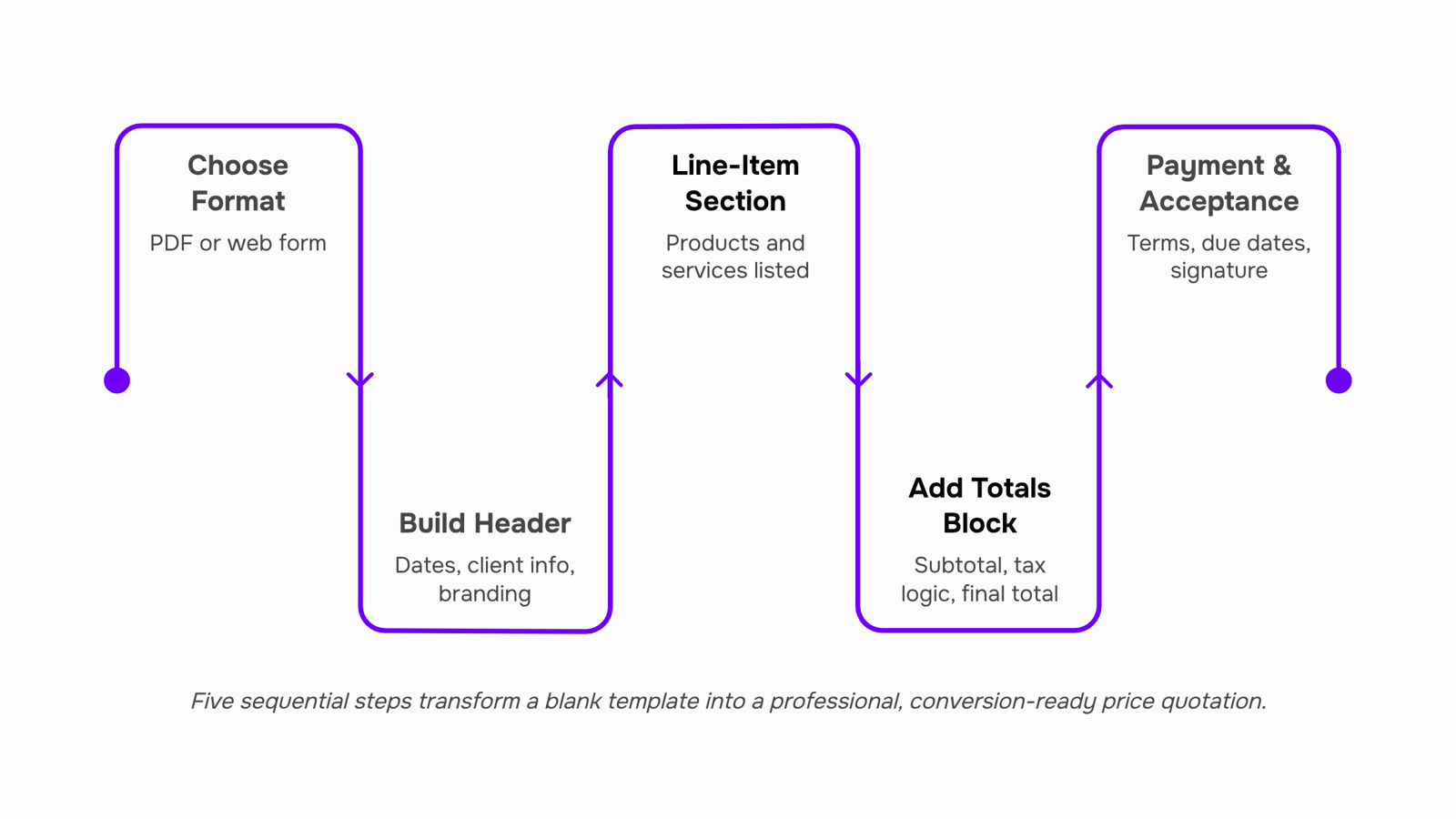
Most price quotation templates fail before they're sent because they were built backwards — starting with design instead of the decisions a client needs to make. Build yours in this order.
Step 1: Choose your format before you touch a layout. Pick the delivery format first: PDF for formal enterprise deals, editable web form for faster SMB approvals. If you're quoting recurring managed services, a line-item format with monthly and annual columns works better than a flat total. Lock this before you design anything.
Set your default format based on your most common deal size, not your largest one.
Step 2: Build the header block. Include your company name, logo placeholder, quote number, issue date, and expiry date. For IT services, 30 days is the standard validity window for project-based work; 60 days is common for hardware-inclusive quotes where pricing can shift. Don't leave expiry date blank — open-ended quotes stall decisions.
Step 3: Structure the line-item section. Break services into named rows: discovery, implementation, licensing, support. Each row needs a description, quantity or hours, unit rate, and subtotal. Bundling everything into one lump sum is the single biggest reason clients request revisions. A clear blank invoice template follows the same row logic — build your estimate template to mirror it so quote-to-invoice conversion takes under two minutes.
Add an optional services row at the bottom. Clients who decline it still see what they're not getting.
Step 4: Add a totals block with tax logic. Subtotal, applicable tax rate (line it out separately), and grand total. If you quote internationally, add a currency field. Ambiguous tax treatment is a common reason IT quotes get kicked back to procurement.
Step 5: Write your payment and acceptance terms. State deposit percentage, payment schedule, and what constitutes acceptance (signature, email confirmation, or purchase order). This is the step most estimate templates skip — and it's what separates a professional price quotation from a rough estimate. For teams who want the full quote-to-cash workflow automated, this block feeds directly into contract and invoice generation.
Once these five blocks are in place, customizing for branding is straightforward — which the next section covers.
How to customize the template for your company's branding
Your price quotation template carries your brand before a client reads a single line item. Here's how to customize it without breaking the structure.
Logo and header: Place your logo top-left, company name and contact details top-right. Keep the header under 15% of the page height so line items stay above the fold.
Colors and fonts: Match your brand's primary color to the table header row and section dividers. Use one font family throughout — two weights maximum (regular for body, bold for totals and section labels).
Company-specific terms: Add your standard payment terms, validity period (30 days is the IT services norm), and liability clause in a fixed footer block. This block stays identical across every quote, so nothing gets edited accidentally.
What not to touch: The line-item columns, subtotal logic, and tax rows. Changing these breaks the structure that a blank invoice template depends on downstream.
A well-branded free price quotation template signals professionalism before negotiation starts.
How to turn an accepted quote into an invoice without re-entering data
Once a client approves your quote, the clock starts. Every minute spent retyping line items, rates, and contact details into an invoice is a minute where errors creep in and payment gets delayed.
The typical failure: someone copies the accepted estimate into a separate invoice template, miskeys a figure, and the client pushes back. That dispute can add days to your payment cycle.
Inzo removes that step entirely. When a client approves a quote built on your estimate template, Inzo converts it to a finalized invoice in one click — same line items, same rates, no re-entry. The quote-to-invoice conversion carries over every field automatically, so the document your client receives matches exactly what they approved.
For IT service contracts, this matters more than most industries. Scope changes are common, and having a clean audit trail from estimate to invoice protects you in disputes.
If your current process involves any copy-paste between documents, that's the first thing to fix.
Free price quotation template: what to look for before you download one
Most free downloads for a price quotation template include a logo field, a line-item table, and a total. That's not enough for IT services.
A usable quotation format for IT services needs these fields:
Scope of work — deliverables, not just product names
Labor breakdown — hours, rate, and role (engineer vs. consultant)
Validity period — 30 or 60 days is standard for IT contracts
Payment terms — net 30, milestone-based, or upfront deposit
Tax and currency — especially if you bill international clients
Approval signature line — so acceptance is documented
Most free templates stop at line items and a subtotal. They skip scope definition and validity dates entirely, which creates disputes the moment a client questions what was agreed.
A template is a starting point. When your client approves, you still need to convert it — without re-entering every line. That's where quote-to-cash workflows close the gap a downloaded file never will.
Closing
A price quotation template is your first defense against slow approvals and revision cycles. The structure forces clarity — line items, terms, expiry date, signature block — so clients can say yes without coming back with questions. But the real bottleneck most IT owners hit isn't the quote itself; it's the manual work between an accepted quote and a sent invoice. Re-entering client data, recalculating totals, and rebuilding the same information wastes hours and introduces errors. Ask yourself: after a client signs your quote, how many minutes does it take your team to turn it into an invoice? If it's more than five, you're losing time where you should be shipping work.
FAQ
What should be included in a price quotation template?
Header block with company and client details, unique quote number, issue and expiry date, itemized line items with unit pricing, subtotal and tax calculations, payment terms, and a signature or e-signature block. Add a notes section for scope exclusions to prevent disputes.
How can I create a professional price quotation template?
Choose your format first (PDF or web form), build the header block with company details and dates, structure line items by service type with quantity and unit rate, add a totals block with tax logic, include payment terms and signature block, then test it with a real client quote before rolling out to your team.
What are the benefits of using a price quotation template for my business?
Faster client approvals, fewer revision cycles, consistent branding across all quotes, and a documented audit trail. Teams using structured templates cut quote creation from 45+ minutes to under 10 minutes.
Can I customize a price quotation template to fit my company's branding?
Yes. Start with a standard structure, then add your logo, color scheme, and legal disclaimers. Keep the core fields consistent across all quotes so clients recognize your format and internal teams can process them consistently.
Are there any free price quotation templates available online?
Many exist, but most lack the IT-specific fields that prevent scope creep disputes — like exclusions blocks and recurring service breakdowns. Build your own using the five-step framework in this guide so it matches your actual quote-to-invoice workflow.
What is the difference between a price quotation and an invoice?
A price quotation is a formal offer valid for a set period (typically 30 days); an invoice is a payment demand after work is delivered or services are rendered. A quotation is a proposal; an invoice is a legal request for payment.
How long should a price quotation be valid before it expires?
30 days is standard for IT project work. Hardware-inclusive or managed service quotes often use 60–90 days. Always state the expiry date explicitly; open-ended quotes stall client decisions and create awkward renegotiations later.


 Elena Petrova15 September 2026


