TL;DR: TL;DR: Most itemized invoice guides list fields without explaining why each one matters. This one connects every line item to a specific outcome, faster payment, cleaner books, fewer disputes, then walks you through building one step-by-step so nothing gets questioned or delayed.
What Is an Itemized Invoice and Why Does It Matter
Professional 3D render of an organized itemized invoice on a modern corporate desk with pen and calculator
An itemized invoice lists every product, service, or fee as its own line — quantity, unit rate, and description — rather than collapsing everything into a single total. A standard invoice might read "Project services: $4,200." An itemized invoice shows the 30 hours of backend development at $80/hr, the $600 annual SaaS license, and the 5-hour support retainer at $120/hr as separate lines.
That distinction matters more for IT businesses than most. When a client questions a charge, a single-line total gives you nothing to defend. Itemized invoices create a paper trail that resolves disputes before they escalate, supports tax deductions (the IRS and HMRC both require sufficient detail for service business claims), and reduces the back-and-forth that delays payment.
For complex projects — hourly dev work, recurring licensing fees, mixed support tiers — the line-item structure also forces billing accuracy on your end. You catch missed charges before sending, not after a client pushes back.
Understanding what an invoice actually requires is the starting point. The next step is knowing which specific fields protect you — from disputes, audit failures, and late payment — which the following section covers field by field. Tools like Inzo handle multi-line item invoicing with tax and discount logic built in, so the structure is enforced automatically rather than left to manual formatting.
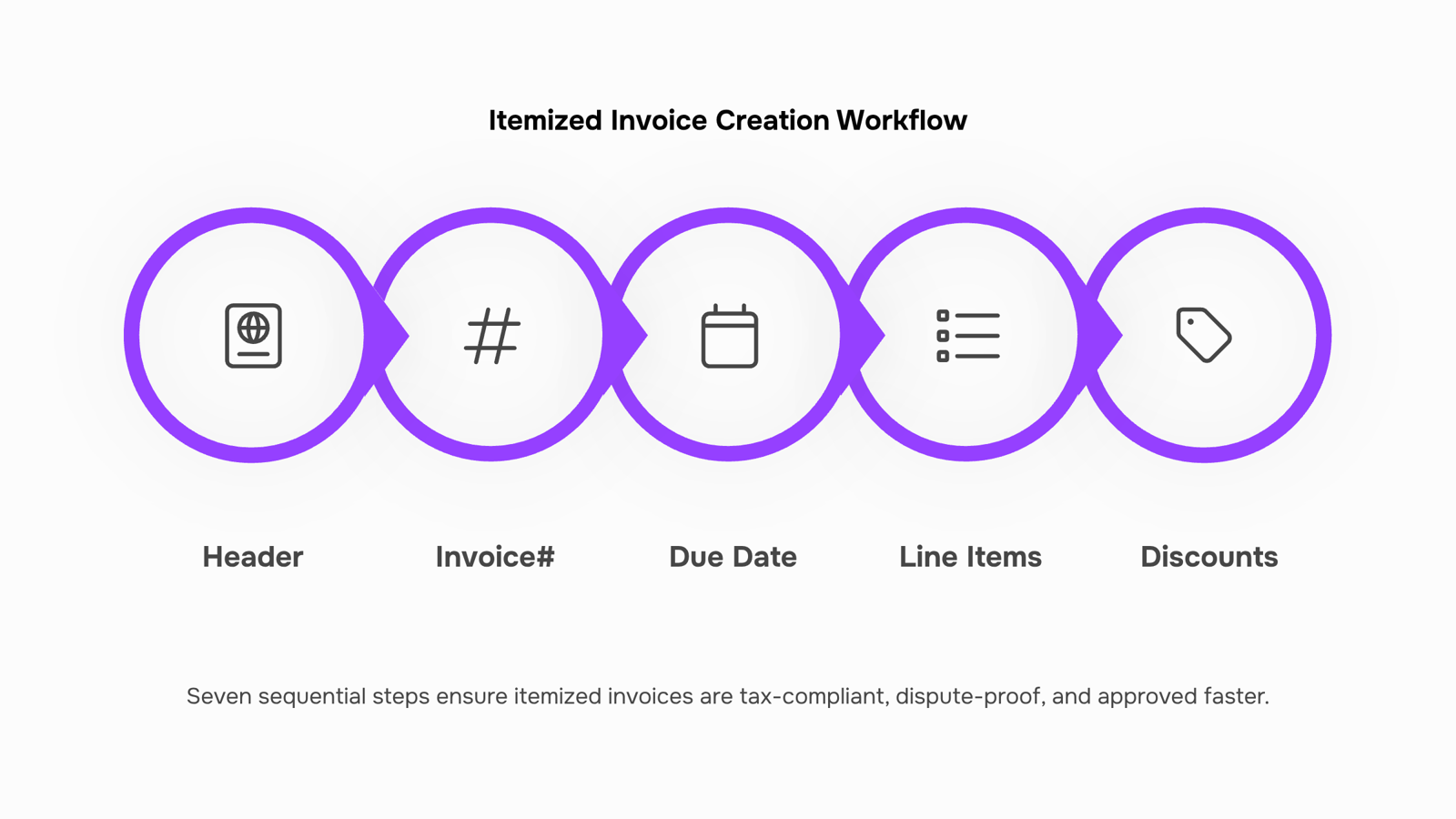
Every field on an itemized invoice does a specific job. Miss one, and you're exposed — to a dispute you can't win, a tax deduction you can't claim, or a payment that sits in "under review" for three weeks.
Here's what must appear, and why each field matters:
Business and client header details. Your legal business name, address, and tax ID (or VAT number where applicable) go at the top. So does the client's full legal name and billing address. These aren't formalities — the IRS and HMRC both require them to validate a service invoice as a deductible business expense. A client who can't match your invoice to their vendor record will hold payment until they can.
Invoice number and date. A unique invoice number creates an audit trail. The invoice date starts the payment clock and determines which tax period the transaction falls into. Without it, "net 30" means nothing enforceable.
Line items with descriptions. This is where most disputes originate. Each line item needs a description specific enough that the client can verify what they received. "Development work — April" fails this test. "Backend API integration, 14 hours @ $120/hr" passes it. For an itemized invoice example in IT billing, think: software license fees listed per seat, support retainer billed as a fixed monthly line, and project deliverables broken out by phase.
Quantity and unit rate. These two fields let clients audit your math independently. If they don't match the statement of work, expect a callback.
Subtotal, taxes, and total due. List the subtotal before tax, then apply each tax rate as its own line (GST, VAT, sales tax — whatever applies). Combining them into a single "total" number is a common mistake that triggers audit flags and client confusion.
Payment terms and method. Net 15, net 30, due on receipt — state it explicitly. Include accepted payment methods. Invoices without clear terms get paid last.
For a full breakdown of which fields are legally required versus best practice, the essential elements every invoice should include covers the complete list with context for service businesses.
How to Structure Line Items for IT Services and Projects
IT invoices fail client approval for one reason more than any other: the client can't tell what they're paying for. Grouping "consulting services — $4,200" into a single line forces a conversation that delays payment. Breaking it down prevents that conversation entirely.
Here's how to structure line items that clients approve on first read.
Hourly development work gets its own line, always. Format it as: Senior Developer — Backend API Integration — 18 hrs × $95/hr = $1,710. The role, the task, and the rate are all visible. If you blended two developers at different rates, give each their own line.
Software licensing and subscriptions should never be bundled with labor. List each license separately — vendor name, license type, quantity, and unit cost. A client who sees Microsoft 365 Business Standard — 5 seats × $22/month can verify it against their own records. One that sees Software — $110 cannot.
Support retainers need a clear scope statement on the invoice itself. Something like: Monthly Support Retainer — 10 hrs included, unused hours do not roll over — $800/month. This prevents scope disputes before they start and signals professionalism.
One-off deliverables — a migration, an audit, a custom script — belong as fixed-fee line items with a short description of what was delivered. Network Security Audit — single engagement, report delivered 14 Jan — $1,200 is enough.
A practical itemized invoice example for an IT project might include six to ten lines across these four categories. That level of detail is also what the IRS and HMRC require to treat service invoices as deductible business expenses — vague descriptions don't qualify.
Inzo handles multi-line invoicing with per-line tax and discount settings, so each category stays clean without manual formatting. For a full breakdown of what every invoice field should contain, see the essential elements of an invoice.
How to Create an Itemized Invoice Step by Step
Start with your business details and client information — name, address, tax ID if applicable. These aren't formalities; they're the fields tax authorities check first when validating a service invoice for deductibility.
Next, assign an invoice number. Use a consistent format: INV-2026-001 works, or prefix by client (ACME-001). Sequential numbering matters for audit trails and for spotting gaps if a dispute arises later.
Set the invoice date and payment due date explicitly. "Net 30" in a notes field isn't enough — write the actual calendar date. Ambiguous due dates are one of the most common reasons IT invoices get queued rather than approved.
Now build your line items. Each row needs four things: a description, quantity, unit rate, and line total. For IT billing, this means separate rows for dev hours (with the hourly rate), software licensing fees, support retainer periods, and any one-off deliverables. If you've already reviewed the IT-specific line item examples in the previous section, apply that structure here — one service per row, no bundling.
Apply discounts before tax, not after. If you're giving a client 10% off a retainer, discount that line item directly so the taxable subtotal is correct. Applying discounts post-tax creates calculation errors that trigger payment disputes.
Calculate tax per line where your jurisdiction requires it, or as a single subtotal percentage where it doesn't. Either way, show the tax amount as its own line — don't fold it into the unit price. The next section covers exactly what auditors expect to see here.
Add payment terms, accepted methods, and any late fee policy in a notes field. Keep it one or two lines.
Review the totals: subtotal, discount (if any), tax, and grand total. These four numbers should reconcile visibly on the face of the invoice.
Inzo handles multi-line item invoicing with tax and discount logic built in, so you're not doing this arithmetic manually each time.
Once everything checks out, send. A blank invoice template can help you standardize this structure across every client from the start.
How to Keep Your Itemized Invoice Tax-Compliant
Tax compliance on a service invoice isn't about adding a tax line at the bottom — it's about whether each field holds up when a tax authority or auditor reviews the document.
For most jurisdictions, a tax-compliant invoice needs: your business name and tax registration number, the client's legal name and address, a unique invoice number, the invoice date, a clear description of each service, the unit price and quantity for every line item, the applicable tax rate per line, and the total tax amount shown separately from the subtotal. Missing any of these can disqualify the invoice for deduction purposes — for your client as much as for you.
The line-item description is where most service invoices fail audits. "Consulting services — April" doesn't establish deductibility. "Backend API integration, 14 hours at $120/hr, Sprint 3" does. For IT businesses billing hourly dev work, licensing fees, or support retainers, that specificity is the difference between a clean audit and a disputed expense.
If you charge different tax rates across line items — say, software licenses taxed differently from labor — each rate must appear on its own line. Bundling them into a single tax figure creates reconciliation problems downstream.
The essential invoice elements your business needs go beyond formatting — they're what makes the document legally defensible. That's the core of what itemized invoice meaning actually covers in a compliance context.
Can You Customize an Itemized Invoice Template for Your Brand
Yes — and the distinction between what you can change and what you must keep consistent matters more than most guides acknowledge.
Brand elements are fully yours to customize: logo placement, color palette, font choices, and layout structure. A well-designed itemized invoice sample reinforces client trust and makes your business look deliberate rather than ad hoc. If you work in IT services, adding a header that distinguishes "Development Hours," "Licensing Fees," and "Support Retainer" as separate line-item categories also signals professionalism before the client reads a single number.
What stays fixed regardless of design: every field that tax authorities and auditors use to verify deductibility. That means service descriptions, quantities, unit rates, tax amounts, and payment terms must remain visible and legible — no hiding them in small print or merging them into a single total. Refer to essential invoice elements every business needs for the full required-field checklist.
Layout flexibility also has a practical limit: itemized invoices sent across borders need to meet the recipient country's format expectations, not just your own.
Inzo lets you set brand defaults once — logo, colors, payment terms — and applies them across all itemized invoices automatically, so every document is consistent without manual reformatting.
Closing
Building an itemized invoice by hand means juggling line items, tax calculations, and compliance fields every single time — and one missed detail costs you either a payment delay or an audit flag. The real payoff isn't just faster approvals; it's the confidence that comes from knowing every charge is defensible, every tax line is correct, and your books will pass scrutiny. Inzo strips the manual work out of that process — it pulls line items directly from closed deals and completed projects, calculates tax automatically, and generates compliant invoices in seconds. Ready to stop rebuilding invoices from scratch? Start a free trial and see how much time you reclaim.
FAQ
Q.How do I create an itemized invoice for my business?
A.Start with your business and client details, assign a sequential invoice number, set explicit payment dates, then build line items with description, quantity, unit rate, and total for each service or product. Apply discounts before tax, show tax as its own line, and verify the math before sending.
Q.What are the benefits of using an itemized invoice for client billing?
A.Itemized invoices resolve disputes before they escalate, support tax deductions by showing sufficient detail for auditors, reduce payment delays, and force billing accuracy on your end so you catch missed charges before the client does.
Q.Can I customize an itemized invoice template to fit my company's brand?
A.Yes — most invoicing tools let you add your logo, colors, and legal business name. The key is keeping the required fields (invoice number, date, line items, tax, payment terms) in the same order so clients and auditors can find what they need.
Q.How do I ensure my itemized invoice is compliant with industry standards?
A.Include your legal business name and tax ID, the client's full legal name and address, unique invoice number, explicit payment terms and due date, separate line items with descriptions, quantity, unit rate, and tax shown as its own line. Match your jurisdiction's tax requirements (GST, VAT, sales tax).
Q.What information should be included in an itemized invoice for tax purposes?
A.Your tax ID, client's tax ID, specific service descriptions (not vague summaries), quantity and unit rate per line item, subtotal before tax, and each applicable tax rate as a separate line. The IRS and HMRC both require this level of detail to validate service invoices as deductible business expenses.


 Elena Petrova15 September 2026


