TL;DR: Most resource planning guides give you a framework and assume the hard part is done. This one shows IT company owners where plans actually break — overallocation, invisible dependencies, and late-stage scope changes — and the specific adjustments that keep resources aligned when projects stop following the script. The focus is on moving from a one-time plan to a system that holds.
What planning of resources means in project management
Modern 3D visualization of resource planning dashboard with interconnected nodes and timelines
Planning of resources is the process of identifying what your project needs, who can do the work, and when they're available, then matching those three things before the project starts rather than after the first sprint falls behind.
In project management, that means more than listing headcount. It covers skills, availability windows, tooling dependencies, and budget, mapped against a delivery timeline. When done well, it gives every team member a clear workload and gives you a reliable forecast of when work actually ships.
Most IT teams get this wrong at the start because they plan against ideal availability, not real availability. A senior developer might be 80% allocated to another project. A QA engineer might be on call rotation every third week. Resource planning in project management that ignores those constraints produces a schedule that looks clean on day one and breaks by week three.
The other common gap: plans treat the backlog as fixed. When priorities shift mid-project (and they always do), a static resource plan has no mechanism to rebalance. Work piles up on the same two people, utilization spikes, and deadlines slip.
Understanding why resource planning matters is the foundation. The harder question is why plans that start solid degrade so quickly, which is what the next section covers.
Why resource plans break down mid-project
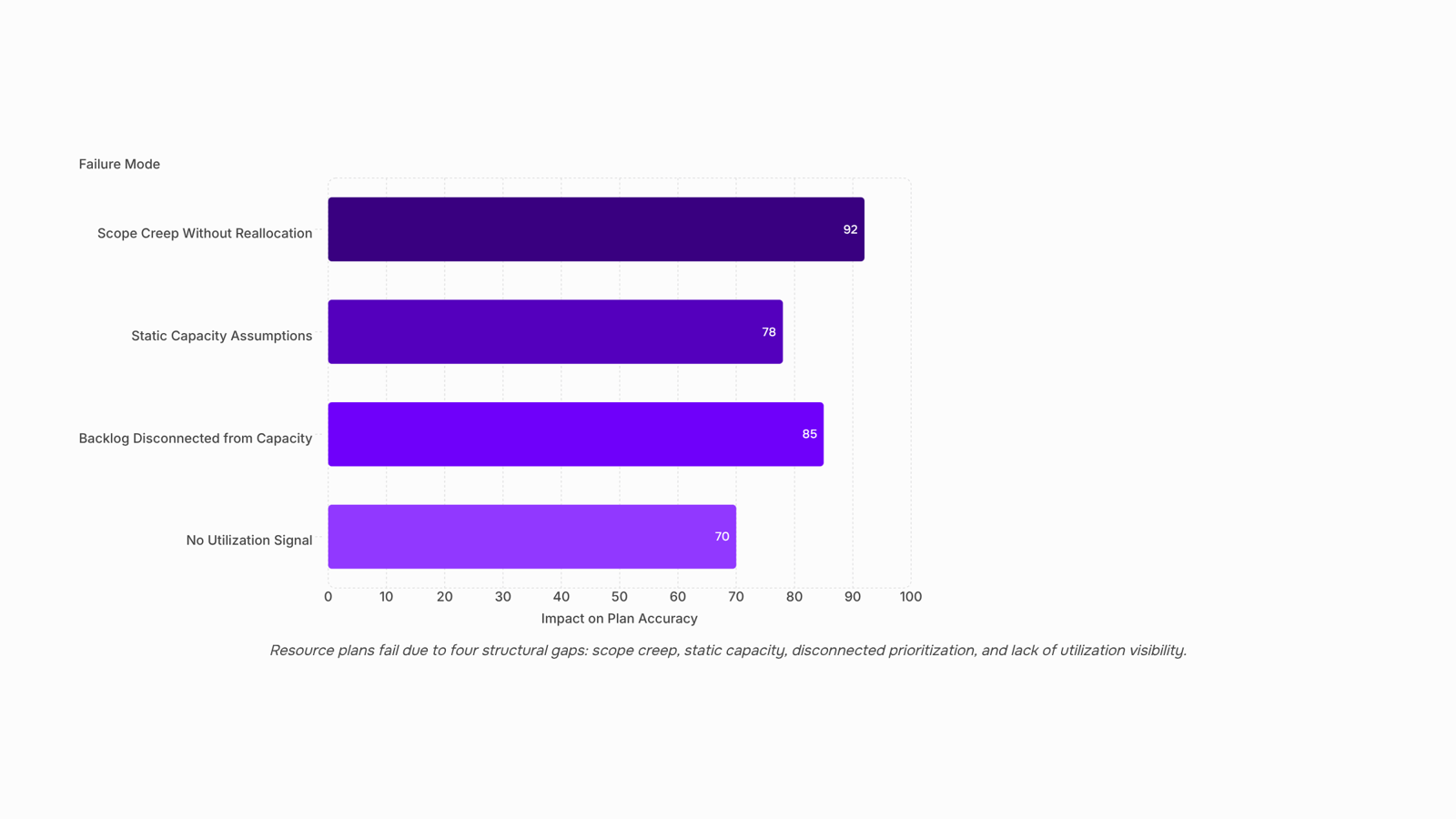
Most resource plans are accurate on day one and wrong by week three. The failure isn't poor intent — it's four specific structural gaps that compound quickly.
Scope creep without reallocation. When a client adds a feature or a stakeholder expands requirements, teams absorb the extra work without adjusting who's assigned to what. The plan stays frozen while the actual workload grows. This is the most common breakdown in resource planning in project management, and it's rarely caught until a deadline slips.
Static capacity assumptions. Initial plans assign people at a flat percentage — say, 80% across six weeks — without accounting for PTO, parallel projects, or support tickets that land mid-sprint. Real availability fluctuates. A plan that doesn't update with it becomes fiction within two weeks.
Backlog prioritization disconnected from capacity. When new items enter the backlog without a capacity check, they get scheduled against people who are already at ceiling. Project prioritization decisions made in isolation from workload data are one of the quieter causes of overallocation — and a direct obstacle to resource utilization optimization.
No signal when utilization drifts. Most teams discover overallocation through a missed deadline, not a dashboard. By then, the damage is done. Effective resource capacity planning requires a live view of who's at what percentage, not a weekly status meeting.
Each failure mode is fixable. But fixing them requires treating the planning of resources as a continuous process, not a one-time document. The next section covers exactly that.
Best practices for resource planning and allocation
The previous section named the failure modes. These practices address them directly.
1. Build your resource plan from confirmed capacity, not assumed availability. Most plans treat "on the team" as "available to this project." It isn't. Before you assign anyone, pull their actual committed hours across all active work. A developer allocated at 80% on a maintenance contract has roughly six hours a week for new project work, not forty. Start there, not from a blank calendar.
2. Tie backlog prioritization to resource decisions. This is the connection most resource planning guides miss. If your backlog isn't ranked by business value and dependency order, you'll assign people to work that gets deprioritized mid-sprint, then scramble to reallocate. Run a prioritized backlog review before each planning cycle. Project prioritization done well cuts reactive reassignments by removing the ambiguity that causes them.
3. Plan to 70–75% of available capacity, not 100%. Fully loaded teams have no room to absorb scope changes, sick days, or a client escalation. The 70–75% rule is a workload management floor, not a productivity ceiling. The buffer isn't wasted time; it's what keeps your plan accurate when reality shifts. Teams that ignore this tend to see their resource plans collapse within the first two weeks of a sprint.
4. Assign ownership at the task level, not just the project level. "The dev team owns the API integration" is not an assignment. One named person owns each task, with a due date and an estimated hour count. Vague ownership is one of the fastest ways resource allocation best practices break down in practice. For a deeper look at how assignment structures affect plan accuracy, resource allocation methods covers three approaches worth comparing.
5. Review and reforecast weekly, not at milestones. A milestone review catches problems after they've compounded. A weekly check, even fifteen minutes, lets you spot a blocked task or an over-allocated team member before it affects the next sprint. This is where resource capacity planning shifts from a one-time setup exercise to a living system.
Project management software that tracks resource utilization in real time makes the weekly review faster, but the cadence matters more than the tool. Get the habit first.
How to optimize resource utilization once the project is running
Once a project is running, the planning of resources shifts from a static document to an active discipline. Most plans degrade within the first two weeks because no one is watching the right numbers.
The two metrics that matter most are utilization rate (billable or productive hours divided by available hours) and allocation variance (planned hours versus actual hours logged). A healthy utilization rate for most IT teams sits between 70% and 80%. Below that, you have idle capacity. Above 85% consistently, you're heading toward burnout and missed handoffs before the next sprint ends.
Build a weekly review cadence around those two numbers. A 30-minute check every Monday, comparing logged hours against the sprint plan, catches over-allocation before it compounds. If one engineer is running at 110% while another is at 55%, that's a reallocation decision you can make today, not at the retrospective.
Backlog prioritization is the lever most IT owners overlook. When scope creep adds unplanned work mid-project, it doesn't just extend timelines. It silently redistributes hours away from committed deliverables. Reviewing the backlog alongside your utilization data, not separately, keeps your resource allocation methods honest.
For teams running multiple concurrent projects, resource capacity planning at the portfolio level prevents the common failure where a single shared resource becomes the bottleneck across three workstreams simultaneously.
Taro surfaces utilization and allocation variance in real time, so your Monday review takes minutes instead of pulling data manually from three different places.
Most teams cobble together three or four tools before they find a combination that actually works for resource planning in project management. At scale, that fragmentation is where plans fall apart.
The main tool categories in use today:
Spreadsheets — still common for small teams, but they break down fast once you're managing more than 10 people across parallel workstreams. No live utilization data, no conflict detection.
Standalone capacity planners — tools that model headcount and availability but don't connect to actual task progress, so the plan drifts from reality within days.
Integrated project management platforms — the most reliable option for large projects, because resource data and task data live in the same system. When someone's scope changes on Tuesday, the utilization view updates automatically.
Taro falls into that third category. Its project planning module tracks logged time, sprint load, and task ownership in one place, so you can see over-allocation before it becomes a missed deadline. That's the gap most resource planning tools don't close: they show you capacity in the abstract but not against live work.
For teams also working through resource capacity planning or comparing resource allocation methods, the tool category matters as much as the process.
Benefits of effective planning of resources
Solid resource planning directly affects whether projects finish on time, within budget, and with a team that wants to work on the next one. According to PMI, resource constraints are among the top reasons IT projects miss deadlines — and the cost compounds fast once a project slips.
The clearest benefits break down this way:
On-time delivery: When resource allocation methods match work to actual availability, buffers shrink and schedules hold.
Cost control: Overallocation burns budget on overtime and rework. Accurate planning of resources keeps spend predictable.
Team retention: Chronically overloaded teams churn. Visibility into utilization lets managers redistribute load before burnout sets in.
Backlog accuracy: When resource capacity planning feeds directly into project prioritization, the backlog reflects what the team can actually deliver — not just what stakeholders want.
Most plans degrade mid-project because capacity data and task assignments live in separate tools. Keeping both in one place is where resource allocation best practices start to hold.
Frequently asked questions about planning of resources
What is planning of resources in project management? Planning of resources means deciding which people, tools, and budget a project needs, when they're needed, and in what quantity. It turns a project schedule into a staffed, funded plan. Good resource planning in project management prevents the two most common failures: overpromising capacity and discovering gaps after work has started.
How does resource utilization optimization improve project outcomes? Higher utilization rates reduce idle time and cut budget overruns. Tracking utilization weekly lets you catch overloaded team members before they miss deadlines. Resource capacity planning gives you the forward visibility to rebalance before a bottleneck becomes a delay.
Closing
Resource planning stops breaking down the moment you treat it as a continuous system instead of a one-time document. Start with confirmed capacity, not assumed availability. Then build a weekly review habit around utilization rate and allocation variance — that fifteen-minute Monday check is what keeps your plan accurate when priorities shift. The real question isn't whether you need a better framework. It's whether your current system can update the resource plan automatically when scope changes, or whether every priority shift requires manual rebalancing across spreadsheets and Slack messages. If it's the latter, Taro is built to handle that update loop — task ownership, capacity tracking, and reallocation signals all wired together so your plan stays current without the overhead. Ready to move from static plans to living ones? Check out Taro and see how it keeps resource allocation synchronized with your actual workload.
FAQ
How to improve resource planning in project management?
Start with confirmed capacity, not assumed availability. Then build a weekly review cadence around utilization rate and allocation variance. Assign ownership at the task level, plan to 70–75% capacity, and tie backlog prioritization to resource decisions so scope changes trigger reallocation, not overload.
What are the best practices for resource planning and allocation?
Build plans from confirmed capacity, tie prioritization to resource decisions, plan to 70–75% capacity (not 100%), assign ownership at task level with due dates, and review weekly. Weekly reviews catch over-allocation before it compounds; milestone reviews catch it too late.
What tools are used for planning of resources in large projects?
Project management platforms with real-time utilization tracking and task-level ownership visibility are essential. Taro integrates task ownership, capacity tracking, and reallocation signals so resource plans update automatically when scope or priority changes, eliminating manual spreadsheet updates.
How to optimize resource utilization in resource planning?
Track utilization rate (70–80% is healthy) and allocation variance weekly. Rebalance when one person runs above 85% while another sits at 55%. Use backlog prioritization as your reallocation lever — when unplanned work lands, it should trigger a capacity check, not silent hour redistribution.
What are the benefits of effective planning of resources?
Clear workload for every team member, reliable delivery forecasts, fewer missed deadlines, reduced burnout from overallocation, and the ability to absorb scope changes without cascading delays. Plans that hold also free managers from reactive firefighting.


 Elena Petrova15 September 2026


