TL;DR: Most guides on managing business processes hand you a maturity model and leave the hard part to you. This one shows IT company owners exactly where manual process management breaks down at scale, which tool categories close those gaps, and how automation handles the work your team keeps doing by hand. You'll finish with a framework you can act on this week.
What Managing Business Processes Actually Means
Business process management (BPM) is the practice of designing, monitoring, and improving the repeatable workflows that keep your company running — client onboarding, ticket escalation, project handoffs, invoicing. Not a methodology you study. A discipline you apply every time work moves from one person or system to another.
For an IT company owner, managing business processes looks like this in practice: a new client signs, and the same sequence of steps needs to happen every time — provisioning access, scheduling kickoffs, assigning internal owners. When that sequence lives in someone's head or a shared inbox, it runs on memory and goodwill. That works at five people. At twenty, it breaks.
The gap between "we have a process" and "our process runs reliably without supervision" is where most IT companies lose hours every week. Inconsistent execution, missed handoffs, no clear audit trail.
BPM closes that gap by making workflows explicit, measurable, and repeatable. You document the steps, assign ownership, set triggers, and track completion. Once a process is visible, you can spot where it stalls and decide which business processes can be automated versus where human judgment still belongs.
If you're figuring out where to start, identifying which processes are ready for automation is a practical first step before touching any tooling.
Where Business Process Management Breaks Down as You Scale
The failure modes in business process management don't appear all at once. They accumulate quietly, then hit you when your team doubles from 12 to 25 people and the informal coordination that worked before stops working entirely.
The first crack is missed handoffs. When a client onboarding or a deployment request moves between your sales, delivery, and support teams, the transfer point lives in someone's inbox or a Slack thread. No formal trigger, no documented owner. Work stalls there until someone chases it.
The second is inconsistent execution. Two engineers handling the same ticket type follow different steps because the process was never written down — it was just observed. One skips a QA check. The other documents everything. Your clients notice the difference even when you don't.
The third is visibility loss. You can't tell where a process stands without asking someone directly. That's not managing business processes — that's managing people who are managing processes, which is a different (and much more expensive) job.
These failure modes compound. A missed handoff creates a delay. The delay triggers a workaround. The workaround becomes the new informal process. Now you have two versions of the same workflow running in parallel, and neither is documented.
If you're trying to streamline business processes at this stage, the bottleneck usually isn't effort — it's structure. Most IT teams at this size haven't yet mapped which processes are stable enough to formalize and which are ready for automation.
The fix isn't adding headcount. It's adding structure before the next growth phase makes the gaps worse.
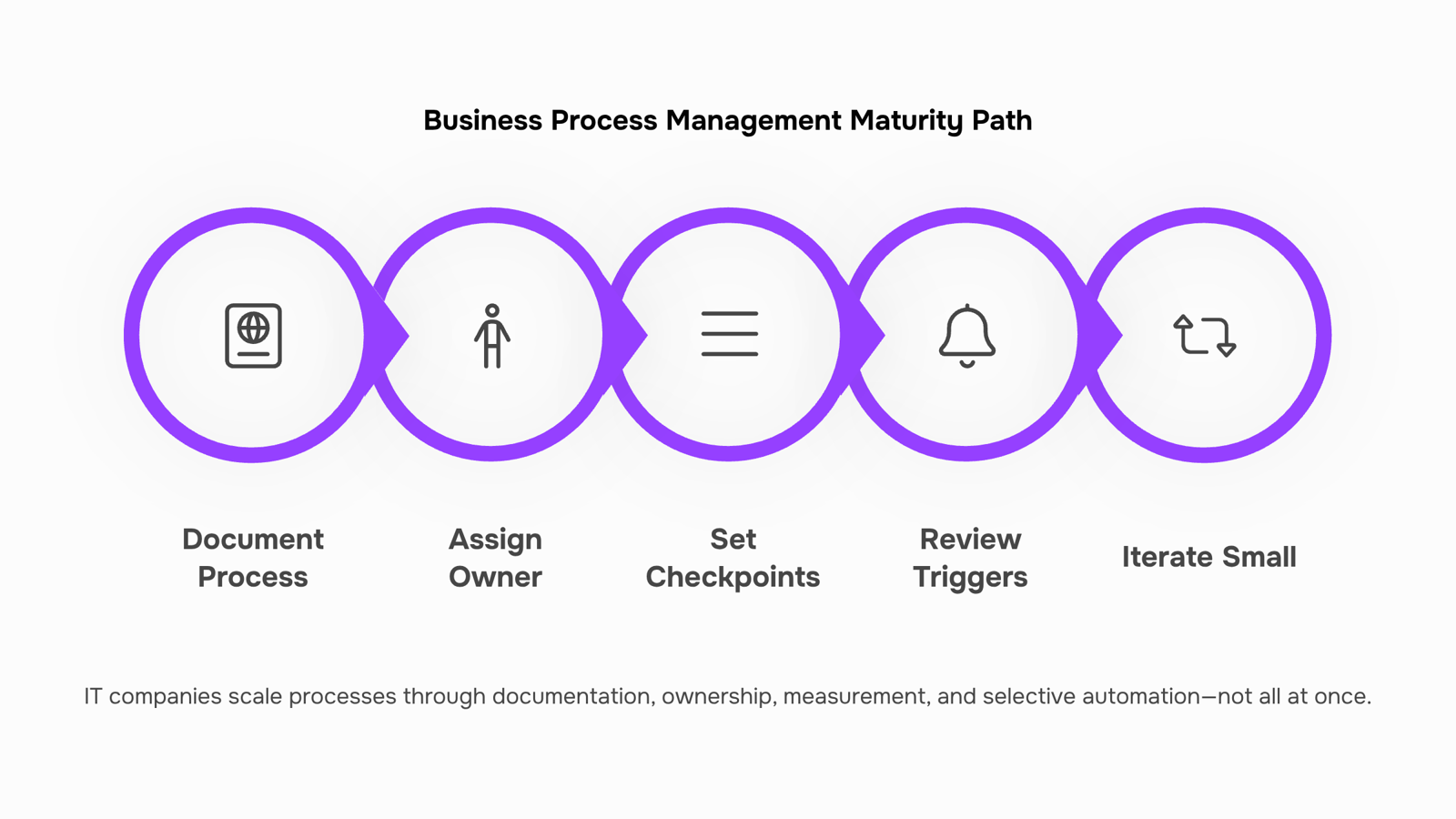
Key Steps to Managing Business Processes Effectively
Effective business process management doesn't require a complete operational overhaul. It requires a repeatable sequence you actually follow.
Here's the framework IT operations teams use to get control without adding overhead:
Document what exists, not what should exist: Write down the process as it runs today, including the workarounds. If your team routes client escalations through a Slack thread because the ticketing system is too slow, document that. You can't fix what you haven't named.
Assign a single owner per process: Not a team. One person who is accountable for outcomes. Missed handoffs almost always trace back to shared ownership, where everyone assumes someone else is watching the step.
Set measurable checkpoints: Define what "on track" looks like at each stage. For a client onboarding process, that might be: credentials delivered within 24 hours, first check-in call booked within 48 hours, project board populated by day three. Vague milestones produce vague results.
Build in a review trigger, not a review calendar: Quarterly reviews sound disciplined but often miss the moment a process breaks. Instead, flag a review whenever a handoff fails twice in a row or a checkpoint is missed three times in a month. That's when the process needs attention, not on a fixed schedule.
Iterate in small increments: Change one variable at a time. If you restructure ownership, reassign tools, and rewrite the checklist simultaneously, you won't know which change fixed the problem.
This sequence applies whether you're trying to improve your business processes through management or starting from scratch. The goal of managing business processes effectively is to create conditions where problems surface early, ownership is unambiguous, and your team spends less time coordinating and more time executing.
Most IT companies that streamline business processes successfully don't do it all at once. They pick the one process causing the most friction and work through these five steps before touching anything else.
The right tool depends on where in your process the work breaks down. Mapping categories to stages is more useful than a flat software list.
Lead capture and qualification sit at the front of every IT services pipeline. CRM platforms (HubSpot, Zoho CRM) handle contact records and pipeline stages, but they rarely trigger the next step automatically. That gap is where most leads go cold.
Project execution and task ownership need a dedicated layer. Tools like Asana, Jira, or Monday.com give you task assignment, deadlines, and status visibility. Without this layer, managing business processes across a five-person delivery team means chasing updates over Slack.
Workflow automation is the connective tissue. This is where workflow automation tools like Revo sit. Revo connects your CRM, project tools, and communication apps so that a trigger in one system (a deal marked "won") automatically fires actions in others (create project, assign owner, send onboarding email). No manual handoff. If you're still deciding which business processes can be automated, start with anything that requires copying data between two tools.
Invoicing and billing close the loop. Delayed invoicing is almost always a process failure, not a finance failure. Billing tools need to connect to project completion signals, not sit in isolation.
Here's a quick category-to-stage map:
Process stage | Tool category | What breaks without it |
|---|
Lead capture | CRM | Leads fall through, no follow-up |
Project delivery | Task management | Unclear ownership, missed deadlines |
Handoffs and triggers | Workflow automation | Manual re-entry, delays between steps |
Billing | Invoicing software | Late invoices, revenue leakage |
For a deeper look at BPM software options for smaller IT operations, the category breakdown there maps well to teams under 50 people. The goal is a connected stack, not a longer one.
Can Automation Improve Business Process Management
Automation improves business process management in a specific, bounded way: it removes the coordination work that doesn't require a human decision.
That means manual triggers (someone remembering to send a status update), data re-entry between tools that don't talk to each other, and status chasing across email threads. These are the tasks that consume 5 to 10 hours per employee per week in IT services firms, not because the work is hard, but because no system owns it. Business process automation addresses exactly this gap.
What automation doesn't replace is worth naming clearly. Judgment calls on scope changes, client relationships that depend on reading tone and context, and decisions that carry real business risk — those stay with your team. Trying to automate them creates brittle workflows that break when reality doesn't match the script.
The practical mechanism looks like this: a trigger fires when a condition is met (a form is submitted, a status field changes, a date passes), a workflow runs without anyone watching it, and the output lands in the right tool without manual copying. That's the connective layer. Most IT company owners who are managing business processes across five or more tools don't have this layer — they have a person doing it by hand.
Revo's process automation sits in this gap. It connects internal and external tools, fires workflows on defined triggers, and removes the re-entry work that creates errors and delays. It doesn't make decisions; it executes them consistently once you've made them.
For a broader view of what business processes can be automated to increase efficiency, the short answer is: any repeatable process with a clear input, a defined output, and no judgment required in between.
Workflow automation tools work best on mature, stable processes. The next section covers how to identify which ones those are.
How to Streamline Business Processes Without Breaking What Works
The honest filter for streamlining comes down to one question: is the process stable enough to automate, or does it still change every few weeks?
Automating an immature process doesn't fix it. It locks in the dysfunction and makes it harder to change later. Before you touch a workflow in a tool like Revo, run it manually twice and document what actually happens, not what the process map says should happen.
A practical triage looks like this:
High repetition, low variation (invoice reminders, status updates, data entry): automate first. These are the clearest wins when you automate business processes.
High repetition, moderate variation (client onboarding, ticket escalation): improve the manual version first, then automate the stable parts.
Low repetition, high judgment (pricing exceptions, scope changes): keep human. Automation here creates false confidence.
The tradeoff is real: over-automating early saves time in week one and costs you two sprints of rework in month three.
When you're ready to identify which processes are ready for automation, the criteria above give you a defensible starting point, not just a gut call. Managing business processes well means knowing what to leave alone as much as knowing what to connect.
Closing
The framework above works because it treats process management as a discipline, not a one-time project. You document what's actually happening, assign clear ownership, measure progress at checkpoints, and iterate when reality diverges from the plan. Most IT company owners already know which processes are slowing them down — the gap is usually the automation layer that connects your tools and removes manual triggers. That's where the real time savings live. Start with one process this week: map it, name the failure points, and see where data moves between systems by hand. Then explore how a tool like Revo can automate those handoffs without disrupting the workflows your team already trusts. A free trial or workflow audit is a good starting point to see what's possible without committing to anything.
FAQ
How can I streamline my business processes?
Document the process as it runs today, assign one owner per process, set measurable checkpoints, trigger reviews when handoffs fail (not on a calendar), and iterate one change at a time. Start with the process causing the most friction.
What tools are best for managing business processes?
CRMs handle lead capture, task managers (Asana, Jira) own project execution, workflow automation tools like Revo connect them and remove manual handoffs, and billing tools close the loop. The right tool depends on where your process breaks down.
Can automation improve business process management?
Yes. Automation removes manual handoffs between systems, eliminates re-entry work, and ensures triggers fire consistently. Start automating anything that requires copying data between two tools.
What are the key steps in managing business processes effectively?
Document what exists, assign one owner, set measurable checkpoints, build review triggers based on failures (not calendars), and iterate in small increments. This sequence applies whether you're improving or building from scratch.
What is the difference between business process management and workflow automation?
BPM is the discipline of designing, monitoring, and improving repeatable workflows. Workflow automation is the tool that executes those workflows by connecting systems and removing manual steps. BPM without automation still requires supervision; automation without BPM creates chaos.


 Elena Petrova15 September 2026


