TL;DR: Most invoice example articles show you a template and leave the rest to guesswork. This one walks IT company owners through every field in a standard invoice, why each one exists, and what happens when any of them are missing. You'll also see how to build invoices directly from the projects and deals already in your workflow, without re-entering data by hand.
What a standard invoice looks like
A standard invoice for an IT services business has roughly ten labeled fields arranged in a predictable order. Here is a concrete example of invoice layout you can use as a reference point throughout this article.
Sender block (top left): Apex IT Solutions, 412 Westfield Ave, Austin TX 78701, tax ID 47-2938104
Client block (top right): BrightPath Logistics, 88 Commerce Drive, Dallas TX 75201
Invoice details:
Line items:
Service | Qty | Rate | Amount |
|---|
Network infrastructure audit | 8 hrs | $175/hr | $1,400 |
Cloud migration planning | 5 hrs | $175/hr | $875 |
Managed support retainer (June) | 1 | $600 | $600 |
Subtotal: $2,875 Tax (8.25%): $237.19 Total due: $3,112.19
Payment terms: Net 15. Wire transfer or ACH. Late fee: 1.5% per month after due date.
Every field in this example of invoice template serves a specific legal or operational function. The invoice number (INV-2026-0047) is not decorative: it is how your accounting system, your client's accounts payable team, and any auditor will trace this transaction. The due date is equally load-bearing. For a deeper look at what an invoice is and how it works, or to review the essential elements every invoice should include, those articles cover the foundational rules before you customize.
What every field in the invoice example means
Each field in a standard invoice example carries a specific job. When one is missing or wrong, payment slows or disputes start.
Invoice number: A unique identifier assigned to every invoice you issue. A good example of an invoice number format is INV-2026-0047, where the prefix, year, and sequence are all visible at a glance. Without a unique number, your client's accounts payable team cannot match the invoice to a purchase order, and you lose the audit trail that protects you in a dispute.
Invoice date: The date the invoice was issued. This anchors the payment clock. If it is missing, the due date becomes ambiguous and your client has grounds to delay.
Due date: The deadline for payment, stated explicitly. "Net 30" written in a notes field is not the same as a clear date. Invoices without a hard due date consistently take longer to pay than those with one.
Sender details: Your business name, address, and tax or registration number. In many jurisdictions, a missing tax ID makes the invoice non-compliant and non-deductible for your client. See essential elements every invoice should include for jurisdiction-specific requirements.
Client details: The billed entity's legal name and address. Billing the wrong legal entity is one of the most common errors in IT service invoicing, especially when a client operates under a parent company and a trading name.
Line items: Each service, deliverable, or product billed separately, with quantity, unit rate, and subtotal. For IT businesses, this is where vague descriptions like "consulting" create disputes. "Cloud infrastructure setup, 12 hours at $150/hr" does not.
Tax and total: Tax rate, tax amount, and final total shown as separate lines. Combining them obscures the calculation and creates problems for your client's VAT or GST filings.
For more context on how these fields work together, the guide on what an invoice is and how it works covers the full picture.
Every professional invoice needs two categories of fields: ones that are legally required in most jurisdictions, and ones that cut down on late payments and disputes.
Legally required in most jurisdictions:
Your full business name, address, and tax identification number (VAT number or equivalent)
Client's full legal name and billing address
A unique invoice number (sequential formats like INV-2026-001 work best for audit trails)
Invoice date and payment due date
An itemized list of goods or services with unit prices and quantities
Subtotal, applicable taxes, and total amount due
Fields that reduce payment delays:
Payment terms spelled out explicitly ("Net 30" is not enough — add the exact due date)
Accepted payment methods with account details or a payment link
A purchase order (PO) number if the client requires one for their accounts payable process
Late payment penalty terms, stated as a percentage and a trigger date
For IT service businesses specifically, the line-item section carries more weight than most invoice guides acknowledge. A vague line like "consulting services — $4,500" invites disputes. Breaking it into "Network infrastructure audit (8 hrs × $150)" and "Remote monitoring setup (6 hrs × $150)" gives the client's finance team something to approve against a scope document.
A good example of invoice template pre-populates most of these fields so you're not rebuilding the structure each time. For a broader look at essential elements every invoice should include, the field logic applies across most invoice types.
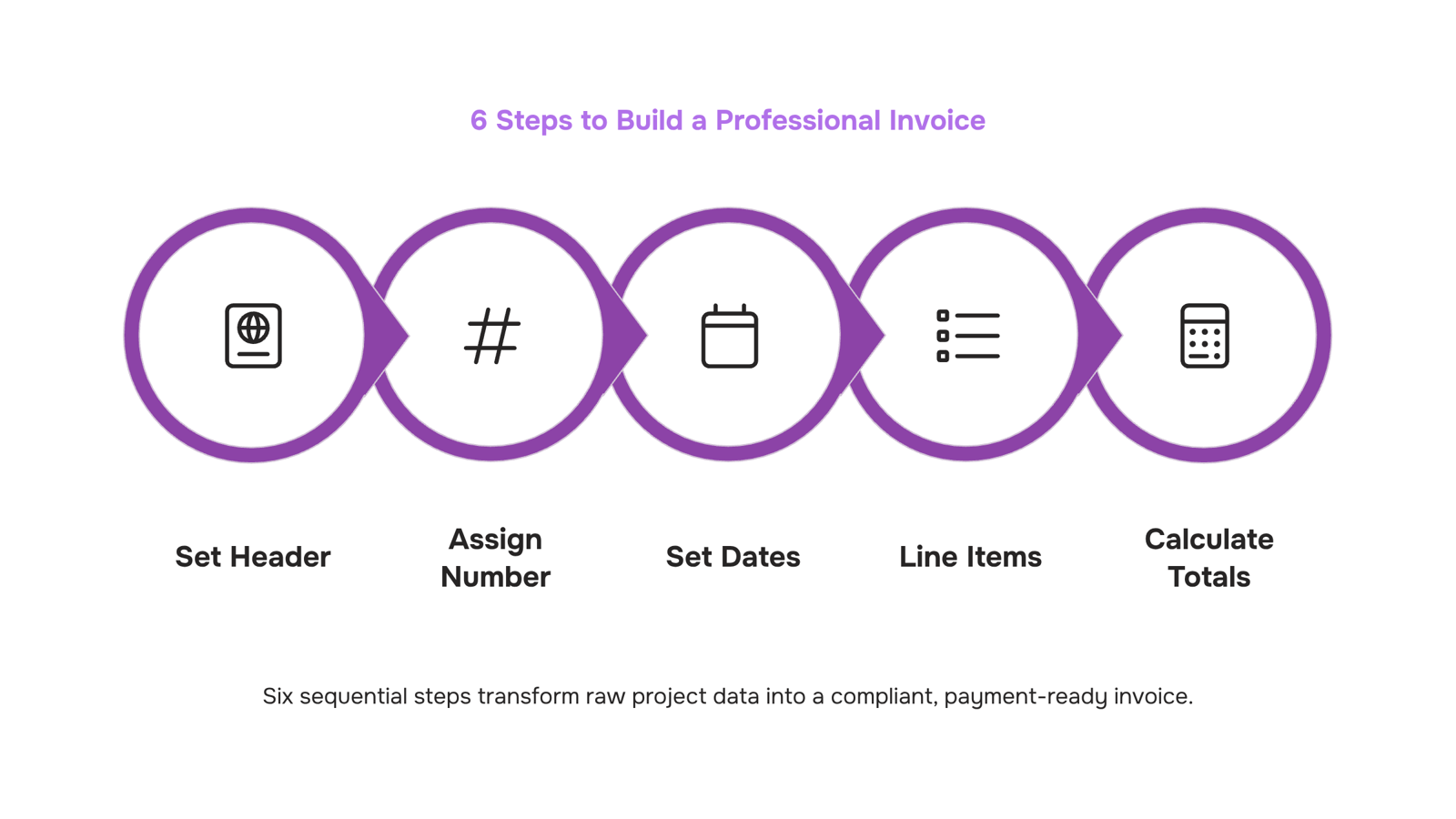
How to build a professional invoice in 6 steps
Here is a concrete example of invoice-building in six steps, using a fictional IT firm — Apex Systems — billing a client for a network security audit.
Step 1: Set your header: Add your business name, logo, address, and contact details at the top. Below that, add the client's name and billing address. This is the first thing a client's accounts payable team scans to confirm the invoice belongs to them.
Step 2: Assign an invoice number: Every invoice needs a unique identifier. A clean example of an invoice number format: INV-2026-0047, where the prefix signals document type, the year aids filing, and the sequence number prevents duplicates. Never reuse a number. Gaps in your sequence are fine; duplicates cause reconciliation problems and can flag an audit.
Step 3: Set the issue date and payment due date: Both dates belong on every invoice. Invoices without a due date get paid significantly later than those with a clear deadline — accounts payable teams prioritize what has a hard date. For Apex Systems, that means "Issued: June 1, 2026 / Due: June 15, 2026" rather than "Net 30" buried in fine print.
Step 4: Build your line items: This is where IT billing gets specific. Break out each service separately: "Network security audit — 8 hours @ $150/hr" is clearer than "consulting services — $1,200." If the project included both labor and software licensing fees, list them as separate line items. Clients dispute vague line items; detailed ones rarely get questioned. For common invoice examples for small businesses, this level of detail is what separates invoices that get paid on time from ones that trigger back-and-forth.
Step 5: Calculate and show the totals: Subtotal, any applicable tax (with the tax rate shown explicitly), and the final amount due. If you're VAT-registered, your VAT number is required here in most jurisdictions — check your local rules.
Step 6: Add payment instructions: Bank details, accepted payment methods, and any late payment terms go here. "Payment by bank transfer to account ending 4821" is more useful than "please remit payment." The less a client has to ask, the faster they pay.
Once you have this structure locked, Inzo can generate the PDF, send it, and track payment status automatically — so the six steps above become a one-time setup rather than a recurring manual task. When you're ready to send, this walkthrough covers how to deliver your invoice once it's built.
Common invoice mistakes that delay payment
Four errors show up repeatedly across IT service invoices, and each one has a predictable cost.
No due date: Invoices without a due date get paid an average of 8 days later than those with one, according to FreshBooks data. "Upon receipt" is not a due date. Write "Net 15" or a specific calendar date.
Vague line items: "Consulting services — $4,200" will get questioned. "Network infrastructure audit, 14 hours at $300/hr" will not. In an example of invoice letter for IT work, every line item should map to a deliverable the client already approved.
Duplicate or missing invoice numbers: A repeated invoice number breaks your audit trail and can trigger a dispute or a failed expense review on the client's side. Use a consistent format: prefix, year, and sequence (e.g., INZ-2026-0041).
Missing tax ID or registration number: Depending on jurisdiction, omitting your tax ID makes the invoice legally unenforceable. This matters especially when a client's accounts payable team needs an example of invoice receipt to process reimbursement.
For a broader look at what fields belong on every invoice, common invoice examples for small businesses covers the full checklist.
How to connect your invoice to your project and deal workflow
An invoice doesn't live in isolation. It's the output of a project that was scoped, approved, and delivered — and when you build it from scratch each time, you're manually re-entering data that already exists somewhere upstream. That's where errors compound: a misremembered hourly rate, a missed line item for a third-party tool, a project phase that got billed twice.
The fix is connecting your invoice to the deal or project it came from. If a client signed off on a statement of work, your invoice line items should pull directly from that document. If a project closed in your task management system, the billable hours and deliverables should flow into the invoice automatically, not get typed in again.
For IT service billing specifically, this matters more than most common invoice examples for small businesses suggest. Your line items often include labor at different rates, licensed software, infrastructure costs, and milestone-based fees — all of which need to match the original estimate exactly. A single misaligned figure triggers a client dispute that delays payment by weeks.
Inzo handles this by linking invoice creation to completed projects and closed deals. When a project wraps in Taro (WorksBuddy's task agent), Inzo can generate a draft invoice from that project's data automatically. You review, adjust if needed, and send — without rebuilding the example of invoice template from memory each time.
That's the difference between an invoice that reflects what actually happened and one that reflects what you remember.
Closing
Building an invoice manually is straightforward once. But when you're closing deals in your CRM and finishing projects at the same time, manually creating each invoice becomes a bottleneck that slows cash flow. Inzo generates invoices directly from closed deals and completed projects in your workflow, pulling client details, line items, and project data automatically so nothing gets re-entered by hand. See how it works with a free trial or schedule a demo to watch invoices flow from project completion to client inbox without the manual step.
FAQ
What does a standard invoice look like?
A standard invoice has ten labeled fields: sender block (top left), client block (top right), invoice number, issue date, due date, line items with quantity and rate, subtotal, tax, total due, and payment terms. Each field serves a legal or operational function.
Can I see an example of a business invoice template?
Yes. Apex IT Solutions billing BrightPath Logistics shows the structure: sender and client details at top, invoice number INV-2026-0047, issue and due dates, itemized services (network audit 8 hrs @ $175, cloud planning 5 hrs @ $175, retainer $600), subtotal $2,875, tax $237.19, total $3,112.19, and Net 15 payment terms.
What information should be included in an invoice example?
Legally required: your business name, address, tax ID, client's legal name and address, unique invoice number, issue date, due date, itemized services with quantities and rates, subtotal, taxes, and total. Recommended: explicit payment terms, accepted payment methods, PO number if required, and late payment penalties.
How do I create a professional-looking invoice?
Follow six steps: set your header with business and client details, assign a unique invoice number (INV-2026-0047 format), set issue and due dates clearly, break line items into specific services with hours and rates, calculate subtotal and tax separately, add payment terms and methods, then review for completeness before sending.
What is an invoice number and how should I format it?
An invoice number is a unique identifier that lets your client's accounts payable team and auditors trace the transaction. Format it as INV-2026-0047, where the prefix signals document type, the year aids filing, and the sequence prevents duplicates. Never reuse a number.
What is the difference between an invoice and a receipt?
An invoice is a request for payment issued before or at the time of sale, with terms and a due date. A receipt is proof of payment issued after the transaction is complete. Invoices drive cash flow; receipts document it.


 Elena Petrova15 September 2026


