TL;DR: Most posts list API integration problems without explaining why they break in production. This one covers the technical mechanism behind each failure, what it looks like when it hits your workflow, and the specific fix, including where automation removes the manual overhead of managing third-party connections.
What API integrations actually do in a business stack
Abstract 3D visualization of interconnected API systems with flowing data pathways and geometric blocks representing seamless digital integration
API integrations are the connective tissue between your business applications. They let two systems exchange data through structured requests and responses, without either system needing to know the other's internal logic. Your CRM pushes a closed-won deal to your billing tool. Your project tracker pulls time entries into an invoice. Each exchange follows a contract: specific endpoints, expected payloads, authentication credentials.
This is different from native sync features. Native sync is vendor-controlled, limited to whatever fields and frequency the vendor decided to expose. Third-party API integrations give you control over what data moves, when it moves, and what triggers the exchange. You define the logic.
In practice, most IT companies run dozens of these connections. A typical stack might include CRM-to-project-management, ticketing-to-email, billing-to-accounting, and time-tracking-to-invoicing. As one practical guide puts it, API integrations power processes that keep data in sync, enhance productivity, and drive revenue.
The catch: every integration you build is a dependency you maintain. Each one has auth credentials that expire, schemas that change, and rate limits that throttle. Understanding how AI-powered integration services handle these failure modes matters more than counting how many connections you can spin up.
That maintenance cost is where most teams underestimate the real work, which the next section breaks down by failure type.
Authentication failures and how they break integrations silently
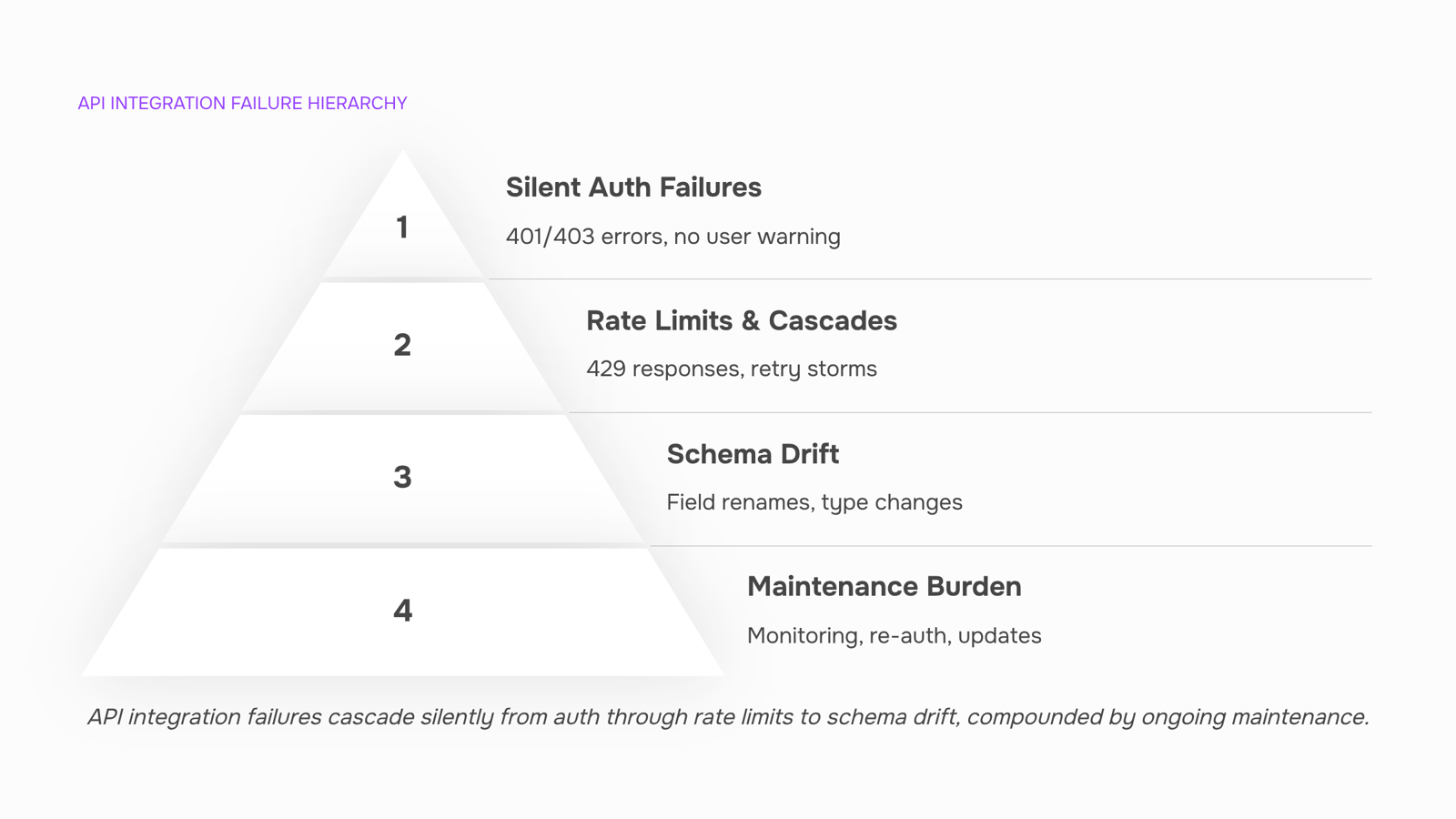
Authentication failures are the quietest killers in api integrations. They rarely throw a dramatic error. Instead, they return a 401 or 403, your system logs it as a failed request, and the data simply never arrives. The end user sees nothing, or worse, sees stale data and assumes everything is current.
Expired OAuth tokens are the most common mode. OAuth access tokens typically expire after 60 minutes. If your refresh token logic fails silently (a misconfigured redirect URI, a revoked grant), every subsequent API call returns unauthorized. In production logs, you see a clean 401 with a "token expired" message. The end user sees a dashboard that stopped updating three hours ago with no warning.
Rotated API keys hit differently. A vendor rotates their key (or your team rotates yours during a security audit), and the old key returns 403 Forbidden. Logs show the rejection clearly, but if nobody is watching those logs, the integration sits dead for days. This is especially common in third-party api integrations where the key owner and the integration owner are different people.
IP allowlist mismatches are the hardest to diagnose. You migrate infrastructure, spin up a new server, or your cloud provider reassigns an IP. The vendor's firewall silently drops the connection. Logs may show a timeout rather than a clear rejection, which makes it look like a network issue instead of an auth issue.
The fix pattern is the same for all three: monitor for auth-specific HTTP status codes, alert immediately, and automate recovery where possible. Self-healing integrations that automatically detect authentication failures and retry with refreshed credentials remove the human bottleneck. If your api integrations platform handles auth and retry logic natively, you skip building this plumbing yourself.
Rate limits, timeouts, and the cascade problem
When your app hits a third-party API's rate limit, the immediate effect is one rejected request. The real damage happens next. A queued sync job fails silently, downstream triggers never fire, and your system either retries too aggressively (compounding the throttle) or gives up entirely (creating data gaps your team discovers days later).
Here is how the cascade typically unfolds in third-party api integrations:
A batch sync exceeds the provider's call ceiling (Salesforce, for example, enforces 100,000 REST calls per 24 hours per org).
The provider returns a 429 or drops the connection. Your integration layer, if it lacks backoff logic, immediately retries.
Retries stack up, the provider blocks your IP or token for a cooldown window, and every integration sharing that credential stops moving data.
Dependent workflows (invoice creation, lead routing, notification emails) either run on stale data or fail outright, producing duplicate records or orphaned tasks.
When rate limits are exceeded, API requests can be denied or delayed, resulting in timeouts and degraded user experience.
Concrete strategies that prevent the cascade:
Exponential backoff with jitter. After each failed attempt, double the wait and add a random offset (e.g., 1s, 2.4s, 5.1s). Jitter prevents synchronized retries from multiple workers.
Token-bucket tracking. Log remaining quota from response headers (X-RateLimit-Remaining). Pause proactively at 10% remaining instead of waiting for a 429.
Circuit breaker pattern. After three consecutive failures, halt all calls to that endpoint for a fixed window. Resume with a single probe request before reopening the circuit.
Decouple with a queue. Push outbound calls into a message queue so failures don't block the calling workflow.
An api integrations platform that handles retry and backoff natively removes most of this burden. If you want to configure multi-step workflows without writing API call logic by hand, that is the faster path for most IT teams.
Data mapping errors and schema drift over time
A data mapping error happens when a field your system expects (say, billing_address.line2) gets renamed, restructured, or removed in the third-party API's response. The problem is rarely announced. Most SaaS vendors push schema changes mid-cycle, sometimes without even a changelog entry. Your integration keeps running, but now it writes null values or mismatched data into your CRM or invoice records.
This is where api integrations silently degrade. A renamed field in a payment gateway might map a customer's company name into their phone number field. A restructured nested object in your CRM API integrations might flatten an array your parser expected, causing duplicate contact records or lost deal stages. You only discover it weeks later when a report looks wrong or a client complains about a bad invoice.
Common mapping failures include:
Field renamed upstream (e.g., company_name becomes org_name) with no error thrown
Data type change (string to integer, or date format shift from ISO 8601 to Unix timestamp)
Nested object depth change that breaks your JSON path references
New required fields added that cause silent 200 responses with partial writes
To prevent this, pin your integrations to a specific API version and validate response schemas before writing to your database. Run a nightly contract test that compares the live response structure against your expected schema. When drift is detected, flag it before bad data propagates. As ZigiWave notes, reliable integrations require proactive mapping validation rather than reactive cleanup.
If you run projects and billing through one connected workspace, Taro keeps task, time, and invoice data mapped internally, so you avoid the schema drift problem between your project tracker and your billing system entirely. For external connections, you can configure multi-step workflows without writing API call logic by hand, which centralizes your field mappings in one auditable place.
The maintenance burden no one budgets for
Most teams budget for building an integration. Few budget for keeping it alive. That gap is where third-party API integrations quietly drain engineering capacity month after month.
The ongoing costs stack up fast:
Monitoring and alerting: Every connected endpoint needs health checks. A silent failure at 2 AM means corrupted data by morning
Re-authentication: OAuth tokens expire, API keys rotate, vendors revoke credentials during security incidents. Someone has to fix the handshake each time
Schema updates: As covered in the previous section, upstream changes break your mappings. Patching them is unplanned work that displaces roadmap items
Error handling and retries: Transient failures (timeouts, rate limits, 5xx responses) need retry logic with exponential backoff. Without it, data gaps accumulate silently
The maintenance burden falls disproportionately on IT, pulling engineers into emergency fixes every time a connected SaaS app pushes a change. APIs change without notice, and the long-term costs far exceed the initial build.
This is exactly why many IT company owners shift toward an api integrations platform that handles auth, retries, and monitoring out of the box. Platforms that handle auth and retry logic natively remove the largest recurring maintenance tasks from your team's plate entirely.
Four criteria separate a useful api integrations platform from one that just adds another dashboard to babysit.
Connector breadth. Count the pre-built connectors that match your actual stack, not the total catalog number. Revo, for example, ships 1000+ pre-built connectors via Pipedream, covering most CRM, billing, and communication tools an IT company already runs. That matters more than a headline figure padded with niche apps you will never touch.
Error visibility. When a third-party api integration fails at 2 AM, you need a clear log showing which call failed, what the response payload was, and whether the platform retried automatically. If the platform only surfaces "sync failed," you are back to manual debugging.
No-code configurability. Your team should be able to map fields, set filters, and adjust trigger conditions without opening a code editor. This is where most crm api integrations stall: the connector exists, but customizing it requires a developer ticket.
Auth and retry logic out of the box. OAuth token refresh, exponential backoff on rate limits, and automatic re-authentication after credential rotation should be default behavior, not something you script yourself.
When evaluating platforms, compare how each handles deployment models and migration costs before committing. For a deeper breakdown of selection criteria specific to B2B workflows, see how to choose the best B2B integration platform for your business.
Can you customize API integrations without rebuilding them from scratch
Yes, but the approach depends on what you're actually changing. Pre-built connectors let you reconfigure field mappings, trigger conditions, and data filters without touching code. You're adjusting behavior within a framework someone already tested. This covers most customization needs for CRM api integrations: mapping custom fields, filtering which records sync, or changing when a workflow fires.
Custom API calls make sense when the pre-built connector doesn't expose the endpoint you need, or when you're chaining logic that the connector's UI can't represent. The tradeoff: you own the maintenance. When that vendor pushes a schema change, you fix it.
For IT teams with limited engineering bandwidth, the decision is straightforward. Start with a platform that lets you configure multi-step workflows without writing API call logic by hand. Only drop to custom code when the connector genuinely can't reach what you need. Most api integrations never require that step.
Closing
Most IT teams treat API integrations as a build-once, forget-forever problem. The reality is messier: auth tokens expire silently, rate limits cascade into data gaps, and schema changes break mappings weeks after they ship. Each failure mode requires its own monitoring, retry logic, and validation layer—unless your integration platform handles it at the infrastructure level.
The teams moving fastest aren't the ones debugging 401s and 429s in production logs. They're the ones using a platform where token refresh, backoff, and schema validation are built-in. If you're currently managing these challenges manually across dozens of connections, start here: explore how Revo's pre-built connector library eliminates the infrastructure work so your team focuses on business logic instead.
FAQ
What are the benefits of using API integrations for my business?
API integrations let you control what data moves between systems, when it moves, and what triggers the exchange—unlike vendor-controlled native sync. They power processes that keep data in sync, enhance productivity, and drive revenue across your entire stack.
How do I choose the right API integrations for my software?
Evaluate based on your actual workflow: lead capture, multi-step follow-up, and data sync. Prioritize integrations that solve your highest-friction handoff first, then build outward. Avoid connecting systems just because the API exists.
Can I customize API integrations to fit my company's needs?
Yes—that's the core advantage over native sync. You define the logic, field mapping, and sync frequency. A visual workflow builder lets you customize without writing code by hand.
What are some common API integration challenges and how to overcome them?
The three biggest: expired OAuth tokens (automate refresh logic and monitor for 401s), rate limit cascades (use exponential backoff and token-bucket tracking), and schema drift (pin API versions and validate responses nightly). A platform that handles these natively removes the manual overhead.
How do I know when an API integration has broken silently?
Monitor for auth-specific HTTP status codes (401, 403) and alert immediately. Run nightly contract tests comparing live response schemas against expected structure. Watch response headers like X-RateLimit-Remaining to catch throttling before it cascades.
What is the difference between a native integration and a third-party API integration?
Native sync is vendor-controlled and limited to fields and frequency the vendor exposes. Third-party API integrations give you full control over data movement, logic, and timing—but require you to maintain auth, retry logic, and schema validation unless your platform handles it.


 Elena Petrova15 September 2026


