TL;DR: Most WBS articles show one diagram and stop. This one breaks down four structurally different examples by project type, explains why each is built that way, and gives you a repeatable 5-step process you can apply to your next project before the day ends.
What a work breakdown structure actually is
3D hierarchical work breakdown structure diagram with geometric blocks and connecting lines showing project phases
A work breakdown structure is a hierarchical decomposition of a project's total scope into smaller, deliverable-based chunks. Each level breaks a parent deliverable into its component parts until you reach work packages, the lowest-level units your team can estimate, assign, and track. The numbering convention (1.0, 1.1, 1.1.1) is a de facto standard across PMI and ISO 21500 guidance, not a mandated format, so adapt it to your tooling.
Why the structure matters more than the tasks themselves: without it, scope creep is almost guaranteed. PMI's 2023 Pulse of the Profession found that a significant share of IT projects exceed their original scope, often because deliverables were never decomposed clearly enough to expose gaps early.
The key distinction in work breakdown structure examples for project management is that WBS organizes by deliverable, not by activity sequence. If you need a deeper primer, start with what a WBS is and how it fits into your project planning process.
Work breakdown structure examples for construction projects
Construction projects are product-based, meaning the WBS decomposes into physical deliverables before it ever touches activities. Here is an annotated WBS for a commercial building project that IT teams managing facility tech rollouts can adapt directly.
Level 1: Commercial Office Build Level 2 (deliverables):
Site Preparation
Structural Frame
Building Envelope
MEP Systems (Mechanical, Electrical, Plumbing)
Interior Fit-Out
Technology Infrastructure
Commissioning & Handover
Take deliverable 6, Technology Infrastructure, and decompose it further:
6.1 Structured Cabling
6.2 Server Room Build-Out
6.3 Access Control & Security
6.4 AV Systems
6.5 Network Commissioning
Then 6.2 breaks into work packages: 6.2.1 Rack Installation, 6.2.2 Power & Cooling, 6.2.3 Fire Suppression. Each work package is the lowest assignable unit, typically 8 to 80 hours of effort. That range comes from standard PMI guidance on when to stop decomposing: if a package exceeds 80 hours, split it; if it falls below 8, you are micromanaging.
Notice the numbering convention (1.0, 1.1, 1.1.1). This is a de facto industry standard rather than a formal PMI or ISO 21500 requirement, but nearly every construction PM uses it because it maps cleanly to cost codes and scheduling software.
The key difference between WBS for construction projects and software WBS (covered next) is that construction deliverables are sequential and physical. You cannot install structured cabling before the structural frame exists. That dependency chain makes it critical to link dependent work packages so nothing moves forward out of sequence.
If you are running a facility tech rollout inside a larger construction program, your WBS slots under a parent deliverable owned by the general contractor. You own decomposition of your branch only. To manage each WBS work package as a tracked task with owners, priorities, and status, assign one owner per package and track completion against the 8-to-80-hour threshold.
Work breakdown structure examples for software development
A WBS for software development decomposes a release cycle into deliverables first, then maps sprint-based work underneath each one. The key difference from construction or marketing WBS structures: your lowest-level work packages align to sprint increments, not calendar milestones.
Here is a simplified WBS for an IT project delivering a SaaS feature release:
1.0 Feature Release v3.2
Notice that Development (1.3) contains sprint-scoped work packages, but the WBS itself stays deliverable-oriented. Each work package under 1.3 represents a shippable increment, not a time block. This is where most WBS for IT projects goes wrong: teams decompose by sprint number instead of by what each sprint produces.
Decomposition depth matters here. Stop breaking down when a work package is assignable to one owner and estimable within 8–40 hours of effort. If you need a refresher on what a WBS is and how it fits into your project planning process, that foundation applies directly.
For teams running multiple parallel features, you can link dependent work packages so nothing moves forward out of sequence, preventing the classic problem where QA starts before the API contract is finalized.
Simple work breakdown structure example for a marketing campaign
A marketing campaign decomposes by activity phase rather than by tangible deliverable. Here is a simple work breakdown structure example for a product launch campaign with a six-week timeline:
1.0 Product Launch Campaign
1.1 Audience Research (persona interviews, competitor audit, keyword mapping)
1.2 Content Creation (landing page copy, email sequence, ad creatives, blog post)
1.3 Channel Setup (paid social configuration, email list segmentation, UTM tagging)
1.4 Launch Execution (go-live coordination, influencer outreach, PR distribution)
1.5 Performance Review (week-one metrics pull, A/B test analysis, retrospective)
Notice the organizing principle: each Level 2 node is a time-ordered phase, not a standalone artifact. That is the structural difference between a WBS for marketing and one for software or construction. You stop decomposing when a work package can be owned by one person and completed within one reporting cycle (typically one week for campaign work).
The numbering convention (1.0, 1.1, 1.1.1) is a de facto standard across PMI-aligned teams, though neither PMBOK nor ISO 21500 mandates a specific format. What matters is consistency.
If you want to manage each WBS work package as a tracked task with owners, priorities, and status, assign every Level 3 item to a single owner and link dependent work packages so nothing moves forward out of sequence.
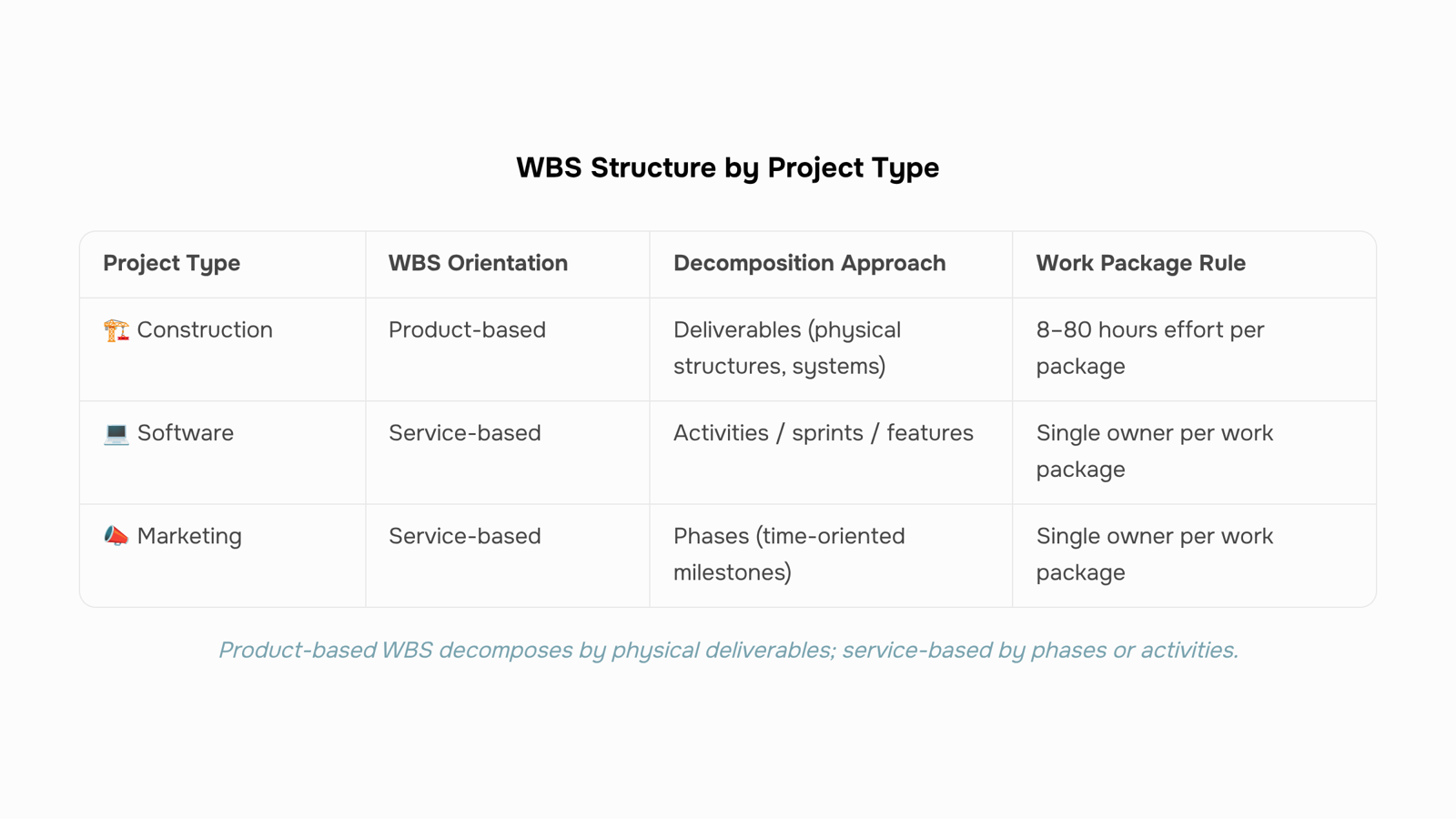
How product-based and service-based WBS structures differ
The structural difference comes down to what organizes each level of decomposition. In a product-based WBS (construction, manufacturing, hardware development), you break down by deliverable: the physical thing being produced. Level 2 might be "chassis," "engine," "electrical system." Each branch terminates at a component you can inspect or test.
In a service-based WBS (consulting engagements, software sprints, marketing campaigns), the organizing principle shifts to activities or phases. Level 2 becomes "discovery," "design," "execution," "review." You decompose until you reach assignable work packages, not physical parts.
This matters for how you manage each WBS work package as a tracked task with owners, priorities, and status. Product-based structures let you validate completion with a binary check: the component exists or it doesn't. Service-based structures need defined acceptance criteria at each node because there's no physical artifact to point at.
Dimension | Product-based WBS | Service-based WBS |
|---|
Organizing principle | Deliverables (nouns) | Activities or phases (verbs) |
Completion test | Physical inspection | Acceptance criteria |
Typical depth | 4–6 levels | 3–5 levels |
Risk of scope creep | Lower (tangible outputs) | Higher (subjective endpoints) |
Most work breakdown structure examples for project management default to the product model because it photographs well in a diagram. If your project delivers outcomes rather than objects, flip the logic and decompose by phase instead.
5 steps to build your own work breakdown structure
Building a WBS follows the same logic whether you are shipping software or renovating an office. Here is how to create a work breakdown structure you can actually hand to your team today.
Name the top-level deliverable. Write one noun-phrase that describes the final output your client or stakeholder receives. For a WBS for IT projects, this might be "Deployed CRM Platform v2.1." Everything below this node exists only to produce it.
Decompose into major deliverables (Level 2). Break the top-level item into three to seven components that, combined, equal the whole. A simple work breakdown structure example for that CRM project: User Interface, Data Migration, Integrations, Testing Suite, Documentation. Each component is a thing you hand over, not a task you perform.
Break each deliverable into work packages (Level 3+). Keep decomposing until each bottom-level item meets two criteria: it can be estimated in 8 to 80 hours of effort, and one person or team can own it completely. PMI's PMBOK guidance treats the 8-to-80-hour rule as the practical floor and ceiling for controllable work packages. If you are still above 80 hours, split again. If you are below 8, you have gone too deep and created micro-management overhead.
Apply a numbering convention. Use the hierarchical format (1.0, 1.1, 1.1.1) so every work package has a unique identifier. This is a de facto industry standard rather than a formal ISO requirement, but it makes status tracking and cost roll-ups unambiguous.
Assign a single owner per work package. Shared ownership means no ownership. Attach one name to each bottom-level node. That person is accountable for scope, schedule, and quality of that package, even if multiple people contribute.
If you want a deeper walkthrough of each decision point, including how to handle dependencies between packages, see how to create a work breakdown structure for your project.
Stop decomposing when every leaf node passes the 8-to-80 test and has exactly one owner. That is your "done" signal.
Common mistakes that make a WBS harder to use
Three WBS mistakes show up repeatedly, especially in IT projects where scope creep is already the default.
Organizing by tasks instead of deliverables. A task-based WBS ("design," "develop," "test") hides what's actually being produced. Deliverable-based work breakdown structure examples make progress measurable because you can point to a finished artifact, not just effort logged.
Decomposing too deep. If a work package takes less than 8 hours, you've passed the useful threshold. Over-decomposition creates tracking overhead without improving clarity. PMI's guidance suggests stopping when packages are assignable and estimable.
No single owner per work package. Shared ownership means no ownership. Every package needs one person accountable for completion. For more on structuring this correctly, see how WBS fits into project management.
Closing
A work breakdown structure transforms a vague project scope into a map your team can execute against. The real friction point arrives once you have that WBS drafted: keeping it alive as priorities shift, dependencies emerge, and work moves through your team. Moving each work package into a task management system with clear owners, dependencies, and status tracking turns your WBS from a planning artifact into a live execution record. Start with your 5-step WBS, then ask yourself: which work package moves first, and who owns it?
FAQ
What are some common work breakdown structure examples for construction projects?
Construction WBS decomposes into physical deliverables: Site Preparation, Structural Frame, Building Envelope, MEP Systems, Interior Fit-Out, Technology Infrastructure, and Commissioning. Each branch breaks into work packages (8–80 hours), like Rack Installation or Power & Cooling under server room build-out.
How do I create a work breakdown structure for a software development project?
Start with your release as Level 1, then decompose into deliverables: Requirements & Discovery, Design, Development (sprint-scoped), Testing & QA, and Deployment. Stop breaking down when a work package is assignable to one owner and estimable within 8–40 hours.
What are the key elements of a work breakdown structure example for IT projects?
Hierarchical levels (1.0, 1.1, 1.1.1), deliverable-based organization, work packages sized 8–80 hours, clear ownership per package, and dependencies mapped so downstream work cannot start prematurely.
Can you provide a simple work breakdown structure example for a marketing campaign?
A product launch WBS organizes by phase: Audience Research, Content Creation, Channel Setup, Launch Execution, and Performance Review. Each phase decomposes into assignable work packages owned by one person and completed within one reporting cycle.
How does a work breakdown structure for a manufacturing project differ from one for a service-based project?
Product-based WBS (manufacturing, construction) decomposes by tangible deliverables like chassis or electrical systems. Service-based WBS (consulting, software, marketing) organizes by activities or phases like discovery, design, execution, and review.
How many levels should a work breakdown structure have?
Decompose until each work package is assignable to one owner and estimable within 8–80 hours. Most projects stop at 3–4 levels; going deeper creates micromanagement without clarity.
What is the difference between a WBS and a project plan?
A WBS defines what will be delivered and decomposes scope into work packages. A project plan adds schedule, resources, budget, and sequencing to those packages. The WBS is the foundation; the plan builds the timeline and dependencies on top of it.


 Elena Petrova15 September 2026


