TL;DR: Most roundups on marketing automation programs list features and call it a comparison. This one maps each program to the specific email workflow it handles best — lead capture, nurture sequencing, CRM sync, conversion tracking — so IT company owners can match a tool to an actual funnel gap. You'll leave with a clear decision framework, not another feature checklist.
What marketing automation programs actually do for email
Modern 3D visualization of marketing automation dashboard with interconnected workflows and analytics metrics
Most email tools let you schedule a broadcast. Marketing automation programs do something different: they respond to what a contact actually does.
When someone opens an email but doesn't click, a well-configured sequence sends a follow-up with a different subject line 48 hours later. When a contact visits your pricing page three times in a week, lead scoring increments their score and alerts a rep. That's the core of email marketing automation software: behavior drives the next action, not a calendar.
The specific functions that matter for email are:
Trigger-based sequences that fire on contact actions (form fill, link click, page visit)
Lead scoring that weights behavior so your team prioritizes the right contacts
CRM sync that keeps contact status current across sales and marketing without manual exports
Send-time optimization that adjusts delivery based on when each contact historically opens
Without these four working together, you're still broadcasting. With them, you're running a system that moves contacts from first open toward a sales conversation on its own.
For a deeper look at how to configure these correctly, the best practices for automating email marketing covers the sequencing logic in detail.
How marketing automation programs increase conversion rates
Four mechanisms drive the lift you get from automated email lead nurturing, and each one works differently.
Trigger timing. Emails sent within minutes of a specific action — a pricing page visit, a demo request, a content download — consistently outperform batch sends. HubSpot's 2024 data puts trigger-based emails at roughly 3× the open rate of broadcast campaigns. The window matters: most intent signals go cold within an hour.
Behavioral segmentation. Marketing automation programs split your list by what contacts actually do, not just who they are. A contact who opens three emails about IT managed services gets different follow-up than one who clicked once and went quiet. That specificity is what email marketing software with the deepest automation features is built to handle.
Follow-up sequencing. A single email rarely converts. A five-step sequence, spaced across eight to twelve days, with each message referencing the previous action, does. Best practices for setting up email automation sequences cover the exact spacing and message logic that holds attention without burning the list.
Lead scoring. Scoring assigns point values to behaviors — opens, clicks, page visits, form fills — and surfaces contacts who cross a threshold. Your reps call warm leads, not cold ones.
Each mechanism compounds the others. Trigger timing without scoring wastes rep time. Scoring without sequencing leaves revenue on the table.
How to choose the right marketing automation program for your business
Five questions will filter your shortlist faster than any feature comparison.
1. Team size and sales motion: Solo operators and small teams (under 10 reps) need simple sequence builders with minimal admin overhead. Teams above 20 need role-based access, shared inboxes, and campaign approval workflows. Match the program's complexity to your actual headcount.
2. CRM dependency: If your pipeline lives in a CRM, your automation program needs a native two-way sync, not a Zapier bridge. A connector adds a failure point and a monthly fee. Know whether you need native integration or whether an API connection is genuinely sufficient for your workflow.
3. Lead volume: Programs priced per contact penalize growth. If you're running marketing automation for IT companies at scale, a flat-rate or activity-based pricing model protects your margins as your list grows.
4. Compliance requirements: Healthcare-adjacent IT companies need a vendor that offers a signed Business Associate Agreement (BAA). Most platforms don't. HIPAA compliant marketing automation programs are a short list, so confirm BAA availability before you evaluate features.
5. Reporting depth: Basic open and click rates are table stakes. What separates programs is whether they surface per-contact engagement history, sequence-level conversion rates, and revenue attribution. If your team reviews pipeline weekly, email marketing software with the deepest automation features will tell you which sequences are actually closing deals.
Best marketing automation programs for email marketing in 2026
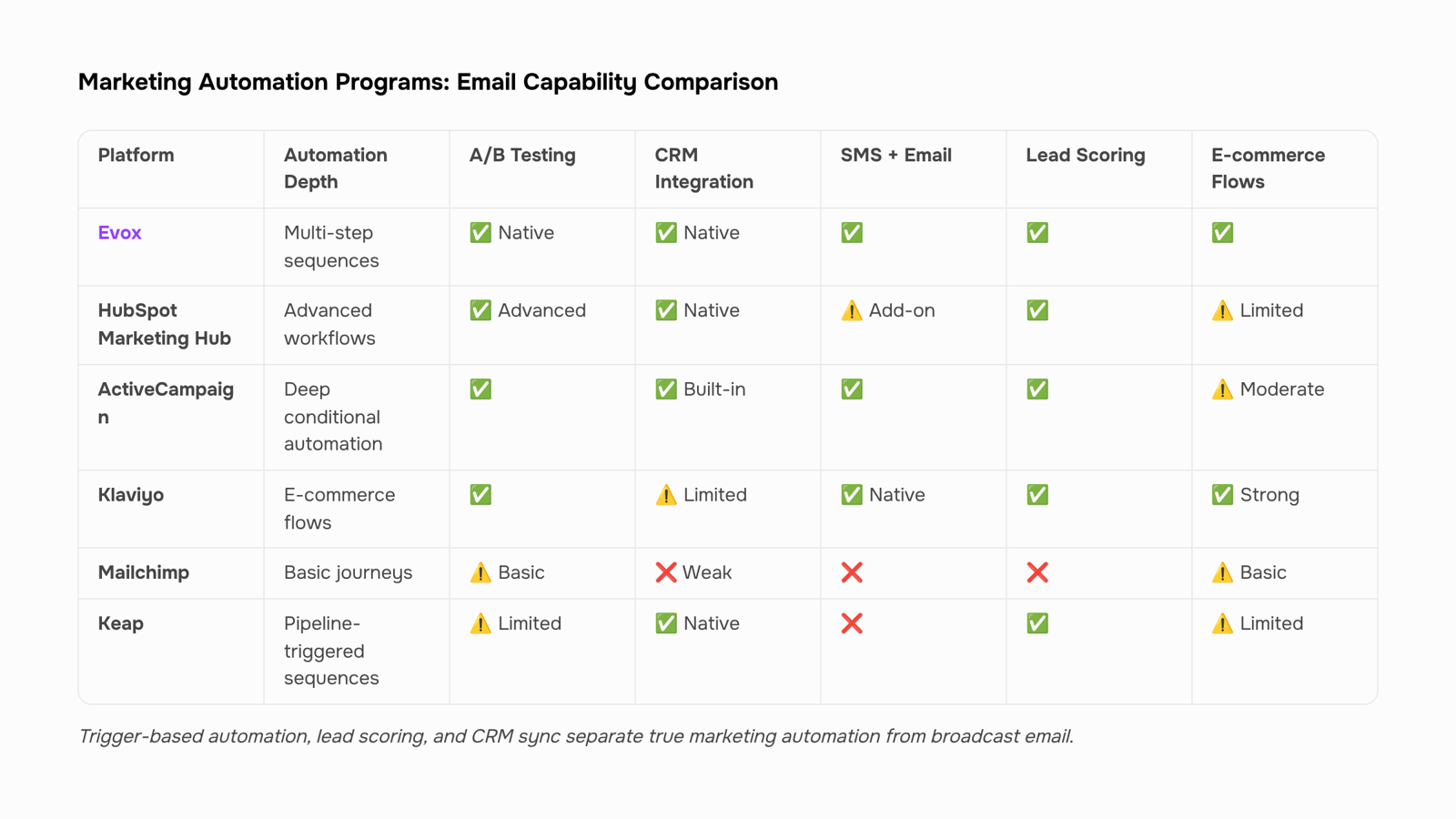
Here's how the leading email marketing automation programs compare across the five dimensions that matter most to IT company owners.
Program | Email Automation Depth | CRM Integration | Lead Scoring | HIPAA Compliance | Starting Price |
|---|
Evox | Multi-step sequences, trigger-based, AI send-time | Native (full CRM built in) | Behavioral scoring, intent alerts | Contact vendor | Paid tiers |
HubSpot Marketing Hub | Advanced workflows, A/B testing, branching logic | Native (HubSpot CRM) | Contact and deal scoring | BAA available (Enterprise) | Free; Starter ~$20/mo |
ActiveCampaign | Deep conditional automation, site tracking | Native CRM + 900+ integrations | Predictive lead scoring | BAA available | Starter ~$15/mo |
Klaviyo | E-commerce-focused flows, SMS + email | Shopify-native, limited B2B CRM | Predictive analytics | Not documented | Free; paid from ~$20/mo |
Mailchimp | Basic journeys, limited branching | Weak native CRM | Basic tagging only | BAA available (Premium) | Free; Standard ~$13/mo |
Keap | Pipeline-triggered sequences | Native CRM (SMB-focused) | Manual and automated scoring | Not documented | From ~$249/mo |
Who each program fits best
Evox is built for IT companies that need CRM and email automation in one system rather than two tools stitched together. Its behavioral lead scoring surfaces buying intent automatically, so your reps know when to call without manually reviewing open rates. If your team runs multi-step nurture sequences tied directly to CRM pipeline stages, Evox removes the integration overhead that slows most setups down.
HubSpot Marketing Hub fits teams already on HubSpot CRM that need enterprise-grade workflow branching. The HIPAA BAA is only available on the Enterprise tier, which starts well above $800/month, so budget for that if compliance is a hard requirement.
ActiveCampaign is the strongest option for teams that want deep conditional logic (if/else branching across 20+ steps) without paying enterprise prices. Its BAA availability makes it one of the few HIPAA-compliant marketing automation programs under $100/month for small lists.
Klaviyo is purpose-built for e-commerce and does that job well. For B2B IT services, its CRM is too shallow to support complex sales cycles, and it has no documented HIPAA path.
Mailchimp works for teams sending straightforward newsletters or simple drip sequences. Its automation branching is limited compared to the others here, and the BAA is locked behind the Premium plan (~$350/month for 500 contacts).
Keap suits solo operators or very small IT firms that want pipeline automation without a separate CRM. The price floor is high relative to list size, which makes it a poor fit once your contact volume scales.
Two things worth noting before you choose: trigger-based automation consistently outperforms broadcast email on open rates (HubSpot's 2024 data puts the lift at roughly 70%), and if HIPAA is a requirement, verify that the vendor will actually sign a BAA before you build a workflow around their platform. For a deeper look at how these programs handle automation features specifically, this breakdown of email marketing software automation capabilities is worth reading alongside this comparison.
Most marketing automation programs are built email-first. Social media posting, listening, and ad retargeting are separate disciplines, and most platforms treat them that way.
A few platforms include native social connectors — LinkedIn and Facebook ad sync, for example — but these are typically bolt-on features, not core workflows. If social is central to your pipeline, a dedicated tool like Buffer or Hootsuite handles it better than any email-CRM stack will.
For IT companies, this distinction matters practically. Marketing automation for IT companies works best when the platform is optimized for what IT buyers actually respond to: triggered email sequences, lead scoring on content engagement, and CRM-synced follow-ups. Social is a top-of-funnel awareness channel; email is where the deal moves.
Focus your stack accordingly. Pick a program that does email and CRM well, then add a social tool only if your pipeline actually requires it.
What changes in 2026 are reshaping marketing automation programs
Three shifts are rewriting what email marketing automation software can do, and they matter more than any feature checklist.
AI-driven send-time optimization has moved from novelty to table stakes. Instead of scheduling blasts at 9 a.m. Tuesday, programs now analyze each contact's historical open patterns and deliver at the individual level. HubSpot's 2024 State of Marketing report notes that trigger-based emails generate significantly higher engagement than broadcast sends, which is the same logic applied per recipient.
Predictive lead scoring is replacing point-based rule systems. Rather than awarding "+10 for opening an email," models trained on closed-won data surface which behavioral combinations actually predict conversion. This makes automated email lead nurturing far more precise than threshold-based drip sequences.
Two-way CRM-to-inbox sync is the third shift. One-way broadcast tools push emails out but never pull reply data back into the CRM. Bidirectional sync means a reply, a bounce, or an unsubscribe updates the contact record immediately, keeping sales and marketing aligned on the same live data.
Understanding which email marketing software has the deepest automation features helps you evaluate which programs have actually shipped these three capabilities versus those still marketing them as roadmap items.
Frequently asked questions about marketing automation programs
What are the best marketing automation programs for email marketing in 2026?
The strongest options combine trigger-based sequencing, lead scoring, and two-way CRM sync in one platform. Evox, HubSpot, and ActiveCampaign each do this, though Evox is built specifically for IT service businesses that need CRM-connected email automation without stitching together separate tools.
Do any marketing automation programs offer HIPAA-compliant email?
Yes, but fewer than you'd expect. HIPAA-compliant marketing automation programs require a signed Business Associate Agreement (BAA). HubSpot Enterprise and Salesforce Marketing Cloud both offer documented BAAs as of 2025. Verify BAA availability before signing any contract if your IT firm handles healthcare clients.
How does automated email lead nurturing differ from broadcast email?
Broadcast sends one message to a list. Automated email lead nurturing triggers messages based on behavior, which consistently produces higher engagement across comparable campaigns.
Which program is easiest to set up?
Platforms with pre-built sequence templates cut setup time significantly. Review best practices for setting up email automation sequences before choosing.
Closing
The right marketing automation program isn't the one with the most features. It's the one that closes the specific gap in your funnel. If you're losing leads between capture and first reply, you need trigger logic and CRM sync working together, not a broadcast scheduler. Evox handles that exact workflow by combining behavioral scoring, multi-step sequences, and a built-in CRM so your team calls warm leads without manual triage. Start by mapping your biggest funnel leak, then match it to the program's core strength. Ready to see how Evox handles your workflow?
FAQ
Q. What are the best marketing automation programs for email marketing?
A. Evox, HubSpot Marketing Hub, and ActiveCampaign lead for IT companies. Each handles different workflows: Evox combines CRM and automation in one system; HubSpot suits teams already on its CRM; ActiveCampaign offers deep branching logic at lower cost.Q. How do marketing automation programs increase conversion rates?
A.Four mechanisms compound: trigger timing (3× open rate vs. broadcasts), behavioral segmentation (personalized follow-up), sequencing (five-step sequences outperform single emails), and lead scoring (reps call warm leads first).Q. How do I choose the right marketing automation program for my business?
A.Filter by team size, CRM dependency, lead volume pricing, compliance needs, and reporting depth. Match the program's complexity to your headcount and confirm native CRM sync, not API bridges, if your pipeline is already in a CRM.Q. Can marketing automation programs be used for social media management?
A.Most email automation platforms don't include native social posting. Some integrate with social tools via Zapier or APIs, but email-focused programs like Evox and ActiveCampaign are built for email workflows, not social scheduling.Q. Are there HIPAA compliant marketing automation programs for healthcare IT clients?
A.Yes. ActiveCampaign offers BAA at Starter tier (~$15/mo), HubSpot at Enterprise ($800+/mo), and Mailchimp at Premium tier. Confirm BAA availability in writing before signing; most platforms don't offer it by default.


 Elena Petrova15 September 2026


