TL;DR: Most project tracking guides give you a method list and assume the rest figures itself out. This one shows IT company owners how to build a connected tracking system — from choosing the right metrics, to monitoring delivery in real time, to acting when something slips. You'll leave with a method-to-system progression that holds up when a milestone is missed or scope shifts mid-sprint.
What project tracking actually means for IT teams
Project tracking is the practice of recording task status, milestone progress, and resource usage in real time so that every decision your team makes is based on current data, not a status update from last week's standup.
For IT teams, that distinction matters more than most. Software projects shift fast: a blocked API integration, a delayed vendor, a scope change on day 12. Without continuous project tracking, those shifts don't surface until they've already pushed your deadline.
PMI's Pulse of the Profession consistently finds that poor visibility into project status is one of the leading causes of IT project failure, with a significant share of projects missing deadlines not because the work was wrong, but because the right people didn't know the work was at risk.
Tracking is not the same as reporting. Reporting is a snapshot you produce on a schedule. Tracking is a live record that updates as work moves. When those two things get conflated, teams end up managing last week's project, not today's.
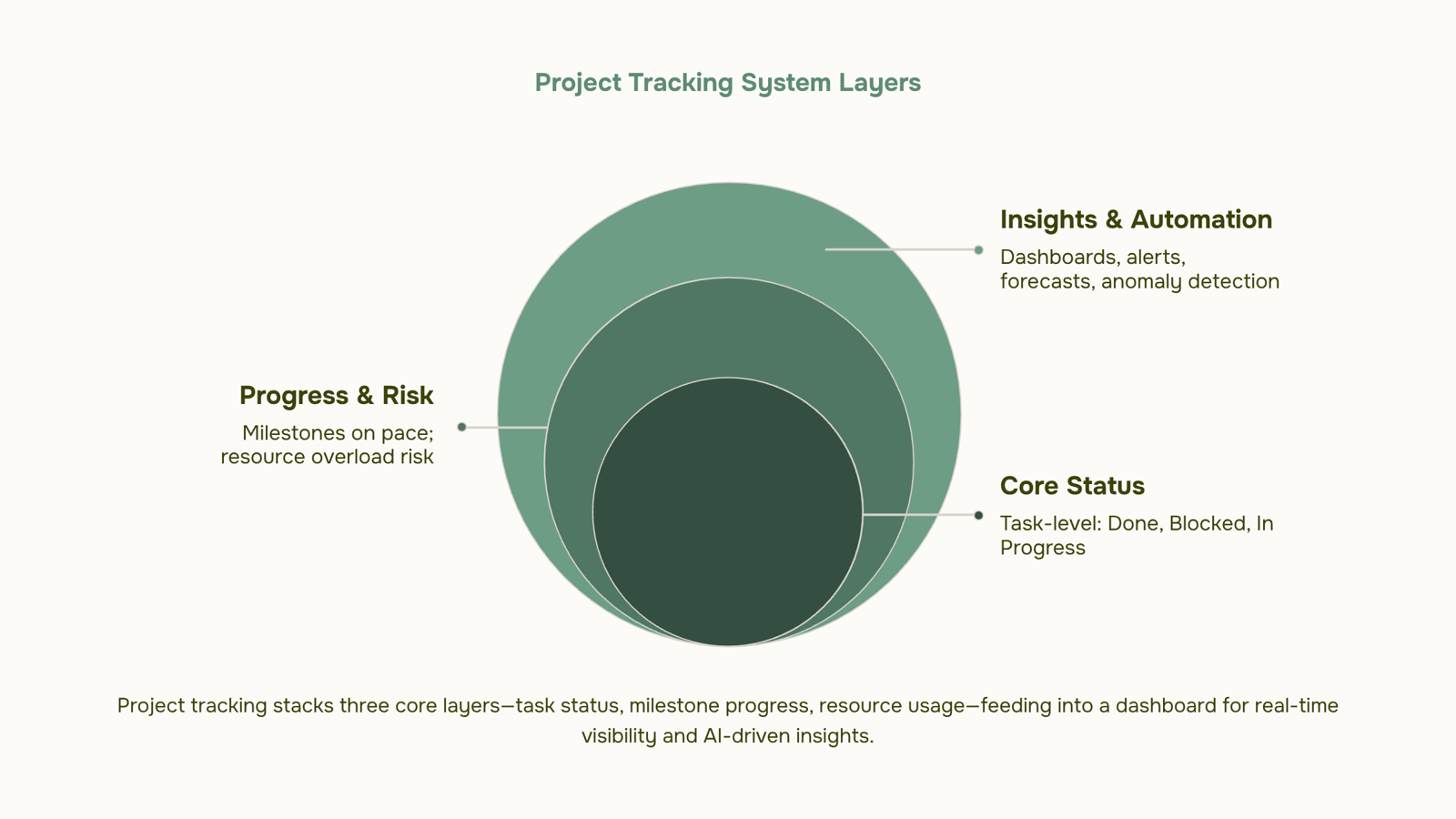
The practice covers three layers: task-level status (what's done, what's blocked), milestone progress (are you on pace for the delivery date), and resource usage (who is overloaded, what's at risk). If any layer goes dark, your project tracking management software is logging history, not enabling decisions.
For smaller teams building this habit from scratch, choosing the right project tracker is a useful starting point.
The 6 most effective project tracking methods
Each method below fits a specific project type. Choosing the wrong one doesn't just create extra admin work — it actively hides the signals you need to act early.
Milestone tracking measures progress against defined delivery points rather than daily task volume. It works well for fixed-scope IT projects like infrastructure rollouts or compliance audits. Where it breaks down: milestones can show green right up until they don't, so you miss the slow drift happening underneath.
Gantt-based timeline tracking maps every task against a calendar, showing dependencies and sequencing in a single view. It's the right choice when your project has hard external deadlines and multiple teams whose work must interlock. The failure mode is maintenance — Gantt charts go stale fast if your team isn't updating task dates in real time.
Kanban status tracking organizes work into columns (typically To Do, In Progress, Done) and makes bottlenecks visible by showing where cards pile up. It fits iterative IT work like sprint-based development or ongoing support queues. It's a poor fit for projects where sequence and timing matter more than throughput.
Time-based tracking records hours logged against estimates at the task level. It's the clearest signal for billing accuracy and resource forecasting, which makes it essential for client-facing IT projects. The limitation: it measures input, not outcome. High hours logged doesn't mean the right work is getting done.
Burndown tracking plots remaining work against time remaining, giving you a daily read on whether the team is on pace to finish. It's built for sprint-based delivery and works best when scope is locked. When scope changes mid-sprint — which is common in IT — the burndown chart becomes misleading rather than useful.
Dashboard-based monitoring aggregates metrics from multiple sources into a single view: task completion rates, milestone slip, resource load, open issues. This is the method that scales. For IT teams running three or more concurrent projects, a well-configured project tracking dashboard replaces the manual status update entirely.
Most teams don't need all six. A useful starting point: use milestone tracking for phase gates, burndown for sprint work, and a dashboard to hold everything together. If you're still choosing the right task tracker for your IT team, the method you rely on most should drive that decision — not the other way around.
Prax's milestone tracking and completion forecasting sit inside the dashboard layer, so the signals from individual methods feed one view rather than five separate reports.
How to identify and surface bottlenecks before they stall delivery
Bottlenecks rarely announce themselves. They show up in the data first, and only become visible in conversation weeks later, usually in a post-mortem.
Four signals are worth monitoring on every active project:
Task age vs. estimate: any task sitting open 20% past its original estimate is a leading indicator, not a trailing one. One overdue task is noise; three in the same sprint is a pattern.
Milestone slip rate: if two consecutive milestones have slipped, the third almost certainly will. Track the gap between planned and actual completion dates, not just whether a milestone was hit.
Assignee queue depth: when one person holds more than three in-progress tasks simultaneously, throughput drops. This is often invisible until the queue collapses.
Dependency chain delays: a task that's blocked but still marked "in progress" creates false confidence in your project tracking view. Flag blocked status separately from active work.
The monitoring routine that catches these early is simpler than most teams expect. Check task age and queue depth twice a week, not daily. Daily check-ins create reporting overhead without improving signal quality. Review dependency chains every time a milestone changes status. That's the moment a downstream delay becomes predictable rather than surprising.
Prioritizing which projects to track most closely matters here because not every project warrants the same monitoring frequency. A two-week internal migration needs different cadence than a six-month client delivery.
When you're ready to move past manual scanning, AI-powered project tracking that automates milestone monitoring can surface these signals automatically, flagging slip rate and queue depth without requiring a weekly audit. That's where project tracking software earns its cost: not in replacing your judgment, but in making sure the signals reach you before the deadline does.
Manual tracking vs. software: how to decide
Spreadsheets work fine until they don't. A project tracking Excel template or Google Sheet handles a solo project or a two-person engagement without much friction. The problem is that most teams keep using them well past the point where they stop working.
Here is a 3-condition rule. Switch to software when any one of these is true:
More than three people need to update the same tracker: Concurrent edits in project tracking Google Sheets create version conflicts. Someone's update overwrites another's, and the "current" status is whoever saved last.
You're managing dependencies across more than one workstream: Spreadsheets show you tasks; they don't show you that Task B is blocked because Task A slipped three days. That gap is where milestone slip starts.
You're spending more than 30 minutes per week manually compiling status reports: That time is a direct signal that your tracking system is working against you, not for you.
Free project tracking tools cover the entry point between spreadsheets and full software. Tools like Trello or Notion handle small teams without a budget commitment. For IT company owners managing multiple concurrent projects, though, the ceiling on free tools appears quickly: no automated alerts, no dependency mapping, no milestone monitoring.
AI-powered project tracking that automates milestone monitoring removes the manual compilation step entirely, which is where most teams lose hours each week. If you're deciding where to start, choosing the right task tracker for your IT team narrows the options based on team size and project complexity.
How often to update project status — and why the answer changes by phase
Update frequency is one of those decisions most teams make once and never revisit. That's where tracking breaks down.
A phase-based model works better than a fixed cadence:
Planning phase: Weekly updates are enough. Scope, dependencies, and resources are still being defined. Daily check-ins at this stage create noise without surfacing real blockers.
Active sprint or execution phase: Daily or every-other-day updates. This is when task ownership, blockers, and velocity actually shift. If your team runs two-week sprints, a mid-sprint check on day 5 catches drift before it compounds. Understanding what project statuses your team uses matters here, because vague statuses make even daily updates useless.
Final delivery phase: Increase to daily, sometimes twice daily for high-stakes handoffs. Scope creep, sign-off delays, and last-minute changes cluster in the final 20% of a project. This is where under-communication is most expensive.
The practical rule: match update frequency to decision velocity. When decisions are being made fast, update fast. When the project is stable, weekly is fine.
Most project tracking management software lets you configure phase-specific notification rules, so the cadence shifts automatically rather than relying on a manager to remember. That's worth setting up before execution starts, not after the first missed deadline.
How AI is changing project tracking in 2026
Three shifts separate 2026's best project tracking software from the dashboards most IT teams were using two years ago.
Automated milestone alerts replace the weekly "where are we?" check-in. Instead of a project manager manually comparing planned vs. actual dates, the system watches task completion rates continuously and fires an alert the moment a dependency slips. No meeting required. No one has to remember to check.
AI-generated completion forecasts go further. Rather than showing you a static due date, they calculate projected completion based on current team velocity, open blockers, and historical delivery patterns for similar work. If your sprint is trending two days late by Wednesday, you know Wednesday, not at the retrospective. Project progress tracking and completion forecasting built on this principle gives IT company owners a number they can act on, not a status they have to interpret.
Anomaly detection is the shift that changes the job description. When the system flags a task that has been "in progress" for six days without a single update, you don't need a status meeting to surface it. The risk is visible before it compounds.
Taken together, these three capabilities move project tracking from a reporting activity into a predictive one. You're no longer documenting what happened; you're seeing what's about to happen. For IT owners prioritizing which projects to track most closely, that distinction determines whether you intervene early or explain a missed deadline.
Closing
The six methods in this article aren't a menu to choose from — they're layers that stack. Milestone tracking gives you phase gates, burndown keeps sprints honest, and a dashboard ties everything together so you're not chasing status updates. The real win comes when you automate the tracking layer itself, so task status, milestone progress, and resource load update without someone manually hunting for answers. Start by picking one method that matches your project type, then add a second one. Once you're managing more than one concurrent project, move to a dashboard. The moment you notice someone spending 30 minutes a week just compiling status, that's your signal to automate. What's the biggest bottleneck your team misses today — one that doesn't surface until it's too late to fix?
FAQ
What are the best methods for project tracking and monitoring?
Milestone tracking for phase gates, Gantt charts for sequenced work, Kanban for iterative delivery, burndown for sprints, and dashboards to aggregate all signals. Choose the one that matches your project type, then layer in a dashboard as you scale.
How can I effectively track project progress and identify bottlenecks?
Monitor task age against estimates, milestone slip rate, assignee queue depth, and blocked dependencies twice weekly. These four signals surface risk before deadlines slip. Automate the scanning to catch them without manual audits.
What tools can I use for project tracking and management?
Spreadsheets work for single projects under three people. For multiple workstreams or teams, use software with dashboard aggregation, dependency mapping, and automated alerts. Taro automates the tracking layer so data stays current without overhead.
Can project tracking be done manually or is software necessary?
Manual tracking works until three conditions hit: more than three people updating the same tracker, dependencies across workstreams, or over 30 minutes weekly spent compiling status. Any one of those signals it's time to automate.
How often should I track and update project status?
Check task age and queue depth twice weekly, not daily. Review dependency chains every time a milestone changes. Daily check-ins create reporting overhead without improving signal quality.


 Elena Petrova15 September 2026


