What are the best online invoice creator tools
TL;DR: TL;DR: Most roundups on online invoice creator tools rank options by template count and stop at PDF export. This one evaluates the full billing cycle — creation, automation, payment tracking, and CRM integration — because that's where IT company owners actually lose time. You'll finish with a clear framework for choosing a tool that fits how your business bills, not just how it looks.
What an online invoice creator actually does
Professional 3D render of a clean digital invoice template on a modern workspace desk
Most tools marketed as an online invoice creator do one thing: generate a PDF. You fill in a client name, add line items, export, and send. That covers the creation step, but billing doesn't end there.
A full-cycle tool handles what comes after: payment tracking, automated reminders, reconciliation, and reporting. For IT businesses billing on project milestones or recurring retainers, that distinction matters more than template design. A late-paying client costs you time whether your invoice looks polished or not.
The gap shows up most clearly when you create invoice online through a basic free tool and then manage follow-ups manually in a separate tab. The tool handled one step; you're still owning the rest.
More capable tools connect invoicing to the work that triggers it. Inzo, for example, can generate an invoice automatically when a CRM deal closes or a contract gets signed, removing the manual handoff entirely. That's a different category from a PDF generator, even if both call themselves an online invoice maker.
The right question isn't "can this tool create an invoice?" It's "how much of the billing cycle does it actually own?"
How to create an invoice online for free
Using a free online invoice creator takes about five minutes once you know the steps. The challenge for IT businesses is that the steps look simple until you hit the edge cases: recurring retainers, project milestone billing, or a client who needs a revised estimate converted to a final invoice.
Here is the standard process:
Choose your tool: Pick a free online invoice creator that exports PDF and sends by email. Wave, Zoho Invoice, and Invoice Ninja all offer free tiers, but each caps something: Wave limits bank connections, Zoho's free plan allows up to five clients, and Invoice Ninja's free tier restricts the number of active invoices.
Set up your business profile: Add your logo, business name, tax ID, and payment terms before you create a single invoice. Changing these later means editing every template.
Enter line items. For IT businesses, this means services, hourly rates, or project milestones. Be specific: "Network setup, Phase 1" beats "Services rendered" when a client disputes a charge.
Apply tax and discounts: Confirm your jurisdiction's tax rules. A flat rate is fine for most; multi-state billing needs more care.
Send and track: Email the PDF directly from the tool. If your tool does not show when the client opened it, you are billing blind.
Free tiers work for occasional, simple invoices. Once you are managing recurring projects or want invoices triggered automatically from CRM deals, online invoice maker tools compared across the full payment cycle shows where the free tier ceiling becomes a real workflow problem.
Not every online invoice creator fails loudly. Most fail quietly — by adding steps instead of removing them, or by disconnecting billing from the work that triggered it.
Before you compare tools, agree on what you're actually evaluating. Five criteria matter for IT businesses specifically:
Automation triggers: Can the tool create an invoice when a project milestone closes or a CRM deal moves to "won"? Manual entry at that stage is where billing delays start. Tools that connect invoicing to upstream events cut that gap entirely.
CRM and project data connection: An invoice that pulls client name, scope, and rate from your CRM is faster and less error-prone than one built from scratch. If your tool can't read deal data, you're re-entering information you already captured.
Payment tracking: Knowing an invoice was sent is not the same as knowing it was paid. Look for status visibility — sent, viewed, overdue, paid — without needing a separate spreadsheet to track it.
Customization depth: Logo, payment terms, tax lines, and line-item descriptions are baseline. IT businesses billing on retainer or project schedules also need recurring invoice logic and milestone-based templates.
Security and compliance: PDF generation, audit trails, and role-based access matter more as your client list grows. Free tiers on most tools gate these features.
These criteria are what separate tools worth using from ones that create a different kind of admin work. For a broader view of how these factors play out across the payment cycle, online invoice maker tools compared across the full payment cycle covers the tradeoffs in more detail.
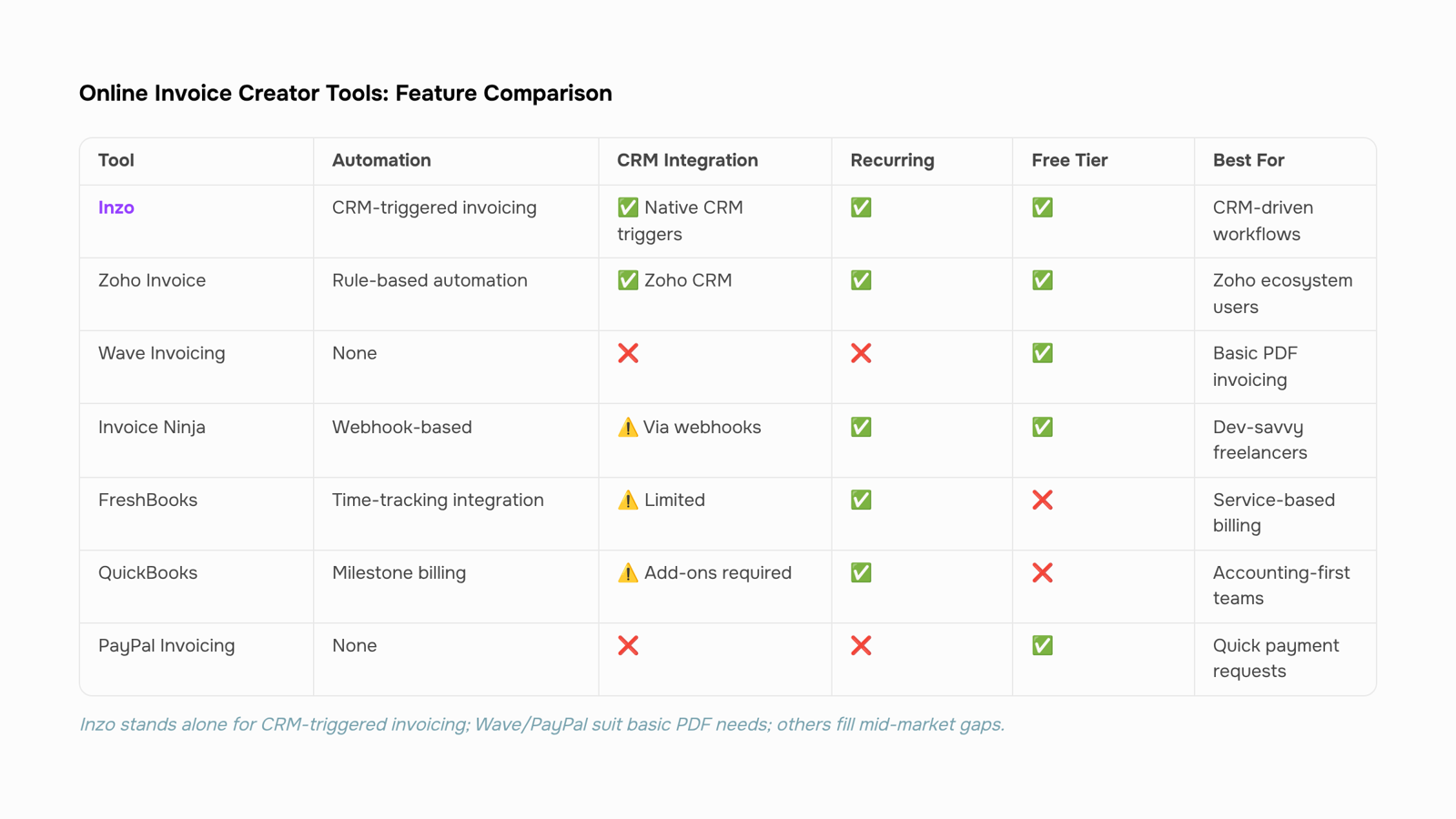
The table below scores seven tools against the five criteria that matter most for IT service businesses: automation triggers, CRM connection, payment tracking, customization depth, and security. Free plan limitations are noted where they affect real workflows.
Tool | Automation triggers | CRM connection | Payment tracking | Customization | Free tier reality |
|---|
Inzo | Yes — triggers from CRM deals and project milestones via Lio | Native (WorksBuddy CRM) | Real-time, with overdue alerts | Line items, tax rules, multi-currency, branding | Included in WorksBuddy plan |
Zoho Invoice | Rule-based recurring only | Zoho CRM (same suite) | Basic status tracking | Good template depth | Free, but capped at 1 user and 1,000 invoices/year |
Wave Invoicing | None | No native CRM | Manual reconciliation | Limited to branding | Free, but payment processing fees apply (2.9% + $0.60) |
Invoice Ninja | Recurring schedules | Webhook-based, no native CRM | Status tracking | High — open source, self-hosted option | Free up to 20 clients; hosted plans start at $10/month |
FreshBooks | Time-tracking to invoice | No native CRM | Good, with late fee automation | Moderate | No free plan; starts at $19/month |
QuickBooks | Recurring and milestone billing | Limited | Strong, tied to accounting | Moderate | No free plan; starts at $30/month |
PayPal Invoicing | None | None | Payment confirmation only | Minimal | Free to create; 3.49% + $0.49 per transaction |
A few things stand out when you read across the rows.
Wave and PayPal are genuinely useful as a free online invoice creator if your only requirement is sending a PDF and collecting payment. The moment you need to track which invoices tie to which client contracts, or trigger billing when a deal closes, both tools hit a wall.
Zoho Invoice is the strongest free option for solo operators who already use Zoho CRM. The 1,000-invoice annual cap is not a real constraint for most small IT firms, but the single-user limit is. If two people on your team touch invoices, you're already looking at a paid tier.
Invoice Ninja earns its place for teams that want a free online invoice creator with more client volume and don't mind a self-hosted setup. The trade-off is maintenance overhead and no native CRM.
Inzo is the only option in this table where invoice creation can trigger automatically when a CRM deal reaches a defined stage, or when a project milestone closes. For IT service businesses billing across retainers, project phases, and ad-hoc work simultaneously, that connection removes the manual step that most teams quietly absorb as overhead every month.
The right choice depends on where your billing bottleneck actually sits. If it's volume, Wave or Zoho Invoice handles it free. If it's the gap between project delivery and invoice creation, that's a workflow problem, and a standalone invoicing tool won't close it.
Can you customize invoices with an online creator
Most online invoice creators offer customization, but there's a real difference between changing a logo color and configuring something that actually fits how IT businesses bill.
Meaningful customization for IT companies covers four areas:
Line items and service descriptions — you need granular rows for labor, licensing, hosting, and retainers, not a generic "services" field
Tax rules — multi-jurisdiction tax rates, reverse-charge VAT for international clients, and tax-exempt line items should all be configurable per client, not per invoice
Branding — your logo, font, and payment terms baked into every template, not re-entered each time
Multi-currency — if you bill clients in USD, GBP, or EUR, the tool needs to handle conversion and display natively
Cosmetic template pickers don't touch any of that. They let you swap colors while leaving the billing logic generic.
Tools that connect invoicing to project data go further: when a milestone closes, the invoice reflects the actual scope delivered. That's where automated invoice management built for connected billing workflows separates from standalone creators. For a broader view, see invoicing software options that go beyond basic creation.
Is an online invoice creator secure for your business
Most reputable online invoice creator tools use AES-256 encryption for data at rest and TLS 1.2 or higher for data in transit. Those are the minimums worth checking before you commit to any platform.
Beyond encryption, look at three specific controls:
Role-based access: Can you limit who sees client billing data? Finance leads and project managers shouldn't share the same permissions.
Audit logs: Does the tool record who created, edited, or sent each invoice? For IT businesses handling client contracts, this matters during disputes.
Data residency: Where are your records stored, and does that conflict with any client data agreements you've signed?
Before signing up, pull the vendor's data processing agreement, not just the privacy policy. The DPA tells you how long data is retained, who can access it, and what happens if you cancel.
For IT owners evaluating the best online invoice creator tools across the full payment cycle, security posture is as relevant as feature count. A tool that reduces billing delays but stores your client data carelessly isn't a trade worth making.
Three mistakes that slow down online invoicing
The first mistake is missing payment terms. An invoice without a due date, late fee clause, or accepted payment methods gives clients no reason to pay on time — and most won't.
The second is manual recurring billing. IT retainers and maintenance contracts repeat every month, yet many owners re-create the same invoice by hand each cycle. That's where an online invoice creator with automation pays for itself immediately.
The third is invoicing disconnected from project status. When billing runs separately from delivery, you invoice before work is confirmed complete — or miss billable milestones entirely. Tying invoice creation directly to project progress closes that gap before it becomes a revenue leak.
Closing
The best online invoice creator for your IT business isn't the one with the most templates—it's the one that removes steps from your actual billing cycle. If you're manually creating invoices after deals close or projects wrap, you're leaving efficiency on the table. The framework above helps you spot which tools own the full cycle and which ones just handle the PDF. Start by mapping your current billing workflow: where do invoices get created, who sends them, how do you track payment status, and where does manual follow-up happen. That map will show you which criteria matter most. If your invoices should generate automatically when a deal closes or a project milestone hits, Inzo connects that trigger natively through your CRM—no manual handoff needed. Explore how that works at worksbuddy.ai/inzo.
FAQ
Q. How do I create an invoice online for free?
A. Choose a free tool like Wave or Invoice Ninja, set up your business profile, enter line items, apply tax, and send via email. The process takes five minutes for simple invoices, but free tiers cap users, clients, or annual invoice volume.Q. What are the best online invoice creator tools?
A. Inzo, Zoho Invoice, Wave, Invoice Ninja, FreshBooks, QuickBooks, and PayPal all create invoices. Inzo stands out for automation triggers tied to CRM deals; others excel at templates, recurring billing, or accounting integration. Pick based on your billing cycle, not template count.Q. Can I customize invoices with an online invoice creator?
A. Yes. Most tools let you add logos, payment terms, tax lines, and custom line-item descriptions. Inzo and Invoice Ninja offer the deepest customization, including recurring and milestone-based templates for IT service billing.Q. Is an online invoice creator secure for my business?
A. Free tiers rarely include audit trails or role-based access. Paid plans from Inzo, FreshBooks, and QuickBooks add encryption, compliance features, and permission controls. Security matters more as your client list grows.Q. What is the difference between an invoice creator and invoicing software?
A. An invoice creator generates a PDF. Invoicing software handles the full cycle: creation, payment tracking, automation, reconciliation, and CRM integration. Inzo is invoicing software; Wave is primarily a creator.Q. Can an online invoice creator handle recurring invoices automatically?
A. Most paid tools support recurring schedules. Inzo goes further—it triggers invoices automatically when a CRM deal closes or a project milestone hits, removing manual creation entirely.


 Elena Petrova15 September 2026


