TL;DR: Most content on project coordination lists tips without explaining why coordination breaks down in the first place. This article covers the operational mechanics — the specific handoff failures, communication gaps, and visibility problems that stall IT projects — and shows where automation replaces the manual work that causes most of the delays. You'll leave with a framework you can apply to your current project stack.
What is project coordination
Modern 3D illustration of organized project coordination dashboard with interconnected task nodes and planning elements
Project coordination is the operational work that keeps a project moving between decisions: scheduling meetings, tracking dependencies, routing blockers, and making sure the right people have the right information at the right time.
That last part is where most teams conflate it with project management. Project management sets direction — scope, budget, stakeholder sign-off, strategic tradeoffs. Project coordination executes the connective tissue underneath it. A project manager decides to shift a deadline; a project coordinator updates the schedule, notifies affected teams, and confirms the downstream tasks are still sequenced correctly. Both roles matter. They are not the same job.
The distinction matters practically because the failure mode is different. When project management breaks down, you build the wrong thing. When project coordination breaks down, you build the right thing late, over budget, or with the wrong people blocked waiting on information they should have had two days ago.
PMI's research consistently points to communication breakdowns as a leading cause of project failure, and coordination is where communication either holds or fractures.
If your team already follows effective project management processes but still misses handoffs or loses status updates between tools, the gap is almost always coordination, not strategy. The next section maps the five core activities that make up that work so you can audit where yours is leaking.
How project coordination works in practice
Project coordination breaks down into five repeating activities. Understanding each one lets you spot exactly where your team loses time or alignment.
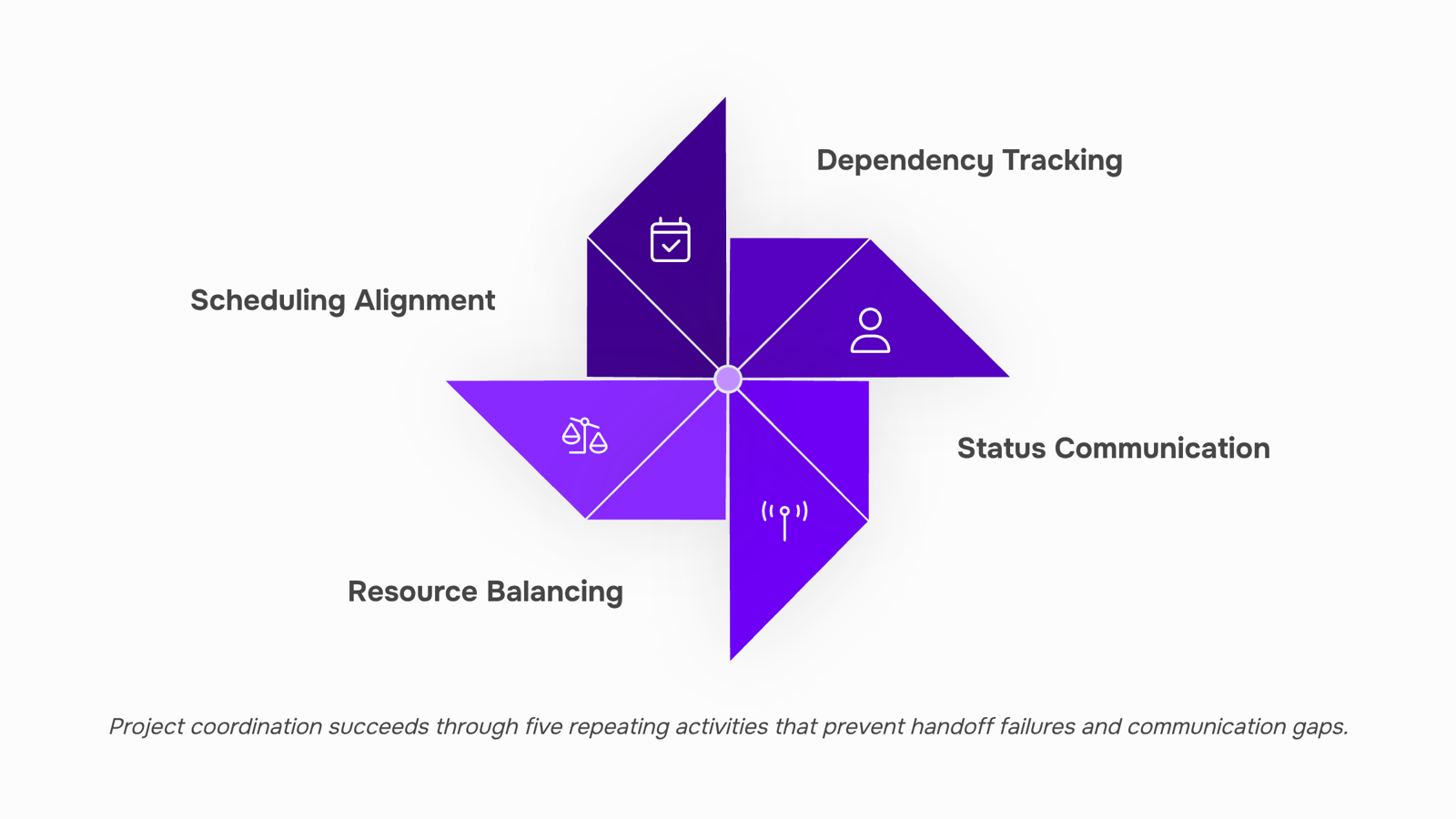
Scheduling alignment means confirming that dependent work is sequenced correctly before it starts, not after a missed handoff surfaces. This is calendar work, but it is also logic work: who needs what, and when.
Dependency tracking is where most teams underinvest. A dependency ignored is a delay waiting to happen. If your team discovers a blocker during a standup rather than a planning session, your tracking process has a gap. Reviewing effective project management processes can help you build the habit earlier in the cycle.
Status communication is the highest-frequency coordination activity and the one most likely to become noise. The goal is a shared, current picture of progress without requiring everyone to ask for updates. Teams that rely on chat threads or email chains for this tend to duplicate effort and miss changes. A single source of truth for projects removes that friction.
Resource balancing means watching who is overloaded and redistributing before delivery slips. This requires visibility across tasks, not just within a single workstream. Setting task priority is the operational lever here.
Escalation routing is the most neglected of the five. When a decision is stuck, someone needs a clear path to raise it. Without that path, teams stall and coordinators absorb the delay personally.
Audit your own process against these five. The activity that feels the most manual or the most reactive is usually where team communication in projects breaks down first. The next section covers project coordination best practices for fixing each one.
Best practices for effective project coordination
Good project coordination best practices are not abstract principles. They are operational habits that reduce the specific failures covered in the previous section: missed handoffs, stalled dependencies, and status updates that arrive too late to act on.
Map dependencies before work starts. Before any sprint or project phase kicks off, list every task that blocks another. A simple dependency register (even a shared spreadsheet) surfaces bottlenecks before they become delays. Teams that do this catch sequencing problems in planning, not in delivery.
Set a single source of truth for task status. When status lives in chat, email, and a project tool simultaneously, someone is always working from stale information. Pick one place where task ownership and progress are recorded, and enforce it. Centralizing project data removes the guesswork that causes duplicate work and missed handoffs.
Define escalation thresholds explicitly. "Flag blockers early" is vague. "Flag anything blocked for more than 24 hours" is actionable. When your team knows the exact threshold, escalation becomes routine rather than a judgment call that often gets delayed.
Separate sync and async communication by decision type. Not every update needs a meeting. Routine status belongs in async channels; decisions with dependencies or ambiguity need synchronous time. Getting this split right shortens feedback loops without adding meeting load, something covered in more depth in the section on team planning and collaboration tools.
Balance resource allocation weekly, not monthly. Overloaded team members are the most common cause of missed deadlines in IT projects. A weekly 15-minute resource check against active tasks catches imbalances before they compound. Pair this with setting task priority so the team always knows what to protect when capacity tightens.
Run a coordination retrospective after each phase. Ask one question: where did information arrive too late? That answer tells you exactly which coordination habit to fix next. Teams that build this into their project management processes improve faster than those who only review outcomes.
How to improve communication during project coordination
Poor communication sits behind most project failures. PMI's research consistently points to it as the leading cause, not technical gaps or budget overruns.
The first decision to make is when to communicate synchronously versus asynchronously. Status updates, progress notes, and low-urgency questions belong in async channels: a shared doc, a task comment, or a structured check-in thread. Reserve live meetings for decisions that require debate or unblocking a dependency that is stalling multiple people.
Escalation thresholds matter just as much. Define them before the project starts. A missed deadline by one day is a task comment. Three days late with downstream impact is a direct message to the lead. A week late with client exposure is a meeting. Without that ladder written down, every delay becomes a judgment call, and judgment calls create inconsistency across team communication in projects.
The third piece is documentation. Every decision, scope change, and handoff note needs to live in one place the whole team can access. When that breaks down, people work from stale threads or misremembered conversations. A single source of truth for your projects removes that ambiguity entirely.
These three patterns separate teams that coordinate well from teams that just communicate a lot:
Async-first defaults for routine status and low-stakes updates
Written escalation thresholds so the team never debates whether to raise a blocker
Centralized documentation so no decision lives only in someone's memory
For the broader process context, effective project management processes covers how communication fits into the full delivery cycle.
Most teams reach for a new tool when coordination breaks down. The real problem is usually that the tools they already have do not connect to each other.
The four categories worth evaluating for project coordination tools are:
Task boards — Kanban or list views that show who owns what and what is blocked. Look for dependency linking, not just status columns.
Gantt and timeline views — useful for spotting schedule conflicts before they become delivery misses. The key feature is drag-to-reschedule with automatic dependency shifts.
Real-time collaboration — comments, mentions, and threaded discussions tied to specific tasks, not floating in a separate chat app. Context stays where the work is.
Time tracking — logs actual hours against estimates so you can see where coordination overhead is eating into delivery capacity.
Most teams end up running three or four separate tools across these categories, which creates the same fragmentation problem they were trying to solve. Team planning and collaboration tools that consolidate these into one system reduce the switching cost significantly.
Taro covers all four in a single workspace: task boards, Gantt timelines, in-context collaboration, and time logging sit alongside each other. That matters for coordination specifically because decisions made in one view (timeline) immediately reflect in another (task board) without a manual sync step. For the underlying project management processes that govern how you use these tools, the structure matters as much as the software.
Can project coordination be automated with software
Yes, but only for the right tasks.
The coordination work that software handles well is mechanical and repetitive: status rollups, dependency alerts, assignment routing when a task changes hands, and notifications when a deadline shifts. These are exactly the tasks that drain hours each week without requiring any real judgment. Automating them through project coordination tools removes the manual chasing and keeps everyone updated without a single status meeting.
What software cannot do is resolve a priority conflict between two stakeholders who both believe their work comes first, or navigate the negotiation when a scope change affects three teams simultaneously. Those situations need a human who understands context, history, and organizational dynamics. No automation layer replaces that.
The practical split looks like this:
Task | Handle with automation | Keep human |
|---|
Daily status rollups | Yes | No |
Dependency alerts past threshold | Yes | No |
Task reassignment when owner is unavailable | Yes | No |
Deadline shift notifications to downstream teams | Yes | No |
Priority conflicts between competing workloads | No | Yes |
Stakeholder negotiation on scope or timeline | No | Yes |
Decisions carrying organizational or client risk | No | Yes |
Taro, paired with Revo for workflow automation, handles the mechanical layer so your team focuses on the judgment calls. Revo fills the workflow gaps that no-code automation solves well: routing, alerts, and reassignment logic that would otherwise require a manual check every morning. If you want a deeper look at how effective project management processes structure this split, that is worth reading alongside this section.
Common coordination failures and how to prevent them
Four patterns kill coordination on IT projects more than anything else.
Scope handoff gaps happen when a requirement leaves the product owner's mouth and arrives at the developer's ticket missing half its context. The fix is requiring a written acceptance criterion before any task moves to "In Progress." No criterion, no movement.
Silent blockers are the ones nobody mentions until the standup where the deadline has already slipped. Make blocked status a required field in your task tool, not an optional comment thread. If the system cannot accept a task without a status, the team cannot silently absorb a delay.
Over-meeting fills calendars while actual coordination work stalls. If a sync has no decision to make, it should be an async update instead. Understanding what are the different stages of project management helps you schedule meetings only where stage gates genuinely require them.
Tool sprawl fractures context across chat, issue trackers, wikis, and email simultaneously. One source of truth for task status, with everything else linking back to it, is the only fix that actually holds.
These are not edge cases. They are where project coordination best practices break down most predictably, and they are all preventable with the right structure in place before the project starts.
Closing
Project coordination is not about adding more meetings or tools. It is about removing the manual work that creates delays. When dependencies are tracked automatically, status updates flow without asking, and blockers surface before they stall the team, coordination overhead shrinks. Your team stops spending time hunting for information and starts spending it on actual delivery.
Taro is built specifically for this. It centralizes task ownership, dependency tracking, and escalation routing so your team has a single source of truth and you see blockers in real time. If your current setup requires constant manual status chasing or you are losing handoffs between tools, it is worth 15 minutes to see how Taro handles it for a live project.
FAQ
Q. What are the best practices for effective project coordination?
A. Map dependencies before work starts, set a single source of truth for task status, define escalation thresholds explicitly, separate sync and async communication, balance resources weekly, and run a coordination retrospective after each phase.Q. How can I improve communication among team members during project coordination?
A. Use async channels for status updates and reserve live meetings for decisions. Define escalation thresholds in writing, and centralize all decisions and handoff notes in one place the whole team can access.Q. What tools are available to facilitate project coordination?
A. Project management platforms like Taro, Asana, or Monday.com centralize task tracking and dependencies. Pair them with async communication tools and escalation workflows to remove manual status chasing.Q. Can project coordination be automated with software?
A. Yes. Automation handles dependency alerts, status rollups, escalation routing, and resource visibility so coordinators focus on unblocking rather than chasing updates. Taro, paired with Revo for workflow automation, covers the mechanical layer so your team focuses on judgment calls.Q. What is the difference between project coordination and project management?
A. Project management sets direction: scope, budget, and strategy. Project coordination executes the connective tissue: scheduling, tracking dependencies, routing blockers, and ensuring the right people have the right information at the right time.


 Elena Petrova15 September 2026


