TL;DR: Most guides on electronic signature policy hand IT company owners a legal definition and a compliance checklist. This one maps each policy component to a concrete implementation decision: how you verify signers, how you configure audit trails, when sequential signing applies, and what triggers automation. You'll finish with a policy that's enforceable in practice, not just documented on paper.
What is an electronic signature policy
An electronic signature policy is a written document that defines how your organization creates, sends, and accepts legally binding digital signatures — and what standards govern each step. Using an e-signature tool without a policy is like having a lock without a key log: you have security, but no record of who used it, when, or under what authority.
The distinction matters most when a signature gets challenged. Courts and regulators don't just ask whether a signature exists. They ask whether your organization had documented intent, verified signer identity, and maintained a tamper-evident record. The US ESIGN Act (15 U.S.C. § 7001) requires demonstrable consent and intent — both of which a policy formalizes before a dispute arises.
A policy also closes the gap between what your tool does and what your process requires. Sigi, for example, generates a tamper-proof completion certificate for every signed document. But that certificate only becomes audit-ready evidence if your policy specifies what it must contain and how long it must be retained.
If you're still building your foundation, start with what an electronic signature actually is before drafting the policy around it.
Esignature legal requirements vary by jurisdiction, document type, and signer role. A written policy is how you prove your process meets those requirements consistently, not just occasionally.
What an electronic signature policy must include
A complete electronic signature policy covers six components. Miss one and your document signing workflow has a gap that surfaces at the worst possible time — usually when a signed contract is disputed.
Scope defines which document types and business units the policy governs. A policy that says "all contracts" without specifying employment agreements, vendor NDAs, or client service agreements leaves room for interpretation you don't want.
Signer identity verification specifies how you confirm a signer is who they claim to be. For low-risk internal forms, email authentication may be enough. For high-value contracts, your policy should require knowledge-based authentication or a one-time passcode sent to a verified mobile number. Understanding what an electronic signature is and how it works helps you match verification strength to document risk.
Accepted signature types matter more than most IT owners expect. A simple click-to-sign carries different legal weight than an advanced electronic signature tied to a signer's certificate. Your policy should name which type is required for which document category. If your business operates across the EU, advanced electronic signatures and when your policy should require them is worth reading before you finalize this section.
Esignature audit trail requirements define what the system must capture: IP address, timestamp, device fingerprint, and the full signing sequence. This is what electronic signature compliance hinges on when a signature is challenged. A platform that logs "signed on Tuesday" is not the same as one that logs the exact UTC timestamp, signer IP, and document hash.
Document retention sets how long signed records are stored and in what format. Many industries require seven years minimum. Your policy should specify the format (PDF/A is the archival standard), storage location, and who controls access.
Revocation procedures define what happens when a signing authority changes — an employee leaves, a vendor relationship ends, or a certificate expires. Without a written revocation process, how signed documents hold up compared to wet signatures becomes a harder question to answer confidently.
When choosing a signing platform, verify it can enforce each of these components technically, not just contractually.
Legal requirements for an electronic signature policy
Three frameworks govern electronic signature compliance in most markets, and your policy needs to satisfy the one that applies to your signers — not just acknowledge that laws exist.
ESIGN Act (15 U.S.C. § 7001) covers US-based transactions. It requires that signers give affirmative consent to receive and sign documents electronically, and that consent be documented before the signing event occurs. Your policy must specify how that consent is captured, stored, and revoked. It also requires that the signature demonstrate clear intent to sign — meaning your workflow needs a deliberate action (a typed name, a drawn signature, a checkbox) that the audit trail can prove happened.
UETA fills the gaps ESIGN leaves at the state level. Most US states have adopted it, and it adds one practical requirement your policy should address: the record must accurately reflect the agreement and remain accessible to all parties after signing. That means your document retention rules aren't optional — they're a legal requirement under UETA, not just good practice.
eIDAS (EU 910/2014) introduces a tiered structure that most US-centric policies miss. Simple electronic signatures work for low-risk documents. Advanced electronic signatures must be uniquely linked to the signer and capable of detecting post-signing changes. Qualified electronic signatures carry the highest legal weight and require a qualified trust service provider. If any of your clients or counterparties are based in the EU, your policy needs to specify which tier applies to which document type. Advanced electronic signatures and when your policy should require them covers the practical threshold decisions.
For a grounding on what an electronic signature is and how it works before drafting these requirements, that context helps when writing the consent and intent language.
How to create an electronic signature policy for your business
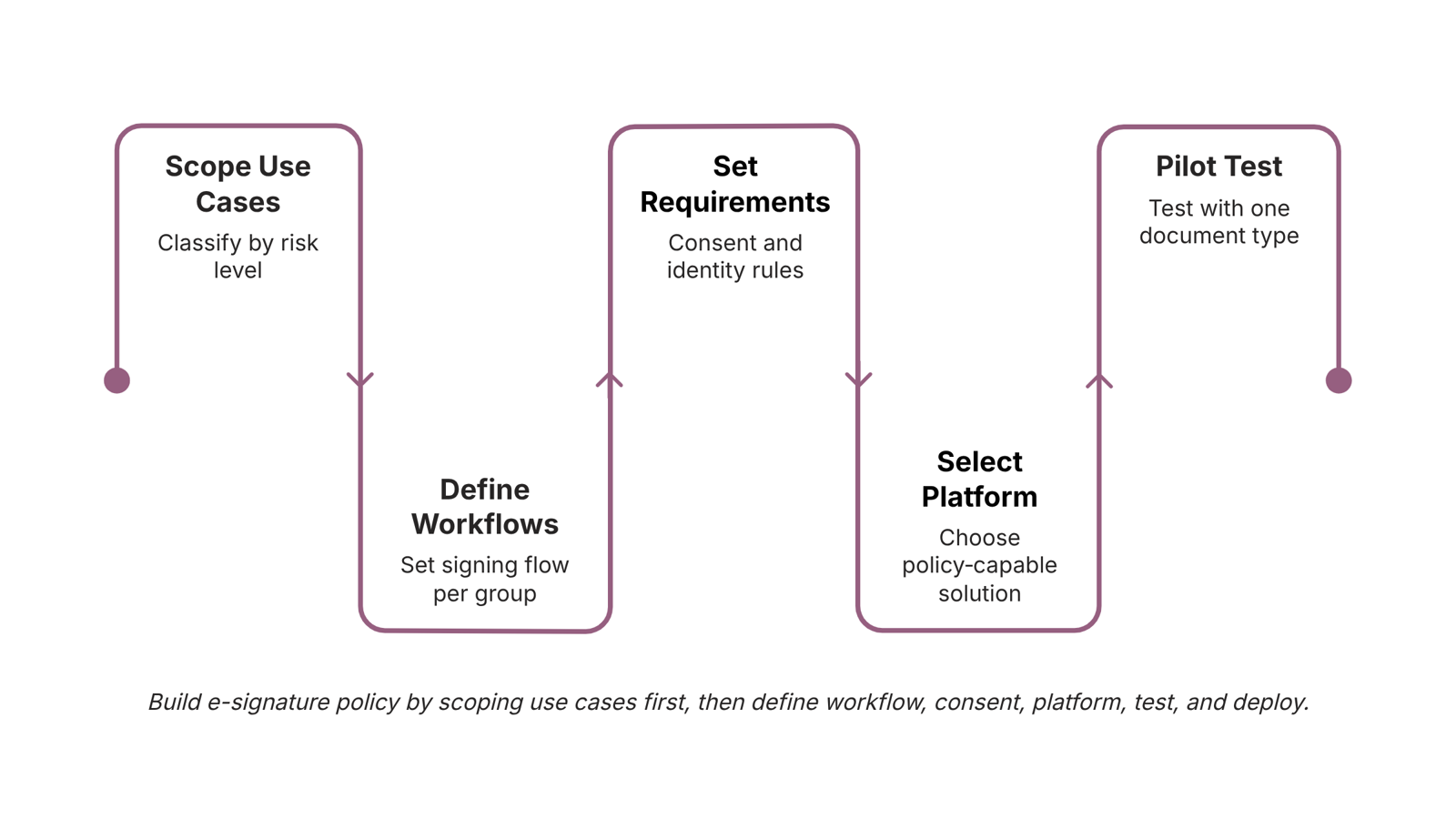
Building an electronic signature policy from scratch takes less time than most IT owners expect — if you follow a defined sequence instead of drafting in circles.
Scope your use cases first: List every document type your business sends for signature: client contracts, NDAs, vendor agreements, HR onboarding forms. Group them by risk level. High-value or regulated documents may require advanced electronic signatures with stronger identity verification. Lower-risk forms can use simple signatures. This grouping drives every other decision in your policy.
Define your document signing workflow for each group: Map who initiates the request, what signing order is required, and what happens if a signer declines or goes unresponsive after a set number of days. A workflow with no defined fallback is a workflow that stalls at the worst moment.
Set signer consent and identity requirements: Your policy needs to specify how consent is captured and recorded. This is the layer the ESIGN Act and UETA require you to document — and it's what determines whether your signed documents hold up if a signature is ever challenged.
Select a platform that supports your policy, not the other way around: Your signing tool should generate audit trails, completion certificates, and timestamped records automatically. If you're building this for the first time, choosing the right signing platform before you finalize the policy saves significant rework. Sigi connects signing directly to your CRM tasks and invoices, so the policy enforcement happens inside the workflow rather than alongside it.
Draft, test with one document type, then publish: Run a single contract type through the full process before rolling out company-wide. Fix gaps in the audit trail or notification logic at small scale. Then formalize the policy and distribute it to everyone who initiates or receives signed documents.
Best practices for implementing an electronic signature policy
Once your policy document exists, enforcement comes down to four operational controls configured inside your signing platform.
Signer verification fields are the first line of defense. Require signers to enter a one-time passcode (OTP) sent to a verified email or mobile number before they can access the document. For higher-risk contracts, your electronic signature policy should specify when identity verification escalates to knowledge-based authentication or ID upload. Define the threshold in the policy itself, not in the platform settings alone, so the requirement survives a tool change.
Audit trail configuration determines whether your signed documents hold up if challenged. Every signing event should capture timestamp, IP address, device fingerprint, and the signer's declared consent to use electronic signatures. That consent record is specifically what the US ESIGN Act (15 U.S.C. § 7001) requires to establish enforceability. A completion certificate that logs each of these fields per signer is the minimum. For a deeper look at how e-signed documents compare to wet signatures in a dispute, the gap usually comes down to audit trail completeness, not the signature itself.
Sequential signing order prevents the common failure where a contract circulates out of sequence and a junior approver signs before legal review. Set signing order at the template level, not manually per send. This removes the human error that creates policy exceptions.
Automation triggers close the loop. Wire your document signing workflow so that a completed signature automatically updates the associated CRM deal, fires an invoice, or closes a task. Without this, signed documents sit in email threads and the policy becomes a paper exercise.
For contracts that carry regulatory weight, review when your policy should require advanced electronic signatures rather than a simple e-signature. The distinction matters under eIDAS if you operate across EU jurisdictions.
How to ensure ongoing compliance with your esignature policy
Compliance isn't a one-time setup. It's a maintenance schedule.
Set a policy review cycle tied to real triggers: annually at minimum, and immediately after any regulatory update to ESIGN, UETA, or eIDAS. Each review should confirm that your consent language still meets documented intent requirements and that your audit trail captures the right data points — IP address, timestamp, signer identity method, and device fingerprint.
Run access control audits quarterly. Who can send documents for signature? Who can void or reassign them? Privilege creep is common in growing IT teams, and an unauthorized void action is exactly the kind of gap that surfaces during a dispute.
Keep signer consent records separate from the signed document itself. If a document is challenged, you need to show consent was given before signing, not infer it from the file.
When a signed document is challenged, your defense rests on four things: the audit trail, the completion certificate, the consent record, and proof the signing platform meets esignature legal requirements in the relevant jurisdiction. If any of those four are missing, the signature is harder to enforce regardless of electronic signature compliance intent.
Closing
A policy that lives only in a document folder is a policy that fails when a signature gets challenged. The real strength comes from pairing your written rules with technical controls that enforce them — audit trails that capture every signing detail, signer verification that proves identity, and signing sequences that enforce order. Sigi handles that enforcement layer automatically, generating tamper-proof completion certificates and audit records that align with your policy requirements without requiring you to build the infrastructure from scratch. Your next step: map your highest-risk document types and ask yourself whether your current signing process can prove compliance if one of those signatures is disputed.
FAQ
What should be included in an electronic signature policy?
Scope, signer identity verification, accepted signature types, audit trail requirements, document retention rules, and revocation procedures. Each component must map to a concrete implementation decision — how you verify signers, what you log, and how long you keep records.
What are the legal requirements for an electronic signature policy?
ESIGN Act requires documented consent and clear signing intent. UETA adds state-level requirements for accurate, accessible records. eIDAS (EU) introduces signature tiers based on document risk. Your policy must satisfy the framework that applies to your signers' location.
How do I ensure compliance with electronic signature policies?
Pair your written policy with a platform that captures and logs every required data point: timestamps, IP addresses, signer identity verification, and signing sequence. Audit trails are what prove compliance when a signature is challenged.
What are the best practices for implementing an electronic signature policy?
Start by scoping use cases and grouping documents by risk level. Define workflows with clear signing order and fallback procedures. Set explicit consent and identity verification requirements tied to document risk. Enforce all rules through your signing platform's audit and verification controls.
Does an electronic signature policy need to cover all document types?
Yes, but requirements vary by risk. High-value or regulated documents may require advanced signatures and stronger identity verification. Lower-risk forms can use simpler verification. Your policy should specify which tier applies to which document category.


 Elena Petrova11 September 2026


