TL;DR: Most billing-and-sales guides treat them as separate problems with separate tools. This one identifies the exact handoff failures that cost IT companies revenue, then walks through a 6-step framework to close those gaps with automation and connected workflows, not additional hires.
What billing and sales alignment actually means
Modern workspace showing streamlined billing and sales process dashboards on laptop and tablet with organized, professional setup
Billing and sales alignment means treating the path from signed deal to collected payment as one continuous workflow, not two departments tossing a PDF over a wall. When your billing and sales processes operate as a single revenue pipeline, every closed deal automatically triggers the correct invoice, payment terms match what was quoted, and cash arrives predictably.
For IT service companies, this matters more than most realize. Project scopes shift, hourly rates vary by role, and retainers renew on different cycles. A clean sales to billing handoff ensures none of that context gets lost between your CRM and your invoicing tool. Without it, you end up re-keying deal terms manually, which is where errors and delays compound.
Most teams already have decent sales ops or decent billing ops. The gap lives in the connection between them. Fixing invoicing speed without fixing the data that feeds it produces marginal gains. Fixing sales tracking without connecting it to invoice creation and status tracking means revenue sits uncollected longer than it should.
The next section breaks down exactly where that connection fails.
Where billing and sales break down most often
Most billing and sales operations failures cluster around four predictable points. Recognizing which ones hit your team tells you where to focus first.
Delayed invoicing after deal close. Sales marks a deal won, but the invoice doesn't go out for days or weeks. For small-to-mid IT service companies, that gap often stretches to 10+ days. Every day of delay pushes your cash collection further out and trains clients to deprioritize your payment.
Manual data re-entry between systems. A rep closes in the CRM, then someone manually copies line items, rates, and client details into a billing tool. Each re-entry introduces errors: wrong amounts, mismatched PO numbers, duplicate entries. If you're evaluating what to look for in billing software, eliminating this handoff should be the first filter.
Disconnected project billing. This is the common challenge in managing billing and sales that almost no one addresses for IT companies specifically. Time logs live in one tool, milestones in another, and invoices in a third. Billable hours slip through the cracks because no single system ties project delivery to invoice creation and status tracking.
Untracked payment status. Sales promises net-30, but nobody monitors whether payment actually arrives. Outstanding invoices go unnoticed until cash flow tightens. Without visibility into payment status, your team can't prioritize follow-ups or flag at-risk accounts before they become write-offs.
These four breakdowns compound. Fix them in isolation and you relocate the problem. The framework ahead treats them as one connected system.
Six steps to streamline your billing and sales process
Most IT service companies lose 5 to 14 days between closing a deal and sending the first invoice. That gap compounds when billing and sales live in separate systems. The six steps below collapse that gap by treating billing and sales as one continuous workflow, not two departments that talk occasionally.
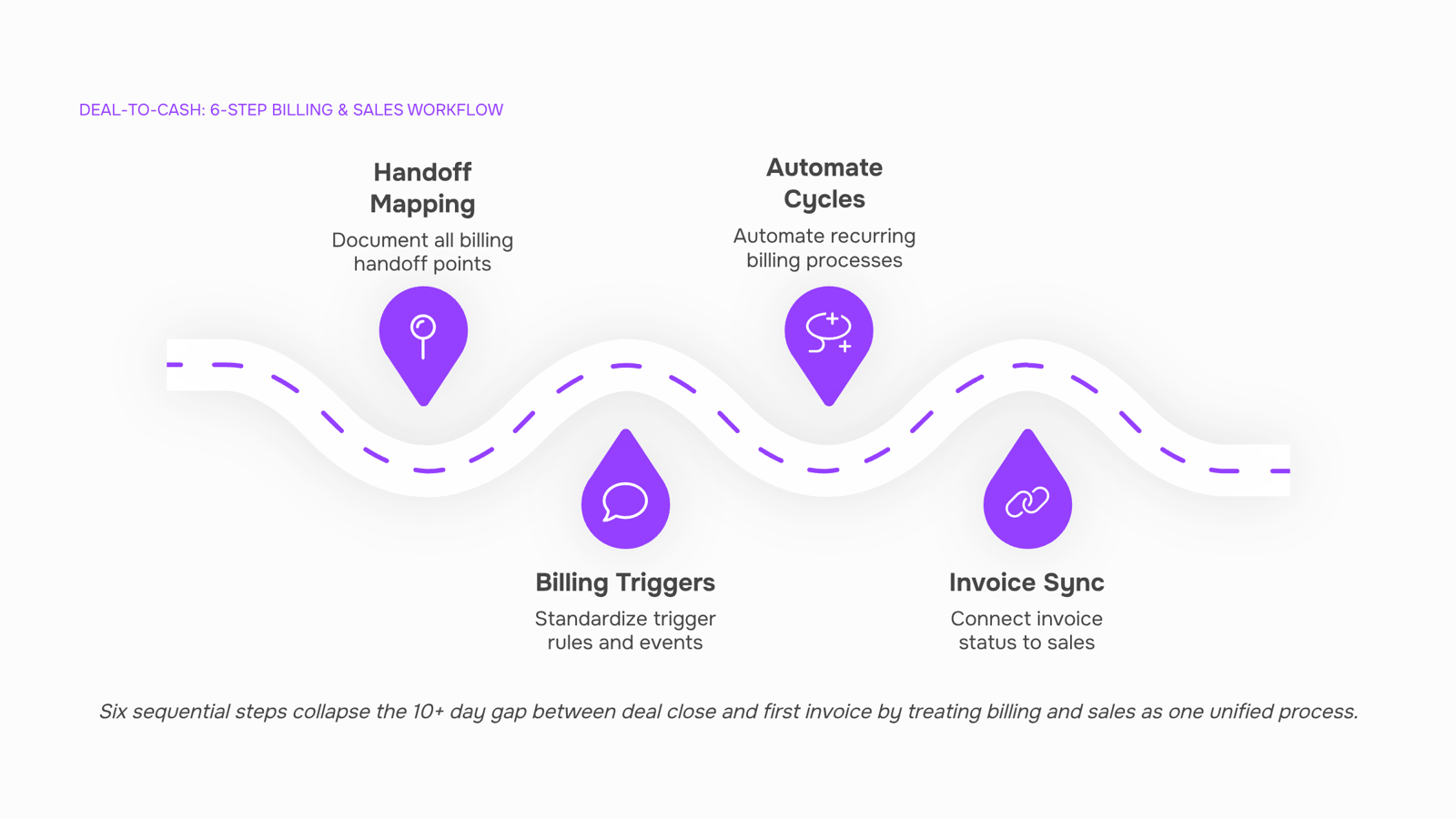
1. Map your deal-to-invoice handoff in writing.
Open your CRM and your invoicing tool side by side. Document every field that needs to move from the closed deal to the first invoice: client legal name, billing contact, payment terms, project scope, and rate type (fixed, hourly, or milestone). If any field requires a human to copy-paste it, flag it. Most teams find three to five manual transfer points here. Writing them down is the prerequisite for eliminating them.
2. Standardize your billing triggers by engagement type.
Not every deal bills the same way. Define explicit triggers:
Retainers and subscriptions: Invoice fires on a calendar date (1st of month, quarterly, etc.) regardless of project status.
Project-based billing: Invoice fires when a milestone is marked complete or when logged hours hit the agreed cap.
One-time deliverables: Invoice fires the day the deliverable is accepted.
Each trigger type needs its own template and automation rule. Mixing them into one "send invoice" button is how line items get missed and disputes start. For project-based billing specifically, tie the trigger to your time-tracking or project management tool so the invoice reflects actual logged work, not a PM's memory of what was delivered.
3. Automate recurring billing cycles.
If even 30% of your revenue is subscription or retainer-based, manual monthly invoicing is a liability. Set up recurring billing automation that generates and sends invoices on schedule without human intervention. The automation should handle prorations, mid-cycle upgrades, and cancellation dates. Test it with one client for a full cycle before rolling it out. A single miscalculated proration erodes more trust than a late invoice.
4. Connect your invoice status back to your sales pipeline.
Your sales team should see payment status without asking finance. When an invoice is overdue, the account owner needs to know before the next upsell conversation. Wire your invoice creation and status tracking into the same workspace your sales team checks daily. This prevents the awkward scenario where a rep pitches an expansion while the client has an unpaid invoice sitting in collections.
5. Build a single source of truth for client billing data.
Billing errors trace back to stale data: an old address, a deprecated PO number, a rate that changed two quarters ago. Consolidate client billing data into one record that both sales and finance reference. When a rep negotiates a rate change, it updates the billing record directly. When finance adjusts payment terms, sales sees it immediately. Review best practices for managing invoices to structure this record so it scales past 20 clients without becoming a maintenance burden.
6. Audit the full cycle monthly, not quarterly.
Run a 15-minute monthly check:
How many invoices went out more than 48 hours after their trigger event?
How many required manual correction after sending?
What percentage of invoices are currently overdue past terms?
Track these three numbers on a rolling basis. If any trend upward for two consecutive months, something in steps 1 through 5 broke. Monthly cadence catches drift before it becomes a quarter of lost revenue.
These six steps work as billing and sales best practices because they treat the two functions as one pipeline. The goal is not perfection on day one. It is removing one manual step per month until the system runs with minimal human babysitting. When evaluating tools to support this, look for platforms that unify deal data and invoice data in one place rather than requiring middleware to bridge them. Knowing what to look for in billing software helps you avoid buying two tools that duplicate 60% of each other's features.
Start with step 1 this week. The map alone usually reveals at least one automation opportunity you can ship within days.
Billing software vs. sales software: what you actually need
Most teams treat billing and sales software as interchangeable categories. They aren't. Here's where they actually differ:
Dimension | Sales software | Billing software | What you need both for |
|---|
Scope | Pipeline, deals, forecasting | Invoices, payments, collections | Full revenue cycle visibility |
Data ownership | Owns the customer record pre-close | Owns the financial record post-close | Single source of truth on deal-to-cash |
Automation depth | Sequences, reminders, lead routing | Recurring charges, late-fee triggers, tax calc | Eliminating the manual handoff between close and first invoice |
Revenue visibility | Projected revenue by stage | Actual collected revenue, aging reports | Accurate forecasting vs. cash position |
The real problem for IT company owners isn't choosing one or the other. It's that most billing and sales software solutions keep these datasets in separate systems, so your finance team re-enters deal terms manually. That gap is where invoices go out late and line items get wrong.
What you actually need: a connected layer where deal data flows directly into billing without a human copy-pasting SOW terms. If you run project-based work, choosing the right billing tool matters even more, because time logs and milestones need to trigger invoices automatically.
How to centralize billing and sales in one workflow
The gap between closing a deal and sending the first invoice averages 10+ days for many small-to-mid IT service companies. That delay compounds when billing lives in a separate tool from your sales pipeline.
Centralizing means one system holds the deal record, the project scope, and the invoice trigger. When a sales order converts directly into a billing event, you eliminate the manual handoff where line items get mistyped or payment terms get lost.
For IT companies running project-based billing, this matters more than most. Time logs, milestones, and PO references need to flow into invoices without someone copying data between tabs. Inzo handles this by linking invoices directly to projects, deals, and subscriptions, converting sales orders into invoices and letting you automate recurring billing cycles without rebuilding each one.
The result: you automate billing workflows at the point where revenue is actually earned, not days later when someone remembers. That single change can optimize billing strategies more than any downstream fix. Review what to look for in billing software if you're evaluating options now.
Three mistakes that slow down billing and sales revenue
Most IT companies lose revenue not from bad pricing but from process gaps between billing and sales. Three errors account for the bulk of that loss.
Invoicing after delivery instead of at milestones. If you wait until a project ships to send an invoice, you're funding the client's cash flow with yours. For a 3-month engagement, that can mean 90+ days of unbilled work sitting on your books. Milestone-based billing ties payment to progress, not completion.
Skipping payment tracking. Roughly 50% of B2B invoices are paid late globally. Without active tracking, overdue invoices quietly age past 60 days, where collection probability drops sharply. Your billing and sales processes need a closed loop: invoice sent, payment expected, follow-up triggered.
Using separate tools with no data sync. When your CRM, project tracker, and invoicing tool don't share data, someone manually re-enters deal terms into an invoice. That manual step introduces errors and delays. To optimize billing strategies for maximum revenue, the deal-to-invoice path needs to be one connected flow, not three disconnected ones. Understanding the benefits of online invoice generation makes this gap clearer.
Closing
Billing and sales alignment isn't about adding tools or headcount. It's about collapsing the handoff between your CRM and your invoicing system so deals close on Monday and invoices land in client inboxes by Tuesday. Start this week by mapping your deal-to-invoice workflow in writing (step 1). You'll likely find three to five manual transfer points that can be automated within days. Once you've eliminated those, the rest of the framework—standardized triggers, recurring automation, and payment visibility—compounds the gains. The question isn't whether to connect billing and sales. It's how quickly you can stop treating them as separate departments.
FAQ
What are the best practices for streamlining billing and sales processes?
Map your deal-to-invoice handoff in writing, standardize billing triggers by engagement type, automate recurring cycles, connect invoice status back to sales, consolidate client billing data into one record, and audit the full cycle monthly. These six steps eliminate manual handoffs and collapse the gap between deal close and invoice delivery.
How can I automate my billing and sales workflows?
Define explicit billing triggers (calendar-based for retainers, milestone-based for projects), set up recurring automation for subscription revenue, and wire invoice status into your sales team's daily workspace. Automation removes manual re-entry and ensures invoices fire within 48 hours of their trigger event.
What are the key differences between billing and sales software solutions?
Sales software tracks deals and pipeline; billing software generates invoices and tracks payments. The gap between them is where most IT companies lose revenue. Choose a platform that unifies deal data and invoice data rather than requiring manual bridges between separate tools.
How do I optimize my billing and sales strategies for maximum revenue?
Connect payment status visibility to your sales pipeline so reps see overdue invoices before upsell conversations, standardize billing triggers to prevent missed line items, and audit monthly to catch drift early. Most IT companies lose 5 to 14 days between deal close and invoice send—collapsing that gap alone improves cash flow predictability.
What are the most common challenges in managing billing and sales operations?
Delayed invoicing after deal close, manual data re-entry between systems, disconnected project billing (time logs, milestones, and invoices in separate tools), and untracked payment status. These four breakdowns compound when billing and sales operate independently rather than as one continuous workflow.
How do I connect project delivery milestones to client invoices automatically?
Define milestone-based billing as an explicit trigger, tie the trigger to your project management or time-tracking tool so invoices reflect actual logged work, and test the automation with one client for a full cycle before rolling out. This prevents billing disputes and ensures invoices match what was actually delivered.


 Elena Petrova15 September 2026


