TL;DR: Most CRM roundups rank tools without defining what "simple" actually means for a small team. This piece gives you the decision criteria first, so you can separate genuinely simple CRMs from bloated platforms with a clean marketing page, then maps those criteria to real options including AI-powered lead routing.
What 'simple' actually means in a CRM
Most people use "simple" to mean a clean interface. That is the wrong test. A simple CRM for small business is one where a lead enters the system and reaches the right rep without anyone copying data between tabs, manually assigning ownership, or remembering to send a follow-up. The operational definition: fewer manual steps between "lead arrives" and "rep responds."
Here is the test you can apply to any tool you evaluate:
Submit a test lead through your website form.
Check whether the CRM captures it automatically, without a Zapier bridge or CSV import.
Confirm the lead gets assigned to a rep based on a rule you set (territory, round-robin, deal size) with zero clicks from you.
Verify the rep gets notified within seconds, not hours.
If any of those steps requires a human to intervene, the tool is not simple. It is just pretty.
Many small teams report that setup overhead alone causes them to abandon a CRM within the first 90 days. That is not a simplicity problem with the UI. It is a simplicity problem with the workflow architecture.
The easiest CRM to use for small business is the one that collapses the gap between lead capture and first contact. Everything else, the drag-and-drop pipelines, the color-coded tags, is decoration on top of that core loop. Teams evaluating sales lead management tools should start with this test before comparing feature lists.
What features do you actually need in a simple CRM
Start with what features do I need in a simple CRM, and the answer is shorter than most vendors want you to believe. Four capabilities carry almost all the value for a small team. Everything beyond them should earn its place or get cut.
Non-negotiables:
Automatic lead capture. Leads from your website form, email, or ad campaign land in the CRM without anyone copy-pasting. If a rep has to manually enter a contact, you've already lost minutes that compound into hours weekly.
Pipeline visibility. One screen showing every deal's stage, owner, and last activity date. No clicking through three tabs to find out whether a proposal was sent.
Contact history. Every email, call note, and meeting summary attached to the contact record. When a second rep picks up the thread, they see what happened without asking.
Assignment rules. Leads route to the right rep based on criteria you set (territory, deal size, round-robin). This is the feature that closes the response-lag gap. Without it, leads sit unowned for hours while your team figures out whose turn it is.
Features that add complexity without proportional return for teams under 20:
Custom reporting dashboards with dozens of widgets nobody checks after week two
Built-in marketing automation suites that duplicate what your email tool already does
Multi-entity relationship mapping designed for enterprise account hierarchies you don't have
Workflow builders that require a dedicated admin to maintain
The pattern: if a feature demands ongoing configuration to stay useful, it's overhead for a small team, not value. Many sales lead management tools bundle these extras and call it "powerful." For you, the best simple CRM for small business is one where the four non-negotiables work on day one and the rest stays out of your way. If you want lead scoring built into your CRM, that's a worthwhile fifth feature, but only after the four above are solid.
How to choose a simple CRM for your small business
Choosing a simple CRM for your small business comes down to four questions. Answer them before you open a single vendor's pricing page.
1. How many people will touch it daily?
If your team is under ten, you need a tool that works without role-based permissions, custom user hierarchies, or a training week. Most CRMs built for enterprise orgs force you into admin overhead that makes no sense when five people share a pipeline. If nobody on your team has "CRM admin" in their job description, the tool must run without one.
2. What's your monthly lead volume?
A business handling 20 leads a month has different needs than one handling 200. At lower volumes, manual entry is survivable. Past 50 inbound leads per month, you need automatic capture and assignment or leads sit untouched for hours. That response lag is where deals die quietly.
3. Which tools must it connect to?
List the three to five tools your team already uses daily: email, calendar, invoicing, proposal software. A simple CRM should connect to those without middleware. If you need Zapier or a developer to wire up basic email sync, the tool is not simple for you, regardless of what the marketing page says.
4. Can it stay functional without a dedicated admin?
This is the filter most teams skip. Many platforms feel easy during onboarding but require ongoing maintenance: field cleanup, automation debugging, permission resets. If the system breaks the moment your most technical person goes on vacation, it is not a fit.
Run your answers against the best sales lead management software for small businesses to see which tools pass all four. The next section compares specific options against these criteria.
The best simple CRM systems for small businesses compared
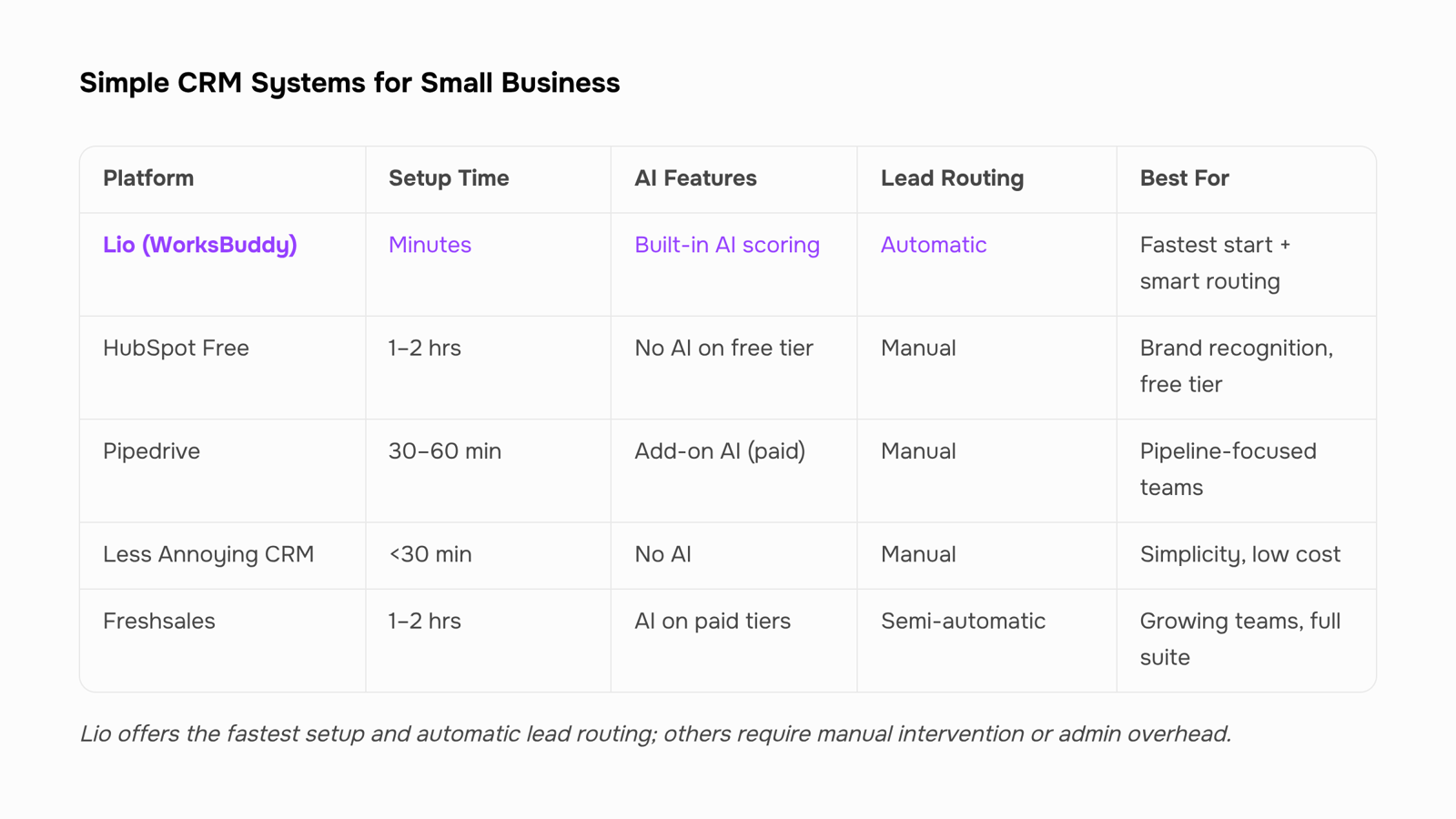
Here is a side-by-side look at five simple CRM systems worth evaluating if you run a small IT company and need something your team will actually use past week one.
Criteria | Lio (WorksBuddy) | HubSpot Free | Pipedrive | Less Annoying CRM | Freshsales |
|---|
Setup time to first use | Minutes (no admin needed) | 1–2 hours | 30–60 min | Under 30 min | 1–2 hours |
AI lead scoring | Built-in, automatic | Not on free tier | Add-on only | None | Available on paid plans |
Lead response automation | Instant routing + follow-up | Manual or paid workflows | Manual | Manual | Basic sequences |
Scales without dedicated admin | Yes | No (grows complex fast) | Partially | Yes (but limited features) | No |
Price transparency | Flat, predictable | Free tier then steep jumps | Per-seat, tiered | Flat per-user | Tiered with feature gates |
A few honest tradeoffs to note:
HubSpot Free gives you a recognizable brand and a large integration library, but the moment you need automation or lead scoring, you jump to paid tiers that assume you have someone managing the system full-time. For a five-person sales team, that overhead rarely pays off.
Pipedrive is visually clean and pipeline-focused. It works well if your sales process is straightforward drag-and-drop. It falls short when you need the CRM to act on incoming leads without human intervention.
Less Annoying CRM lives up to its name for simplicity. The tradeoff is that it stays simple permanently. No AI, no automation, no scoring. If your lead volume grows past 50–100 per month, you will outgrow it.
Freshsales offers AI features on higher tiers, but setup overhead and tier complexity make it a better fit for teams with 20+ reps and a RevOps person configuring things.
Lio sits in a specific gap: it is the easiest CRM to use for small business teams that also need instant lead response. The moment a lead arrives, Lio scores it, routes it to the right rep, and triggers follow-up. No workflow builder to configure, no admin to maintain. That addresses the lead response lag problem directly, where most small businesses lose deals not because they lack interest, but because five hours pass before anyone replies.
If your decision checklist from the previous section pointed toward low lead volume and zero integration needs, Less Annoying CRM is fine. If you need AI-assisted qualification without the setup tax, Lio is the best simple CRM for small business teams that plan to grow. For teams already managing documents alongside deals, pairing it with a CRM that handles document management closes another common gap.
Is a simple CRM enough for a growing small business
Yes, if "simple" means fast to learn and light on configuration. No, if it means the system caps out the moment you add a second sales rep or a new lead source.
The distinction matters. A simple CRM for small business becomes a liability when it lacks three things:
Automated lead routing so new inquiries reach the right rep in minutes, not hours
Built-in qualification logic that scores inbound leads without manual tagging
Workflow triggers that fire follow-ups the moment a lead meets a threshold
Without those, you outgrow the tool within a quarter. Your team reverts to spreadsheets for the overflow, and you lose the speed advantage a CRM was supposed to give you.
The best simple CRM for small business keeps the interface minimal while embedding intelligence underneath. Lio does this by scoring and assigning leads at the moment of capture, so a five-person IT sales team operates with the same response speed as a 20-person team running a complex stack. The surface stays clean. The automation scales behind it.
If you are evaluating whether a simple CRM is enough for a growing small business, ask one question: does it let you add rules and automations without adding complexity to the daily view? If yes, you can scale on it. If adding a workflow means rebuilding the system, you will hit a wall fast.
Compare sales CRM options built for IT sales teams or explore why small IT teams are moving away from complex CRMs.
What is the easiest CRM to use for a small business
The easiest CRM to use for small business is one where a lead hits your inbox and reaches an assigned rep without you touching a settings panel for hours first. The real benchmark: time-to-first-use under 15 minutes, meaning a form submission routes to the right person with zero manual configuration.
Most tools marketed as "simple CRM for small business" still require you to build pipelines, map fields, and configure notification rules before anything works. That setup overhead is why many small teams abandon their CRM within the first quarter.
Lio clears that bar. You connect your lead source, and its AI assigns incoming leads to reps based on availability and fit immediately. No pipeline builder to configure on day one. No field-mapping wizard. A lead comes in, gets scored, gets routed. Your rep gets a notification. That full loop runs in under ten minutes from account creation.
If you want to compare broader options, look at sales CRM tools built for IT teams or explore why small IT teams are ditching complex platforms entirely.
Closing
The gap between a lead arriving and a rep responding is where most small teams lose deals, not because their CRM looks bad, but because it requires manual handoffs to work. The best simple CRM for small business collapses that gap: automatic capture, instant scoring, rule-based assignment, zero clicks from you. Everything else is decoration.
Lio handles this loop from day one, with no admin overhead or setup tax. A lead lands, gets routed to the right rep, and they're notified within seconds, all without you copying data between tabs or remembering whose turn it is. Ready to see it work? Start a free trial and watch a lead move from inbound to assigned rep without touching it.
FAQ
What is the easiest CRM to use for a small business?
The easiest CRM prioritizes automatic lead capture, instant assignment, and zero manual handoffs—not just a clean interface. Lio is built for this: leads route to reps automatically with AI scoring, no admin setup required.
How do I choose a simple CRM for my small business?
Answer four questions first: How many daily users? What's your monthly lead volume? Which tools must it connect to? Can it run without a dedicated admin? These answers filter out tools that feel simple but demand ongoing maintenance.
What features do I need in a simple CRM for my small business?
Four non-negotiables: automatic lead capture, pipeline visibility, contact history, and assignment rules. Everything beyond these—custom dashboards, built-in marketing automation, enterprise reporting—adds overhead small teams don't need.
Is a simple CRM enough for a growing small business?
Yes, if it scales without adding admin overhead. Once you hit 50+ leads monthly, you need automatic routing and AI scoring to prevent response lag. Lio handles this growth without requiring a dedicated RevOps person.
What are the best simple CRM systems for small businesses?
Lio excels at instant lead routing with zero setup. HubSpot Free works for under 50 leads/month but gets complex fast. Pipedrive is pipeline-focused but requires manual assignment. Less Annoying CRM stays simple but has no automation. Freshsales adds overhead most small teams don't need.


 Elena Petrova15 September 2026


