TL;DR: Most client communication guides hand you a list of tips and call it a framework. This one maps communication to each phase of an IT project — kickoff through delivery — with specific cadences, channel rules, and the automation triggers that catch problems before clients go quiet. You'll finish with a repeatable system, not a checklist.
Why client communication breaks down in IT companies
Most IT projects don't fail because of bad code. They fail because the client expected one thing and the team delivered another, and nobody caught the gap until it was expensive to fix.
The breakdown usually follows a predictable pattern. During discovery, communication is frequent and energetic. Once the build starts, updates become irregular. By QA, the client is either over-involved or completely in the dark. Neither is good.
Three specific failures drive most of this:
No channel rules: Clients send requests through Slack, email, phone calls, and project tickets simultaneously. The team responds wherever feels fastest, which means nothing is tracked and priorities get set by whoever shouts loudest.
Cadence tied to milestones, not phases: A weekly update works during a stable build sprint. It fails during QA, when a client needs to know about a blocker the same day it surfaces.
Ownership is assumed, not assigned: When two people think the other is handling client updates, the client hears nothing.
The cost is real. Most teams that lose a client mid-project or fail to renew cite communication gaps as the primary reason, not technical shortfalls.
Understanding what good customer communications management actually looks like is the first step. The next is building a structure that makes consistent client communication automatic rather than effort-dependent.
Key elements of a successful client communication plan
A client communication plan is a written agreement between your team and the client that answers five questions before the project starts: who talks to whom, through which channel, how often, what triggers an escalation, and where the record lives.
Most IT firms skip the plan and rely on instinct. That works until a client emails at 11 PM expecting a same-day response, or two team members send conflicting status updates on the same day. A written plan removes both problems by making the defaults explicit.
Here are the five components that make a plan repeatable:
Channel rules: Assign each message type to one channel. Slack for quick questions, email for decisions and approvals, a shared project board for task-level updates. When a client knows where to look, they stop sending the same question three ways.
Cadence: Set a fixed update rhythm tied to project phase, not to how busy the team feels. A weekly summary during the build phase and a daily check-in during QA are two different cadences for two different risk levels. Clients who receive predictable updates ask fewer ad hoc questions.
Escalation paths: Define what triggers an escalation and who handles it. Scope changes go to the project lead. Budget overruns go to the account owner. A client who already knows the path stays calmer when something goes wrong.
Ownership: One named person owns client communication per project. Not "the team." One person. Shared ownership produces gaps.
Documentation: Every decision made in a call gets confirmed in writing within 24 hours. This protects both sides and eliminates the "I thought we agreed" conversations that derail timelines.
For a broader look at how these components fit into a repeatable system, the customer communications management best practices guide covers the governance layer in more detail. And if your team sends manual follow-ups today, automated email follow-up sequences can handle the routine confirmations so the project lead focuses on decisions, not reminders.
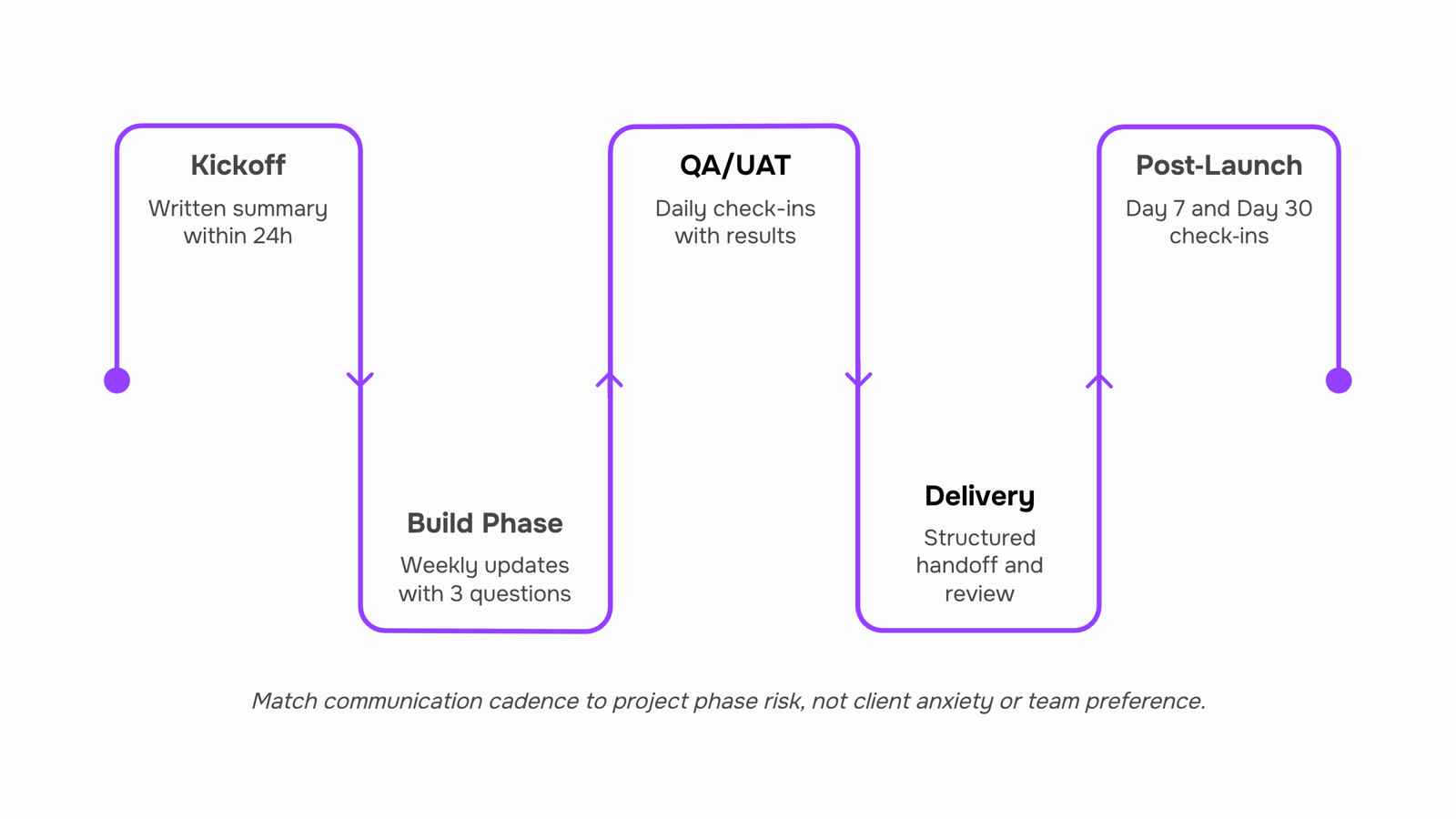
Best strategies for effective client communication by project phase
Each project phase creates different client anxieties — and different communication needs. Matching your actions to those needs is what separates teams that retain clients from teams that lose them at renewal.
Kickoff: Set the operating model before you touch any deliverable. Send a written summary within 24 hours of the kickoff call: confirmed scope, named contacts on both sides, escalation path, and the cadence you'll follow for the rest of the project. Clients who don't hear from you in the first 48 hours start filling the silence with doubt. Follow the customer communications management best practices that apply here: one channel for decisions, one for async updates, nothing left to improvisation.
Build phase: Weekly status updates work for most projects under 12 weeks. Each update should answer three questions: what shipped, what's next, and does anything need a client decision before the next cycle. Keep it under 200 words. If a client has to ask "where are we?", the cadence has already broken down.
QA: This phase generates the most client confusion because timelines compress and bug counts spike. Send a short daily note — even a two-line Slack message — confirming what was tested and what's pending sign-off. Silence during QA reads as a problem, even when there isn't one. Pair this with clear email etiquette rules for professional communication so your written updates don't create new misunderstandings while resolving old ones.
Delivery: Don't just hand over the build. Send a structured delivery summary: what was delivered against what was scoped, known limitations, and the next 30 days of support terms. Clients who receive a clean delivery document are significantly less likely to raise scope disputes after the fact.
Post-launch: Most IT firms go quiet here. That's the gap. A check-in at day 7 and day 30 costs 15 minutes and signals that you're a partner, not a vendor. Automate this with follow-up sequences so it happens on every project without relying on someone to remember.
The pattern across all five phases: communicate before the client asks, confirm in writing, and make the next step obvious.
How to improve communication with clients remotely
Remote work removed the hallway check-in. What replaced it, for most IT teams, is a chaotic mix of Slack pings, email threads, and video calls that overlap without a clear protocol.
Three specific problems drive most remote communication failures:
Timezone gaps create async-by-default conditions that teams haven't explicitly designed for
Sync vs. async confusion means clients get a Zoom invite when a written update would have been faster and clearer
Tool fatigue happens when clients are expected to monitor Slack, email, a project portal, and a shared doc simultaneously
Fix each one with a rule, not a preference.
For timezone gaps, pick one daily window where both parties are reachable and protect it. Outside that window, all updates go async in writing. For sync vs. async, use a simple decision rule: if the answer requires back-and-forth, schedule a call; if it's a status update or a decision with two options, write it out. This alone cuts unnecessary meetings by roughly half on most distributed projects.
For tool fatigue, consolidate to one client-facing channel per communication type. Status updates go in one place. Approvals go in one place. Urgent escalations have one defined path. Clients should never have to guess where to look.
Pair this with customer communications management best practices to build the broader system around these rules.
Also worth reviewing your email etiquette rules for professional communication — async communication only works when the writing itself is clear and actionable.
For recurring async touchpoints, automated email follow-up sequences can handle scheduled updates without adding manual effort to your team's plate.
How often to communicate with clients about project updates
There's no universal answer, but there is a defensible default: match your update frequency to the phase you're in, not to how anxious the client feels.
Project phase | Recommended cadence | Format |
|---|
Discovery | Every 2–3 days | Short async summary + one live call |
Active build | Weekly | Structured status email |
QA / UAT | Every 2–3 days | Bug tracker link + written summary |
Delivery / handoff | Daily (final week) | Brief written checklist |
Post-launch support | Bi-weekly | Async update unless issue arises |
Client type matters too. A technical stakeholder who reads Jira tickets needs less hand-holding than a non-technical executive who only sees the invoice. For exec-level contacts, weekly written summaries with a single "status at a glance" line do more work than a detailed changelog.
Two rules that prevent most frequency complaints:
Set the cadence in writing during kickoff. Clients who agree to a schedule upfront rarely complain about over- or under-communication
Never let a phase transition pass silently. A one-line message saying "we've moved from build to QA" resets expectations before they drift
If you want a ready-made structure for this, the communication plan template guide covers what to document at each phase so nothing falls through.
Most teams hit a wall not because their communication plan is wrong, but because executing it manually doesn't scale past two or three active projects. The right tool stack removes that ceiling.
For async updates, a project management layer handles status visibility so clients aren't waiting on a reply to know where things stand. For follow-ups, automated email follow-up sequences handle the repetitive touchpoints — check-ins after milestone delivery, reminders before review deadlines, nudges when a client goes quiet. Evox handles exactly this: it runs follow-up sequences triggered by project events rather than someone remembering to send an email.
Where Lio fits is on the record side. Client Record Tracking means every conversation, decision, and open item is tied to the account, not buried in someone's inbox. When a project changes hands or a client asks "what did we agree on in week two," the answer is a search, not a dig through email threads.
For teams building out the broader system, customer communications management best practices covers the governance layer that makes these tools stick, and email etiquette rules for professional communication addresses the tone and format details that affect whether clients actually read what you send.
The tools matter less than the trigger logic behind them. Automate what's predictable; keep human judgment for what isn't.
Closing
The framework works only if it runs on autopilot. Weekly summaries, daily QA check-ins, post-launch follow-ups — these only stick if they're triggered automatically, not remembered by whoever's juggling five projects. That's where the system breaks for most teams: the plan exists on a slide deck, but the execution depends on someone's to-do list.
Evox and Lio solve this by connecting client records to automated follow-up sequences in one place. Your communication cadence runs on schedule, every decision gets logged without manual entry, and nothing falls through because a team member forgot. The framework becomes a system. Ready to stop relying on memory? Start a trial and see how automation changes your client retention rate.
FAQ
Q. What are the best strategies for effective client communication?
A. Communicate before the client asks, confirm decisions in writing within 24 hours, and match your cadence to project phase—weekly during build, daily during QA. Assign one named owner per project and route each message type to one channel to eliminate confusion.Q. How can I improve communication with my clients remotely?
A. Protect one daily timezone-friendly window for sync communication; move everything else async and written. Use one channel per communication type and apply a simple rule: back-and-forth = call, status or decision = written update.Q. What tools can I use to streamline client communication?
A. Consolidate to one project board for task updates, one email channel for decisions, and one escalation path for urgent issues. Automate routine follow-ups and client record-keeping so your team focuses on decisions, not reminders.Q. How often should I communicate with my clients about project updates?
A. Weekly during stable build phases, daily during QA when risk is highest, and structured summaries at kickoff and delivery. Post-launch, send check-ins at day 7 and day 30 to signal partnership.Q. What are the key elements of a successful client communication plan?
A. Channel rules (one per message type), fixed cadence by phase, defined escalation paths, one named owner, and written confirmation of all decisions within 24 hours. Document everything to eliminate 'I thought we agreed' disputes.


 Elena Petrova15 September 2026


