TL;DR: Most risk mitigation guides treat risk as a planning artifact: identify it, log it, move on. This one shows IT company owners how risks surface inside running projects and what to do the moment they appear, before a missed dependency or scope change becomes a production incident. You'll get a concrete framework tied to real execution triggers, not a checklist you file and forget.
What risk mitigation means in software development
Risk mitigation is the process of identifying threats to a software project and taking deliberate action to reduce their probability, impact, or both. It sits inside the broader discipline of risk management, but it is not the same thing. Risk management covers the full cycle: identify, assess, respond, monitor. Risk mitigation is specifically the response layer.
That distinction matters because most teams conflate the two and stop at the risk register. Logging a risk is not the same as acting on it.
In software development, mitigation maps to four response strategies: avoid the risk entirely, reduce its likelihood, transfer it (via contracts, insurance, or vendor agreements), or accept it with a documented contingency. Choosing the wrong strategy for a given risk is itself a source of project failure. Research from the Standish Group consistently links unmanaged risk to cost overruns and missed delivery dates.
For a structured approach to moving from identification to response, see how to build a risk mitigation plan that covers the full identification-to-response loop.
Why proactive risk mitigation matters for your business
Skipping formal risk mitigation in project management doesn't just create problems later — it makes problems more expensive. Research from McKinsey found that large IT projects run 45% over budget on average, with scope creep and unaddressed technical risk as the leading drivers.
Four outcomes change when teams act early:
Delivery speed. Teams that identify blockers in week two resolve them faster than teams that discover them in week eight, when dependencies have multiplied.
Budget protection. A risk caught during planning costs a fraction of what it costs mid-sprint. Rework, emergency contractors, and delayed releases compound quickly.
Team stability. Unmanaged risk lands hardest on engineers. Repeated crunch cycles from avoidable surprises drive burnout and attrition — two costs that rarely appear in a project post-mortem but show up in hiring budgets.
Stakeholder trust. Predictable delivery builds it. Surprise delays erode it, sometimes permanently with enterprise clients.
These aren't sector risk mitigation factors that only apply to regulated industries. They apply to any software team shipping under deadline pressure.
Real-time risk alerts that monitor overdue tasks, deadline risk, and workflow bottlenecks automatically give teams visibility before a risk becomes a cost. The next section covers how to build that process from the ground up.
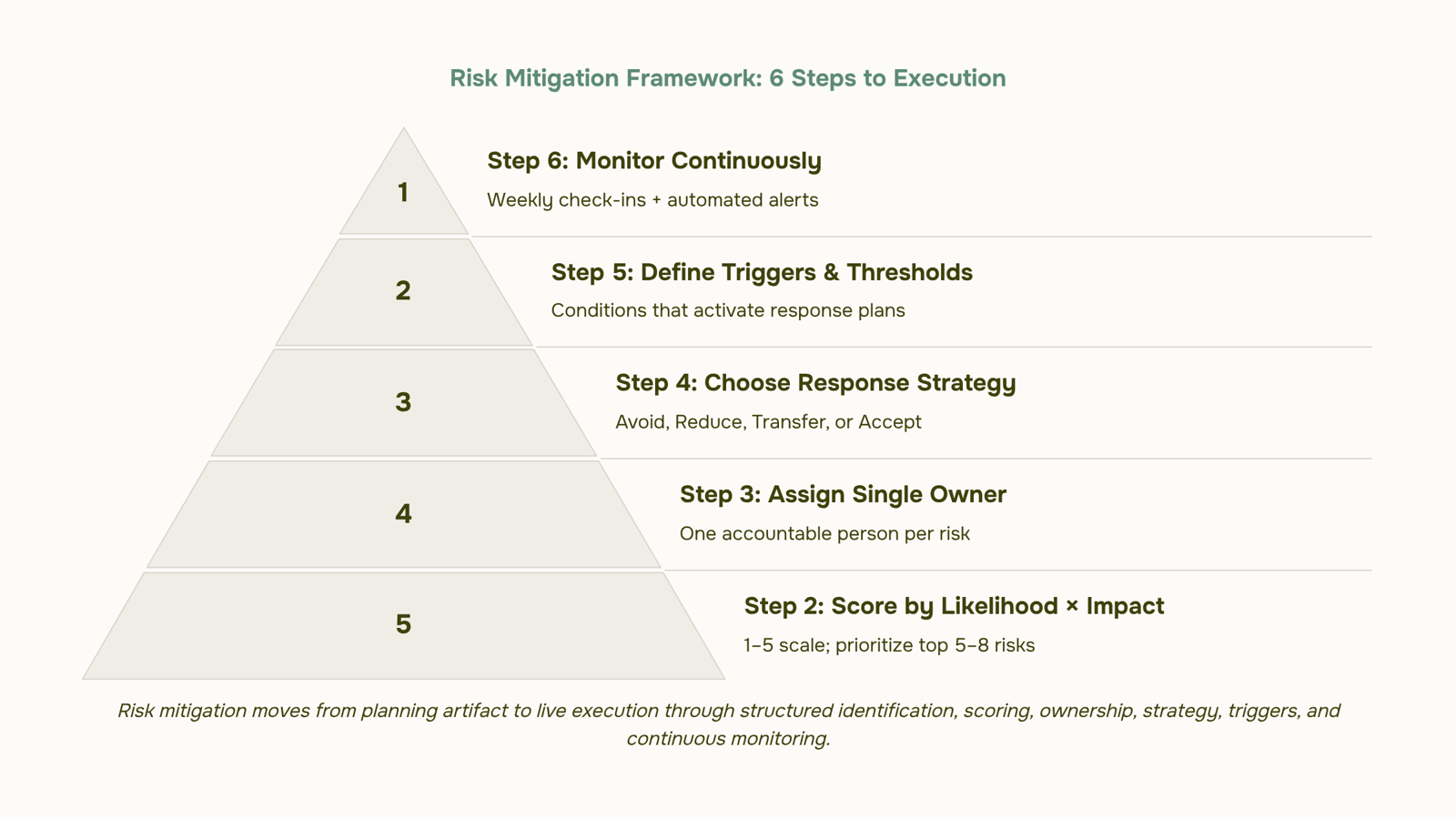
6 steps to build a risk mitigation plan for software projects
Identify risks before the first sprint starts: Pull your team together before kickoff and surface every assumption that could break the project. Group risks by category: technical (untested APIs, legacy integrations), resource (key-person dependency, contractor availability), and external (third-party vendor timelines, compliance changes). A 90-minute pre-sprint risk workshop typically surfaces 15 to 20 risks a team would otherwise discover mid-delivery. For a starting point on the most common IT risks software teams face and how to categorize them, that taxonomy is already mapped out.
Score each risk by likelihood and impact: Not every risk deserves equal attention. Use a simple 1-to-5 scale on both axes and multiply them to get a priority score. A third-party payment API with a history of downtime might score 4 × 5 = 20. A minor UI dependency might score 2 × 2 = 4. Work the top five to eight risks first. Everything below a threshold score goes on the register but gets reviewed weekly rather than actively managed.
Assign an owner to every risk on the register: Unowned risks don't get managed. Each item in your risk mitigation plan needs one named person accountable for monitoring it and triggering a response if conditions change. Not the team. One person. On a 10-person dev team, this typically means senior engineers own technical risks, the project manager owns timeline and vendor risks, and finance owns budget exposure.
Choose a response strategy for each high-priority risk: The next section covers this in detail, but at the planning stage you need at least a provisional response assigned. Avoid, reduce, transfer, or accept. A team building on an unstable third-party API might reduce the risk by building an abstraction layer. A team with a single database expert might transfer the risk by cross-training a second engineer. Leaving this blank is how projects stall when the risk materializes.
Build triggers and thresholds into the plan: A risk mitigation plan without triggers is just a list. Define the condition that moves a risk from "monitored" to "active." For example: if sprint velocity drops below 60% of baseline for two consecutive sprints, escalate the delivery risk to the project sponsor. Specific thresholds make the plan actionable under pressure, when teams are least likely to stop and think.
Monitor continuously, not just at milestones: Real-time risk alerts that monitor overdue tasks, deadline risk, and workflow bottlenecks automatically remove the dependency on someone remembering to check. Most teams review risk registers at phase gates, which means a risk can burn for three weeks before anyone acts. Weekly async check-ins on the top risks, combined with automated signals for stalled workflows, close that gap. AI-powered risk prediction that scans for stalled workflows and blocked dependencies before they escalate takes this further by surfacing patterns a manual review would miss.
The full loop, from identification through live monitoring, is what separates a working risk mitigation strategy from a document that gets filed and forgotten.
Four risk mitigation strategies and when to use each
The four standard risk mitigation strategies in project management aren't interchangeable. Each fits a different threat profile, and defaulting to "reduce everything" is how teams waste sprint capacity on risks that should have been transferred or simply accepted.
Avoid means eliminating the risk entirely by changing scope or approach. If a third-party API has a history of breaking changes and your release date is fixed, cut the dependency. The risk disappears because the condition that created it no longer exists.
Reduce means lowering probability or impact through direct action. Adding automated regression tests before a major refactor is a classic example. You can't eliminate the chance of introducing bugs, but you can catch them before they reach production.
Transfer shifts the financial or operational consequence to another party. Cyber liability insurance, SLAs with penalty clauses, and fixed-price contracts with vendors all move the cost of failure away from your team. This works best when the risk is real but outside your direct control.
Accept is the right call when the cost of responding exceeds the likely cost of the risk itself. A minor UI inconsistency in a rarely used admin panel often belongs here.
Mapping each risk to the right response is covered in detail in how to build a risk mitigation plan that covers the full identification-to-response loop, and the most common IT risks software teams face gives you a starting inventory to work from.
Risk mitigation tools fall into three practical categories, and knowing which one you're missing usually explains why risks keep slipping through.
Risk registers and scoring matrices are the foundation. A spreadsheet-based register works for small teams, but once you're tracking 20+ risks across multiple sprints, manual updates become the bottleneck. A probability-impact matrix helps prioritize, but only if someone updates it regularly.
Project-integrated dashboards solve the staleness problem. Tools that live inside your workflow, rather than beside it, surface risk signals as work moves. Real-time risk alerts that monitor overdue tasks, deadline risk, and workflow bottlenecks automatically remove the manual overhead of checking a separate log.
Predictive analysis tools go further. AI-powered risk prediction that scans for stalled workflows and blocked dependencies before they escalate shifts your risk mitigation plan from reactive to proactive.
The right tool reduces how much your team has to remember. For a fuller picture of the most common IT risks software teams face and how to categorize them, that context shapes which tool category you actually need first.
How to automate risk mitigation inside your project workflow
Automation handles the parts of risk mitigation that humans consistently drop: monitoring for signals, firing alerts, and routing escalations before anyone notices a problem. Specifically, you can automate deadline-risk detection, overdue task flags, dependency blocks, and stakeholder notifications. Real-time risk alerts that monitor overdue tasks, deadline risk, and workflow bottlenecks automatically remove the need for someone to manually scan a dashboard every morning.
What automation cannot replace is judgment. Deciding whether a delayed API integration is a minor inconvenience or a release-blocking risk still requires a human who understands the project context. The same applies to choosing between the four response strategies (avoid, reduce, transfer, accept) for any given risk.
A practical split looks like this:
Automate: signal detection, threshold alerts, escalation routing, status updates
Keep human: risk scoring, response strategy selection, owner assignment, stakeholder communication
Taro's AI-powered risk prediction scans for stalled workflows and blocked dependencies continuously, so your risk mitigation strategies stay active between planning sessions rather than sitting in a document no one opens. For teams building this from scratch, how to build a risk mitigation plan that covers the full identification-to-response loop is a useful next read.
Common mistakes that make risk mitigation plans fail
The most common failure isn't a bad risk mitigation plan. It's a plan that gets written once and never touched again. Teams log risks during sprint planning, then ignore the document until something breaks. A risk log is only useful if it's reviewed on a set cadence, weekly at minimum for active projects.
The second mistake is shared ownership. When a risk belongs to "the team," it belongs to no one. Every item in your risk register needs a single named owner who is accountable for monitoring and response.
Third: teams conflate identifying a risk with mitigating it. Labeling a dependency as "high risk" is not a response strategy. You still need to decide: avoid it, reduce it, transfer it, or accept it. Sector risk mitigation factors vary, but that four-option decision applies universally.
If your team skips that step, build the full identification-to-response loop into your process before the next planning cycle.
Closing
Risk mitigation isn't something you do once at project kickoff and then file away. It's a continuous cycle of identifying threats as they surface, assigning owners to act on them, and monitoring for the conditions that trigger a response. The teams that ship on time and on budget aren't the ones with the longest risk registers — they're the ones that catch risks early and respond before they compound into delays or rework.
Most of the heavy lifting in step six — monitoring task status, flagging overdue items, alerting owners when thresholds are crossed — can run continuously inside a project tool rather than requiring manual weekly reviews. If you want to see what automated risk monitoring looks like in a live project environment, take a look at Taro's risk alerts dashboard. It shows you exactly which risks are active, which tasks are at risk of missing their deadline, and which workflows are stalled before they become problems.
FAQ
What are the best strategies for risk mitigation in software development?
The four core strategies are avoid (eliminate the risk entirely), reduce (lower probability or impact), transfer (shift the cost to another party), and accept (with a documented contingency). Choose based on threat profile, not habit. Most teams default to reduce when transfer or avoid would be faster.
How can risk mitigation be implemented in project management?
Identify risks before the first sprint, score by likelihood and impact, assign an owner to each, choose a response strategy, define triggers, and monitor continuously. Without triggers and owners, a risk register is just a list.
What tools are used for risk mitigation and analysis?
Risk registers live in spreadsheets or project management platforms, but the real value comes from tools that monitor live workflows and surface risks automatically — like task tracking systems that flag overdue items and stalled dependencies before they become problems.
Can risk mitigation be automated with software solutions?
Yes. Automated alerts can monitor task status, deadline risk, and workflow bottlenecks continuously, removing the dependency on manual weekly reviews. AI-powered risk prediction can also surface stalled workflows and blocked dependencies before they escalate.
What are the benefits of proactive risk mitigation in business?
Four outcomes change: faster delivery (blockers caught early resolve quicker), budget protection (risks caught in planning cost a fraction of mid-sprint fixes), team stability (fewer surprise crises reduce burnout), and stakeholder trust (predictable delivery builds it).
What is the difference between risk mitigation and risk management?
Risk management covers the full cycle: identify, assess, respond, monitor. Risk mitigation is specifically the response layer — deciding whether to avoid, reduce, transfer, or accept each risk. Most teams conflate the two and stop at logging.
Who should own risk mitigation on a software development team?
Each risk needs one named owner accountable for monitoring and triggering a response. Senior engineers typically own technical risks, project managers own timeline and vendor risks, and finance owns budget exposure. Unowned risks don't get managed.


 Elena Petrova15 September 2026


