What an SAP implementation project plan actually is
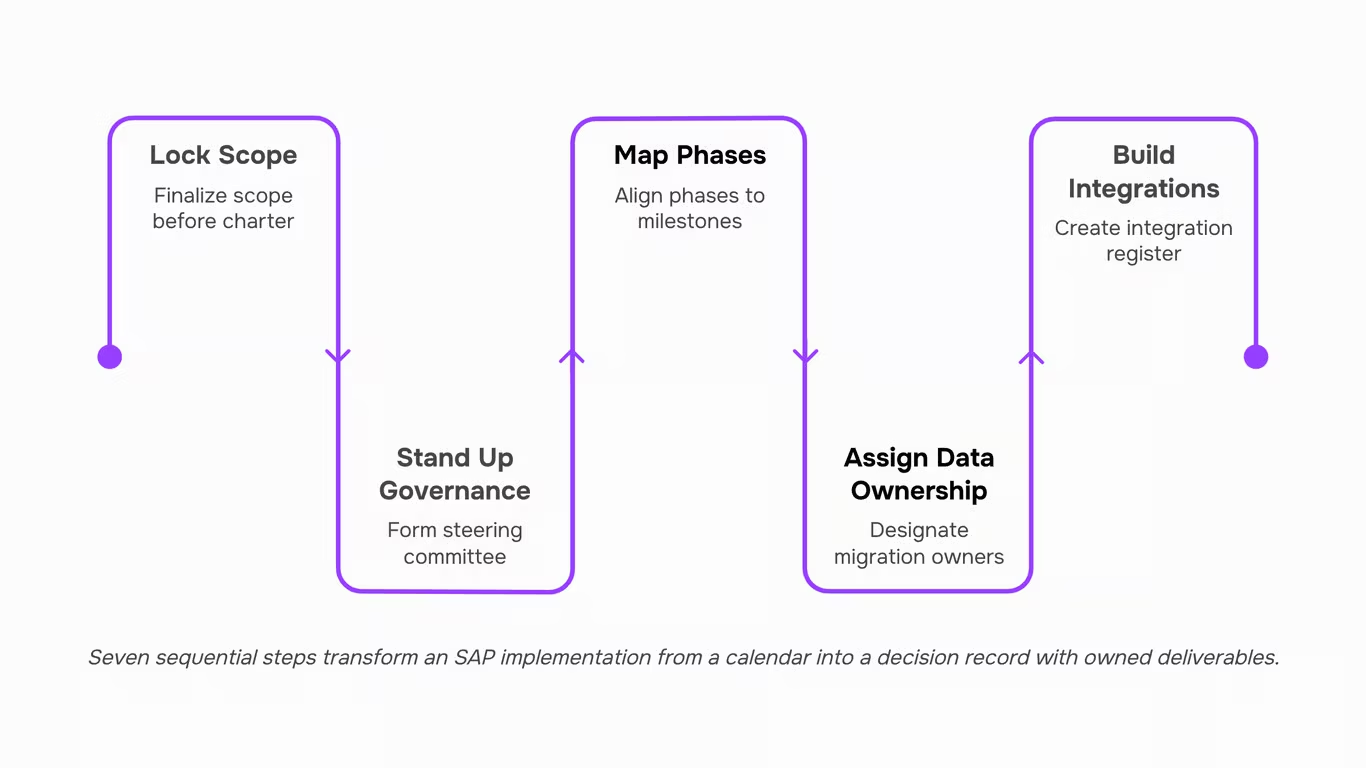
An SAP implementation project plan is a structured document that defines scope, phases, resource assignments, milestones, and data migration ownership for an SAP rollout, before a single sprint begins. It is not a Gantt chart you fill in after kickoff. It is the decision record that answers who owns what, which processes are in scope, and how the project connects to SAP Activate's six phases: Discover, Prepare, Explore, Realize, Deploy, and Run.
Most generic SAP project management guides treat the plan as a scheduling exercise. That framing misses the point. Panorama Consulting's 2023 ERP report found that scope creep and unclear ownership are the leading causes of implementation overruns, both of which a well-built plan prevents at the outset.
The plan also names a steering committee, sets escalation paths, and assigns data migration accountability. Without those three decisions locked in early, even a well-resourced team drifts. Taro gives every project a single source of truth from day one, which matters on a rollout that spans months.
How long a typical SAP implementation takes
- Timeline estimates vary more than most vendors admit, but the ranges below reflect what mid-market and enterprise teams actually experience across SAP implementation phases.
- For SMB deployments using SAP Activate, a focused rollout with limited customization typically runs four to six months. Mid-market projects, covering two to four business units, generally land between eight and fourteen months. Large enterprise rollouts with complex integrations, multi-country scope, or significant data migration work routinely take eighteen to thirty-six months.
- Those ranges assume a reasonably stable scope. Panorama Consulting's 2023 ERP report found that over 50% of ERP implementations exceed their original timeline, with scope creep and data readiness cited as the leading causes.
- The SAP project timeline also shifts depending on which methodology governs the work. SAP Activate structures delivery into six phases: Discover, Prepare, Explore, Realize, Deploy, and Run. Each phase carries its own exit criteria, and skipping those gates is where projects lose months, not days.
Understanding the different stages of project management before sprint one helps IT leads build a schedule stakeholders will actually trust, rather than one that needs to be revised before the first milestone review.
The critical components your plan must include
Before you open a project tool or schedule your first sprint, six components need to exist on paper. Miss any one of them and your SAP implementation project plan will surface the gap at the worst possible moment, usually two weeks before go-live.
- Scope definition: Document exactly which modules, legal entities, and integrations are in scope. Undocumented scope is the leading cause of budget overruns, according to Panorama Consulting's 2023 ERP report.
- Steering committee: Assign executive sponsors with decision-making authority, not just visibility. Escalations without a clear owner stall for weeks.
- Data migration ownership: Name a data lead before the project kicks off. Data cleansing routinely takes longer than teams expect, and no one wants to discover that on cutover weekend.
- Cutover strategy: Your SAP go-live checklist should trace back to a documented cutover window, a rollback plan, and a hypercare period with defined exit criteria.
- Change management plan: Training schedules, communication cadences, and resistance mitigation need owners before the first configuration session.
- Risk register: A living log of known risks, probability ratings, and mitigation owners keeps the steering committee informed without requiring status meetings for every issue.
Taro surfaces blockers and milestone gaps across the full rollout so nothing lives only in someone's inbox.
Seven steps to build your SAP implementation project plan
Building an SAP implementation project plan without a clear sequence is one of the fastest ways to burn budget before a single sprint begins. The seven steps below follow the logic of SAP's Activate methodology (Discover, Prepare, Explore, Realize, Deploy, Run), with an added pre-work step that most teams skip entirely. Each step names a concrete deliverable so your steering committee always knows what "done" looks like.
- Lock scope before you open any project tool: Document exactly which SAP modules, business processes, and legal entities are in scope. Produce a signed scope statement. Skip this and you will spend the next six months negotiating what was always implied, which is the single most cited driver of SAP project failure according to Panorama Consulting's 2023 ERP report.
- Stand up your steering committee and name a single executive sponsor: The sponsor owns escalation decisions and budget releases. The deliverable here is a RACI matrix that shows who approves scope changes, who signs off on go-live, and who resolves cross-functional blockers. Teams that treat governance as an afterthought routinely lose two to four weeks waiting for decisions that should take two hours.
- Map your SAP implementation phases to a realistic calendar: For a mid-market S/4HANA rollout, SAP partner benchmarks place the Prepare through Deploy phases at nine to fourteen months. Enterprise programs with multiple country rollouts typically run eighteen to twenty-four months (SAP, 2023). Attach start and end dates to each Activate phase now, before the project feels urgent, so stakeholders have grounded expectations from day one. Understanding the different stages of project management helps you map these phases to the governance checkpoints your organization already uses.
- Assign data migration ownership to a named person, not a team: The deliverable is a data migration plan that covers source system inventory, cleansing rules, load sequencing, and a mock-migration date. Data quality problems are the second most common cause of SAP project delays, and they almost always trace back to shared ownership where everyone assumes someone else is handling it.
- Build your integration register: List every third-party system that touches SAP, the interface type, the owner, and the test date. A single undocumented integration discovered late in the Realize phase can push go-live by four to six weeks.
- Draft your cutover strategy and work backward: Cutover is not a go-live weekend task. It is a plan that starts months earlier and includes data freeze dates, parallel run windows, rollback criteria, and hypercare staffing. The deliverable is a cutover runbook with hour-by-hour task assignments.
- Load the plan into a work management layer that surfaces blockers in real time: A spreadsheet cannot tell you when a milestone is at risk until it is already late. Taro holds the full SAP project plan, tracks milestone status across workstreams, and flags dependencies before they become delays, which matters on a rollout where a single blocked task can ripple across three teams. If your organization is also evaluating how to keep the plan flexible as requirements shift, adaptive planning software explains why static Gantt charts tend to break down on multi-phase ERP programs.
Each step produces something your team can point to. That is the difference between a plan and a calendar.
Common risks that derail SAP projects (and how to manage them)
Five failure modes show up on nearly every troubled SAP project. Build mitigation tasks for each one directly into your SAP implementation project plan before sprint one starts.
- Scope creep is the most common SAP implementation risk. Every undocumented "nice to have" that enters the build phase adds cost and pushes your SAP project timeline. Freeze scope at the end of Explore, document every change request formally, and route it through your steering committee.
- Data quality problems surface late when they should be caught early. Assign a named data owner per business domain in week one. Run cleansing cycles in parallel with configuration, not after.
- Under-resourced change management is where budgets get cut first and where projects fail most visibly. Panorama Consulting's 2023 ERP report found that change management gaps remain a top-three cause of ERP overruns. Treat it as a workstream, not a workshop.
- Integration delays compound quietly. Third-party systems that miss API readiness dates push cutover back by weeks. Map every integration dependency in your project charter and assign a technical owner to each one.
- Cutover timing is the final pressure point. Teams that skip dress rehearsals arrive at go-live with unresolved data loads and open defects. Run at least two full cutover rehearsals and build a hard stop into your plan if critical items remain open.
How to track your SAP plan without losing visibility
- A multi-phase SAP project spans months, involves dozens of contributors, and produces status updates that go stale within days. Without a structured layer holding everything together, blockers surface in retrospect rather than in real time.
- This is where the different stages of project management become more than theory. Each SAP phase needs owned milestones, visible dependencies, and a clear path to your SAP go-live checklist items.
- Taro gives every project a single source of truth from day one, mapping milestones across SAP Activate phases, assigning task ownership, and flagging overdue items before they compress your cutover window. When integration delays or data quality issues appear, the team sees them in the plan, not in a Monday morning status call.
For teams running adaptive planning software, Taro's project planning layer fits naturally into SAP project management without requiring a separate tool to track what the plan already owns.
SAP implementation plan vs. project charter: what is the difference
- Both documents are real, and both are required. The confusion comes from timing: the project charter is written before work begins. It authorizes the project, names the sponsor, defines scope boundaries, and secures budget. Think of it as the executive handshake.
- The SAP implementation project plan comes after. It takes the charter's approved scope and breaks it into the actual SAP implementation phases: Discover, Prepare, Explore, Realize, Deploy, and Run. It owns timelines, resource assignments, milestones, and dependencies across every workstream.
- Build the charter first. Without it, your plan has no agreed scope to schedule against, and scope creep becomes almost inevitable. Once the charter is signed, map each phase into a structured plan so every team sees what they own and when.
Closing
Turn Your SAP Implementation Plan Into a Living System, Not a Static Document
An SAP implementation project plan only works if the team can see it, act on it, and update it in real time — a spreadsheet filed away after kickoff is not a plan, it's a record.
The groundwork covered here gives you the structure to move through each phase with confidence: scoping the project before a single consultant is onboarded, sequencing testing so UAT doesn't collapse under last-minute changes, and building a change management track that runs parallel to every technical milestone, not after it.
Teams that treat the plan as a live operational tool consistently hit go-live dates. Teams that don't spend the final weeks firefighting avoidable blockers.
Once your plan is built, bring it into Lio — track milestones, surface blockers early, and keep every workstream aligned across a six-month rollout. Book a quick walkthrough here.
FAQ
Q. What are the key steps in an SAP implementation project plan?
The six core phases are project preparation, blueprinting, realization, final preparation, go-live, and post-go-live support. Each phase has defined deliverables, and rushing any one of them, especially final preparation, is where most go-lives break down.
Q. How long does a typical SAP implementation project take?
Most implementations run 6 to 18 months, depending on scope and the number of modules deployed. The biggest time variable is rarely the software, it's data migration, change management, and stakeholder decision speed.
Q. What are the most critical components of an SAP implementation project plan?
A scoped project charter, phased milestones, a data migration strategy, a cutover plan, and a defined change management process. Miss change management in particular and even a technically clean implementation will fail at adoption.
Q. How can I create a successful SAP implementation project plan?
A. Define your phase structure, assign owners, and lock in what "done" looks like for each milestone before configuration begins. Build cutover and hypercare into the plan from day one, not as afterthoughts.
Q. What are the common risks associated with SAP implementation projects?
A. Scope creep, data migration failures, and end-user resistance are the top three. Scope creep alone drives the majority of overruns, usually because change requests get approved without reassessing the timeline or budget.
Q. What is the difference between SAP ASAP and SAP Activate methodologies?
A. ASAP is a linear, waterfall-style approach suited to on-premise deployments with locked requirements. SAP Activate replaced it for S/4HANA and cloud projects, using agile sprints and pre-configured best-practice content.
Q. Who should own the SAP implementation project plan inside an IT team?
A. The project manager owns the plan, but a dedicated SAP workstream lead should co-own it day-to-day. Without that pairing, the PM spends more time translating between consultants and stakeholders than driving decisions.



 Elena Petrova15 September 2026


