TL;DR: Most CRM roundups list features and stop there. This one maps each sales CRM software capability to a specific pipeline outcome — faster lead response, fewer dropped follow-ups, shorter deal cycles — so IT company owners can evaluate tools against the problems their team actually needs to solve.
What sales CRM software actually does for your team
Sales CRM software is a system that tracks every prospect, deal, and conversation in one place so your team stops losing revenue to missed follow-ups and forgotten leads.
For IT sales teams specifically, the gap between "interested prospect" and "closed deal" is where most revenue leaks. A CRM closes that gap by giving every rep a live view of the pipeline: who's waiting on a proposal, which deal has gone quiet for two weeks, and which lead came in this morning and hasn't been contacted yet.
CRM lead management is the core function most teams underestimate. It's not just a contact database. It captures leads from multiple sources, scores them by fit and intent, and routes them to the right rep before the window closes. Pair that with sales software that automates follow-up tasks and you remove the manual work that slows most small IT sales teams down.
As sales pipeline software, a CRM also gives managers visibility they can act on: conversion rates by stage, average deal age, and rep-level activity. That's the data that tells you whether a slow quarter is a volume problem or a process problem.
The rest of this article evaluates top sales CRM options for IT sales teams against those exact criteria.
How sales CRM software improves your pipeline
Four CRM functions move the needle on pipeline health more than anything else.
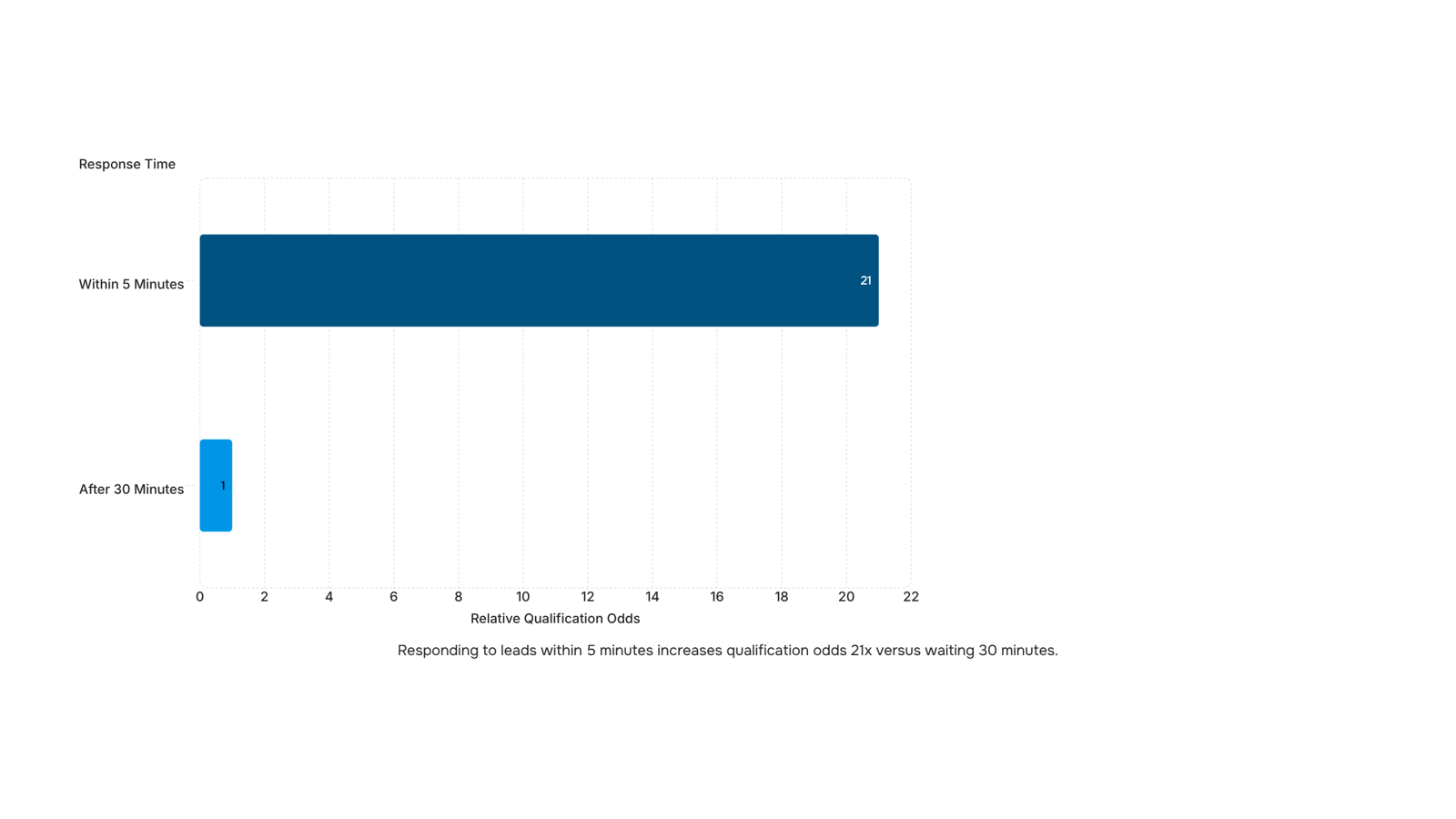
Lead capture speed is where most IT sales teams lose deals before they start. When a prospect fills out a form or clicks a demo request, the window to respond is short. Research from HubSpot puts the odds of qualifying a lead at 21 times higher if you respond within five minutes versus 30. Sales CRM software that auto-captures and routes leads the moment they arrive removes the manual handoff that kills that window.
Follow-up automation handles the second failure point. Most stalled deals don't die from a hard no — they die from silence. Sales automation software schedules follow-up sequences automatically, so a lead that doesn't reply on day one gets a touchpoint on day three without anyone on your team remembering to send it. That consistency compounds over a full quarter.
Deal visibility is what separates a pipeline you manage from one that manages you. When every deal sits in a shared view with stage, owner, last activity, and next step visible at a glance, your team stops asking "where does this stand?" and starts asking "what does this need?" A custom pipeline builder — like the one in Lio — lets you map stages to your actual sales motion rather than a generic template, which means the data reflects reality instead of approximating it.
CRM lead management closes the loop by connecting capture, follow-up, and visibility into one sequence. When those three functions run in the same system, you can see exactly where deals stall and fix the stage, not just the rep.
For a closer look at how these functions stack up across tools, the top sales CRM options for IT sales teams breaks down the tradeoffs worth knowing before you choose.
Key features to look for in a sales CRM
Not every CRM feature matters equally for a sales team. These six are the ones that directly affect whether deals move or stall.
Lead capture and routing. The CRM should pull leads from every source — web forms, email, LinkedIn, inbound calls — and assign them to the right rep automatically. Manual assignment creates delays; delays kill deals. Look for lead management tools that connect to your CRM without requiring custom code to wire them up.
AI lead scoring. Not all leads deserve the same attention. AI lead scoring ranks prospects by conversion likelihood using behavioral signals — pages visited, email opens, response patterns — so your team works the hottest pipeline first instead of guessing. For sales CRM for IT teams specifically, this matters because deal cycles are longer and misallocated time is expensive.
Follow-up automation. A CRM that only logs activity isn't doing enough. Sales software that automates follow-up tasks — reminders, email sequences, task creation after a call — removes the manual overhead that causes leads to go cold between touchpoints.
Pipeline visibility. You need a single view showing every deal, its current stage, and what action is overdue. Without this, managers are running status meetings to collect information the CRM should already surface.
Reporting tied to revenue. Activity metrics (calls made, emails sent) are easy to track. The feature worth paying for is revenue attribution — which source, rep, or campaign is actually closing deals. Use sales tracking tools that work alongside your CRM to fill any gaps your CRM's native reporting misses.
Integration depth. Email, calendar, invoicing, and marketing automation all need to connect without manual data entry between them. This is covered in the next section, but when evaluating any sales CRM software, treat shallow integrations as a dealbreaker, not a minor inconvenience.
Most IT sales teams run four to six tools at any given time: an email client, a calendar, a marketing automation platform, and some form of invoicing. When your sales CRM software doesn't connect to those tools, data lives in silos. Your reps manually copy lead details from one system to another, follow-ups slip, and nobody knows which leads came from which campaign.
The integration points that matter most:
Email and calendar sync keeps every touchpoint logged automatically. Without it, reps either skip logging or spend 20 minutes a day doing it manually.
Marketing automation connections (think HubSpot forms, Mailchimp sequences) pass qualified leads directly into your pipeline the moment someone engages, so no lead sits in a spreadsheet waiting to be transferred.
Invoicing and billing links close the loop between a signed deal and a raised invoice. When that connection is missing, finance chases sales for deal details weeks after the fact.
The failure mode isn't dramatic. It's a slow bleed: leads that were never followed up because they didn't make it into the CRM, deals that stalled because nobody saw the last email, revenue that got delayed because invoicing ran a week behind close.
Lio is built to sit at the center of that stack, connecting lead capture, scoring, and routing so the handoffs between tools happen without manual intervention. For a broader look at how lead management tools connect to your CRM, that guide covers the full picture.
Top sales CRM software options for sales teams in 2026
Picking the right sales CRM software comes down to one question: what specific part of your pipeline is breaking right now?
Here are five options worth considering in 2026, matched to the problem they actually solve.
Salesforce Sales Cloud fits IT companies running complex, multi-stakeholder deals. Its strength is deal visibility across long sales cycles, but the configuration overhead is real. Budget 60 to 90 days for a proper setup before your team sees value.
HubSpot CRM works well for IT teams that are earlier in formalizing their sales process. The free tier is genuinely usable, and the email and calendar sync is reliable out of the box. Where it falls short is AI lead scoring at scale — you'll hit limits without upgrading to a paid tier.
Pipedrive is built around pipeline management, which makes it a strong fit if your bottleneck is deal visibility rather than lead capture. It's straightforward to configure and your team will adopt it faster than most. It doesn't do much outside the pipeline itself, so expect to bolt on separate tools for marketing automation and invoicing.
Zoho CRM covers a wide surface area — lead scoring, workflow automation, and integrations with the broader Zoho suite. For a sales CRM for IT teams that already use Zoho Desk or Zoho Books, the connected workflow is a real advantage. The interface takes adjustment, and support quality varies by tier.
Lio by WorksBuddy is built specifically around the lead-to-close workflow. It captures leads the moment they come in, scores them using AI lead scoring, and routes them to the right rep without manual intervention. Where most sales pipeline software requires your team to update records manually, Lio reads incoming data and surfaces where attention is needed. It connects directly with WorksBuddy's invoicing and e-signature agents, so the handoff from closed deal to signed contract happens inside one system rather than across three tools.
Tool | Best for | Main gap |
|---|
Salesforce | Complex enterprise deals | High setup cost |
HubSpot | Early-stage sales process | AI scoring behind paywall |
Pipedrive | Pipeline visibility | Limited outside the pipeline |
Zoho CRM | Existing Zoho users | Steep learning curve |
Lio | Lead capture to close, IT teams | Newer to market |
The next section covers how to match your specific bottleneck to the right tool before you commit.
How to choose the right CRM for your sales team
Start with your bottleneck, not your budget.
Most IT teams buy sales CRM software based on a demo that looked clean, then spend three months working around features they don't need. A four-step filter prevents that.
Name the actual failure. Is your team losing deals to slow follow-up, or to disorganized pipeline visibility? Those are different problems requiring different tools. Check your lead management tools that connect to your CRM before you evaluate anything else.
Match features to that failure. If follow-up is the gap, prioritize automation sequencing. If visibility is the gap, prioritize pipeline reporting.
Check integration fit. A sales CRM for IT teams typically needs to connect with your ticketing system, invoicing tool, and calendar. If those integrations require middleware, add that cost to your evaluation.
Calculate onboarding cost honestly. Include setup time, data migration, and the two to four weeks your team won't be fully productive.
Decide on one criterion at a time. It keeps the shortlist short.
Closing
The best sales CRM isn't the one with the most features—it's the one that fixes the specific leak in your pipeline. Whether that's lead response time, follow-up consistency, or deal visibility, the framework above maps each capability to the outcome your team actually needs. Teams that struggle with immediate lead capture and automatic routing without a lengthy implementation can see how Lio handles that workflow end-to-end. Ready to test it? Start a free trial and see how your pipeline moves in the first week.
FAQ
What are the top sales CRM software options for sales teams?
The best CRM depends on your pipeline problem: Salesforce for complex multi-stakeholder deals, HubSpot for integrated marketing and sales, Pipedrive for visual pipeline management, and Lio for immediate lead capture and automatic routing without long setup.
How can sales CRM software improve my sales pipeline?
Sales CRM software closes four critical gaps: faster lead response (21x higher qualification odds within five minutes), consistent follow-up automation to prevent deals from going cold, shared deal visibility so managers see what needs action, and connected lead management that tracks capture through close.
What are the key features to look for in a sales CRM software?
Prioritize lead capture and automatic routing, AI lead scoring to rank prospects by conversion likelihood, follow-up automation that removes manual overhead, pipeline visibility in one shared view, revenue-tied reporting (not just activity metrics), and integration depth with email, calendar, and marketing tools.
How does sales CRM software integrate with other sales tools?
The critical integrations are email and calendar sync (automatic touchpoint logging), marketing automation connections (leads flow directly into pipeline), and invoicing links (deals connect to invoices without manual handoff). Without these, data lives in silos and follow-ups slip.
How long does it take to set up a sales CRM for a small team?
Setup time varies by tool complexity: Lio and Pipedrive typically take one to two weeks for a small team; HubSpot three to four weeks; Salesforce four to eight weeks. The key is choosing a CRM with pre-built pipeline templates and integrations that don't require custom code.


 Siddharth Rao15 September 2026


