TL;DR: Most guides list portal features like they're shopping specs. This one connects each feature to the workflow that actually matters: how fast a customer issue reaches the right person. Built for IT company owners who need their portal to close the gap between ticket submission and resolution, not just look modern.
What a customer care portal actually does
Modern digital customer care portal interface with organized dashboard elements and clean design aesthetic
A customer care portal is a personalized interface that gives your customers a single point of access to submit issues, track resolution progress, and find answers without waiting for a reply. It sits between the customer's problem and your team's response workflow, routing each request to the right person with the right context already attached.
For a customer portal for IT companies, this matters more than in most industries. Your clients expect technical issues acknowledged in minutes, not hours. A portal that captures the request, surfaces the customer's service history, and routes it based on urgency removes the email-forwarding chaos that delays first response.
The functional role breaks down to three things:
That baseline, intake plus visibility plus deflection, is what separates a customer care portal from a shared inbox with a logo on it.
Core features every customer care portal needs
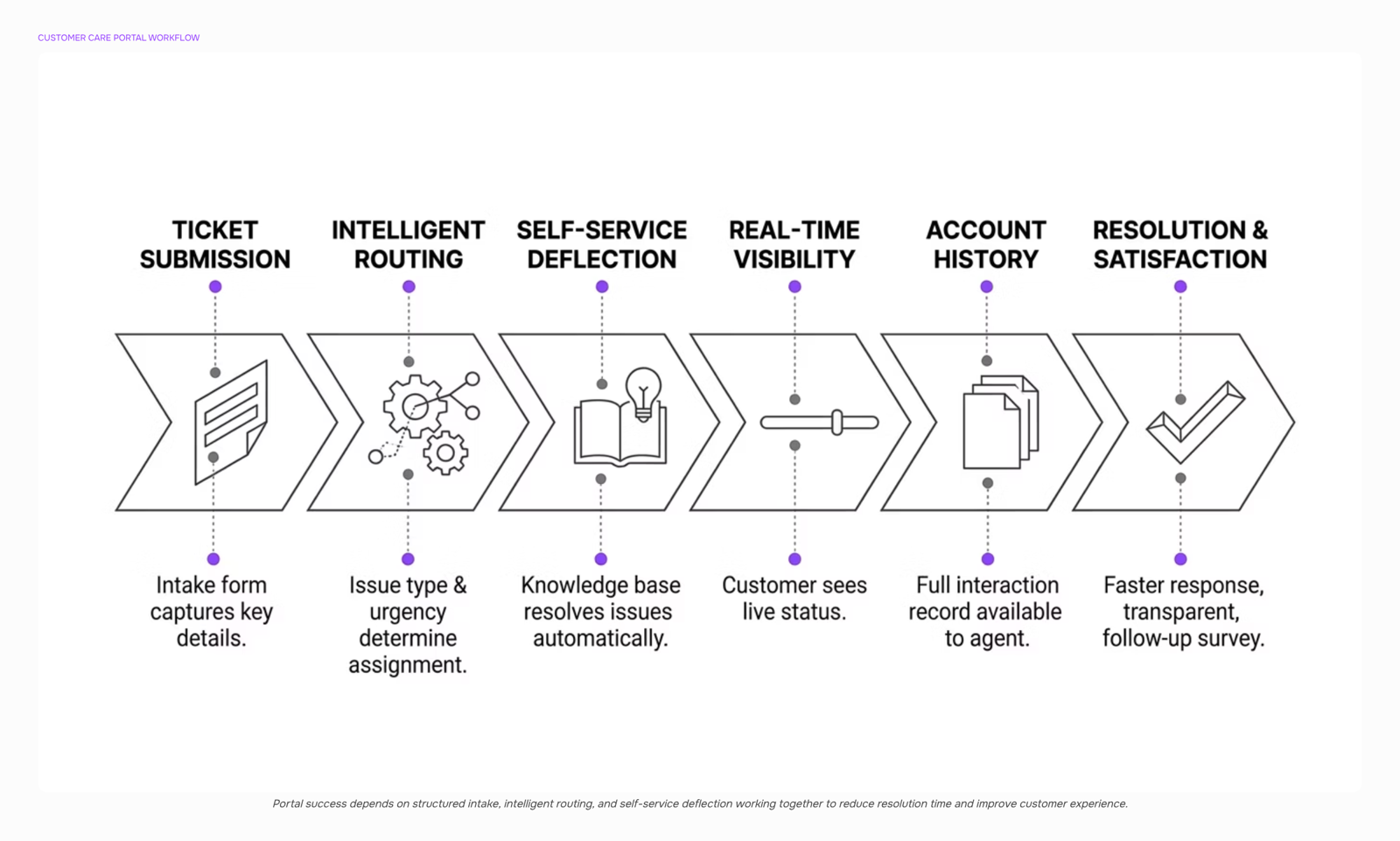
A customer care portal is only as useful as the workflows it enables. Strip away branding and you get four non-negotiable capabilities that determine whether the portal actually reduces response time or just adds another screen between the customer and your team.
Ticket submission with structured intake. The portal needs a form that captures problem type, urgency, and relevant context (account ID, affected service, screenshots) before a human touches it. A ticket management system that accepts unstructured "describe your issue" text without routing logic creates the same triage bottleneck as email. The form should map inputs to your internal categories so tickets land in the right queue on arrival, not after a rep reads and re-tags them.
Real-time status tracking. Customers check back because they don't trust silence. A self-service customer portal that shows ticket state (received, assigned, in progress, resolved) with timestamps eliminates 20-40% of "any update?" follow-ups. The tracker should update automatically from your internal tool. Manual status changes defeat the purpose.
Knowledge base with search. Not a marketing FAQ. A searchable library of resolution articles tied to the same categories your ticket form uses. When a customer selects "DNS propagation issue," the portal should surface the three articles most likely to resolve it before the ticket even submits. This is where measurable ticket deflection happens. (The next section covers which knowledge base patterns actually reduce volume.)
Account and interaction history. The customer should see every past ticket, its resolution, any SLA commitments, and their current service tier. Your team should see the same view. This eliminates the "can you re-explain your setup?" friction that makes B2B customers feel invisible.
These four customer support portal features form the evaluation baseline. If a portal lacks any one of them, it shifts work back to email and chat, which is where response times collapse. The same intake logic applies to sales inquiries. Lio uses structured capture to assign incoming contacts the moment they arrive, separating support requests from revenue opportunities before a rep intervenes.
Self-service features that actually reduce ticket volume
Three self-service capabilities consistently reduce ticket volume. Everything else is decoration.
A searchable knowledge base is the baseline. But "searchable" means full-text search with typo tolerance and synonym matching, not a static FAQ page organized by internal department names. When articles are structured around the customer's problem (not your product's taxonomy), most teams find ticket volume drops by 20% or more within the first quarter. The key: articles need to answer the exact question a customer would type into a search bar, not the question your support team wishes they'd ask.
Guided troubleshooters (decision-tree flows that walk a user through diagnosis) outperform static articles for multi-step issues. Password resets, connectivity problems, license activation failures. These are high-volume, low-complexity tickets that a self-service customer portal should eliminate entirely. If your portal still generates tickets for password resets, the self-service layer is broken.
Status pages (service health, known outages, maintenance windows) cut a specific ticket type: "is it just me?" inquiries. During an outage, these tickets can spike 5-10x. A real-time status page with email/SMS subscription prevents that flood.
What doesn't move the needle: chatbots trained on the same thin FAQ content, community forums without moderation or staff participation, and video libraries nobody watches past the first 30 seconds. These look impressive in demos. They rarely reduce support tickets in practice.
The real test of your customer support portal features is simple: check which ticket categories dropped after launch. If the answer is "none," you built a brochure, not a self-service layer.
How the portal should route requests to the right person
Most portals let you create routing rules. Few actually route well. The gap between "has routing" and "routes correctly" is where customer satisfaction collapses.
A customer care portal for IT companies typically handles mixed inbound traffic: password resets, outage reports, license questions, and pre-sales inquiries all land in the same queue. Without intelligent triage, a high-urgency production outage sits behind a billing question, and a prospect asking about enterprise pricing waits 48 hours for a reply that should have taken five minutes.
Effective automated lead and support routing needs three inputs evaluated simultaneously:
Issue type: Is this a break-fix ticket, a how-to question, or a buying signal? Each goes to a different team
Customer tier: Enterprise clients with SLAs get priority over free-tier users. The portal should know this before a human touches the request
Urgency signals: Keywords like "down," "blocked," or "renewal" should bump priority automatically
A portal that categorizes, prioritizes, and routes customer requests based on pre-defined rules removes the manual sorting step that adds 10 to 30 minutes of dead time per ticket during business hours.
The harder problem is when a support contact carries sales potential. Someone submitting a ticket about hitting usage limits is signaling expansion readiness. Most portals miss this entirely because support and sales live in separate systems.
This is where Lio fits. It applies scoring to inbound contacts to separate a support issue from a sales opportunity and matches requests against your ideal customer profile in real time. The result: support tickets reach your help desk, and revenue-bearing contacts reach your sales team, without anyone manually triaging a shared inbox.
Wrong routing costs you twice: once in resolution time, once in missed revenue.
How a customer care portal improves customer satisfaction
A customer care portal improves satisfaction through three specific mechanisms, not vague "better experiences."
Response time reduction. When customers submit requests through a portal with a ticket management system instead of emailing a shared inbox, routing happens instantly. The request hits the right person without sitting in a queue waiting for manual triage. Self-service portals give customers immediate access to answers, reducing wait times for issue resolution. For IT support specifically, B2B customers expect responses within hours, not days. A portal that auto-routes and surfaces knowledge base articles before ticket creation closes that gap.
Transparency through ticket status visibility. Customers stop emailing "any update?" when they can see their ticket's current stage, assigned owner, and expected resolution window. This alone cuts follow-up volume by a measurable margin.
Consistency through documented history. Every interaction lives in one place. When a customer contacts you again, the responding agent sees full context. No re-explaining. No contradictory answers from different team members.
These mechanisms compound. Faster responses build trust. Visibility reduces anxiety. History prevents the frustrating "I already told someone this" loop. For IT company owners running a customer care portal, the result is fewer escalations and higher retention, not because you hired more people, but because your system removes the friction that erodes satisfaction in the first place.
What to look for when implementing a portal for your IT business
Before you compare vendors, settle three questions that determine whether a customer portal for IT companies actually sticks or becomes shelfware within six months.
Integration depth, not just integration count. Your portal needs to talk to your PSA, ticketing system, and CRM at the field level. If a client submits a request and your team has to copy it into ConnectWise or Autotask manually, you have a form, not a portal. Prioritize CRM and ERP integration as a core requirement over cosmetic features.
Data ownership. Ask where client data lives, who controls exports, and what happens if you leave the platform. Multi-tenant SaaS portals sometimes lock your ticket history behind an API paywall on lower tiers.
Build vs. buy tradeoff. Building gives you control; buying gives you speed. For most IT firms under 200 clients, buying a configurable portal and spending the saved dev hours on automated lead and support routing pays back faster. You can wire inbound requests through a system like Lio that scores each contact to separate support issues from sales opportunities, so nothing sits unrouted while your team triages manually.
Pick the portal that answers all three. Features follow from there.
Features that signal a portal is ready to scale
A self-service customer portal that works for 50 customers will buckle at 500 without four capabilities most vendors treat as premium add-ons.
API access lets your portal talk to your PSA, billing stack, and CRM without manual CSV exports. Without it, you're stuck re-keying data between systems as ticket volume climbs.
Role-based permissions control who sees what. Your tier-1 techs shouldn't access the same dashboards as your account managers. This matters more as you add staff and clients simultaneously.
Analytics dashboards tied to SLA tracking show you where response times drift before clients notice. A secure portal gives customers authenticated access to check ticket status on their own, but you need the internal view to spot patterns across accounts.
SLA breach alerts close the loop. When a ticket approaches its deadline, the system escalates automatically rather than relying on someone checking a queue.
These customer support portal features separate a tool you'll outgrow from one that compounds value. If your portal also handles inbound contacts, consider scoring them to separate support issues from sales opportunities so nothing falls through the cracks.
Closing
A customer care portal that routes tickets fast, surfaces history instantly, and deflects routine issues cuts response time and reduces your team's manual triage work. But here's what most IT company owners miss: the portal is half the system. The other half is what happens when a support ticket reveals a sales opportunity—a usage spike, an expansion question, a renewal signal. If that lead sits in your support queue while your sales team never sees it, you've built a better support tool but left revenue on the table. The real gap isn't the portal itself. It's the moment a customer care request turns into a buying signal and no one acts on it fast enough. That's where Lio's instant lead capture and assignment close the loop your portal leaves open, ensuring every revenue-ready contact reaches your sales team within minutes, not days.
FAQ
What features should a customer care portal have?
Structured ticket submission, real-time status tracking, a searchable knowledge base, and account history visibility. Without all four, tickets get delayed in triage or customers re-explain their issue repeatedly.
How can a customer care portal improve customer satisfaction?
It eliminates silence by showing real-time ticket status, surfaces resolution articles before submission, and routes urgent issues to the right person instantly. Most teams see 20-40% fewer follow-up inquiries within the first month.
What are the benefits of using a customer care portal?
Faster first response, reduced one-to-one support load through self-service deflection, and clearer visibility for both customers and your team. IT companies typically see 20% ticket volume reduction and measurably shorter resolution times.
How do I implement a customer care portal for my business?
Start with structured intake forms that map to your internal ticket categories, add a searchable knowledge base organized around customer problems (not your taxonomy), then layer in real-time status tracking. Test with your highest-volume ticket types first.
What is the difference between a customer care portal and a help desk?
A help desk is internal software your team uses to manage tickets. A customer care portal is the external interface customers use to submit issues and track progress. Most portals sit on top of a help desk system.
How do I reduce ticket volume with a self-service portal?
Add a searchable knowledge base with full-text search and synonym matching, build guided troubleshooters for multi-step issues like password resets, and post a real-time status page for outages. These three cut volume 20%+ within the first quarter.


 Elena Petrova15 September 2026


