TL;DR: Most guides on cloud-based customer management list contact fields and pipeline stages, then stop. This one focuses on what IT company owners actually need: vendor management, credit tracking, document handling, and the billing workflows that generic CRM comparisons skip entirely. You'll finish with a clear feature checklist tied to how IT service businesses actually run.
What is a cloud-based customer management system
A cloud-based customer management system is software that stores, organizes, and surfaces customer data on remote servers you access through a browser, with no on-premise installation required.
For IT companies, that distinction matters more than it does for most. Your team manages clients across multiple projects, tracks support tickets, handles renewal cycles, and often juggles vendor relationships in parallel. A generic spreadsheet or desktop CRM breaks under that load. A cloud customer management system keeps every client record, communication history, and billing status in one place your whole team can access from any site or device.
The difference from standard CRM is worth naming. A CRM handles pipeline and sales activity; a cloud-based customer management system extends into post-sale operations: contract tracking, credit balances, vendor coordination, and payment history. IT service companies need both layers, not just the sales funnel.
Most IT teams that outgrow basic tools end up evaluating purpose-built options. The best sales CRM software for IT teams and the best client tracking software both point toward the same gap: IT companies need a system that connects customer management to financial data, not just contact records.
The next section breaks down exactly how that works in practice.
How a cloud customer management system works
A cloud customer management system works by centralizing every customer interaction, billing record, and communication thread in a single hosted environment your team accesses through a browser — no local installs, no manual syncing between tools.
Here is the operational sequence most IT companies follow:
Customer data enters the system through a web form, manual entry, or an API connection to your ticketing or project tool. Contact details, service history, and account status are stored in one record.
Invoices and billing are generated against that record automatically, based on project milestones, subscription cycles, or time logged. This is where customer management features like credit balance tracking matter — you can see what a client owes before you send the next invoice.
Communications are logged against the customer record in real time, so any team member picking up a ticket sees the full history without asking a colleague to forward an email thread.
Alerts and automations trigger when a payment is overdue, a contract is up for renewal, or a support SLA is approaching its limit.
Reports pull from the same data layer, so revenue, outstanding balances, and client activity reflect the actual state of your accounts.
For IT companies specifically, good customer communications management practices depend on this kind of unified record — because fragmented tools mean fragmented context, and fragmented context costs you client trust.
Why IT companies need cloud-based customer management
Most IT companies already use three to five tools to handle what one system should cover: a spreadsheet for client contacts, a separate platform for vendor invoices, another for project billing, and an inbox holding the gaps between all of them. That fragmentation has a real cost — context switching alone eats hours each week that could go toward delivery.
A cloud CRM for IT companies solves a different problem than a generic CRM does. IT service businesses carry dual relationship complexity: you manage customers who pay you and vendors you pay, often within the same engagement. A client running a managed services contract might have three active vendors tied to their account. Tracking that in disconnected tools means someone is always working from stale data.
Cloud-based customer management centralizes both sides. Your team sees client history, outstanding invoices, vendor commitments, and credit balances in one view. For a deeper look at where CRM ends and service management begins, the distinction between CRM and customer service software is worth understanding before you evaluate any platform.
The next section covers exactly which features make that possible.
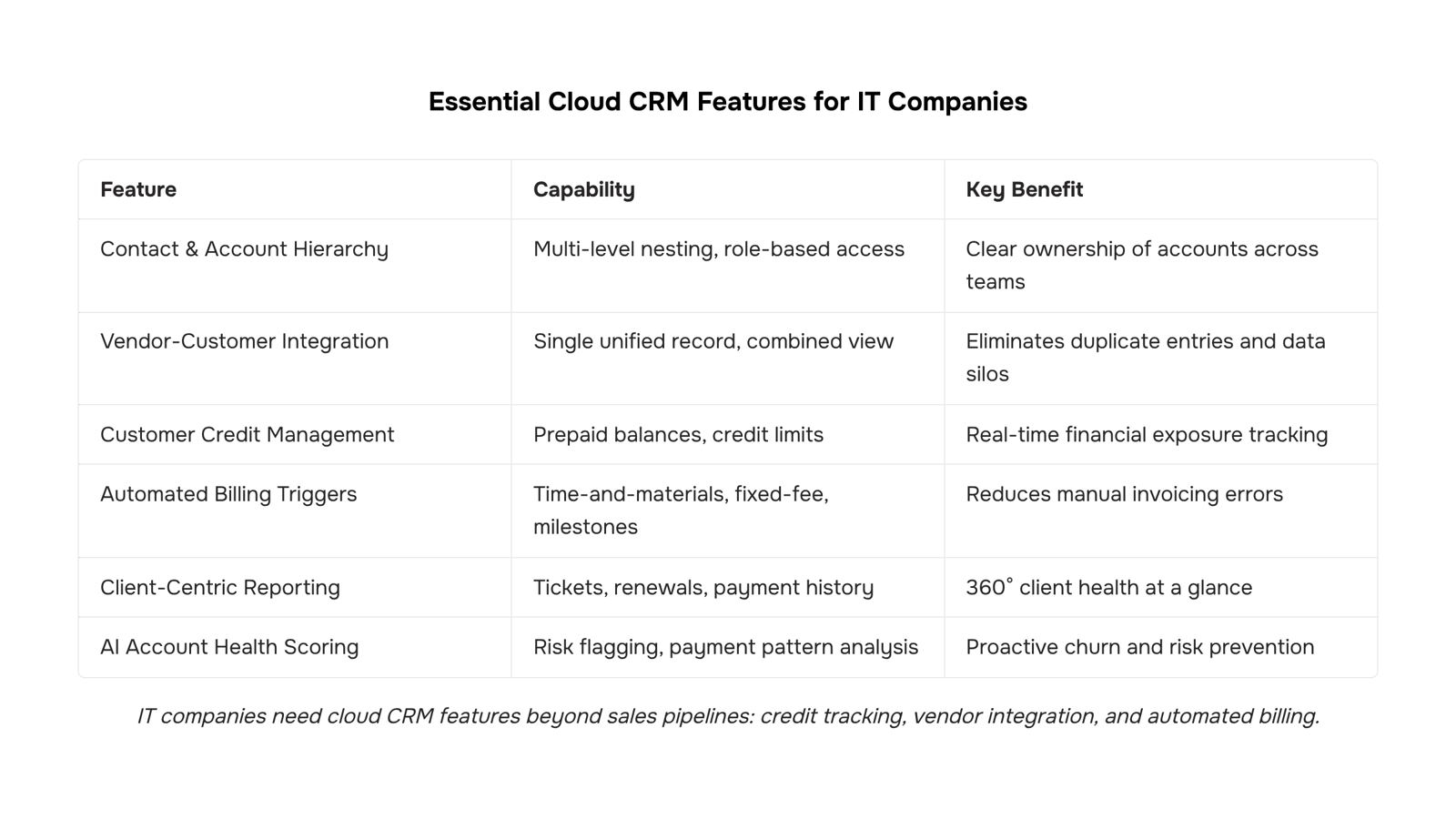
Features to look for in a cloud customer management system
Most cloud-based customer management feature lists read like a CRM brochure. They cover contact storage, pipeline views, and email sync, then stop. For IT company owners managing service contracts, vendor relationships, and recurring billing at the same time, that list misses most of what actually matters.
Here are the customer management features worth evaluating before you commit to a system.
Contact and account hierarchy
A flat contact list breaks the moment a single client has multiple sites, departments, or escalation contacts. Look for a system that lets you nest contacts under accounts, tag them by role (billing, technical, executive), and filter by relationship type. This matters more in IT services than almost any other vertical, where the person who approves invoices is rarely the person who files support tickets.
Integrated vendor and customer management
Most systems treat vendors and customers as separate objects, which forces you to maintain two records for the same company when a client is also a supplier. A system built for vendor and customer management in one place eliminates that duplication. You get a single timeline showing purchase orders, invoices, and communication history without toggling between tools. If you're evaluating whether a platform handles this, test it with a real scenario: add a company as both a vendor and a client, then pull a combined activity report.
Customer credit management
This one rarely appears on generic feature checklists, and it should. Customer credit management means tracking prepaid balances, credit limits, and outstanding amounts against each account. For IT companies running retainer agreements or prepaid support hours, this is table stakes. Without it, your team is reconciling credit balances in a spreadsheet outside the system, which introduces errors and delays billing. Look for a system that shows available credit at the invoice level, not just in a separate finance module.
Automated billing and invoice triggers
Manual invoicing at the end of a billing cycle is where revenue leaks. A useful cloud-based customer management system should let you set billing rules by contract type: time-and-materials, fixed fee, or milestone-based. When a trigger fires (a project closes, a support block is consumed, a date passes), the invoice should generate without someone remembering to create it. Inzo handles this natively, connecting billing triggers to the client record so nothing falls through between project delivery and payment collection.
Reporting tied to client activity, not just pipeline
Sales-focused CRMs optimize their reporting for deals and conversion rates. IT service businesses need reports on client health: open tickets, overdue invoices, contract renewal dates, and payment history. If the system's default dashboards don't surface those without custom configuration, budget extra time for setup. For a deeper comparison of where CRM functionality ends and service management begins, CRM vs Customer Service Software covers the distinction clearly.
The right feature set depends on your billing model and how tightly your vendor relationships connect to your customer delivery. But credit tracking, unified vendor-customer records, and automated billing triggers are the three areas where most generic systems fall short for IT operators specifically.
How vendor management fits into customer management
Most IT companies run customer and vendor workflows in separate tools, then spend hours reconciling the gap. That's a structural problem, not a process one. A cloud based customer management system that also handles vendor relationships removes the reconciliation step entirely.
The connection matters because your vendors directly affect what you deliver to customers. A delayed vendor payment holds up a project. An untracked vendor bill creates a surprise at month-end. When vendor credit management sits in the same system as your customer records, you can see the full financial picture without switching tabs.
Customer credit management works the same way. If a customer has an outstanding credit balance, your team needs to see that before sending the next invoice, not after a dispute.
Inzo handles both sides: vendor bill tracking, vendor credit management, and customer financials in one place. When a vendor bill changes, the downstream effect on client billing is visible immediately. That's the kind of vendor and customer management visibility that standalone CRMs typically don't offer, as most are built around contacts, not financial workflows.
Most IT company owners shortlist a cloud customer management system by comparing pricing tiers and UI screenshots. That's where the problems start.
Mistake 1: Treating customer management features as a checklist: Contact records and pipeline views are table stakes. What separates useful tools is whether they handle customer credit management, payment history, and credit balance tracking alongside relationship data. If you need a separate spreadsheet for credit limits, the system isn't doing its job.
Mistake 2: Ignoring vendor management: Most cloud-based customer management tools are built for sales teams, not IT service operations. If your system can't connect vendor records to customer accounts, you're maintaining two databases and reconciling them manually.
Mistake 3: Underestimating integration gaps: A tool that doesn't connect to your billing, project, or support workflows creates more overhead than it removes. Before you commit, map the key differences between CRM and customer service software so you're comparing the right categories.
Mistake 4: Choosing based on today's team size: A system that works for 10 clients rarely scales cleanly to 100 without a painful migration.
How AI is changing cloud customer management in 2026
Three shifts define how cloud based customer management systems work in 2026, and all three reduce the manual work that used to fall on your team.
Automated data entry now handles contact updates, invoice status changes, and payment records without anyone touching a form. Systems pull from email threads, payment gateways, and support tickets to keep customer records current.
Predictive account health scoring flags at-risk accounts before a renewal conversation goes sideways. Instead of reviewing every account manually, your team sees a ranked list: who needs attention this week and why.
AI-assisted credit risk flagging is the shift most cloud CRM for IT companies still miss. When a customer's payment pattern changes — slower approvals, partial payments, disputed invoices — the system surfaces it automatically rather than waiting for your finance team to notice.
Together, these features shift your team from reactive record-keeping to proactive account management. If you want to see how this connects to lead handling, automated CRM systems improve lead management outcomes in the same way.
Closing
The feature checklist above separates systems that handle IT service operations from those that just log contacts. The difference comes down to whether your platform connects customer records to billing workflows, vendor relationships, and credit tracking — or leaves those threads scattered across spreadsheets and separate tools. Without unified customer and vendor management, your team works from incomplete data, invoices slip, and client trust erodes. The next step is straightforward: take this checklist to your current system (or a platform you're evaluating) and verify it covers all five layers. If gaps appear, you'll know exactly where to focus before committing to a new tool.
FAQ
What is a cloud-based customer management system and why do IT companies need one?
A cloud-based customer management system centralizes customer data, billing, vendor relationships, and communication history in one browser-accessible platform. IT companies need it because they juggle dual relationship complexity—managing clients and vendors simultaneously—across multiple projects, support tickets, and renewal cycles that spreadsheets and disconnected tools can't handle at scale.
How does Inzo help manage customers and vendors in one platform?
Inzo integrates vendor and customer management into a single record, eliminating duplicate entries for companies that are both suppliers and clients. You access combined activity timelines, purchase orders, invoices, and communication history without toggling between tools, keeping your team working from one source of truth.
Can we integrate vendor management with customer management in Inzo?
Yes. Inzo's customer and vendor management feature lets you add a company as both vendor and client in one record, then pull combined activity reports showing invoices, purchase orders, and communications in a unified timeline without manual reconciliation.
What is the difference between a cloud CRM and a cloud customer management system?
A CRM handles pipeline and sales activity; a cloud customer management system extends into post-sale operations: contract tracking, credit balances, vendor coordination, and payment history. IT service companies need both layers, not just the sales funnel.
How does customer credit management work in a cloud-based system?
Customer credit management tracks prepaid balances, credit limits, and outstanding amounts against each account. A good system shows available credit at the invoice level so your team knows what a client owes before sending the next invoice, eliminating spreadsheet reconciliation and billing delays.


 Elena Petrova11 September 2026


