TL;DR: Most feature guides for an automated invoice management system stop at capability checklists. This one maps each feature to a specific business outcome IT company owners actually measure: cash flow timing, project billing accuracy, and approval speed. You'll finish with a framework for evaluating tools against your real operational needs, not a generic list someone copied from a product page.
What an automated invoice management system actually does
A basic invoicing tool creates and sends invoices. An automated invoice management system does the work that happens before, during, and after that: it captures incoming bills, matches them against purchase orders, routes approvals, flags discrepancies, schedules payments, and reconciles records without someone manually touching each step.
The distinction matters because most teams evaluating tools are actually comparing two different categories. A tool that generates a PDF and emails it is an invoicing tool. A system that triggers an invoice automatically when a project milestone closes, tracks whether the client opened it, chases overdue payments, and logs everything to your accounting software is automated invoice processing.
For IT companies specifically, that trigger layer is where the real value sits. When a service delivery event, a subscription renewal, or a completed ticket can fire an invoice without manual input, billing stops depending on someone remembering to do it.
The next section puts numbers to that gap: processing speed, error rates, cash flow timing, and staff cost. If you want to see how the mechanics work before getting into features, this breakdown of how invoice automation works covers the underlying process in detail.
Automated vs. manual invoice processing: four key differences
Manual invoice processing has four measurable disadvantages compared to automation, and each one compounds over time.
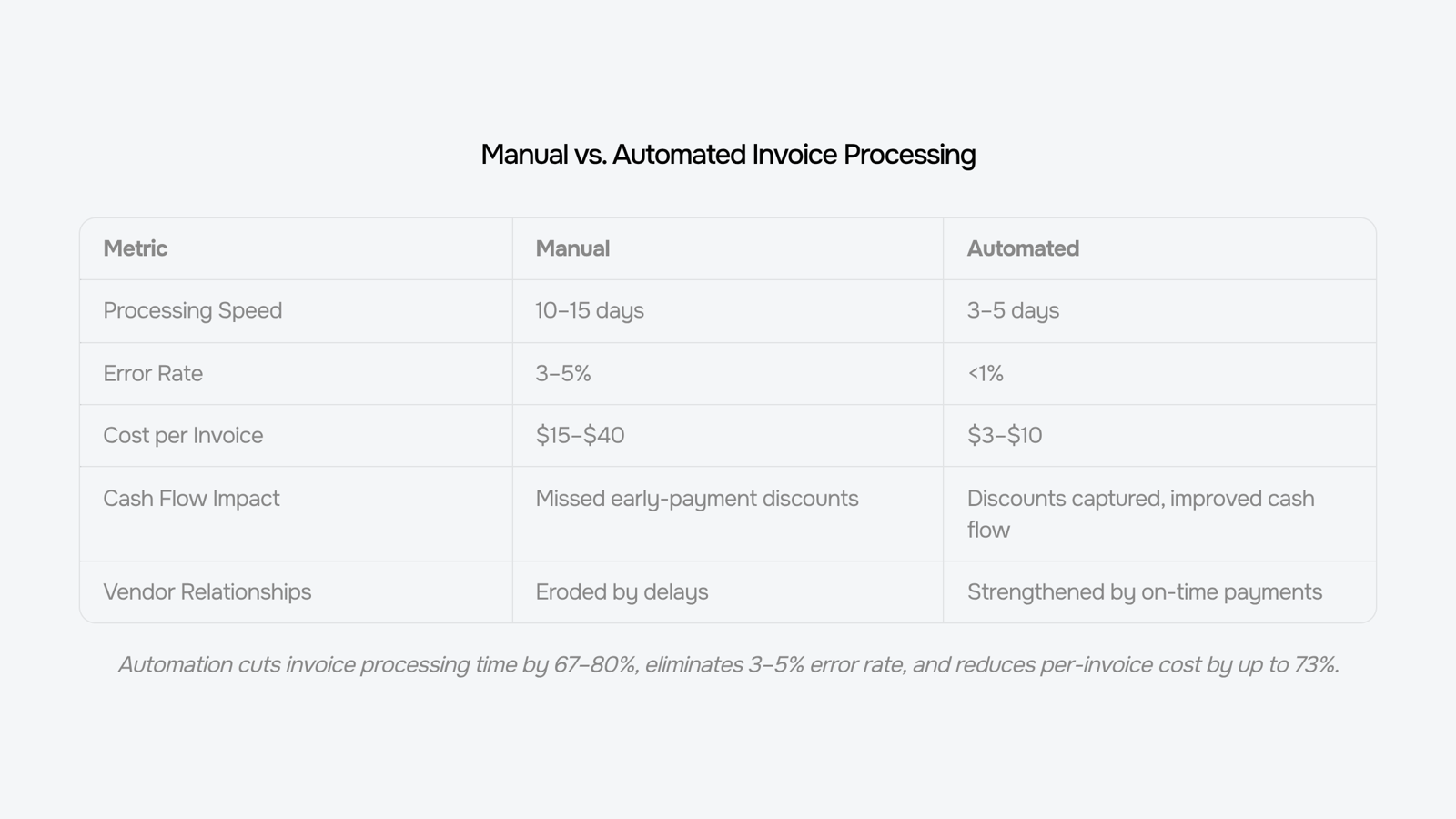
Speed. A manual invoice cycle, from receipt to approval to payment, typically takes 10 to 15 days. Automated invoice processing compresses that to 3 to 5 days by routing documents, flagging exceptions, and triggering approvals without waiting for someone to open an email.
Error rate. Manual data entry produces errors on roughly 3 to 5% of invoices, according to accounts payable research from the Institute of Finance and Management. Duplicate payments, transposed amounts, and missed line items are the most common failures. Automated extraction and three-way matching (purchase order, receipt, invoice) catches those mismatches before they reach payment.
Cash flow timing. Late payments are a direct consequence of slow processing. When invoices sit in an inbox for days, early-payment discounts expire and vendor relationships erode. Accounts payable automation surfaces due dates in real time, so your team can prioritize high-value invoices and capture discounts that manual queues routinely miss.
Staff cost. Processing a single invoice manually costs between $15 and $40, depending on approval layers and exception handling. Automation brings that figure down significantly by removing repetitive data entry and follow-up steps from your team's workload.
The gap between manual and automated isn't just operational, it shows up in cash flow, headcount, and vendor trust. Invoice tracking software makes that gap visible before it becomes a budget problem.
8 features to look for in an automated invoice management system
Eight features separate an invoice tool that handles admin from one that actually improves how your business gets paid.
1. Trigger-based invoice generation
The most overlooked invoice automation feature is automatic creation. A good system fires an invoice the moment a defined condition is met: project milestone reached, subscription renewal due, service ticket closed. For IT companies especially, this matters because your billing events are scattered across project tools, ticketing systems, and time trackers. A system that waits for someone to remember to invoice is just expensive spreadsheet software.
2. Recurring invoice automation
If you bill clients on a schedule, recurring invoice automation should be non-negotiable. The system should handle variable amounts (not just fixed retainers), apply the right tax rates by client or region, and send on the exact date without manual review. One misconfigured recurring invoice that goes out wrong costs more to fix than the time it would have taken to build the rule correctly.
3. Two-sided coverage: receivables and payables
Most feature lists focus entirely on outbound invoicing. The tools that actually move the needle track both sides. On the payables side, that means capturing vendor bills, matching them against purchase orders, flagging discrepancies, and routing for approval before payment. If your system only handles what you send out, you're still managing half the cash flow problem manually. For a deeper look at the vendor side, vendor invoice management covers how that workflow connects.
4. Approval routing with escalation logic
An invoice that sits in someone's inbox waiting for sign-off is a payment delay in disguise. Look for configurable approval chains: amount thresholds that route to different approvers, automatic escalation after X days, and audit trails that show exactly where a document stalled. This is what separates a tool from a process.
5. Real-time status tracking
Once an invoice is sent, you need to know whether it was opened, disputed, or ignored. Tracking at the line-item level, not just "sent/paid," lets your team intervene before a payment becomes overdue. According to Atradius, a significant share of B2B invoices are paid late globally, and most of those delays start with a dispute that no one caught early enough.
6. ERP and accounting system integration
An automated invoice management system that doesn't sync with your accounting software creates a second reconciliation problem. Check whether the integration is bidirectional: does it push invoice data out and pull payment confirmations back? One-way syncs that require manual imports defeat the purpose.
7. Tax and compliance handling
Tax rules change by jurisdiction, client type, and service category. A system that hard-codes a single tax rate will break the moment you add an international client or a new service line. Look for configurable tax logic, support for multiple currencies, and audit-ready export formats. For IT companies billing across regions, this feature alone can justify the switch.
8. Configurable exception handling
Every invoice workflow has edge cases: a client who always disputes line 3, a vendor who sends PDFs in a non-standard format, a project that bills differently depending on the contract type. A system without configurable exception rules forces your team to handle those manually, which is exactly the error-prone work you were trying to eliminate.
Score any tool you evaluate against these eight criteria before you ask about pricing. A system that checks six of eight but misses trigger-based generation and two-sided tracking will leave the most expensive parts of your process untouched.
How these features improve your company's cash flow
The link between invoice features and cash flow is direct: every day a payment sits in a manual queue is a day it isn't in your account.
Automated invoice processing removes the lag at each handoff. When your system generates an invoice the moment a project milestone closes, sends a payment reminder on day 15 without anyone scheduling it, and flags overdue accounts before they hit 30 days, your receivables cycle compresses. According to research cited by Atradius, a significant share of B2B invoices are paid late globally, and most of that delay starts with slow issuance, not slow payers.
Invoice tracking software adds the visibility side. You can see, at any moment, which invoices are outstanding, which clients are habitually late, and where your 60-day exposure sits. That predictability lets you plan hiring, vendor payments, and runway without guessing.
For IT companies specifically, the highest-value feature is trigger-based automation: an invoice fires automatically when a service ticket closes or a subscription renews. Inzo handles exactly this, connecting your project or ticketing data to INZO so billing happens without a manual step.
The result isn't just faster payment. It's a receivables pipeline you can forecast. For a deeper look at the mechanics, how invoice automation works covers the full process end to end.
Does system size matter: small business vs. enterprise needs
System size shapes which features are non-negotiable and which are optional extras.
For a small IT business, the core requirements are straightforward: automated invoice generation triggered by project milestones or time entries, basic approval routing, and payment status tracking. A 10-person shop processing 50 invoices a month doesn't need multi-entity consolidation. It needs invoices to go out on time and payments to come back without manual chasing.
Enterprise teams have a different problem. Volume, not speed, is the constraint. At hundreds of invoices monthly across multiple clients, departments, or subsidiaries, you need role-based approval workflows, audit trails, and accounts payable automation that handles vendor bill matching alongside outbound invoicing.
Capability | Small business | Enterprise |
|---|
Auto-invoice triggers | Non-negotiable | Non-negotiable |
Multi-entity support | Nice-to-have | Non-negotiable |
Vendor payment allocation | Optional | Required |
Role-based approvals | Basic | Granular |
Audit trail | Basic | Full compliance-grade |
The practical test: if your team spends more than 30 minutes a week reconciling invoice status, your current setup has a gap regardless of company size. Invoice management best practices for IT companies can help you identify where that gap sits before the next section's demo checklist.
How to evaluate a system before you commit
Before you sign up for any automated invoice management system, run it through these questions during the demo.
On automation depth: Does it trigger invoices automatically from a project milestone, a contract end date, or a time-log threshold — or does someone still have to click "send"? For IT companies billing on retainers or project phases, that trigger logic is the difference between getting paid on time and chasing it.
On tracking: Can you see, at a glance, which invoices are approved, disputed, or overdue? Solid invoice tracking software surfaces that status without a manual audit.
On vendor-side coverage: Does it handle bill tracking and vendor payment allocation, or only outbound invoices? Most tools only cover one side.
On error handling: What happens when a duplicate invoice comes in? A system worth using flags it before it posts, not after.
Review your shortlist against the invoice management best practices for IT companies before your trial ends, and check whether the invoice automation features in INZO match what your workflow actually needs.
Closing
The eight features covered here form a checklist, not a wish list. Trigger-based generation, two-sided coverage, approval routing, and real-time tracking are the difference between a tool that processes invoices and a system that actually improves cash flow. The gap between manual and automated shows up fastest in receivables cycle time and payment accuracy, but it compounds across vendor relationships, early-payment discounts, and staff burnout. Start by auditing your current tool against these criteria. If you're using Inzo or evaluating it, you can check how it stacks up against this framework on their feature page to see whether it handles the specific workflows your team runs today.
FAQ
How can an automated invoice management system improve my company's cash flow?
Automation compresses the receivables cycle from 10-15 days to 3-5 days by eliminating manual handoffs, flagging discrepancies early, and triggering payments on schedule. It also surfaces early-payment discounts in real time, so you capture them before they expire.
Is an automated invoice management system suitable for large enterprises?
Yes. Large enterprises benefit most from two-sided coverage (payables and receivables), configurable approval routing with escalation logic, and multi-currency tax handling across jurisdictions. These features scale with complexity.
What are the key differences between automated invoice management systems and manual processing?
Automation cuts processing time from 10-15 days to 3-5 days, reduces error rates from 3-5% to near zero, lowers per-invoice cost from $15-40 to a fraction of that, and eliminates manual data entry and follow-up work.
Can an automated invoice management system handle recurring client billing?
Yes. Look for systems that support variable amounts, apply correct tax rates by client or region, and send on exact dates without manual review. This is a non-negotiable feature for subscription or retainer-based IT services.
How long does it take to set up an automated invoice management system?
Setup time depends on complexity and integration needs. Basic configuration (recurring rules, approval chains) typically takes days to weeks. Full ERP integration and multi-workflow configuration may take longer, but most systems are operational within 2-4 weeks.


 Elena Petrova15 September 2026


