TL;DR: Most project scope document guides hand you a template and call it done. This one shows IT company owners exactly what each section does mechanically to prevent scope creep, where vague language creates real project risk, and how to structure a document that holds up when clients push for changes.
What a Project Scope Document Actually Is
A project scope document is a written agreement between you and your client (or stakeholders) that defines exactly what the project will deliver, what it won't, and what conditions govern both. It names deliverables, boundaries, assumptions, constraints, and acceptance criteria in one place before any work starts.
It is not a project charter, which authorizes the project and names its sponsor. It is not a project plan, which schedules the work. The scope document comes first and feeds both. If you're unclear on where each fits, how a project charter differs from a scope document explains the sequencing.
Here's why skipping it is expensive: according to PMI research, scope creep affects the majority of IT projects, and most overruns trace back to work that was never explicitly excluded. Each section of a scope document prevents a specific failure. The deliverables list stops "while you're at it" additions. The exclusions list kills assumptions before they become change orders. The acceptance criteria remove the ambiguity that causes rework in the final week.
For IT projects specifically, the scope, time, and cost constraints are tightly coupled. Expand scope without adjusting the other two, and the project slips almost automatically. A scope document is the mechanism that keeps all three in balance.
How a Scope Document Differs from a Project Plan and Project Charter
The three documents serve different purposes at different stages, and mixing them up is how IT projects lose a week before work even starts.
A project charter authorizes the project. It names the sponsor, states the business case, and gives the project manager formal authority to proceed. If you want to understand how a project charter differs from a scope document, the short answer is: the charter says "this project is approved and here's why"; the scope document says "here's exactly what we're building."
A project plan comes after both. It maps tasks, owners, timelines, and scope, time, and cost constraints into a working schedule. You can't build a credible plan without a signed scope document, because the plan depends on knowing what's in and what's out.
The project scope document sits between the two. It translates the charter's business case into specific deliverables, exclusions, and acceptance criteria before anyone opens a Gantt chart.
Document | When you write it | Primary question it answers |
|---|
Project charter | Project initiation | Should we do this? |
Project scope document | Before planning begins | What exactly are we building? |
Project plan | After scope is approved | How and when do we build it? |
Write them in that order. Skipping the scope document and jumping straight to a project plan is the most common reason IT projects drift — you end up building the planning process on top of assumptions nobody agreed to.
The Key Elements Every Project Scope Document Must Include
Six sections. Each one exists to prevent a specific failure, not to fill a template.
Objectives define what success looks like before anyone writes a line of code. Without them, teams optimize for activity instead of outcomes. A vague objective like "improve system performance" gives engineers no target; a measurable one like "reduce API response time to under 200ms for 95% of requests" does.
Deliverables list exactly what the project produces. Each deliverable should be concrete enough that a client can point to it and say "yes, that's what I asked for" or "no, that isn't." Missing this section is the most direct path to the conversation where your team ships something real and the client says they expected something different.
Exclusions are where most project scope document templates fall short. Writing down what you will not deliver sounds obvious, but it's the section that prevents the most expensive conversations. If your IT project covers cloud migration but not post-migration support, that needs to be explicit. Assumptions left unstated become commitments by default.
Assumptions capture the conditions your plan depends on. The client will provide database access by week two. The legacy system runs on SQL Server 2019. If any assumption turns out to be wrong, the project timeline shifts. Documenting them gives you a defensible baseline when scope change requests arrive. Scope, time, and cost constraints are all downstream of the assumptions you record here.
Constraints are the fixed limits: budget cap, regulatory deadline, a specific tech stack mandated by the client's existing infrastructure. Naming them early prevents your team from designing a solution that can't actually be built within the real boundaries of the engagement.
Acceptance criteria close the loop. They define the conditions under which each deliverable is considered complete and approved. Without them, "done" is a moving target. A project scope document sample example that skips acceptance criteria almost always produces a drawn-out sign-off process where the client keeps finding new reasons to withhold approval.
A solid project brief template that cuts scope creep will mirror this structure. If your current template for project scope document work omits any of these six sections, that gap is where your next scope dispute will start.
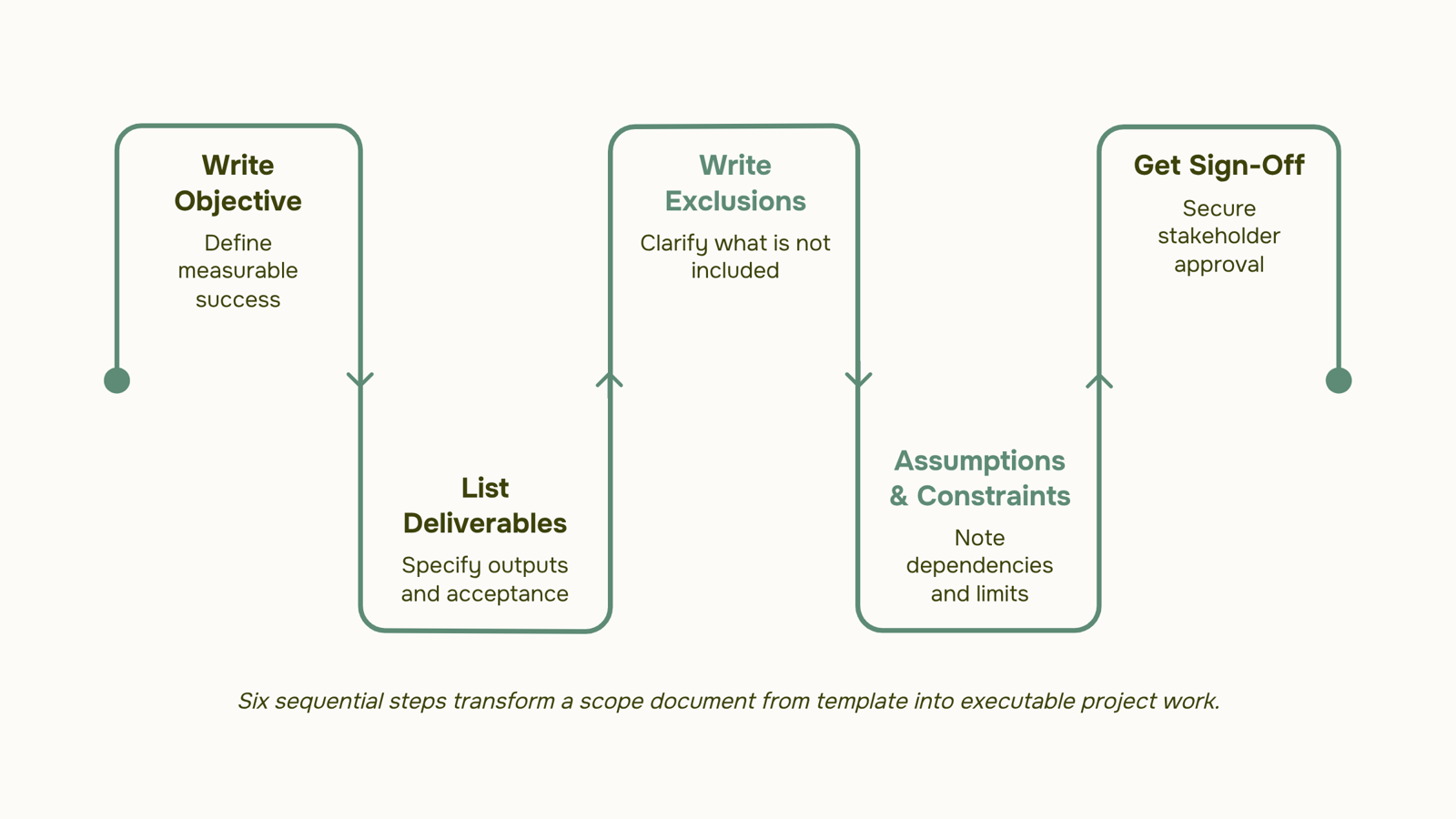
How to Write a Project Scope Document Step by Step
Start with the outcome, not the timeline. Most teams open a blank scope document and immediately list tasks. That's backwards. Before you write a single deliverable, answer one question: what does success look like on the day this project closes?
Here's a sequence that works for IT projects specifically:
Write the objective first: One or two sentences, measurable. "Migrate 200 on-premise workloads to AWS by Q3 with zero unplanned downtime" is a scope anchor. "Modernize infrastructure" is not.
List deliverables with acceptance criteria attached: Don't write "new VPN configuration." Write "VPN configuration supporting 500 concurrent users, validated by load test before handoff." Each deliverable needs a pass/fail condition, or your client will define one for you at the worst possible moment.
Write the exclusions section before the timeline: This is the step most guides skip. Exclusions force the conversation about what you are not building while the project is still theoretical. If third-party integrations, user training, or hardware procurement are out of scope, say so explicitly. Discovering that disagreement in week six costs far more than the ten minutes it takes to document it now.
Add assumptions and constraints: State what you're assuming to be true (client provides VPN credentials by day five) and what limits your options (scope, time, and cost constraints all belong here). Unwritten assumptions are just future arguments.
Get sign-off before any work begins: A scope document without a signature is a draft. Every named stakeholder approves the document, in writing, before the first task is assigned.
Once this document exists, building the planning process that follows becomes straightforward because the boundaries are already agreed on. If you want a head start, a project brief template that cuts scope creep can give you the structure before you fill in project-specific details.
The next section shows what a finished project scope document example looks like for a real IT infrastructure project.
A Short Project Scope Document Example
Below is a condensed project scope document example for a server migration project. It's not exhaustive — it's meant to show the structure in action.
Project: On-premise to cloud migration (AWS EC2), 12-server environment Client: Redfield IT Services Owner: Infrastructure Lead, Jamie Okonkwo
Objective: Migrate all production servers to AWS by end of Q3 with zero data loss and under four hours of cumulative downtime.
Deliverables:
Migrated server instances, each passing a defined load test before sign-off
Updated network topology documentation
Runbook for post-migration support team
Exclusions:
Acceptance criteria: All servers pass load testing at 95% baseline performance. Client signs off within five business days of migration completion.
Timeline: 10 weeks. Milestones at weeks 3 (environment setup), 7 (test migration), and 10 (production cutover).
Approved by: Jamie Okonkwo, Redfield IT Services — [date]
Notice what the exclusions section does: it removes the ambiguity that causes scope creep before the project starts. If application reconfiguration isn't listed as excluded, a client can reasonably assume it's included. That assumption, left unchallenged, is where budgets break.
For the planning work that follows this document, see building the planning process that follows your scope document.
Can a Project Scope Document Be Changed Mid-Project
Yes, a project scope document can be changed — but the change has to go through a formal process, not a Slack message.
The mechanism is a change request: a written record that describes what's changing, why, and what it costs in time, budget, or resources. The project owner reviews it, stakeholders approve or reject it, and the scope document gets updated to reflect the decision. That paper trail is what separates a legitimate scope adjustment from scope creep.
Scope creep almost always starts informally. A client asks for "one small addition," a developer says yes without escalating, and six weeks later the project is three weeks late with no documented reason why. Defining the scope of work clearly upfront reduces these moments, but it doesn't eliminate them.
A solid template for project scope document management should include a change log section from day one — not added later when things go sideways.
Turning Your Scope Document Into a Working Project
A finalized project scope document is only useful if someone converts it into assigned work. That means mapping each deliverable to a task, setting milestones against your agreed timeline, and naming an owner for every line item — not leaving it in a shared folder as a reference artifact.
Taro handles exactly this gap. You attach the scope document, break it into tracked tasks, and assign ownership without switching tools. When your team reviews project scope documents examples from past projects, Taro surfaces the patterns: which deliverables consistently slip, which owners are overloaded, where estimates were wrong.
The scope stops being a document. It becomes the project.
Closing
A project scope document isn't busywork—it's the mechanism that keeps scope creep, timeline slippage, and budget overruns from becoming your project's default state. The six sections work together to remove ambiguity before work starts, so your team and your client operate from the same definition of done. Once the scope document is signed off, it needs to live somewhere the whole team can see it—not buried in an email thread or a shared drive folder nobody checks. Taro connects your scope directly to project phases, milestones, and task assignments so the document stays the source of truth throughout delivery, not just at kickoff. Start this week: pull your last three IT projects and ask yourself which scope disputes could have been prevented with a tighter exclusions section or clearer acceptance criteria.
FAQ
What is the purpose of a project scope document?
It defines exactly what the project will deliver, what it won't, and what conditions govern both—preventing scope creep, timeline slippage, and rework. Each section stops a specific failure: deliverables prevent "while you're at it" additions, exclusions kill unstated assumptions, and acceptance criteria remove ambiguity at sign-off.
What are the key elements of a project scope document?
Objectives (what success looks like), deliverables (what you're building), exclusions (what you're not), assumptions (conditions your plan depends on), constraints (fixed limits like budget or deadline), and acceptance criteria (conditions for completion). All six must be explicit or disputes will fill the gaps.
How do I write a project scope document?
Start with a measurable objective, then list deliverables with acceptance criteria attached. Write exclusions before the timeline, add assumptions and constraints, and have the client sign off before planning begins. Order matters: outcome first, timeline second.
Can a project scope document be changed during the project?
Yes, but through formal change control. Any change to scope, time, or cost should be documented, approved, and added to the baseline. Without that discipline, you lose the document's ability to protect the project.
How does a project scope document differ from a project plan?
The scope document answers "what exactly are we building?" The project plan answers "how and when do we build it?" You can't build a credible plan without a signed scope document, because the plan depends on knowing what's in and out.
How long should a project scope document be?
Long enough to be unambiguous, short enough to be read. For most IT projects, 3 to 5 pages is typical. If it's under a page, you've skipped critical sections like exclusions or acceptance criteria. If it's over 10, you're mixing in planning detail that belongs in the project plan.
Who is responsible for writing the project scope document?
The project manager drafts it in collaboration with the client, sponsor, and key stakeholders. The client must review and approve it before work starts. Shared ownership prevents the document from becoming a one-sided artifact nobody trusts.


 Siddharth Rao15 September 2026


