TL;DR: Most ERP content stops at definitions and feature lists. This one shows IT company owners how the process layer of an enterprise resource management system actually works, where legacy ERPs create gaps, and how modern workflow tools close those gaps without replacing your core system. You'll leave with a clear picture of what to build, extend, or automate.
What is an enterprise resource management system?
An enterprise resource management system is a centralized software platform that connects an organization's core business functions — finance, HR, procurement, project delivery, and operations — through a single shared data layer.
For most IT companies, the problem isn't a shortage of tools. It's that those tools don't talk to each other. A project manager updates a resource plan in one system while finance tracks costs in another and HR manages headcount in a third. The result is decisions made on stale data, billing delays, and resource conflicts that surface too late to fix cheaply.
An enterprise resource management system removes those gaps by treating every department as a node in one connected process. When a new client project is created, the same event updates capacity planning, triggers procurement requests, and feeds into financial forecasting — automatically, without a manual handoff.
This matters more for IT companies than most sectors because IT delivery is resource-intensive and margin-sensitive. Misallocating a senior engineer for two weeks, or missing a billing milestone because project completion wasn't visible to finance, has direct revenue consequences.
The distinction from standalone enterprise risk management tools is scope: risk tools monitor exposure, while an enterprise resource planning system actively coordinates execution across departments. Understanding the key components of enterprise risk management solutions helps clarify where the two systems overlap — and where each one stops.
How does an enterprise resource management system work?
At its core, every enterprise resource management system runs on one principle: a single shared database that all modules read from and write to. There is no re-keying data between departments. When finance closes a purchase order, procurement sees the update. When HR onboards a new engineer, project management can assign them immediately.
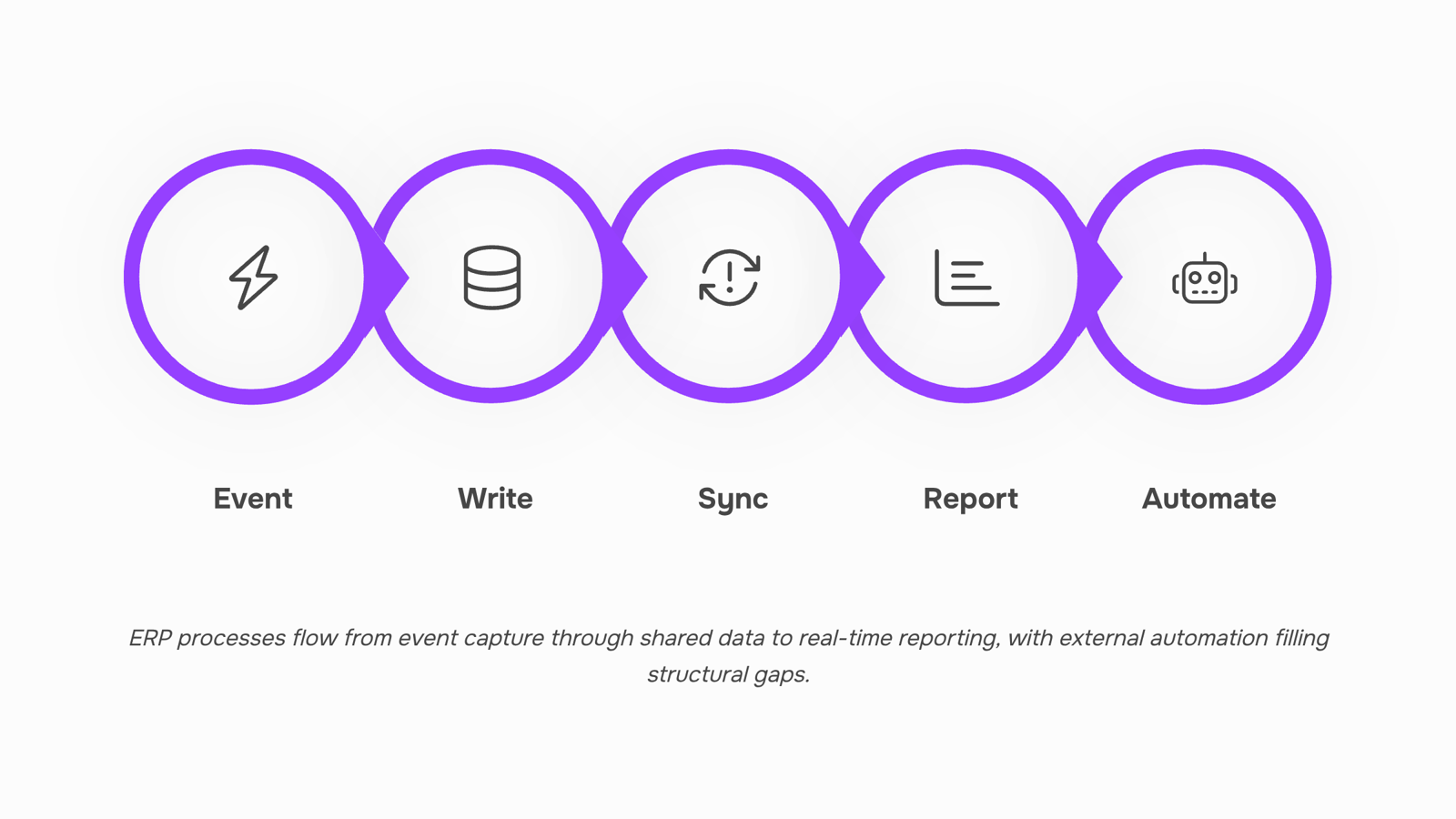
Here is the data flow in sequence:
A business event triggers a transaction: A client signs off on a project, a vendor sends an invoice, or an employee logs hours. Each event enters the system through its originating module.
The module writes to the central data layer: That single record becomes the source of truth. Finance, HR, supply chain, and project modules all pull from the same row, not from siloed spreadsheets.
Connected modules update automatically: A logged timesheet updates project cost tracking, which updates the client invoice, which updates cash flow forecasting. This is where business process automation inside ERP actually runs.
Reporting aggregates in real time: Because the data layer is shared, your dashboard reflects the current state of the business, not last week's export.
Gaps trigger external automation: Built-in ERP workflows handle structured, predictable handoffs well. For everything else, a workflow automation platform that connects your ERP to the rest of your stack fills the gaps that native modules leave open.
The handoff between steps 3 and 5 is where most IT companies lose time. Standard enterprise resource planning logic covers the predictable 80%. The remaining 20%, client notifications, approval routing, cross-tool syncs, needs automations IT teams build to extend ERP capabilities outside the core system.
Key features of an enterprise resource management system
Finance and accounting
The finance module is the transaction backbone of an enterprise resource management system — it records every purchase, invoice, and payment in a single ledger that every other module can read from.
For IT companies, this means project costs, vendor payments, and payroll all post to the same chart of accounts without manual re-entry. When a project closes, the cost data is already reconciled.
HR and workforce management
The HR module tracks headcount, contracts, time-off, and payroll calculations against a single employee record.
When your finance module needs to run payroll or your project module needs to check resource availability, both pull from the same record. No spreadsheet handoffs, no version conflicts.
Supply chain and procurement
This module manages vendor relationships, purchase orders, and inventory levels — and triggers reorder or approval workflows when thresholds are crossed.
For IT service companies, "supply chain" often means software licenses, hardware, and contractor agreements rather than physical goods. The module handles all three under the same approval logic.
Project management
The project module connects task ownership, timelines, and budgets to the financial and HR data sitting underneath. You can see burn rate against budget in real time, not at month-end.
This is where workflow automation for IT companies becomes relevant: built-in ERP project workflows handle status tracking, but most teams need external automation for client notifications, escalation routing, and cross-tool handoffs.
Reporting and analytics
The reporting module aggregates data across every other module into dashboards and scheduled exports.
Because the data lives in one layer, a single report can show project margin, headcount cost, and outstanding invoices together — without a manual data pull. A workflow automation platform that connects your ERP to the rest of your stack can push those reports to Slack, email, or a client portal on a timer.
CRM integration
Most ERP systems include a basic CRM module or a native integration point for one. It links sales pipeline data to project capacity and invoicing, so a won deal can trigger resource allocation and contract generation without a separate system handoff.
Benefits of implementing an ERP system
Implementing an enterprise resource management system produces measurable operational gains across the business functions it touches. The five that matter most for IT companies:
Reduced manual data entry: Finance, HR, and project modules share a single data layer, so information entered once flows everywhere. Teams that previously reconciled spreadsheets across three tools cut that work significantly.
Faster reporting: Unified data means reports pull from one source rather than five. Month-end closes that took days compress to hours.
Unified data across departments: A single record for each client, project, and cost center eliminates version conflicts between sales, delivery, and finance.
Project cost visibility: Real-time budget tracking against actuals lets project managers catch overruns before they compound, not after invoicing.
Compliance tracking: Audit trails, access controls, and automated policy checks are built into the workflow rather than bolted on at quarter-end.
Where most ERP systems fall short is in the automation layer between modules. The automations IT teams build to extend ERP capabilities address exactly that gap, connecting business process automation to the workflows your ERP handles natively.
Where ERP systems fall short for IT companies
Traditional ERP systems were built for manufacturers and distributors. IT service companies have been bending them to fit ever since, with mixed results.
Four limitations show up consistently in IT contexts:
Rigid workflows: Most ERP systems ship with fixed process templates. When your delivery model changes — a new managed service tier, a shift to outcome-based billing — reconfiguring those templates takes months, not days.
Weak cross-tool automation: An ERP system tracks data well but rarely acts on it. When a project hits budget threshold, someone still has to manually flag the account team. Business process automation between your ERP, PSA, and CRM almost always requires custom development or a separate middleware layer.
Slow implementation: According to Panorama Consulting, most mid-market ERP deployments run over timeline or budget. For IT companies already running lean, that gap is expensive.
No trigger-based logic. ERPs store state. They don't respond to it. A ticket escalation, a contract renewal date, a utilization spike — none of these fire an action automatically inside a standard enterprise resource management system.
This is where a workflow automation platform that connects your ERP to the rest of your stack fills the gap. Revo sits between your systems and handles the logic your ERP was never designed to run.
ERP vs CRM: what is the difference?
ERP and CRM solve different problems. Confusing them leads to buying the wrong system or expecting one to do the other's job.
Dimension | ERP | CRM |
|---|
Scope | Operations-wide (finance, HR, projects, procurement) | Customer-facing (sales, marketing, support) |
Primary users | Finance, ops, project managers | Sales reps, account managers, marketing |
Data focus | Internal costs, resources, utilization | Leads, deals, customer interactions |
IT company use case | Billing accuracy, resource allocation, project margin | Pipeline tracking, client retention |
Integration approach | Central data backbone; other tools connect to it | Often standalone; syncs with ERP for full picture |
For most IT companies, the practical answer is: you need both, connected. Your CRM captures the deal; your enterprise resource management system executes the delivery. The gap between them — where a closed deal becomes a staffed project with tracked costs — is where manual handoffs break down.
That gap is exactly where a workflow automation platform that connects your ERP to the rest of your stack earns its place. Without it, your ERP system and CRM stay siloed, and your ops team fills the space with spreadsheets.
How AI is changing enterprise resource management in 2026
Three shifts are reshaping how an enterprise resource management system actually operates in 2026, and they're worth understanding before you evaluate any platform.
Predictive resource allocation moves planning from monthly spreadsheet reviews to continuous forecasting. Instead of reacting to a capacity gap, the system flags it two to three weeks out, based on pipeline data, project velocity, and headcount. IT companies running 20-plus concurrent projects see the clearest gains here.
AI-driven process automation closes the gap between ERP modules and the tools outside them. Most enterprise resource planning platforms handle internal workflows well but stop at the boundary of your CRM, ticketing system, or billing software. A workflow automation platform that connects your ERP to the rest of your stack removes that boundary, and the automations IT teams build to extend ERP capabilities are increasingly AI-triggered rather than rule-based.
Real-time anomaly detection in financial data catches billing errors, duplicate entries, and budget overruns as they happen, not at month-end close. For IT companies managing retainer clients and project-based revenue simultaneously, this matters more than most ERP vendors acknowledge.
Business process automation and workflow automation for IT companies are converging here. The ERP is no longer the end of the system; it's the center of one.
Closing
An enterprise resource management system is only as powerful as the connections it makes — and that's where most IT companies hit their first real constraint. Your ERP handles the predictable 80% of process automation: finance posting, resource allocation, project cost tracking. But the client notifications, approval routing, cross-tool handoffs, and real-time visibility that actually move the needle? Those live in the gaps between your core modules.
Now that you understand what an ERP covers — and where it intentionally stops — you can map your own process gaps. The ones that fall outside native ERP workflows are exactly where workflow automation closes the loop. Ready to see how? Explore how Revo connects your ERP to the rest of your stack without replacing it.
FAQ
What is an enterprise resource management system?
A centralized platform connecting finance, HR, procurement, project delivery, and operations through a single shared data layer. For IT companies, it eliminates manual handoffs between departments and ensures decisions are made on current data, not stale exports.
What are the key features of an enterprise resource management system?
Finance and accounting, HR and workforce management, supply chain and procurement, project management, reporting and analytics, and CRM integration. Each module reads from and writes to the same database, so data entered once flows everywhere without re-keying.
How does ERP differ from CRM?
ERP coordinates execution across all departments through a shared data layer; CRM focuses on sales pipeline and customer relationships. Most ERPs include a basic CRM module or integration point, but they serve different purposes.
What are the benefits of implementing an ERP system?
Reduced manual data entry, faster reporting, unified data across departments, real-time project cost visibility, and built-in compliance tracking. For IT companies, the biggest gain is catching resource conflicts and budget overruns before they hit invoicing.
Do small IT companies need a full ERP system?
Depends on complexity. If you're managing multiple projects, vendors, and resource constraints across teams, yes—the ROI appears quickly. If you're a single-project shop, a lighter setup may suffice, but gaps between tools will still cost you.


 Elena Petrova11 September 2026


