TL;DR: Most content on integrated master schedules stops at the definition and a diagram. This piece gives IT project managers the full picture: the three-tier hierarchy, how cross-team dependency mapping works in practice, and the specific points where an IMS breaks down so yours doesn't. You'll finish with enough to build one that holds under real project pressure.
What an Integrated Master Schedule Actually Is
An integrated master schedule is a networked, time-based schedule that consolidates activities, milestones, and deliverables across every workstream in a program into one authoritative source. It is not a Gantt chart with color-coded bars, and it is not a flat task list. The difference is dependency logic: every activity in an IMS is linked to at least one predecessor or successor, so a slip in one workstream propagates visibly through the entire schedule rather than hiding in a separate spreadsheet.
In project schedule management, most teams work with a simple project plan — one timeline, one team, one delivery date. An IMS operates at the program level, meaning it coordinates multiple projects simultaneously. A hardware delivery, a software integration sprint, and a compliance review can each have their own schedule, but the IMS shows where they intersect, where one blocks another, and what the critical path looks like across all three.
This is what maintaining a single source of truth across project workstreams actually requires in practice: not just shared visibility, but shared dependency logic. The four dependency types Taro enforces across workstreams — finish-to-start, start-to-start, finish-to-finish, start-to-finish — are the same relationship types an IMS encodes at scale.
Strip the dependency network out, and you have a collection of plans. Keep it, and you have an IMS.
The Three-Tier Hierarchy That Makes IMS Work
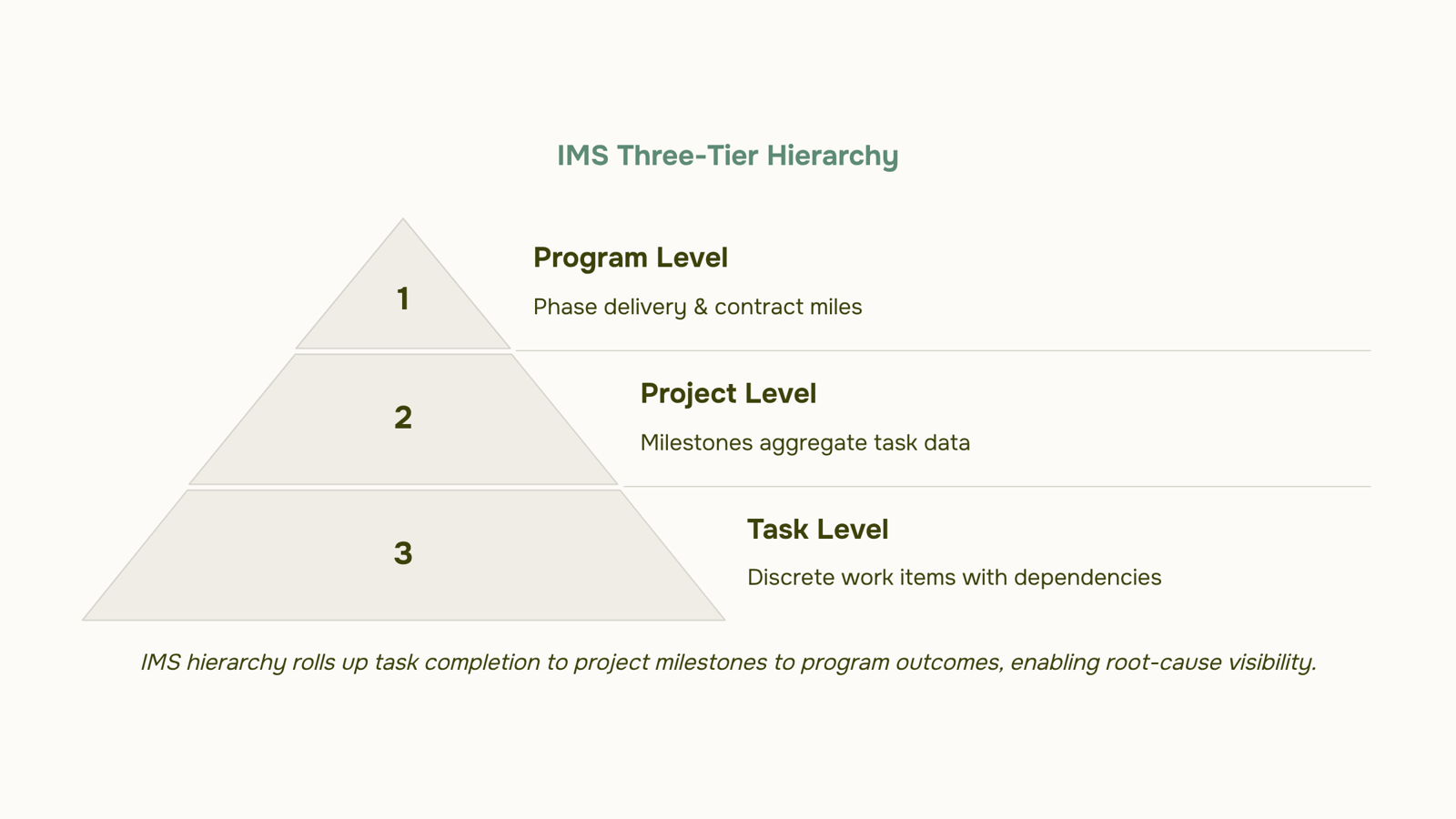
The master schedule hierarchy runs on three levels, and understanding how data flows between them is what separates a real integrated master schedule from a glorified to-do list.
At the base, you have tasks: discrete, time-boxed work items owned by a specific person or team. Each task has a start date, an end date, and a dependency relationship to at least one other task. That specificity is what makes roll-up possible.
The middle tier is the project level. Project milestones aggregate task completion data from below. When three tasks in a software build workstream finish, the milestone "build complete" flips. That milestone then becomes an input to the tier above it. Nothing at the project level is manually estimated — it reflects what the task data actually says.
The top tier is the program level. Program outcomes, like "Phase 1 delivery" or "contract milestone 3," are composites of project milestones across multiple workstreams. This is where executives and program managers read schedule health. If a program milestone shows red, the hierarchy tells you exactly which project, and which task, caused it.
A flat Gantt chart cannot do this. It shows you that something is late. The master schedule hierarchy shows you why, and how far the impact travels.
Grouping project-level work into program-level epics is the structural equivalent of this middle tier in a work management tool — it keeps task detail visible without forcing program managers to read every line.
The hierarchy also sets up dependency enforcement, which is where the four dependency types Taro enforces across workstreams become critical. That's the next piece.
How Cross-Team Dependency Mapping Works Inside an IMS
Dependency mapping is the mechanism that turns a collection of parallel workstreams into a coherent integrated master schedule. Without it, you have a list of dates. With it, you have a model that shows what breaks when something slips.
The four dependency types Taro enforces across workstreams are:
Finish-to-start (FS): Task B cannot begin until Task A finishes. The most common type — infrastructure provisioning before software deployment, for example.
Start-to-start (SS): Task B cannot start until Task A starts. Useful when two workstreams must run in parallel from a shared trigger point.
Finish-to-finish (FF): Task B cannot finish until Task A finishes. Common in testing and documentation pairs where both must close together.
Start-to-finish (SF): Task B cannot finish until Task A starts. Rare, but relevant in handoff scenarios where a legacy process must stay live until a replacement is initiated.
What makes cross-team dependency mapping meaningful inside an IMS is enforcement, not just documentation. When a finish-to-start dependency slips by five days, the IMS should propagate that delay forward through every downstream task automatically. That cascade is what separates project schedule management from a static Gantt chart.
In practice, the highest-risk dependencies are the ones that cross organizational boundaries — where Team A owns the predecessor and Team B owns the successor. Those handoffs need a named schedule owner on each side, not just a line on a chart.
Maintaining a single source of truth across project workstreams is what makes that enforcement possible. If each team tracks progress in a separate tool, the dependency model breaks the moment data goes stale.
How to Create an Integrated Master Schedule Step by Step
Building an integrated master schedule follows a sequence that most teams get wrong by starting in the wrong place. Start with scope, not tasks.
Define program scope: Document every deliverable the program must produce before you open a scheduling tool. If the scope isn't agreed on, every date you set is provisional.
Break scope into project-level workstreams: Grouping project-level work into program-level epics gives you the structural layer that separates program-level milestones from task-level execution. Each workstream should have a clear owner and a defined output.
Map milestones across workstreams: Identify the contractual, regulatory, or customer-facing dates that cannot move. These become your fixed anchors. Everything else builds backward or forward from them.
Identify and log cross-team dependencies: This is where most IMS builds stall. The four dependency types Taro enforces across workstreams — finish-to-start, start-to-start, finish-to-finish, start-to-finish — each carry different risk profiles. Log every cross-team link explicitly. An undocumented dependency is a future schedule slip waiting to happen.
Set the baseline: Once milestones and dependencies are mapped, freeze the schedule. The baseline is your measurement reference. Any change after this point requires a formal variance log, not an informal date adjustment.
Assign schedule owners: Every workstream needs one person accountable for keeping their dates current. Without named owners, schedule data degrades within weeks.
For the schedule to stay accurate, it needs a home. Maintaining a single source of truth across project workstreams prevents the fragmentation that happens when teams track dates in separate files. A project management information system handles storage, access control, and reporting in one place.
Where Integrated Master Schedules Break Down in Practice
Three failure modes account for most IMS breakdowns, and each one is predictable.
Dependency drift is the most common. One workstream slips by a week, but the teams downstream don't find out until their own milestones are already at risk. Without structured cross-team dependency mapping, a two-day delay in infrastructure provisioning can cascade into a three-week slip in UAT before anyone flags it.
Baseline conflicts surface when scope changes mid-project but the IMS baseline isn't formally updated. Teams start working from different versions of the schedule. What looked like alignment in the last status meeting was actually two groups tracking against different assumptions.
Schedule fragmentation is quieter but just as damaging. Workstream owners maintain separate files — a network team in Smartsheet, a dev team in Jira, a PMO in Excel. The integrated master schedule in project management exists on paper, but no single file reflects actual program status. You can't surface risk you can't see.
Storing schedule data in a central system removes the version problem. Grouping work into program-level epics keeps fragmentation from taking hold in the first place.
Benefits of Using an Integrated Master Schedule
An integrated master schedule gives your program one authoritative timeline instead of five competing ones. Every stakeholder reads the same data, dependency changes propagate automatically, and schedule risk surfaces weeks before it becomes a missed milestone.
The concrete outcomes most IT project managers report:
Earlier risk visibility: Slippage in one workstream flags immediately across all linked tasks, rather than surfacing at the next status meeting.
Fewer rework cycles: When four dependency types are enforced across workstreams, teams stop rebuilding work that a predecessor task invalidated.
Cleaner scope change management: A single baseline makes it obvious what a scope addition actually costs in schedule terms.
The honest tradeoffs: initial setup takes real effort, and maintaining a single source of truth across project workstreams requires someone to own schedule hygiene ongoing. Project schedule management discipline pays off at scale, not on day one.
Using Project Management Software to Build an IMS
Not every project management tool can support a true integrated master schedule. The capabilities that matter most are specific: finish-to-start and finish-to-finish dependency enforcement across workstreams, hierarchical task grouping that rolls up to program level, baseline tracking so you can measure schedule variance over time, and real-time status rollup so a slip at the task level surfaces immediately at the executive view.
Most generic project management software for scheduling handles flat task lists reasonably well. Where they fall short is dependency drift — when one workstream slips three days and the downstream tasks don't update, your IMS stops reflecting reality within hours. That's the failure mode most tools ignore.
When learning how to create an integrated master schedule, the tool choice shapes what's actually buildable. Taro addresses the core requirements directly. The four dependency types Taro enforces across workstreams — finish-to-start, start-to-start, finish-to-finish, and start-to-finish — map to the dependency logic a valid IMS requires. Grouping project-level work into program-level epics gives you the three-tier hierarchy (program, project, task) that the DCMA 14-Point Assessment uses as its structural baseline.
The practical result: a schedule change at the task level propagates up through the epic, so program managers see the impact without waiting for a status meeting.
For teams that also need to understand how a project management information system stores and surfaces schedule data, that context matters — the IMS lives inside a PMIS, and the two are not interchangeable.
Closing
An integrated master schedule is the difference between knowing something is late and understanding why it matters to every other workstream. The hierarchy, the dependency logic, and the named ownership are what turn a collection of parallel timelines into a coherent model that holds under real project pressure. Start by mapping your program scope into workstreams, lock down your cross-team dependencies, and assign a schedule owner to each one. Then move it into a tool that enforces those relationships automatically—not to add overhead, but to catch slips before they cascade. Ready to see how dependency mapping and epic rollups work in practice? Check out Taro's project management features to walk through a live example.
FAQ
What is an integrated master schedule in project management?
A networked, time-based schedule that consolidates activities, milestones, and deliverables across every workstream in a program into one authoritative source. Every activity is linked to at least one predecessor or successor, so delays propagate visibly across the entire schedule instead of hiding in separate spreadsheets.
How do I create an integrated master schedule for my project?
Define program scope, break it into project-level workstreams, map fixed milestones, log cross-team dependencies explicitly, freeze the baseline, and assign a schedule owner to each workstream. Store it in a centralized tool that enforces dependency logic automatically.
What are the benefits of using an integrated master schedule?
You get visibility into cross-team dependencies, automatic delay propagation so slips cascade visibly, a clear critical path across multiple projects, and accountability through named schedule owners. The hierarchy lets you read program health without reading every task.
Can I use project management software to create an integrated master schedule?
Yes. The software must enforce dependency types across workstreams, support hierarchical roll-ups from tasks to milestones to program outcomes, and maintain a single source of truth. Without those capabilities, you have a Gantt chart, not an IMS.
What is the difference between an integrated master schedule and a project plan?
A project plan covers one timeline and one team. An IMS coordinates multiple projects simultaneously and shows where they intersect, where one blocks another, and what the critical path looks like across all three through dependency logic.
How do you handle schedule changes when one workstream slips in an IMS?
The IMS propagates the delay automatically through every downstream task linked by dependency. Log the variance formally, not informally, and adjust dependent milestones. A named schedule owner on each workstream ensures the cascade is tracked and communicated.


 Elena Petrova15 September 2026


