TL;DR: Most guides define a credit invoice and move on. This one shows IT business owners exactly when to issue one, how to apply it against an open balance, and what goes wrong in your accounts receivable when the process gets skipped or handled inconsistently. You get a five-step workflow you can run today.
What a credit invoice is
A credit invoice is a document one business sends to another to reduce or cancel an amount already billed. Where a standard invoice says "you owe us X," a credit invoice says "we owe you X back." It carries a negative monetary value and attaches directly to the original invoice it corrects.
You issue one in three situations: a billing error on the original invoice, a partial or full return of goods or services, or a negotiated discount applied after the original invoice was sent. In each case, the credit invoice creates a formal paper trail that satisfies both parties' accounting records.
This matters more than most finance guides acknowledge. Atradius and similar trade credit research consistently finds that a significant share of B2B invoices contain errors requiring correction — and each one needs a proper credit document, not an informal email, to hold up under audit. Under US GAAP, the original invoice stays on the books; the credit invoice offsets it in accounts receivable rather than deleting the original transaction.
If you're still building out the basics, the definition, components, and purpose of a standard invoice is worth reading first. For teams managing high invoice volumes, best practices for invoice management covers how to keep credit invoices from slipping through the cracks.
Credit invoice vs credit memo: key differences
The terms get mixed up constantly, but they're not interchangeable. A credit invoice is a legally issued document that reduces the amount owed on a specific invoice. A credit memo is an internal accounting record that adjusts a balance. The distinction matters for your AR ledger, your audit trail, and how clients interpret what they receive.
Dimension | Credit invoice | Credit memo |
|---|
Legal status | Legally binding document sent to the client | Internal accounting adjustment; not always client-facing |
Accounting treatment | Reduces AR balance on a specific original invoice | Adjusts the general ledger; may not reference a specific invoice |
When to use | Billing error, approved discount, returned goods or services | Internal write-offs, balance corrections, intercompany adjustments |
Format | Mirrors a standard invoice: line items, original invoice reference, negative amounts | Shorter memo format; may lack line-item detail |
Client receives it? | Yes, always | Not always |
Tax implication | Must reflect the corrected taxable amount | Varies; may not carry VAT or sales tax adjustments |
The practical rule: if a client overpaid or was overbilled and you need to correct the record externally, issue a credit invoice. If the adjustment is internal, a credit memo handles it.
Where this trips up IT companies specifically: a client disputes a line item on a $12,000 project invoice. You agree to remove a $1,500 consulting block. That requires a credit invoice referencing the original document, not a memo buried in your accounting software. Your client needs the paper trail; so does your auditor.
For a broader look at how these documents fit into the billing cycle, the invoice management best practices for IT companies guide covers the full workflow.
Why credit invoices matter for your business
Issuing credit invoices correctly does more than fix a billing error. It shapes how your business looks to clients, auditors, and your own finance team.
Audit trail integrity is the first concrete benefit. Tax authorities in the US require businesses to retain original invoices and issue a separate correcting document rather than editing the source record. A credit invoice creates that paper trail automatically, so if you face an audit, every adjustment is traceable to a specific transaction.
Accurate AR balances follow from that. When a credit invoice is applied against the original, your accounts receivable balance reflects what clients actually owe, not an inflated number that distorts your cash flow picture. Finance teams relying on overstated AR make worse collection decisions.
Client trust is harder to quantify but real. A client who receives a properly formatted credit invoice, referencing the original invoice number and the exact line being corrected, sees a business that handles mistakes cleanly. That matters more in IT services, where billing disputes can stall renewals.
Faster dispute resolution is the fourth outcome. A credit invoice gives both parties a shared reference point. There is no ambiguity about what was corrected, when, or by how much.
If you want a foundation for understanding what goes into each document before you issue a credit, the core components of an invoice are worth reviewing first.
How to create a credit invoice in 5 steps
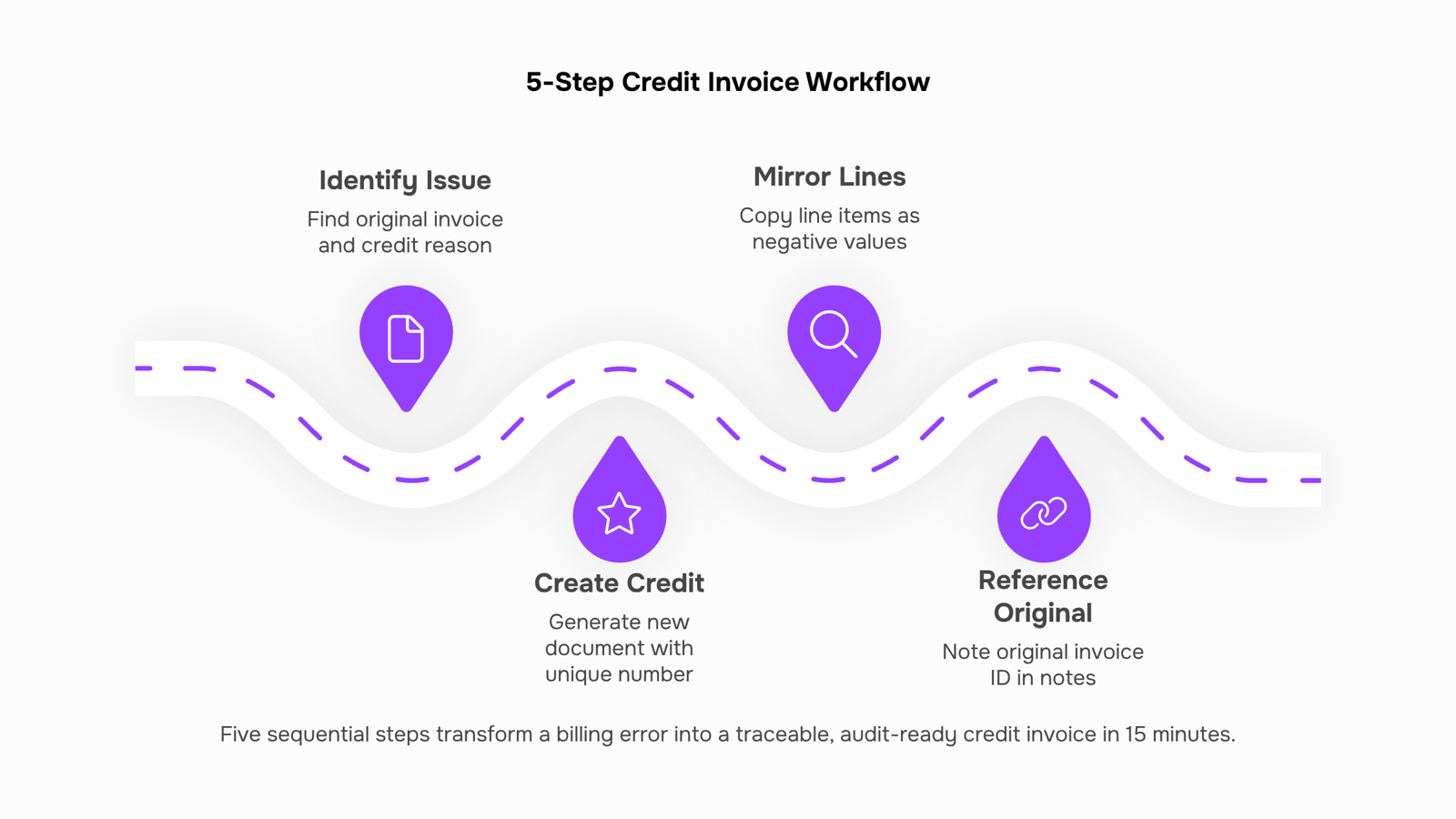
Before you issue a credit invoice, pull the original invoice. Every field on the credit document traces back to it: the invoice number, the line items, the amounts, the client details. Without that reference, your AR team and your client's AP team are reconciling against different records.
Identify the original invoice and the reason for the credit. Locate the invoice number, the billing date, and the specific line item being corrected. Common reasons include overbilling, a returned service, a pricing error, or a negotiated discount after the fact. Document the reason explicitly — your audit trail depends on it.
Create a new document with a unique reference number. A credit invoice is not a revised version of the original. It is a separate document. Assign it its own sequential number (for example, CN-1047 referencing INV-1047) and set the issue date to today, not the original billing date. This keeps your invoice management records clean and satisfies the IRS requirement to retain both documents independently.
Mirror the original line items, then apply negative amounts. List the same service descriptions and quantities from the original invoice. Enter the credit amounts as negative values against each corrected line. If the original invoice billed $4,200 for a managed services retainer and the agreed correction is $700, the credit invoice shows -$700 against that line, not a rewritten total. This is what a credit invoice example looks like in practice: a mirror document, not a replacement.
Reference the original invoice number in the header and notes field. State clearly: "This credit invoice applies to INV-1047 dated [original date]." Clients processing high volumes of vendor documents need that link to match the credit against the right open payable. Missing this reference is the single most common reason credit invoices sit unprocessed in a client's AP queue.
Send the credit invoice and confirm it is applied in your AR ledger. Delivery is not the finish line. Once the client acknowledges receipt, mark the original invoice as partially or fully credited in your accounts receivable system. If you are using Inzo to manage billing, the payment status updates automatically when the credit is logged, so your AR balance reflects the correction without a manual reconciliation step.
If you want a refresher on what a standard invoice should contain before you build the credit version, the core components are covered here.
Credit invoice example for an IT services business
Imagine you're running a 10-person IT consultancy. In March, you billed a client $4,800 for a 40-hour network migration project (Invoice #1042). After delivery, the client flags that 8 hours were duplicate-billed. The correct charge is $3,840.
You don't edit Invoice #1042. Instead, you issue a credit invoice that references it directly.
Here's what that credit invoice contains:
Credit Invoice #CN-1042 (your numbering convention signals it's a correction)
Issue date: the date you're issuing the credit, not the original invoice date
Reference: "Issued against Invoice #1042, dated March 14, 2026"
Line item: "Duplicate billing adjustment — 8 hours @ $120/hr"
Credit amount: -$960.00
New balance due: $3,840.00
The negative amount is what makes this a credit invoice, not a standard invoice. Your client applies the $960 against their open balance, and your accounts receivable reflects the corrected figure.
This is the format most IT service businesses need for common invoice scenarios involving scope changes, overbilling, or cancelled line items. Credit invoices follow the same structure regardless of the correction type — what changes is the line item description and the amount.
Keep the original invoice intact. The credit invoice is the audit trail.
Use credit invoices to manage accounts receivable
Credit invoices reduce AR errors only when they're applied against the right open balance, not just filed and forgotten.
The process has four steps. First, identify the original invoice and confirm the outstanding balance. Second, issue the credit invoice referencing that invoice number directly. Third, apply the credit to reduce the open balance in your AR ledger. Fourth, confirm the net amount still owed, or zero it out if the credit covers the full amount.
Where most teams lose track is step three. The credit invoice exists, but no one updates the AR record, so the balance stays open and the client gets a follow-up they shouldn't.
Inzo's customer credit management links each credit invoice to its original, applies it automatically against the open balance, and flags any remaining amount still due. Combined with invoice tracking best practices, that closes the gap between issuing a credit and actually clearing the AR entry.
Common mistakes to avoid when issuing credit invoices
The most common mistake is issuing a credit invoice without referencing the original invoice number. Without that link, your AR team has no way to match the credit against the correct open balance, and the discrepancy sits unresolved.
The second mistake: treating a credit invoice as a full refund. A credit invoice reduces what the client owes; it does not automatically trigger a cash payment. Confusing the two creates reconciliation gaps.
Third, failing to update AR records immediately. The credit exists on paper but not in your books, which distorts your receivables picture.
Review the essential elements of an invoice before issuing any correction document.
Closing
A credit invoice is not just a correction document—it's your AR team's insurance policy. When you issue one properly, you're building an audit trail that protects you, clarifying the balance your client actually owes, and signaling that your business handles mistakes with precision. The five-step workflow above takes 15 minutes to execute and eliminates the reconciliation chaos that costs IT companies thousands in delayed collections each quarter. Start by pulling your last three billing disputes and asking: did we issue a formal credit invoice, or did we just send an email and hope it stuck? If it's the latter, you've found where your AR leakage lives.
FAQ
What is a credit invoice and how does it work?
A credit invoice is a formal document that reduces or cancels an amount already billed on a standard invoice. It carries a negative monetary value and attaches to the original invoice to correct billing errors, process returns, or apply negotiated discounts while maintaining a complete audit trail.
How do I create a credit invoice for my business?
Identify the original invoice and reason for the credit, assign the credit invoice a unique reference number, mirror the original line items with negative amounts, reference the original invoice number clearly, and confirm the credit is applied in your AR ledger.
What is the difference between a credit invoice and a debit invoice?
A credit invoice reduces an amount owed (negative value), while a debit invoice increases it (positive value). Debit invoices are rare in standard billing; credit invoices are the correction tool you'll use regularly.
What is the difference between a credit invoice and a credit memo?
A credit invoice is a legally binding document sent to the client that reduces a specific invoice balance. A credit memo is an internal accounting adjustment that may not reference a specific invoice or be client-facing.
How can I use credit invoices to manage my accounts receivable?
Apply credit invoices against open balances to reflect what clients actually owe, preventing inflated AR figures that distort cash flow forecasts and collection decisions. Link each credit to its original invoice for clean reconciliation.
What are the benefits of using credit invoices for my business?
You build an audit trail that satisfies tax authorities, maintain accurate AR balances, strengthen client trust through transparent corrections, and resolve disputes faster because both parties share a clear reference point.
Do I need to reference the original invoice on a credit invoice?
Yes. State the original invoice number and date in the header and notes field. This link is critical for your client's AP team to match the credit against the right payable and prevents the credit from sitting unprocessed.


 Elena Petrova15 September 2026


