TL;DR: Most articles on critical path analysis hand you a diagram and a definition. This one shows IT project managers how to identify the critical path inside a real workflow, use it to manage schedule risk, and recover when a task slips mid-project. You'll leave with a method you can apply to your next project this week.
What is critical path analysis?
Critical path analysis is a scheduling technique that identifies the longest sequence of dependent tasks in a project — the sequence that sets the earliest possible finish date. Delay any task on that sequence, and the entire project delivery date moves with it.
The method traces back to 1957, when Morgan Walker and James Kelley developed the critical path method (CPM) at DuPont to manage complex plant maintenance schedules. The core logic hasn't changed: map every task, link task predecessors and dependencies, calculate durations, and find the chain with zero scheduling flexibility.
That chain is your critical path. Tasks sitting on it have no "float" — no spare time before they affect the deadline. Tasks off the critical path have float, meaning they can slip a day or two without consequence. Understanding that distinction is what separates reactive firefighting from deliberate schedule management.
In practice, critical path analysis in project management gives you three things most teams lack:
A clear answer to "what actually controls the deadline?"
A prioritization filter — protect critical tasks first, flex non-critical ones when resources get tight
An early warning system when scope changes or delays threaten delivery
Most teams visualize the output as a network diagram or alongside a Gantt chart. If you want to see how Gantt charts and the critical path method work together as a single planning system, that connection matters more than most scheduling guides acknowledge.
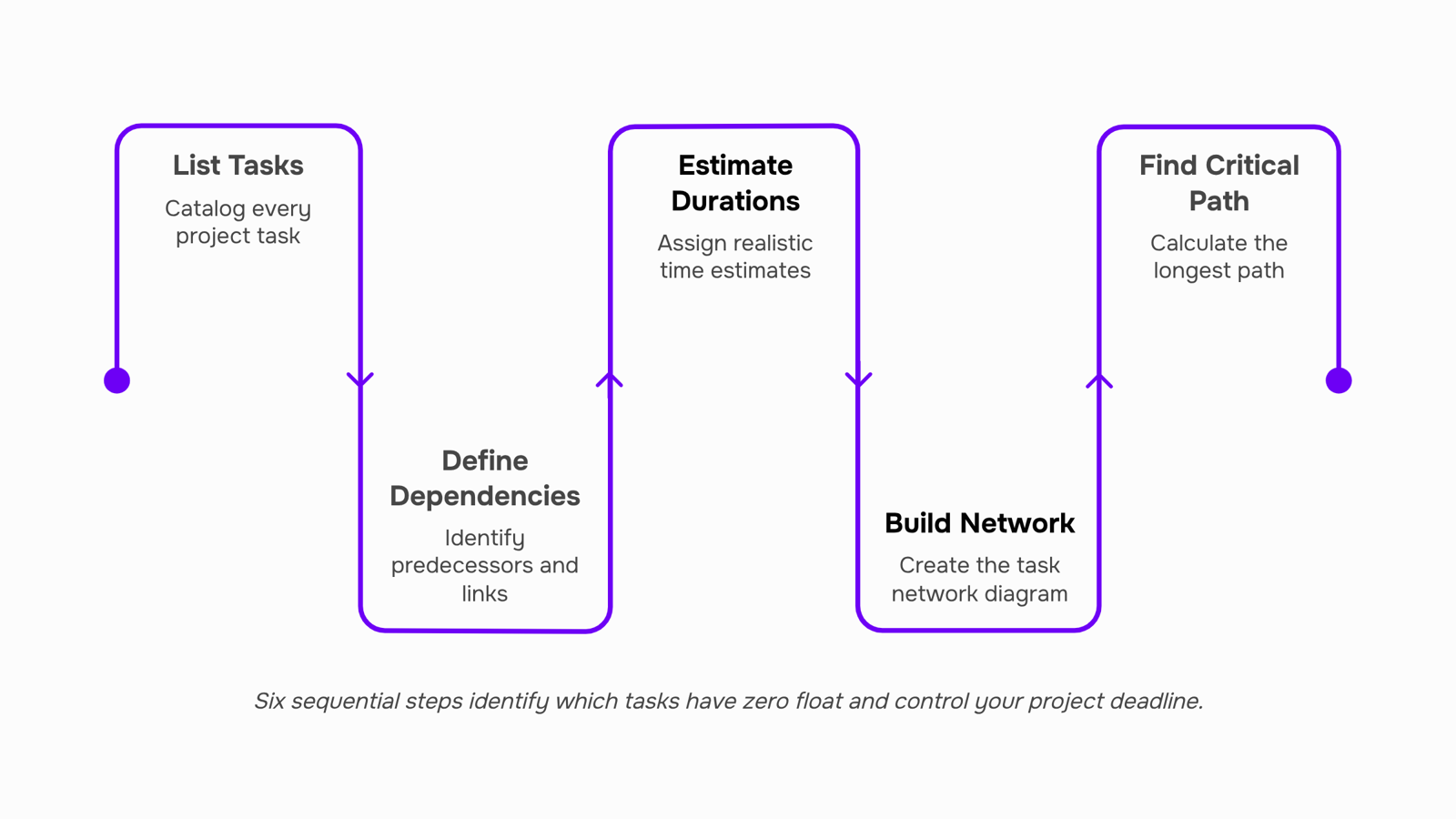
List every task in the project: Start with a complete task inventory before you touch any scheduling tool. For a software release, that means everything from environment setup and code freeze to QA sign-off and deployment. Missing a task here is the most common reason a critical path analysis project management effort falls apart mid-execution.
Define dependencies: For each task, identify what must finish before it can start. These relationships, called task predecessors and dependencies, determine the shape of your network. A task with no predecessor can start on day one. A task with three predecessors can't start until all three are done. Get this wrong and your critical path is fiction.
Estimate durations: Assign a realistic duration to each task. Use historical data where you have it, and involve the person doing the work, not just the person scheduling it. Ranges are fine at this stage ("3 to 5 days"), but you'll need a single number to calculate the path.
Build the network diagram: Map tasks as nodes connected by arrows that reflect your dependency logic. This is where how task dependencies affect your project timeline becomes visual. You're looking for every possible sequence from project start to finish.
Calculate the longest path: Run a forward pass through the network, adding durations to find the earliest finish for each task. The sequence with the highest total duration is your critical path. Every task on it has zero float, meaning any delay there pushes the end date.
Calculate float for non-critical tasks: Float (sometimes called slack) is the time a task can slip without affecting the deadline. Subtract the task's early start from its late start. Tasks with float give you scheduling flexibility. Tasks with zero float need active monitoring. For a practical look at how this connects to visual planning, see how Gantt charts and the critical path method work together.
A critical path analysis sample for even a 20-task project typically surfaces two or three paths that are within a day of each other, which is exactly where schedule risk hides.
Critical path analysis example for an IT project
Take a mid-size IT team shipping a cloud migration for a client. The project has roughly 20 tasks, but only a handful drive the deadline.
Here's how the critical path analysis example plays out in practice:
List every task: Infrastructure audit, environment setup, data migration, integration testing, UAT, cutover, and sign-off. Each task gets a duration estimate.
Map dependencies: Integration testing can't start until environment setup and data migration are both done. These task predecessors and dependencies define your network.
Run forward and backward passes: Forward pass gives you the earliest each task can start. Backward pass gives you the latest it can finish without pushing the go-live date. The difference is float.
Identify the critical path: In this migration, the sequence environment setup → data migration → integration testing → UAT → cutover has zero float. Every day of delay on any of those tasks moves the go-live date by exactly one day.
Spot what has slack: Documentation and training prep each have four days of float. Your team can shift those resources to the critical path during crunch without breaking anything.
This is the step most project managers skip. They build a schedule but never calculate float, so they treat every task as equally urgent. Understanding how task dependencies affect your project timeline is what separates a schedule from a plan.
For a deeper look at how the critical path method (CPM) connects to visual scheduling, the project management critical path analysis example above maps directly to a Gantt view once your critical path is confirmed.
How critical path analysis improves project scheduling
Once you've mapped your task predecessors and dependencies, critical path analysis produces three concrete scheduling outputs that most teams don't get from a basic timeline.
Float visibility: Every non-critical task carries float, the number of days it can slip before it pushes your end date. Knowing which tasks have zero float tells you exactly where to focus attention and where you have room to move resources without consequence.
Deadline confidence: When you layer your critical path onto a critical path analysis Gantt chart, you can see whether your planned finish date is realistic or optimistic. If the critical path runs 47 days and your deadline is in 40, you know that before kickoff, not two weeks in.
Resource prioritization: Critical path analysis in project management forces you to sequence work by dependency, not by who asked loudest. Tasks on the critical path get staffed first. Tasks with float absorb delays when a senior engineer is pulled into something urgent.
The result is a schedule you can defend, not just present. How task dependencies affect your project timeline explains the dependency logic that makes this sequencing work.
Critical path analysis and project risk management
Float is your early warning system. When a critical task starts burning through its buffer faster than the schedule allows, that depletion is a signal, not just a number. Most teams notice the problem only when a deadline slips. Critical path analysis in project management lets you see it while you still have options.
Here is what to watch and what to do:
Track float daily on critical tasks: A task with zero float has no room for delay. If a dependency slips by even one day, your end date moves. Understanding task predecessors and dependencies tells you which tasks are most exposed.
When a critical task slips, resequence before you replan: Check whether any near-critical tasks (float of one to three days) can be parallelized or reassigned. Replanning the full schedule is slower and often unnecessary.
Identify which tasks are about to become critical: Float depletion on near-critical paths is the second signal most teams miss. You can identify bottlenecks on the critical path automatically rather than waiting for a status meeting to surface them.
Reassign resources to the critical path first: Non-critical tasks with healthy float can absorb short delays. Critical ones cannot.
For a deeper look at how how task dependencies affect your project timeline, the dependency structure is where most schedule risk hides.
Critical path analysis vs Gantt chart: how they work together
Critical path analysis and Gantt charts solve different problems, which is why teams that use both together finish projects more predictably than teams that rely on either alone.
A Gantt chart shows when tasks are scheduled. Critical path analysis shows which tasks cannot slip without pushing the end date. One is a calendar; the other is a dependency map with risk attached.
Dimension | Gantt chart | Critical path analysis |
|---|
Primary view | Timeline with start/end bars | Network of task dependencies |
Shows float/slack | Rarely, without extra configuration | Yes, by design |
Identifies schedule risk | No | Yes — zero-float tasks flag immediately |
Best used for | Communicating schedule to stakeholders | Making scheduling decisions |
Works alone? | Yes, but misses dependency risk | Needs duration estimates to function |
In practice, run your critical path analysis first, identify which tasks carry zero float, then build the Gantt chart around those constraints. The Gantt becomes your communication layer; the critical path stays your decision layer.
For a deeper walkthrough of combining both methods on IT projects, the sequencing matters more than most guides admit.
Benefits of using critical path analysis
Used consistently, critical path analysis in project management delivers measurable advantages beyond knowing which tasks run longest.
Deadline accuracy improves: CPA forces you to map every task predecessor and dependency before work starts, so your end date reflects reality, not optimism.
Resource conflicts surface early: When you can see which tasks have zero float, you know exactly where a delayed hire or late vendor delivery will cost you days, not just inconvenience.
Scope changes get priced in time, not just money: Adding a feature mid-sprint? CPA shows whether it touches the critical path or sits safely in the float buffer.
Risk conversations become specific: Instead of "we might be late," you can say which task, by how many days, and why. That changes how stakeholders respond.
Schedule compression stays controlled: Crashing or fast-tracking only makes sense on critical-path tasks. Applying either elsewhere wastes budget without recovering a single day.
Closing
Building the critical path is straightforward once you map dependencies and run the math. The harder part is keeping it current. As tasks slip, scope shifts, and resources get pulled in new directions, your diagram goes stale fast. Most teams rebuild it manually every few weeks, which means they're flying blind between updates.
The real leverage comes from automating that monitoring. Once your critical path is live in your project management system, you need a tool that flags when a critical task is at risk, recalculates float in real time, and alerts you before a delay cascades to your deadline. That's where your schedule stops being a static artifact and becomes a live risk dashboard. What's your biggest bottleneck right now—visibility into which tasks are actually blocking delivery, or the manual work of keeping the schedule current?
FAQ
What is critical path analysis in project management?
Critical path analysis identifies the longest sequence of dependent tasks in a project—the sequence that sets your earliest possible finish date. Any delay on that path delays the entire project.
How do I perform a critical path analysis on my project?
List all tasks, define dependencies, estimate durations, build a network diagram, calculate the longest path, then calculate float for non-critical tasks. The critical path is the sequence with zero float.
What are the benefits of using critical path analysis?
You get a clear answer to what controls the deadline, a filter for prioritizing critical tasks first, and an early warning system when scope or delays threaten delivery.
Can critical path analysis help with project risk management?
Yes. It surfaces which tasks have zero scheduling flexibility and therefore pose the highest risk to your deadline, letting you focus mitigation efforts where they matter most.
How does critical path analysis improve project scheduling?
It shows you which tasks have float (scheduling flexibility) and which don't, gives you deadline confidence before kickoff, and forces resource prioritization by dependency rather than urgency.
What is the difference between critical path analysis and a Gantt chart?
Critical path analysis is the method that identifies which tasks drive the deadline; a Gantt chart is the visual format that displays the timeline. They work together—the critical path highlights which bars on the Gantt matter most.


 Megan Foster15 September 2026


