TL;DR: Most contact tracking guides list tools without explaining what breaks when you pick the wrong one. This one covers decision criteria, integration requirements, and the specific workflow gaps manual CRMs leave open for IT company owners managing sales pipelines across multiple client accounts.
Contact tracking software records every interaction between your team and a contact, then surfaces that history at the moment someone needs to act on it. That includes emails, calls, meeting notes, form fills, and status changes, all tied to a single client record tracking timeline.
A generic CRM stores contact data. Contact tracking software does something different: it captures the sequence and context of touchpoints so you can see not just who a contact is, but what happened, when, and what should happen next.
The distinction matters for IT company owners running fast sales cycles. A CRM might tell you a lead exists. Contact tracking software tells you that lead opened your proposal Tuesday, went silent, and has no follow-up scheduled. That gap between "stored" and "tracked" is where deals die quietly.
What a dedicated contact tracking tool handles that a basic CRM often doesn't:
Automatic logging of inbound and outbound communications without manual entry
Timeline views showing interaction recency and frequency per contact
Trigger-based alerts when a contact goes cold or hits a defined milestone
Attribution of which touchpoint moved a deal forward
If your team already uses a CRM built for IT sales, contact tracking software either layers on top or replaces the interaction-history module entirely. Some tools, like those offering AI-powered contact and lead tracking, merge both functions so the record stays unified without double entry.
The core question when evaluating: does this tool show me what happened last, or just who exists?
Contact tracking turns scattered interactions into a timeline your sales team can actually use. When every call, email, and meeting lives in one record, reps stop asking "where did we leave off?" and start picking up conversations mid-thread. That difference compounds fast in IT sales, where deal cycles involve multiple stakeholders and technical scoping calls weeks apart.
Here is what changes operationally when lead contact tracking works:
Follow-up speed drops: Reps see exactly which prospects went cold and why. Most SMB sales teams average 42+ hours between first contact and follow-up (HubSpot, 2024). A tracked timeline with reminders cuts that to single digits.
Context survives handoffs: When an account moves from SDR to closer, the full conversation history travels with it. No re-introductions, no lost requirements.
Patterns surface before deals stall: You notice a prospect stopped responding after pricing was shared, not three weeks later when pipeline review happens.
For contact management for sales teams under 50 people, the gap between "we track contacts" and "we actually use that data" is usually automation. Manual logging fails because reps skip it when busy. Tools that capture interactions automatically, like AI-powered contact and lead tracking, remove that failure point entirely.
The relationship improvement is not abstract. It is a rep opening a call with "last time we discussed migrating your staging environment" instead of "remind me what you need." That specificity signals competence, and competence closes deals. If you are evaluating options, compare how client tracking tools handle relationship history across your team size.
Most contact tracking software checks the same boxes on paper: store names, log emails, set reminders. The features that actually matter are the ones that close the gap between "data entered" and "deal moved forward." Here is what to evaluate:
Automatic interaction capture: A sales contact tracking tool that requires manual logging after every call or email thread is dead on arrival in a fast-moving IT sales cycle. Look for tools that pull in emails, meeting notes, and form submissions without your team lifting a finger.
Timeline-based contact history: You need a single chronological view per contact, not scattered notes across tabs. When a prospect re-engages after 90 days, your rep should see the full arc in under 10 seconds.
AI lead management capabilities: This is where modern tools diverge from legacy CRMs. AI-native tracking does three things older tools cannot:
Scores contacts based on engagement patterns, not just job title
Flags contacts going cold before your rep notices
Suggests next actions tied to where the contact sits in your pipeline
If a tool markets itself as "AI-powered" but only offers a chatbot, that is not AI lead management. That is a FAQ widget.
Integration depth, not breadth: Twenty integrations mean nothing if none of them pass context. Prioritize tools that sync contact history bidirectionally with your email, calendar, and invoicing stack. For a breakdown of tools that handle this well, see client tracking software built for managing relationships.
Ownership and routing rules: In teams above five reps, contacts get orphaned. Your contact tracking software should assign ownership automatically based on territory, deal stage, or last interaction, not round-robin luck.
Reporting that answers "why," not just "how many:" Pipeline dashboards are table stakes. What separates useful tools: showing which contacts stalled, why, and what action correlates with re-engagement. Platforms with AI-powered contact and lead tracking surface these patterns without manual report-building.
Yes, but the overlap is smaller than most vendors suggest. Sales and marketing both need lead contact tracking, meaning they record who engaged, when, and through what channel. That's where the similarity ends.
Marketing tracking cares about aggregate patterns: which campaign drove the most demo requests, what content converts by segment, which channels produce qualified leads at scale. Contact management for sales teams is individual and sequential: what did this person say on the last call, what proposal version did they see, when is the next follow-up due.
The divergence matters for tool selection. A platform built for marketing attribution often stores contacts as audience members, not deal participants. It tracks impressions and clicks but skips call notes, proposal history, and hand-off context. A sales contact tracking tool does the reverse: deep individual timelines, shallow campaign analytics.
For IT company owners running both functions (often with the same three people), the practical answer is: pick a tool that maintains a single contact record with layered views. Marketing sees campaign engagement. Sales sees deal history. Neither overwrites the other.
If your current setup forces sales to re-ask questions marketing already answered, or marketing can't see which leads sales actually closed, you have two disconnected systems wearing one logo. For a deeper look at where these workflows connect, see how to track sales leads effectively.
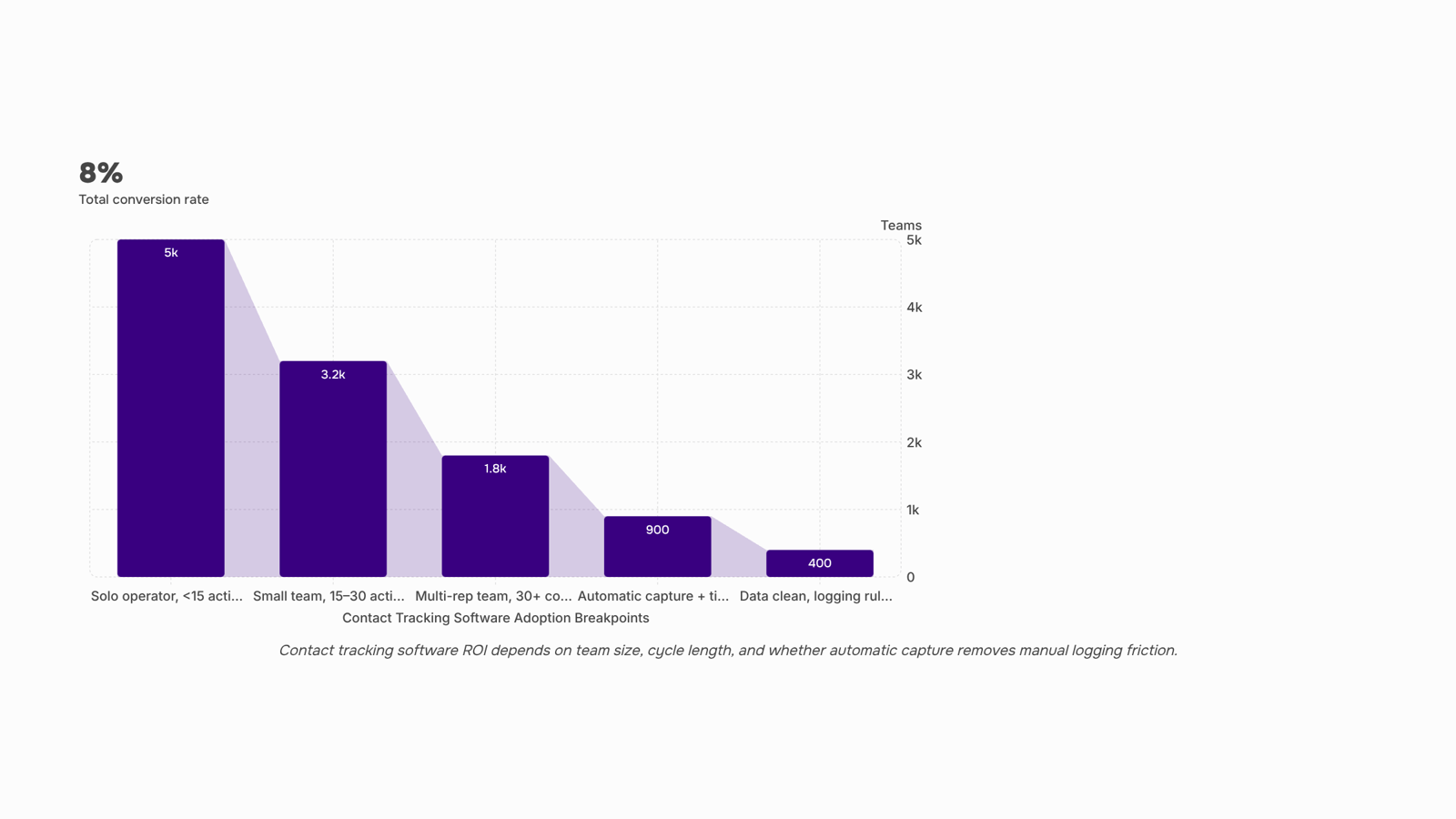
Yes, but only when the cost of forgetting exceeds the cost of the tool. For a solo operator closing two or three deals a month, a spreadsheet with columns for last contact date, next step, and deal value covers basic client record tracking without overhead. The breakpoint hits when you're juggling more than 10 to 15 active conversations simultaneously, because that's where follow-up gaps start costing real revenue.
Small teams (two to five people) hit that threshold faster. Without shared visibility into who said what and when, you get duplicate outreach, missed callbacks, and prospects who go cold because nobody owned the next step. A lightweight sales contact tracking tool solves this without requiring a full CRM deployment.
The decision framework is simple:
Spreadsheet is enough when you have fewer than 15 active contacts, one person owns all relationships, and your sales cycle is under two weeks.
Dedicated contact tracking software is worth it when multiple people touch the same prospect, your cycle exceeds 30 days, or you've lost a deal in the last quarter because someone forgot to follow up.
If you're between those two states, start with a tool designed for small team sales workflows rather than a full CRM you'll only use at 20% capacity.
Most contact tracking software evaluations stall because the buyer treats every feature as equally important. They're not. For IT company owners running fast-moving sales cycles, three criteria separate tools that stick from tools that get abandoned within 60 days.
Filter 1: Does it track contact history without manual entry?
If your team has to log every call, email, or meeting by hand, the data goes stale within a week. Look for automatic activity capture from email and calendar. This is where AI lead management features earn their keep: they reconstruct timelines without relying on rep discipline.
Filter 2: Does it distinguish lead contact tracking from full CRM workflow?
You don't need pipeline stages, marketing automation, and support ticketing bundled together if your problem is simply knowing when you last spoke to a prospect and what was said. A dedicated contact tracking software tool that does one job well beats a bloated CRM you'll configure for months and never fully adopt. If you need help distinguishing these categories, this breakdown of best client tracking software for managing customer relationships clarifies the boundary.
Filter 3: Does it connect outbound actions to contact records automatically?
Tools like Lio tie lead capture and scoring directly to contact timelines, so your reps see the full picture without toggling between apps. That connection eliminates the contact history gaps that cost deals.
Apply these three filters in order. If a tool fails filter one, skip it regardless of price or brand recognition. Your next step is avoiding the setup mistakes that corrupt the data these tools collect.
Most teams fail at the same three points during setup, and each one compounds over time.
Importing dirty data without deduplication: If your client record tracking starts with duplicate or outdated contacts, every automation you build on top inherits those errors. Clean before you import, not after.
Skipping field standardization: When reps enter "CEO," "Founder," and "Owner" in a free-text role field, segmentation breaks immediately. Lock down picklist values on day one.
No defined logging rules for contact management for sales teams: If logging a call or email is optional, history gaps appear within weeks. Most teams find that reps stop logging once pipeline pressure builds, which means your contact tracking software shows a false picture of engagement. Set a minimum: every outbound touch gets logged, manually or automatically.
These mistakes explain why adoption craters after month one. If you sell to e-commerce clients, the same principles apply to customer tracking setups in that vertical.
Closing
The difference between a contact that gets followed up on and one that goes silent isn't complexity—it's visibility. When your team can see the full timeline of every interaction, follow-ups happen faster, context survives handoffs, and deals stop dying in the gaps between emails. The tools that matter are the ones that capture interactions automatically and surface what should happen next without requiring manual work after every call.
The real test is whether your current setup tells you what happened last, or just that a contact exists. If you're spending time reconstructing conversations or missing follow-ups because history is scattered across tabs, contact tracking software built around AI-powered capture—like Lio—closes that gap by pulling emails, calls, and notes into a single timeline automatically. See how it handles the follow-up sequences your current setup likely has open right now.
FAQ
Q. What is the best contact tracking software for my business?
A. The best tool depends on your workflow, but prioritize automatic interaction capture, timeline-based history, and AI-powered engagement scoring. For IT teams, Lio combines all three with bidirectional integrations that keep contact records unified without manual entry.Q. How does contact tracking software improve customer relationships?
A. It turns scattered interactions into a usable timeline. Reps stop asking "where did we leave off?" and start with context. Most teams average 42+ hours between contact and follow-up; tracking cuts that dramatically while preventing deals from stalling unnoticed.Q. What features should I look for in contact tracking software?
A. Automatic email and call capture, single chronological timelines per contact, AI engagement scoring, bidirectional integrations, and ownership routing. Skip tools that require manual logging or offer shallow campaign analytics instead of individual deal history.Q. Can I use contact tracking software for both sales and marketing?
A. Yes, if the tool maintains one contact record with layered views—marketing sees campaign engagement, sales sees deal history. Most platforms built for one function skip the other; unified systems prevent teams from re-asking questions already answered.Q. Is contact tracking software suitable for solo entrepreneurs or small teams?
A. Yes, when the cost of forgotten follow-ups exceeds the tool cost. Solo operators benefit most from automatic capture and AI alerts; manual CRMs fail because logging gets skipped under pressure. Start with a free trial to test whether it saves more time than it requires.


 Elena Petrova15 September 2026


