TL;DR: Most articles on document version control stop at definitions and feature lists. This one shows IT company owners where version control actually fails under real collaboration pressure, what human error patterns cause the most damage, and how to build a system that holds when multiple people are editing the same document at once.
What document version control actually means
Document version control is the practice of recording every change made to a file, who made it, and when — so your team can retrieve any earlier state and understand exactly how a document evolved. That is different from simply storing documents in a shared folder, where saving a new copy silently overwrites what came before.
The distinction matters in practice. A shared drive gives you a file. A version control system gives you a file plus its full history: a log of edits, a clear record of which version was sent to a client, and the ability to roll back if something breaks. For IT company owners managing contracts, SOWs, and technical specs across multiple projects, that history is what prevents a team member from working off a stale draft without knowing it.
Document management version history is the specific feature to look for when comparing document management platforms for your team. Not every platform that calls itself a document manager actually tracks changes at the field or clause level.
If you want to understand how to build a document control process that holds up over time, the definition above is the foundation. The mechanics come next.
How document version control works in practice
When a document enters a version control system, the system assigns it a version identifier, typically a number like v1.0, and logs the author, timestamp, and a summary of what changed. Every subsequent edit creates a new version rather than overwriting the old one. The original stays intact.
Most document version control systems handle this through one of two models. Sequential numbering (v1, v2, v3) works well for contracts and approvals where the audit trail matters. Branching models, borrowed from software development, let two contributors edit in parallel and merge changes later, which suits larger teams working on technical documentation simultaneously.
The change log is where the real value lives. When you track changes to documents across a project, the log shows exactly who modified clause 4.2 on Tuesday and why the approval date shifted. Without that record, reconstructing what happened requires asking people, which takes time and produces incomplete answers.
Here is how a typical cycle runs in practice:
A team member checks out the document, locking it or flagging it as in-progress.
Edits are saved as a new version with a required comment.
The system notifies reviewers and routes the document for approval.
On approval, the version is marked final and the previous draft is archived but retrievable.
For a deeper look at building a document control process that holds up over time, the linked guide covers governance structures that keep this cycle consistent across projects.
Why version control reduces document errors
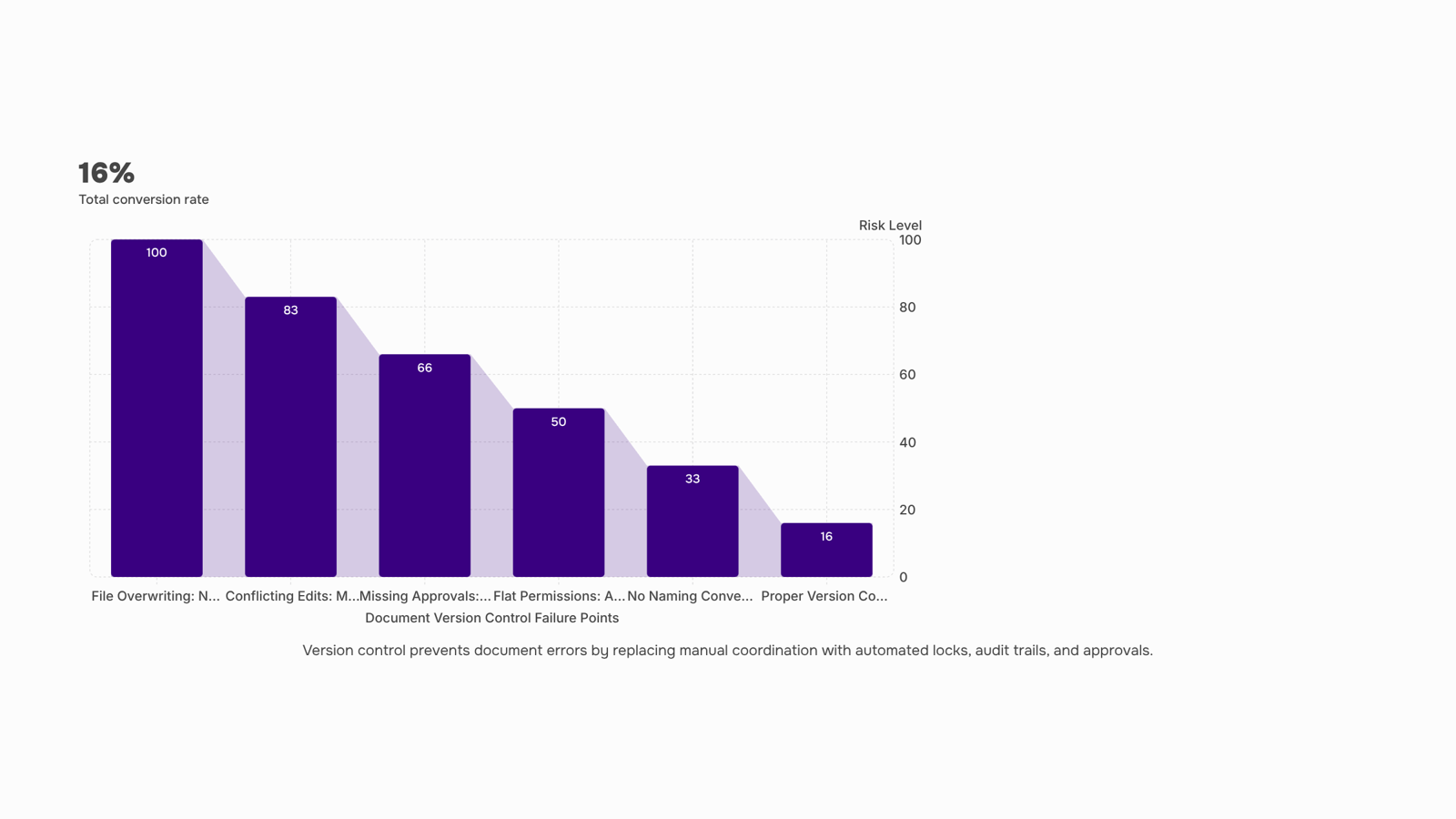
Three document errors cause most rework on IT teams: someone overwrites a file someone else was editing, two people work from different drafts without knowing it, and a document gets signed before the right person reviewed it.
Document version control addresses each failure at the mechanism level, not the policy level.
Overwriting happens when there is no lock or merge system. Version control software for teams assigns each save a unique version number and either locks the file during editing or merges concurrent changes with a conflict flag. Neither approach relies on people remembering to coordinate.
Conflicting edits surface when teams share files over email or a shared drive with no change log. A proper version control system timestamps every edit, tags the author, and surfaces a diff so reviewers can see exactly what changed between v1.4 and v1.5. That audit trail is also what makes building a document control process that holds up over time possible in the first place.
Missing approvals are a workflow gap, not a file gap. Version control closes it by gating promotion to the next version on a recorded sign-off. The document cannot move to "final" until the approval is logged.
If you are still comparing document management platforms for your team, check whether each option enforces approval gates or just tracks edits passively. The difference matters more than storage limits or UI.
Six steps to set up version control your team will use
A working setup takes about half a day if you move through these steps in order. Skip one and you'll rebuild it later under pressure.
Audit what you already have: List every document type your team touches regularly: contracts, SOWs, technical specs, onboarding forms. For each one, note where it lives, who edits it, and how often it changes. You're looking for the three or four document types causing the most friction, not a complete inventory.
Set a naming convention and enforce it immediately: The format that holds up in practice is: [ProjectCode]_[DocumentType]_v[VersionNumber]_[YYYYMMDD]. For example: ACM001_SOW_v2_20250610. Every team member uses it from day one. A one-page reference doc pinned in your project channel removes the excuse of forgetting.
Define your permission tiers before you touch any software: Three tiers cover most IT team structures: view-only (clients, external reviewers), edit (assigned contributors), and approve (project lead or account owner). Map each document type to a tier before configuring anything. Doing it inside the tool first leads to permission sprawl you'll spend weeks untangling.
Build the approval workflow as a checklist, not a conversation: An approval that lives in Slack or email will be missed. Write out the exact sequence: who reviews first, who signs off, what triggers the next version increment. For client-facing contracts, that sequence typically runs from drafter to legal review to account lead to client signature. If you're routing documents for e-signature, connecting version control to your document signing workflow shows how to close that loop without manual handoffs.
Configure your audit trail settings on day one: Every major document management platform logs changes, but most teams leave the default settings in place and discover gaps during a dispute. Turn on timestamped edit history, require a change comment for every new version, and confirm that your system captures who viewed the document, not just who edited it. This is the layer that protects you if a client claims they never saw a revision.
Run a 48-hour pilot on one active project: Pick a live project, apply the full system, and have the team flag anything that slows them down. You'll surface naming edge cases and permission gaps faster in two days of real use than in two weeks of planning. Adjust, then roll out to the rest of the team.
For teams that need document version control for collaboration across clients and internal staff simultaneously, building a document control process that holds up over time covers the governance layer that keeps the system from drifting after the first month. If your workflow ends in a signed contract, Sigi handles the signature and completion certificate without breaking the version chain you just built.
What to look for in a version control system for collaboration
Four criteria separate version control software for teams that actually holds up from one that looks good in a demo.
Concurrent editing with conflict resolution: Multiple people editing the same file at the same time is the norm in IT services work. The system needs to either merge changes automatically or surface a clear conflict flag before someone overwrites another person's work. If it just saves the last write, you'll spend more time reconciling drafts than building them.
Granular permission controls: Flat access is where document version control for collaboration breaks down. You need at least three tiers: view-only for clients or external reviewers, edit access for active contributors, and admin control for whoever owns the final version. Without this, anyone can overwrite a reviewed draft, and you won't know until the damage is done.
Approval workflows tied to version gates: A version number should mean something. If a document can move from v1 to v2 without a sign-off step, your version history is just a log of saves, not a record of decisions. Look for systems where a reviewer must approve before a new version is published. This matters especially for contracts and compliance documents where connecting version control to your document signing workflow is part of the handoff.
Audit trail depth: You need to see who changed what, when, and from which version, not just a timestamp. Shallow audit trails show you that a file changed; deep ones show you why the current version looks different from the one your client approved.
When comparing document management platforms for your team, run each tool against these four criteria before the feature list.
Common mistakes that break version control
Three mistakes account for most document version control failures, and all three are fixable before they compound.
No naming convention: Files named "contract_final_v2_REAL.docx" are a symptom, not a quirk. Without a enforced naming standard (project code, date, version number, status), teammates create parallel branches that never reconcile. Pick a format on day one and document it.
Flat permissions: When everyone can overwrite the master file, someone will. Role-based access, where editors draft and only approvers publish, is the single change that most reduces accidental overwrites. If your tool doesn't support it, that's a gap worth addressing before you set up controlled document practices.
Skipping approval workflows: Tracking changes to documents is only useful if a defined approver reviews them before a version is locked. Without that gate, version history becomes archaeology rather than governance.
For a deeper look at maintaining version control across the document lifecycle, the linked guide covers the full sequence.
Closing
Document version control stops being theoretical the moment your team edits the same contract simultaneously. You now know where the friction actually happens—overwriting, conflicting drafts, missed approvals—and how a proper system locks those gaps at the mechanism level, not through hope and Slack reminders. The six-step setup takes half a day and pays back immediately: no more reconstructing what changed, no more signing off on stale versions, no more rework because two people were editing different drafts. The question isn't whether you need version control; it's whether you're ready to wire it into your existing document workflow so approvals, e-signatures, and version history all move together. See how Sigi connects version history, approval workflows, and e-signatures in one system—built for IT teams managing multiple clients and projects at once.
FAQ
How does document version control work?
Each edit creates a new version with a unique identifier, timestamp, and author tag. The system either locks the file during editing or flags conflicts when multiple people edit simultaneously, then routes the document through an approval workflow before marking it final. The original stays intact and retrievable.
How can I track changes to documents with version control?
Version control systems log every edit with a change comment, author, and timestamp—creating a diff that shows exactly what changed between versions. Configure audit trail settings on day one to capture who viewed the document, not just who edited it, so you have a complete record if disputes arise.
What is the best document version control system for collaboration?
The best system enforces approval gates (not just passive tracking), timestamps every edit, requires change comments, and connects version history to e-signature and workflow routing. For IT teams managing multiple clients and projects, look for platforms that integrate version control with approval workflows and document signing.
How does document version control reduce errors in document management?
It eliminates the three biggest failure modes: file overwriting (via locking or merge conflict flags), conflicting drafts (via timestamped diffs and author tags), and missing approvals (via gated version promotion). None of these fixes rely on people remembering to coordinate—they're built into the mechanism.
What is the difference between document version control and document management?
Document management stores files; version control tracks how they evolved. A shared drive gives you a file. Version control gives you a file plus its full history—who changed what, when, and why—plus the ability to roll back and enforce approval gates before a version moves forward.


 Elena Petrova11 September 2026


